
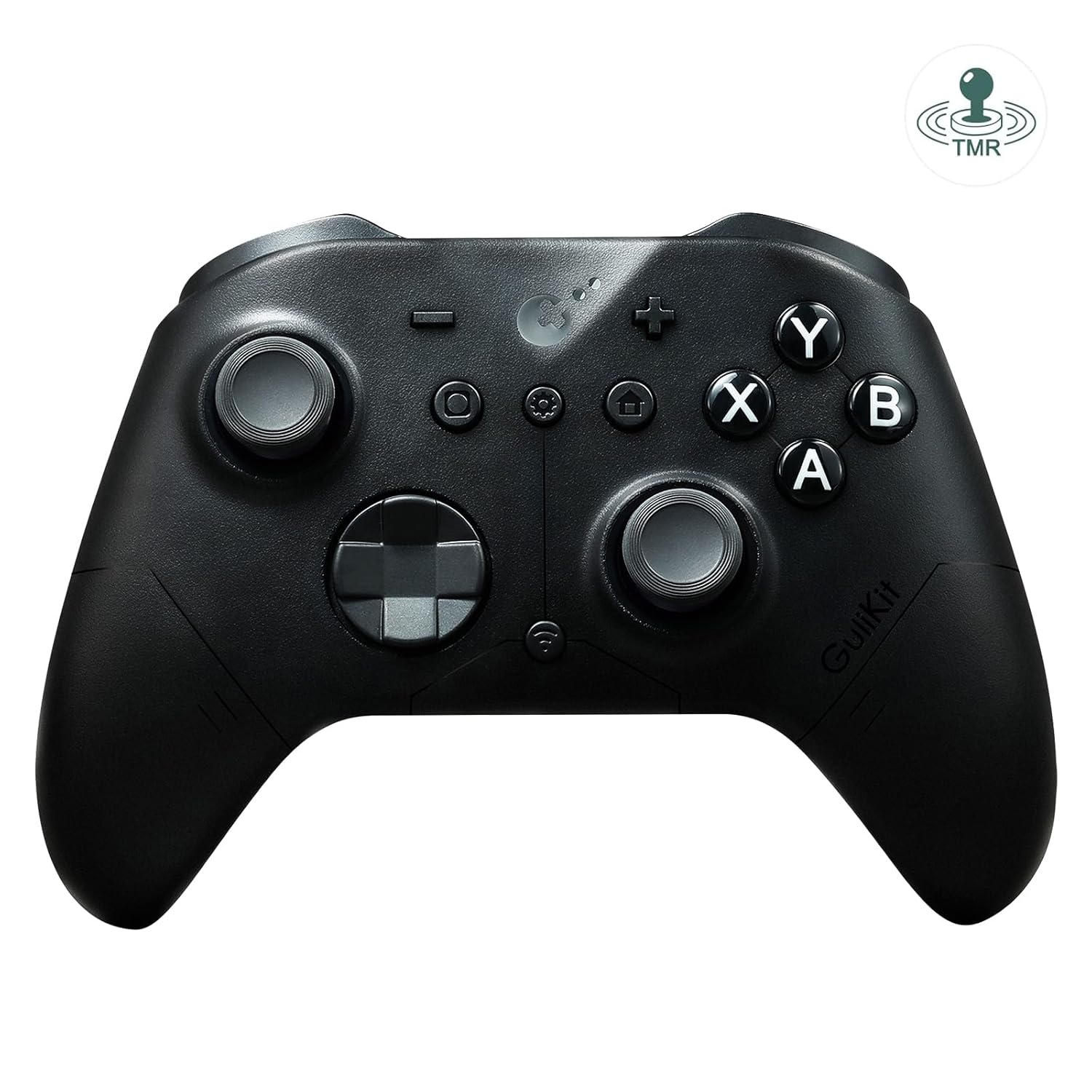
AKNES GuliKit ES PRO Wireless PC Gaming Controller for Switch 1/2, Windows/Android/Mac/Steam Deck with 3.25ms Low Latency, Magnetic TMR Joysticks, Switch1/2 Wake-Up, Tactile Switch D-pad – Black
Original price was: $29.99.$24.99Current price is: $24.99.
Related Products




[ad_1]
Product description


How to enable wakeup Switch 2 on GuliKit ES PRO E-sports PC Game Controller
Refer to the uploaded video for pairing instructions and ensure you update to the latest firmware available on GuliKit website.
Set the controller to NS mode, turn it on, hold the pairing button for 2 seconds, and the indicator will flash rapidly to initiate pairing.First put Switch 2 into sleep mode (black screen). Press the HOME button on the Joy-Con to wake the screen, then enter the controller pairing interface and complete pairing.
The video showcases the product in use.The video guides you through product setup.The video compares multiple products.The video shows the product being unpacked. How to enable wakeup Switch 2 on GuliKit ES PRO Merchant Video
Compatibility Switch 1/2, Windows, iOS, macOS, Android, Steam Deck Joysticks HallPi TMR joysticks Triggers Hall Effect triggers Polling rate 1000Hz/1.87ms latency on Wired connection to Windows, 750Hz/3.25ms latency on Bluetooth connection 6-Axis motion control On bluetooth mode. Or gyro motion aim function for PC. Asymmetric rotor motor 3 levels intensity adjustment. Tactile Switch D-pad 4-direction mode, 8-direction mode Turbo function On A, B, X, Y, R, ZR Battery 950mAh built-in battery pack. About 30 hours gaming time. Weight 225g Package Contents GuliKit ES Pro * 1, USB-C cable (1 meter) * 1, Manual * 1 Support Please feel free to contact our support team if you have any problems or concerns: 1) Read the AKNES store page introduction, by Amazon message. 2) Email. 3) By AKNES official web. – Contact informations there.
Multi-Platform Compatibility – Seamlessly connect to PC Windows, Switch 2/ Switch/Switch Lite/OLED, Android, iOS, Mac, Steam Deck, and ROG Ally. One-key mode switching simplifies cross-device gaming.
Ultra-Low Latency & High Responsiveness – Experience competitive-grade performance with GuliKit Hyperlink 2 wireless technology, achieving 3.25ms latency at 730Hz polling (Bluetooth) and 1.87ms in wired mode (1000Hz). Ideal for esports and precision gaming.
Advanced Hall Joysticks & Triggers – Equipped with precision Hall effect magnetic joysticks for Long-lasting Durability control, plus 256-level Hall Effect triggers for lifelike analog input.
Extended 30-Hour Battery & Auto-Sleep – 950mAh rechargeable battery delivers 30 hours of gameplay. Features auto-sleep after 15 minutes of inactivity for power efficiency.
Custom Controls & Switch 1/2 Wake-Up Support – Adjustable vibration, turbo, joystick dead-zone on/off, and Physical ABXY swap supported (Switch-layout caps sold separately), Setting via controller or web tool. Supports wake-up for Switch 1/2 (*Special pairing required for Switch 2 wake-up – see video guide. Firmware update essential.*).
Switch 1/2 Wake-Up – Ensure you update to the latest firmware available on GuliKit website. A. Set the controller to NS mode, turn it on, hold the pairing button for 2 seconds, and the indicator will flash rapidly to initiate pairing. B. First put Switch 2 into sleep mode (black screen). Press the HOME button on the Joy-Con to wake the screen, then enter the controller pairing interface and complete pairing.
Trusted by AKNES – Enjoy reliable customer support. Contact us anytime for assistance—we’re here to help! Visit our store for more details.
[ad_2]
5 reviews for AKNES GuliKit ES PRO Wireless PC Gaming Controller for Switch 1/2, Windows/Android/Mac/Steam Deck with 3.25ms Low Latency, Magnetic TMR Joysticks, Switch1/2 Wake-Up, Tactile Switch D-pad – Black
Be the first to review “AKNES GuliKit ES PRO Wireless PC Gaming Controller for Switch 1/2, Windows/Android/Mac/Steam Deck with 3.25ms Low Latency, Magnetic TMR Joysticks, Switch1/2 Wake-Up, Tactile Switch D-pad – Black”

Original price was: $29.99.$24.99Current price is: $24.99.
There are no reviews yet.