
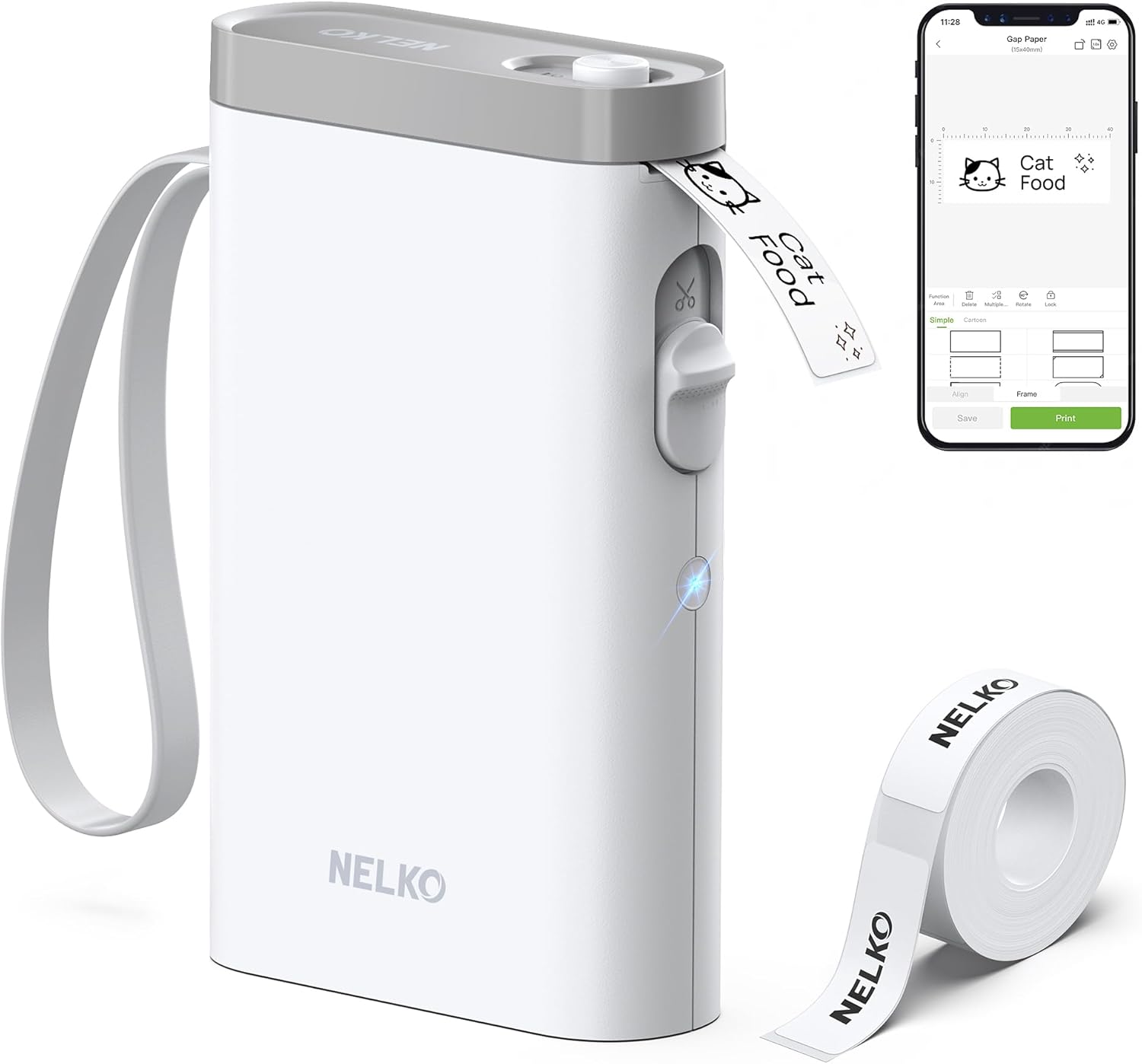
Nelko Label Maker Machine with Tape, P21 Bluetooth Label Printer, Wireless Mini Label Makers with Multiple Templates for School Office Home, White
Original price was: $29.99.$17.08Current price is: $17.08.
Related Products



Product description
Nelko P21 Label Maker for Valentine Christmas Thanksgiving Surprises
The video showcases the product in use.The video guides you through product setup.The video compares multiple products.The video shows the product being unpacked. P21 label maker Merchant Video


1 Multiple Label Styles
2 Various Size
3 Customize
4 Multiple Resources
5 AI Gallery
The video showcases the product in use.The video guides you through product setup.The video compares multiple products.The video shows the product being unpacked. P21 label makers label maker label maker machine Merchant Video


1 Bluetooth Connection
2 Connect Label Printer
3 Install Label Tape
4 Indicator Light
5 About the Adapter
2026 New Version NELKO P21 Mini Portable Bluetooth Label Makers


Warm Tips:
1. Download the App “Nelko” from the Apple Store/Google Play, and meets with applicable data compliance laws.
2. Connect the Bluetooth via the “Nelko” App, not on the phone system.
3. Before printing, please select the appropriate size for the printing paper on the “Nelko” App.
How to connect Bluetooth?
1. Connecting to Bluetooth through the “Nelko” APP.
2. Download the App “Nelko” from the Apple Store/Google Play.
3. Turn on Bluetooth on your phone, long press to turn on the P21 labelmaker machine, and open the “Nelko” app to link to Bluetooth.
What system does this label machine support?
This mini portable Bluetooth printer supports iOS and Android mobile systems. IOS phones require IOS 13 or above to be used.
Why is the printing unclear?
Please use genuine label paper, otherwise it may result in poor printing quality or mismatches.
Note: Please do not tear the green sticker from the original label paper.
And the size of the label tape can be 12x40mm, 14x40mm, 15x40mm or 14X75mm.
How to use the label makers best sellers with tape correctly?
1. Long press the power on button, indicator light will display green.
2. Successfully connected to Bluetooth, indicator light displayed in blue.
3. Press the button twice to adjust the paper position.
4. Press the button once to print the test page.
Why can I search for P21 label maker but not connect to Bluetooth?
1. Press the power button to start the label maker.
2. Open the paper bin cover of the label maker.
3. Press the power button 3 times in a row.
4. After about 2s, the label maker beeps 4 times, “Didi Didi”, which means the reset is successful.
Work with NELKO P21 Labal Maker Machine
Add to Cart
Add to Cart
Add to Cart
Add to Cart
Add to Cart
Add to Cart
Add to Cart
Customer Reviews
4.7 out of 5 stars 5,396
4.8 out of 5 stars 151
4.4 out of 5 stars 271
4.6 out of 5 stars 48
4.8 out of 5 stars 1,411
4.7 out of 5 stars 929
4.7 out of 5 stars 123
Price
$7.98$7.98
$15.99$15.99
$69.99$69.99
$29.99$29.99
$12.99$12.99
$13.99$13.99
$15.99$15.99
Pack
180 Labels
1
3
3
1
540 Labels
540 Labels
Color
White
Christmas
White
Black
Blcak
Yellow/Pink/Blue
Transparent
Size
14mm x 40mm
14mm x 40mm
4.2×1.69×5.4 inch
14mm x 40mm
6.5 x 2.5 x 4.5 inches
14mm x 40mm
14mm x 40mm
Compatible Printer
NELKO P21 Label Maker
NELKO P21 Label Maker
Work with PP01 Photo Paper
NELKO P21 Label Maker
NELKO P21 Label Maker
NELKO P21 Label Maker
NELKO P21 Label Maker
Advantage
Clear Printing, Widely Usage
Clear Printing, Widely Usage
Clear Printing, Widely Usage
Clear Printing, Widely Usage
Powerful Compatibility
Clear Printing, Widely Usage
Clear Printing, Widely Usage
High Quality
✓
✓
✓
✓
✓
✓
✓
2026 New Version: Compared with the traditional label makers, half weight and size of the traditional label maker, smaller, smarter and convenient for users to carry. Wireless Bluetooth label maker can slip into your pocket, allow printing anytime, anywhere. We recommend using our NELKO thermal label paper. Attention: For P21 Nelko APP iOS Users, Nelko iOS V2.7.0 printing multiple copies abnormal, please update Nelko APP to the latest version V3.3.0. Ideal for home and school organization
High-quality Printing: Label Makers with BPA-Free Direct Thermal Technology. Equipped with high-speed chips and 203 DPI, you can enjoy high-definition without relying on ink or toner. Label maker built in durable rechargeable battery, it can work for a long time. This label maker is monochrome printout, which only prints black text. We can create color label and need to use color pattern label tapes for printing.(Note: Not including charging adapter, not suitable for fast charging adapter)
Easy to Use: NELKO label printer compatible with IOS & Android Phone via bluetooth connection. Step 1: Download “Nelko” APP from Google Play or App Store. Step 2: Install the paper roll. Step 3: Connect the P21 bluetooth within APP. Step 4: Choose a quick template and start printing. It is not compatible with Google phones on Android 14. This label maker machine with tape APP included more than 90 +Fonts, 10+ Languages, 450+ Materials. (Note: This label maker doesn’t work with computers)
Multiple Creative Function&Templates: This app of the label maker provides various features and templates, easy to create various design label stickers from App with Text, QR code, Barcode, Materials, Images, Time and Borders, etc. The length of labels is fixed, including 12X40mm, 14X40mm, 14x50mm, 14x75mm, and more. Please do not tear or destruct the green sticker on the back of the label strip , otherwise it will affect the printing effect. (Note: Continuous label tapes are not supported)
Design Your Own Labels: The label maker machine with tape is widely used in life and office. For Home, organizing your clothes, food storage, cosmetics items, and mailings. For Office, office organization includes notebook tags, price tags, reminder tags, and other office supplies. For School, label maker for classroom teacher and kids school items, personal item identification, name tags. Labeler makers can also double as a thoughtful and heartfelt Valentine’s Day gift for your close loved ones
13 reviews for Nelko Label Maker Machine with Tape, P21 Bluetooth Label Printer, Wireless Mini Label Makers with Multiple Templates for School Office Home, White
Add a review

Original price was: $29.99.$17.08Current price is: $17.08.
Donni1 –
Nice Little Device!
Just got this today and was using it within 10 minutes (I have a tabbed schedule book for an upcoming wedding and wanted clear, easy-to-read titles on the tabs). It met the job at hand and then some. App was easy to use. The finger-touch sizing is one of several great features I’ve used so far.
Frank Dias –
Makes labeling fast, clean, and organized. No more messy handwritten labels
I use this label maker regularly, and it is very easy to set up and use. It connects quickly to the app, and creating labels is straightforward with no learning curve.I use it to label file folders, which keeps everything looking clean and organized, and I also use it to label food containers in the refrigerator. The labels print clearly and give everything a neat, uniform look.Overall, this label maker works reliably, saves time, and is great for staying organized at home or in the office.Came fast and packaged well. Thanks.
SierraPrimeShopper –
Easy to use, convenient and print app works great.
Great, easy to use label maker. Perfect for what I need, and easy to load. I would recommend buying a couple additional roles of labels depending on how often you use them. The phone app works perfectly and simple to figure out. Seems sturdy but it’s a label maker, and how sturdy does it need to be. Label roles hold a lot of labels and the app lets you customize a little bit. It’s small and light and easy to carry.
Bryan NAAGA –
Not too bad. It works!
[4 STARS for build quality and app finickyness]Very cheap material. The price matches what you get. The setup was initially frustrating because the printer NEEDS to be fully charged before it would connect to my phone’s Bluetooth.The app is basic but intuitive enough. The app feature that matters the most to me is the ability to make the type smaller (2.5) while increasing spacing (.3) for better readability. Perfect.I quickly made a few labels for my guages that look identical but each requires a label to tell them apart.The finished product is more than satisfactory. The price definitely matches the build quality. If it dropped on a hard surface, I’d be surprised if it turned on, let alone printed anything.Good enough for my simple needs.
Firas –
Well designed little label printer! Review and how to use.
This smart little printer has a dedicated app with an easy to use interface and plenty of free templates to choose from. It charges with USB C which is great as most people have a few of those cables sitting around.The labels are waterproof which is a great plus thanks to the fact it doesn’t use ink but instead a heating process to stamp in the labels. It comes with a roll of 180 labels, 14 mm x 40 mm or 0.55 x 1.57 inches, very standard size. Currently on amazon 3 extra rolls (540 labels) from Nelko is $16.99, although for most people 180 will serve plenty.The product is easy to use. Click P21 on the top left of the app and click to connect, you’ll hear a little beep. Before your first print you’ll have to open it up by sliding the notch at the top (doesn’t have to be slid all the way) then put the label on the track, then the button should turn blue. When you close click the button twice and it’ll calibrate the label on the track. To print, use a pre-made template (14 mm x 40mm) or create your own, click “EDIT” then the print option comes up, click print again and like magic it heat prints without ink. Hold on the button toThe quality of the heat print is very good, deep black and filled in near perfectly in the lettering. At this price point, you are getting an excellent product, and the labels will last longer than simply writing things in with ink, not to mention look much better. I use these for my keys, jars among other things, very nice little machine, highly recommend!
Lany –
Perfect for Short Labels—No Time Wasted on Options!
I bought the Nelko P21 label maker for my mom postcard collection, and it works perfectly! The app has tons of fonts, frames, and fancy options, but honestly, I stick to just a few—I consider scrolling through all the choices a total waste of time. The labels themselves are small, just right for short titles or captions, not for writing a novel. Simple, intuitive, and exactly what I needed!
L Hall –
Amazing little label printer. Does so much, for a very small price…(and it’s easy!)
I’m not sure what I can say that hasn’t already been said…this is an awesome little label printer!!Charge it up, turn it on, it connects via bluetooth with the app you’ve installed on your phone. Quite a few templates, fonts, etc. SOOOO handy! Use it way more than I thought I would. Very good print quality, labels stick well. Really, no negatives that I can think of. For the price, this is an amazing little label printer! (even my wife is impressed…and that takes some doing, let me tell you!!)
Amy Page –
Great Little Label Printer!
Love this little printer. It’s so lightweight and easy to use. Download the app, connect Bluetooth, then it walks you through setup. I ordered a transparent label roll but have used the one that comes with it. Instructions to prepare the label to for use were easy.It looks like one has to pay for some of the VIP things in the various options but not 100% sure. The selection of free items is good so I probably won’t explore those more but it’s available. Of the 6 – 7 labels done so far it was easy, loved I could change font size. Worked perfectly for what I’m wanting to label. Did one label with just a doggo on it. Cute. App is easy to use, it’s laser printing so no ink.I do not know how long the little machine will last or anything like that but I’m very happy with the purchase.
Mrs Hanadi –
It’s Amazon worth every cent
Linda –
This label maker works very well. The unit is well made and super easy to use.I highly recommend this for someone that wants labels fast, with no fuss.
Muhsin Kamil –
Good!! As expected
kzmori –
簡単にラベルシールが作成できます。家の収納整理のために購入しましたが、お手軽でなおかつ簡単でよかったです。セールでお得に購入できました。ただ、付属シールの長さが決まっていたので長めのテープは作れないのかなと思いました。この値段でラベルシールが作れるのでコスパは最高です。
Daniele –
La Nelko P21 è stata una scoperta fantastica! Compatta, elegante e facilissima da usare grazie al Bluetooth, è diventata uno strumento indispensabile in casa. I bambini la usano per etichettare quaderni e giochi, mentre noi adulti la sfruttiamo per organizzare documenti, spezie in cucina e persino scatole in garage.L’app è intuitiva e offre tante opzioni creative, dalle icone ai font personalizzati. La stampa è veloce e precisa, e le etichette resistono nel tempo. Un prodotto versatile che semplifica la vita quotidiana e aggiunge un tocco di ordine ovunque.Consigliatissima per famiglie, studenti, hobbisti e chiunque ami l’organizzazione con stile!