

13 in 1 USB C Docking Station – Dual Monitor, Triple Display, 8 USB C/A Ports, Ethernet, Audio – LIONWEI USB C Hub for MacBook,Dell,HP,Lenovo,Surface
Original price was: $79.99.$44.79Current price is: $44.79.
Related Products




Product description


1 10Gbps Transfer
2 100W Charging
3 1000Mbps Network
4 Refuse Chaos
LIONWEI Laptop Docking Stations
Add to Cart
Add to Cart
Add to Cart
Customer Reviews
4.1 out of 5 stars 9,839
4.3 out of 5 stars 12,481
4.3 out of 5 stars 12,481
4.1 out of 5 stars 463
Price
$55.99$55.99
$44.79$44.79
$44.79$44.79
—
4K@60Hz
✔
✔
✔
✔
Dual HDMI
✔
✔
✔
✔
DisplayPort
✔
✔
✔
✔
VGA
✘
✘
✔
✘
USB Data Ports
3*USB C + 3*USB A
2*USB C + 6*USB A
3*USB C + 3*USB A
2*USB C + 2*USB A
10Gbps Transfer Speed
✔
✔
✔
✘
100W Charge Power
✔
✔
✔
✔
1000Mbps Gigabit Ethernet
✔
✔
✔
✔
SD/TF
✔
✘
✔
✔
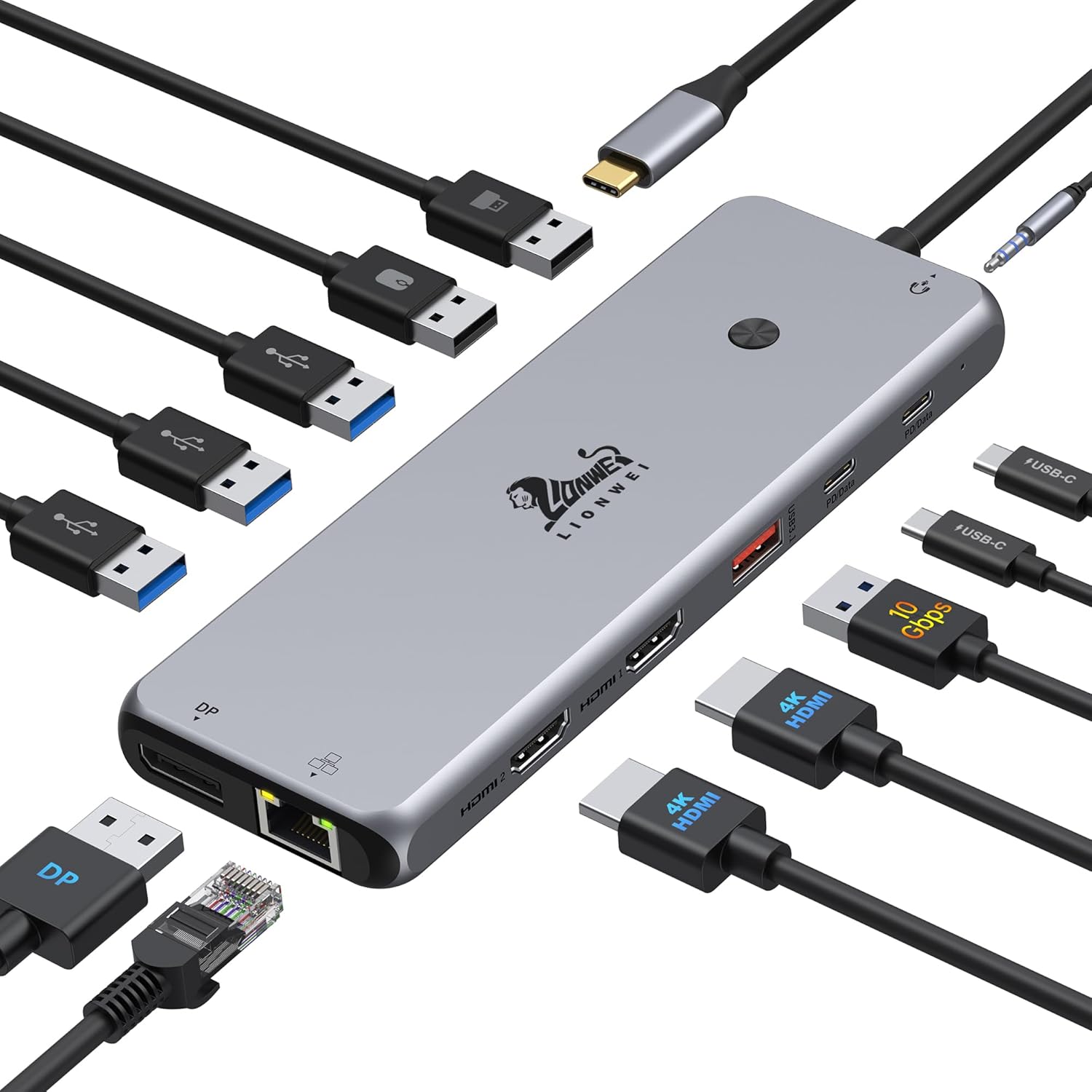
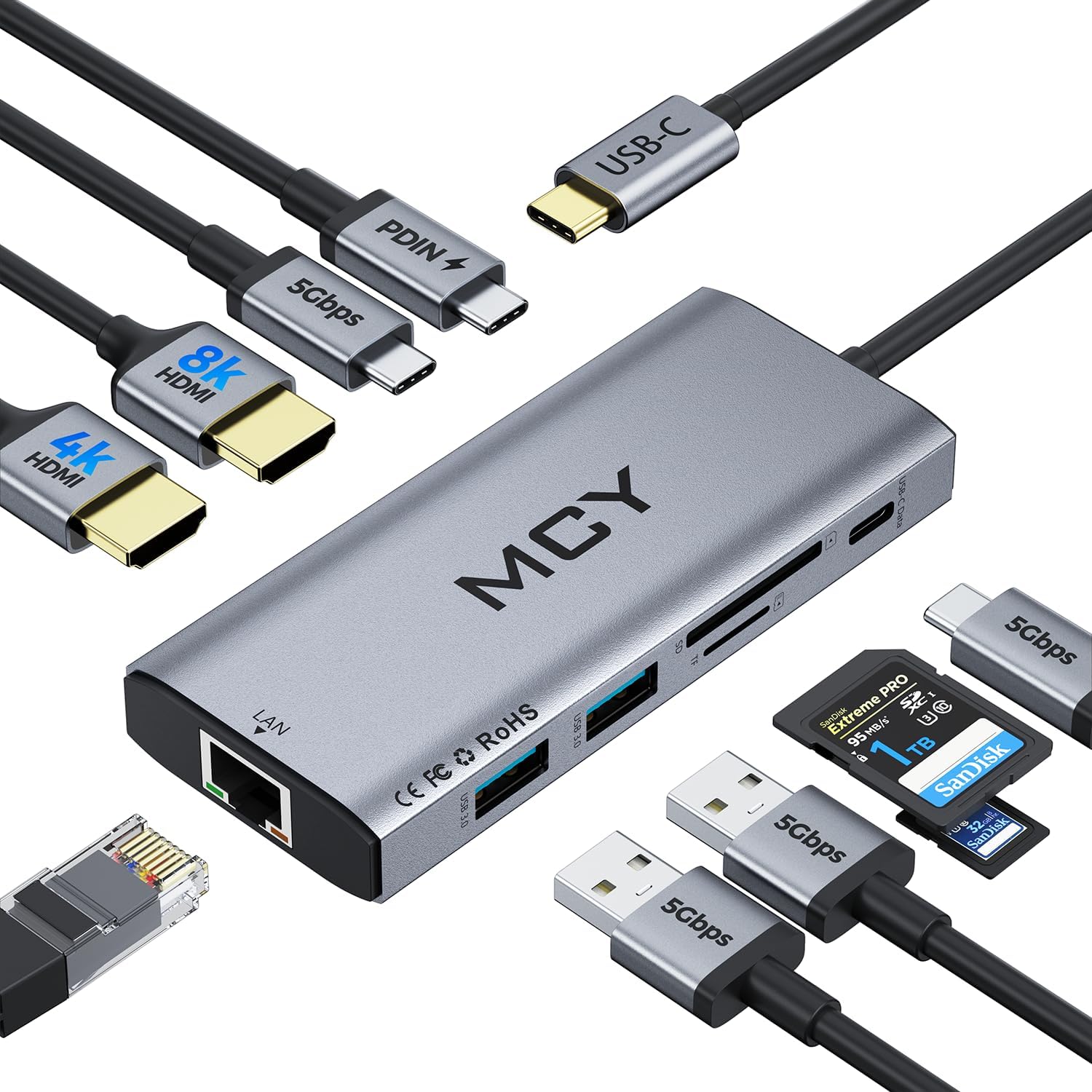
【13 in 1 Laptop Docking Station】Plug and play. With this usb c hub multiple adapter, you get 2*4K HDMI, DisplayPort, 2*USB C ports(Both support 100W Power Delivery+10Gbps Data Transfer), USB 3.1(10Gbps), 3*USB 3.0, 2*USB 2.0, 3.5mm Audio, Gigabit Ethernet port.
【Triple Display Docking Station】This usb c docking station only Windows System support MST and SST(Mirror & Extend Mode), HDMI port support up to 4K@60Hz (DP1.4 Source); DP port support up to 4K@60Hz. ❣️Note: For Extend mode, MAC OS can Only Extend One Monitor (4K@60Hz).
【Fast Data Transfer & PD Charging Port】USB-C 3.1 No longer distinguish between data transmission and fast charging port, fulfill the 10Gb/s high speed rates data transfer at the same time. And this computer docking station with power delivery support 100W PD Charging (This docking station will occupy 13W power to work, so only 87W power for laptop charging.).
【Gigabit Ethernet & Audio/Mic】 Docking station ethernet port download movies quickly and reduce game lag. This laptop docking station with 3.5mm Audio/Mic 2-in-1 jack.
【18 Month Warranty】LIONWEI support 18 month product warranty, If you encounter any problems in use, please feel free to message us.
9 reviews for 13 in 1 USB C Docking Station – Dual Monitor, Triple Display, 8 USB C/A Ports, Ethernet, Audio – LIONWEI USB C Hub for MacBook,Dell,HP,Lenovo,Surface
Add a review

Original price was: $79.99.$44.79Current price is: $44.79.
Chochocho –
Awesome USB hub
Every port working perfectly for 2 years now. Perfect option for laptops or anyone needing more connections. All connectors operate as expected over USB C
Richard Ramirez –
Perfect all-in-one USB-C hub—stable triple display, fast ports, and rock-solid performance!
This USB-C hub is a powerhouse! The 13-in-1 design gives me every connection I need—dual HDMI plus DP for multiple monitors, plenty of USB-A and USB-C ports, fast Ethernet, and even an audio jack. Setup was seamless with my MacBook, and the video output is crystal clear on all displays. Data transfer is quick, and I love that it keeps everything organized with just one cable to my laptop. Sturdy build, no overheating, and reliable performance—perfect for work and home office setups. Highly recommended if you want a true all-in-one docking solution!
Rusty –
Yes! Works from a USB Lithium Power Bank Passing Power To The Host Computer!
12 March 2025 (Just got it today)Review for ASIN B0BNTHWWMY Described as: USB C Hub USB C Docking Station Dual Monitor 13 in 1 Triple Display Multiport Adapter with 2 HDMI+DP+8 USB C/A Ports+Ethernet+Audio, USB C Dongle for MacBook/Dell/HP/Lenovo ThinkPad/SurfaceIt does that which I truly needed. It will pass power from a USB Lithium Power Bank through itself to the host computer. That means it will work in a power outage or it will work when I have to go to an office or to court where no AC outlet is available. Not all of these USB-C Docking Stations will do that. I have a recently purchased Orico that will not do that so I have to return the Orico now that I have this Lionwei.This one is a Lionwei brand: Not known to me but I’ll be keeping my eye on the brand from this point onward. It’s a solid feeling item made of metal. I guess aluminum? I don’t know.I’m not going to be using multiple monitors. Today, my first day of ownership, I only had time to test the things I need most:(1) USB Lithium Power Bank providing power to the host through this docking station. That works great. My little HP notebook requires 45W ( 3 amps at 15 V). My RoMoss 65W power bank does that for sure and obviously there’s an additional 20W overhead to also power the Lionwei docking station. Works great. My old trusty HP Elite X2 1012 G1 Notebook is charged while using it when connected to the power bank through this Lionwei dock.(2) RJ45 Gigabit LAN – worked fine.(3) Several USB drives. 1-USB3 Sandisk flash; 1-USB 10Gbps M.2 enclosure; 1 WD MyPassport 2TB Hard Drive and all worked as expected and all at the same time.(4) Just for a test, I connected a HDMI 1080p TV. It worked fine.And all of the above were attached and running while the HP notebook was being powered and charged by the RoMoss 40,000mah 65W power bank through this Lionwei USB dock. That should give me about 60 minutes from the power bank before the notebook battery begins to drain and then I should have another 60 minutes from the internal battery.Excellent for my needs. I try to avoid giving 5 stars because people tend to consider that a 5 star rating is the beginning of an untruthful review that was bought and paid for. So, 4 stars is as good as it gets most of the time from me and this is 4 stars for sure.And…yes, I bought it with my own money. I just wanted to put up a review immediately because I have spent well over 12 hours over many days trying to find a docking station that advertises it will work from a lithium power bank. None of them seem to want to advertise that they will work from a lithiuim power bank. Why? I don’t know. But, this Lionwei does it and does it well.Now, when the tornado rips my house to shreds, I can still hotspot my phone to my notebook and power them from a lithium backup…if….I can find those devices in the rubble. Or, I can take them to a remote location away from AC mains and still get work done as long as I have a cell signal. I’ve also got a 30,000mah RoMoss power bank to power my phone.The RJ45 LAN is mostly for connection to my Synology NAS. The NAS is connected to a Cyberpower UPS that will power the NAS for about 18 hours. So, if the power is out, I can still get needed files from my home NAS.Good luck to all. If anything goes wrong, I’ll come back to update.01 April 2025UpdateNothing new to report. Still works as expected. Nice product.
RandomWoof –
HDMIs Stopped Working After ~6 months
Edited Review: I think Amazon makes it really hard to contact your merchant to discuss troubleshooting issues. Fortunately, the merchant/seller was able to offer me a full refund or send a new one. I opted for a new one because I really did like it when I initially had it. Hopefully, it won’t have the same issue again 6 months later. I will update if that’s the case. The merchant also showed me some steps, but it still didn’t work on the old one. However, on the newer one it did work. Thanks!–Previous Review–Product Bought: 13 in 1 USB C Docking Station – Dual Monitor, Triple Display, 8 USB C/A Ports, Ethernet, Audio for WindowsI had bought this back in September 2023. It was working GREAT and worked with my KVM switch so it made it easy for me to switch between my work laptop and my personal desktop. I used the docking station for my work laptop since I require more USB ports. It stopped working all of a suddenly today.I know:It’s not my KVM switch because the dual monitors work fine when I switch to my personal desktop.It’s not the HDMI cables because when I plug each one individually into my work laptop, they still appear as an extended monitor.It’s not my work laptop because it turns on and can recognize the other USB devices in the dock station.For some reason, it’s ONLY the HDMI ports. Everything else like the USBs work just fine and my work laptop can recognize those. However, the HDMI ports are broken.So beware! I tried finding tech support, but it’s no longer available since I am past the return window. That’s what I get for being cheap. I guess I should find the original OEM dock stations for my work laptop now.I really liked the quality of the material if it did work. It’s not some flimsy plastic although it could be a mix of metal and plastic. It keeps cool.
Tonyam –
TL;DRGreat USB C hub for Macbook Pro 16. It has all the necessary adaptors and it has a good low profile shape which can be integrated smoothly with the MBP 16. (See uploaded video) I will highly recommend this hub.Pros:1. I purchased this usb c hub to convert the my MBP16 usb c to USB-A and sd card reader. And it works great, every usb converting function is working as expected. In the meantime, the hub won’t get extremely hot (my previous adaptor does). It will keep in a warm temperature which is acceptable.2. I occasionally use its HDMI adaptor to connect my MBP to a 1080P monitor, and the monitor can work smoothly in 60HZ.3. I really like its low profile design and it can be connected/integrated with my MBP smoothly. The hub is tightly connected with my mac and they are almost in the same level, I can put my mac on the desk and do not need to worry if the hub has bump or create uneven point.Cons:1. The hub’s power light won’t turn off, even I shutoff my laptop. It maybe because I have my mac’s power cable always connected, but I think it makes more sensor to shutdown the hub if the laptop is in sleep mode or shutdown.2. It lacks DP adaptor. I think this “Con” belongs to Apple. I cannot find a usb c to hdmi adaptor that support 4k 60Hz output. So to use mac with 4K 60Hz monitor, it needs to be “usbc to usbc” or “usbc to dp”. In general, I think a DP adaptor is more preferable than a HDMI for a Mac.
Varun Atre –
So far this product has been really good for all the uses I needed out of it.The build quality is really great, all the ports work really well and are sturdy. There is no part of the product that is creaking or a loose piece of plastic.It fits really well if there is no protective case on your Macbook, which I didn’t mind removing but some people might.The best feature about this product is the Hdmi port. The resolution on that port which the monitor receives is really good in quality.This is definitely a good buy. The only thing that is left to be spoken for is the life of this product.So far it has been really good.
Suffia Hussain –
This is great for intended purpose
How To Exit 9 To 5 –
Awesome cord. Very durable, affordable and serves it’s purpose.My Asus Zen Book sadly was built with a mini HDMI. Those things are just too damn sensitive. I moderately tripped over the cord and it only shows picture now if I hold the cord on a certain angle. A full sized HDMI would barely be bent at all… I was trying one last time to position it good but it seems like it doesn’t show picture at all anymore (Guess I tried to bend it back in place too much). I’ll fix it eventually, money is better spend reinvested in my online business.Too my amaze, my type C port has a “D” beside it so it allows display out. I’m glad I got an premium ultra book…Picture is expected at good quality, if I play a 4k video on YouTube with a 1080p TV it looks the same as it would on a 4k screen (2160p). What I’m saying is it’s not worth it to get anything more than 1080p unless you have a tv over 80’…(I think your money could be better spent at that point). That is if your tv is 10+ feet away from you which it should be because 10+ feet away makes it so your REM sleep isn’t negatively affected from watching TV before bed…Just a little tip to save you some cash and tiredness in the morning.
Mohammed t. –
It is a very nice cable, at first all I wanted was to screen mirror my game to my tv using my new galaxy s9, i tried using my charger it did not work so i bought this plugged it in. The screen mirror feature worked but what I didn’t know is that it allowed my phone to serve as a desktop pc, looked just like a linux OS, it was very cool to use because it seemed as if it were a pc. I would really like to use the feature more, at first I saw that this product had no downsides but since i wanted to use the pc feature my bed is far from my tv and the length was short, i would be very interested in a wireless version. All in all I’d say this product is worth the money I spent and then some