

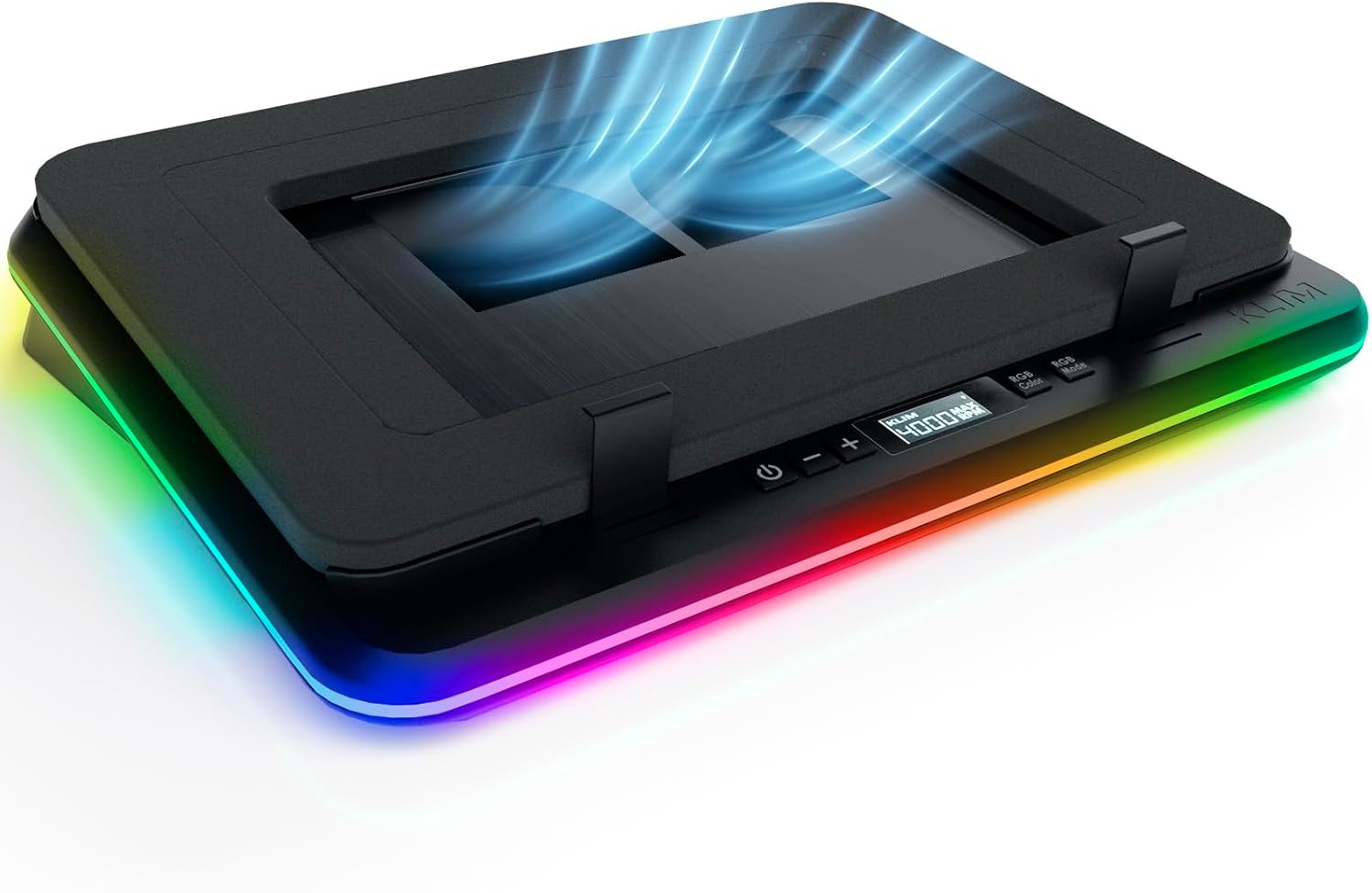
KLIM Turbofrost Gaming Laptop Cooling Pad – 4 Powerful Turbo Fans – 4 x 4000 RPM, Dynamic RGB, 4-Ports USB, Laptop Cooler 2 Power Modes USB-C/DC, Sealed Foam for Fast Cooling – Up to 17in – Black
Original price was: $79.95.$59.95Current price is: $59.95.
Related Products





Product description


🌀Unleash Cryogenic Cooling: 4 high-speed fans each spinning at 4,000 RPM giving you a combined cooling force of 16,000 RPM. Our secret lies in the collaboration of the 4 fans, working in harmony to distribute the workload. This synergy maximizes airflow, keeping your system icy cold under pressure.
💪German-engineered for Performance: 2-Year R&D for next-level cooling. Aircraft-grade aluminum for faster heat dissipation. Anti-dust system for superior cooling & durability. This isn’t your average laptop cooler. Upgrade Now.
🔕Silence the Screech, Unleash the Power: its adaptive noise-canceling foam will fit perfectly any laptop up to 17.3″. This premium quiet laptop cooling pad chills your machine without the jet-engine roar, maximizing performance with minimal noise.
🌈Immerse yourself in the game: 360° RGB with 64 unique customizable effects. Your light settings and fan speeds save automatically. Focus on the victory, not your settings with our rgb laptop cooling pad.
⚡Power Up Your Way: Dual Power (Wall Plug or Laptop USB-C) + 3 USB-A ports. Cools ALL Major Laptops 💻. Uninterrupted Cooling, Anywhere.
🦺Why choose KLIM: Cooling Mastery & Unmatched Performance. We’ve spent a decade perfecting laptop cooling. TurboFrost stands as the pinnacle of laptop cooling solutions in the entire market. Don’t settle for average. Game with confidence – 5-year assurance & 24/7 support. Choose KLIM.
13 reviews for KLIM Turbofrost Gaming Laptop Cooling Pad – 4 Powerful Turbo Fans – 4 x 4000 RPM, Dynamic RGB, 4-Ports USB, Laptop Cooler 2 Power Modes USB-C/DC, Sealed Foam for Fast Cooling – Up to 17in – Black
Add a review

Original price was: $79.95.$59.95Current price is: $59.95.
Lunar –
I absolutely love this cooling pad.
A genuine life saver of a cooling pad! My acer gaming laptop would almost always end up 95 degrees fahrenheit or more during gaming but after putting up the klim it sits at a lovely 80 degrees fahrenheit, the fans can be a tad loud when set to max but once I place my laptop on top it’s quieter and is basically soothing low ambient background noise. It was easy to setup, easy to use, and my laptop fits perfectly & comfortably on top, klim provides a fully functional cooling pad and it gets the job done. The only thing I didn’t like was that when you have it plugged by Usb port it will not run at max fan speed, you will have to directly plug it into a socket for it run it’s max at 4,000 but other than that zero big issues with the overall product and Usb port. Also! Just a bit of extra but I love the adjustable light it has, it gives me a bit of mellow lighting when I shut off brighter lights and I get color options.
Alex –
Good stuff
Dropped my temps by around 15° celsius. I was seeing a boost in fps by around 30% which is huge. The noise is high but what do you expect, it’s a giant fan. Very high quality foam that keeps the laptop in place and makes full use of the cooler.
AJ Boop –
Pretty good
Pretty good overall but for the pricetag it is decently loud and durability is like meh, kind of expected more with the price
andre –
works great
Keeps my laptop good and cool.
hakeem –
Works well
Works well and its quiet
Yue X. –
Great quality and design.
Works good drops temperature of laptop by 10 degrees Celsius.
John –
Excessive fan noise and buzzing make this unit unusable.
Excessive fan noise and buzzing make this unit unusable. It seems to provide ample air volume, but it is far too noisy to use in a work environment. As an aside, a cooling pad without lame LED lighting – or at least the ability to permanently turn off or disable the lights would be welcome. I can’t recommend this unit based on my experience.
Andrés Arrieta –
Moderno
De los mejores artículos de este rubro. A pesar que mi escritorio es algo pequeño , se adapta a este Junto con mi laptop Acer Predator que es de tamaño considerable. El sonido no llega a ser nulo, pero con las esponjas ya no senvuelvenmolesto como tal. Solo quisiera tener la opción de apagar el RGB 🥲
The Third Man –
Compared to other laptop coolers we have reviewed this is 100% top of the tree. Presented in a box that reflects the nature of the item – this cooler just blows all other coolers that we seen tested and reviewed previously out of the water! Fits any laptop from 14” to 17.3″The base is constructed from a solid matt plastic base which can be propped up using a solid metal bar with the upper part of the cooler being half plastic (bottom) and aluminium (upper). The upper is curved to enable the airflow to be directly where it needs unlike other coolers where is just spread “everywhere”.The top is covered in black memory foam, sections of it can be removed in order to achieve a perfect fit for your laptop – making sure all of the airflow isn’t wasted and goes directly to where it is needed. Two adjustable metal stay plates are included to prevent you laptop from sliding of the base – but I found these were required unless the upper surface was angled acutely.Can be stepped from 1500 RPM to 4000RPM (500RPM steps). 4 buttons on the front that control #1 on / off, #2 fan decrease / increase, #3 Colour and #4 Mode. No quite as the picture (no white marking). 3 x USBa sockets on the back and 1 USBc which are powered from the mains transformer.18 selections for lighting (9+9) which I found can be a distraction until you find the correct settingYou do have to run this from a separate power source rather than the usual USB socket but when you do wow!I was very sceptical about the price (at time of test £99) but having now tested and reviewed this item I can say it worth all the money.The only diss is at 4000RPM it’s a bit noisy – but better noisy than a slow running gaming laptop.Comes with comprehensive instructions, stickers, USB to USBc lead, a 12v power supply accessories including a spare foam filter and adjustable metal stay plates.If you have a gaming laptop you need this!
lecara –
I don’t own a gaming PC but my work laptop does get pretty toasty just in regular use, even with a raised stand that helps with airflow, and this cooling pad is able to completely make my laptop’s exhaust room temperature instead of the little toaster that it normally is!There are a few drawbacks naturally; this cooler is far bulkier than an oldschool cooling pad (thin thing with fans that don’t actually manage to help that much) or a laptop stand; it is also going to be typically louder than just your laptop alone but a lower frequency than the annoying laptop fan whine which is perceived as louder to our ears. That said, it helps with temperatures and also the longevity of your gear!The main reason why an old school type of cooling pad never really worked that well is because air will blow in the path of least resistance most of the time, so while it will cool the bottom of the laptop it doesn’t do that much to help cool its interior. This design with the foam frame blocking all other airflow going to the bottom of the laptop means full rerouting of airflow. This means that with the cooling pad turned off the heat will be a little bit higher than without it, but with the fans turned on you can force air through it in a way that the laptop fans themselves normally don’t achieve. Better airflow, and all through the internals, which makes my laptop feel as if it doesn’t even heat up!To be fair, for best results you would want to raise the kickstand in the back up, and use an external keyboard/mouse to operate the laptop. You can still use the laptop directly if you want but since there are no front kickstands the laptop cannot be “raised” only “tilted forward”, which isn’t always as ergonomic to type on or use the trackpads.There are two ways to power this cooling pad: USB-C or via the included AC adapter. I use USB-C power exclusively because I can plug it into my I/O station, which will automatically turn off that USB-C port when I disconnect my laptop from the thunderbolt cable connection. This means that when I unplug my laptop from the station, I can have the cooling pad shut down automatically. While it doesn’t turn on automatically when I establish the Thunderbolt connection, it isn’t difficult to operate with all the control buttons in front.A few things to note though:1. The maximum fan speed with USB-C vs AC is not the same; USB-C maxes out at 3300RPM while AC can go to 4000RPM.2. The USB ports in the back do not carry data, just charging for your other devices. They are a bit hard to access too, so frequent plugging/unplugging from the ports is not ideal.3. There is a dust cover in the back too, which can also be a little hard to access because of where it is located, but is thankfully not something you need to access too often.4. There seems to be some degree of memory to the cooling pad’s settings but I don’t think it is entirely consistent; I keep the lights off in general to have less distraction (even if the solid light is very subtle) but after a long period of time unplugged, once plugged in it kind of resumes with the lights on. Probably not a problem most people will find troubling.Overall I’m really impressed with the product. Yes, it makes your laptop a lot bulkier but you can now truly transform your laptop into your main computer without fear of heat degradation. The only thing I would be careful of is that if your laptop is on and the power goes out (and cooler stops working), the heat buildup will be a little faster than if the laptop was on a bare desk. Thankfully there won’t be extra overheating compared to a bare laptop since modern devices can throttle power automatically.
Carlos Limon –
Bastante eficiente para una computadora de 16 pulgadas y mantiene abajo de 80 c* la maquina Bastante bien
Peter C Smith –
This product is really good quality. The fans help to keep your laptop super cool whilst working. This is quite a large unit, I will not suit every environment. That said, it’s a great way to use your laptop on your lap as it’s incredible stable I’m quite comfortable. I particularly liked and a various angles this allows you to set your laptop. This makes working really easy and typing a lot easier than if the keyboard is flat. The fan speeds are really good, though on full power it is a little on the noisy side but not overly so. On the mid setting, is still provides great cooling, What’s been a lot quieter overall, this is a really good product that is well made and will certainly improve the performance of your laptop. If you have a laptop that gets particularly warm, this will certainly solve the problem .
Beaxir –
I regularly pushes my gaming laptop (RTX 3080, Intel i9) to its limits with games with 3D rendering, overheating has been my nemesis. Without the KLIM Turbofrost, my laptop could hit 90°C within minutes, throttling performance and sounding like a jet engine. With this cooling pad, the situation is much better.What I like:1. Unmatched cooling performance: This is the Turbofrost’s crown jewel. With all four 4,000 RPM fans running via the included DC adapter, my CPU/GPU temps dropped by 12–15°C during extended gaming sessions. For instance, Black Myth Wukong at top graphic mode, which previously caused thermal throttling, now runs smoothly at 80°C instead of 93°C. The sealed foam padding creates an airtight seal around my 17-inch laptop, forcing cool air directly into the intake vents wihtout wasted airflow.2. Smart dual-power flexibility: I often switch between my desk and couch. Using USB-C power (from my laptop) runs only two fans (max ~3,300 RPM), which is enough for light tasks like browsing or video calls. For serious gaming, I plug into the wall for full 4-fan power. The automatic fan/lighting memory is a nice touch. It is nice that I don’t need to reconfigure settings every time.3. Build quality & thoughtful extras: The aircraft-grade aluminum base feels premium and dissipates heat passively. The three USB-A ports (power-only) keep my mouse and headset dongles connected, decluttering my desk. The RGB lighting is gamer-flashy but can be turned off….I kept it on low for subtle ambiance.The mixed: realistic trade-offs1. Noise levels: not for silence seekers. At full tilt of 4,000 RPM, the Turbofrost is loud, comparable to a small desk fan on high. It’s a deep hum, not a screech, which I find less annoying than my laptop’s native fans. With headphones on, it’s unnoticeable. For quiet work, I run it at 50% speed (~2,000 RPM), which still cools effectively without dominating my room’s acoustics.2. Bulk & portability: Weighing 1.6 kg and measuring 41 cm wide, this isn’t a throw-in-your-backpack accessory. It stays on my desk. The tilt-only design (no height adjustment) also means I need an external keyboard for ergonomic typing.The Drawbacks: what could be better1. USB-powered mode is gimped: KLIM markets USB-C power as a full feature, but it only activates two fans at reduced speeds. A temperature drop of ~5°C (vs. 12°C on DC power) feels underwhelming. This should be clearer upfront.2. Non-functional data ports: The rear USB-A ports only deliver power. They can’t transfer data. If you need extra connectivity, you’ll still need a separate hub.3. Dust filter access is awkward: Cleaning the dust filter requires maneuvering the pad upside down. Of course not a big deal, but inconvenient for weekly maintenance.Who Should (and Shouldn’t) buy thisBuy if: You have a high-end gaming or workstation laptop that thermal-throttles. The Turbofrost is among the few pads that meaningfully combat this. Content creators, streamers, and hardcore gamers will appreciate the raw cooling power.Skip if: You prioritize portability, need near-silent operation for libraries/offices, or own a thin-and-light laptop. A laptop cooling pad with quieter but less powerful might suit you better.VerdictThe KLIM Turbofrost isn’t perfect, but it’s the most effective cooling pad I’ve used so far for taming a fiery laptop. Yes, it’s loud at max settings and desk-bound, but when my GPU stays below 80°C during a Cyberpunk 2077 or Black Myth marathon, I stop caring about the noise. If you’re battling thermal throttling and can tolerate its quirks, this will be a great option. Just keep the DC adapter handy and your headphones closer.