

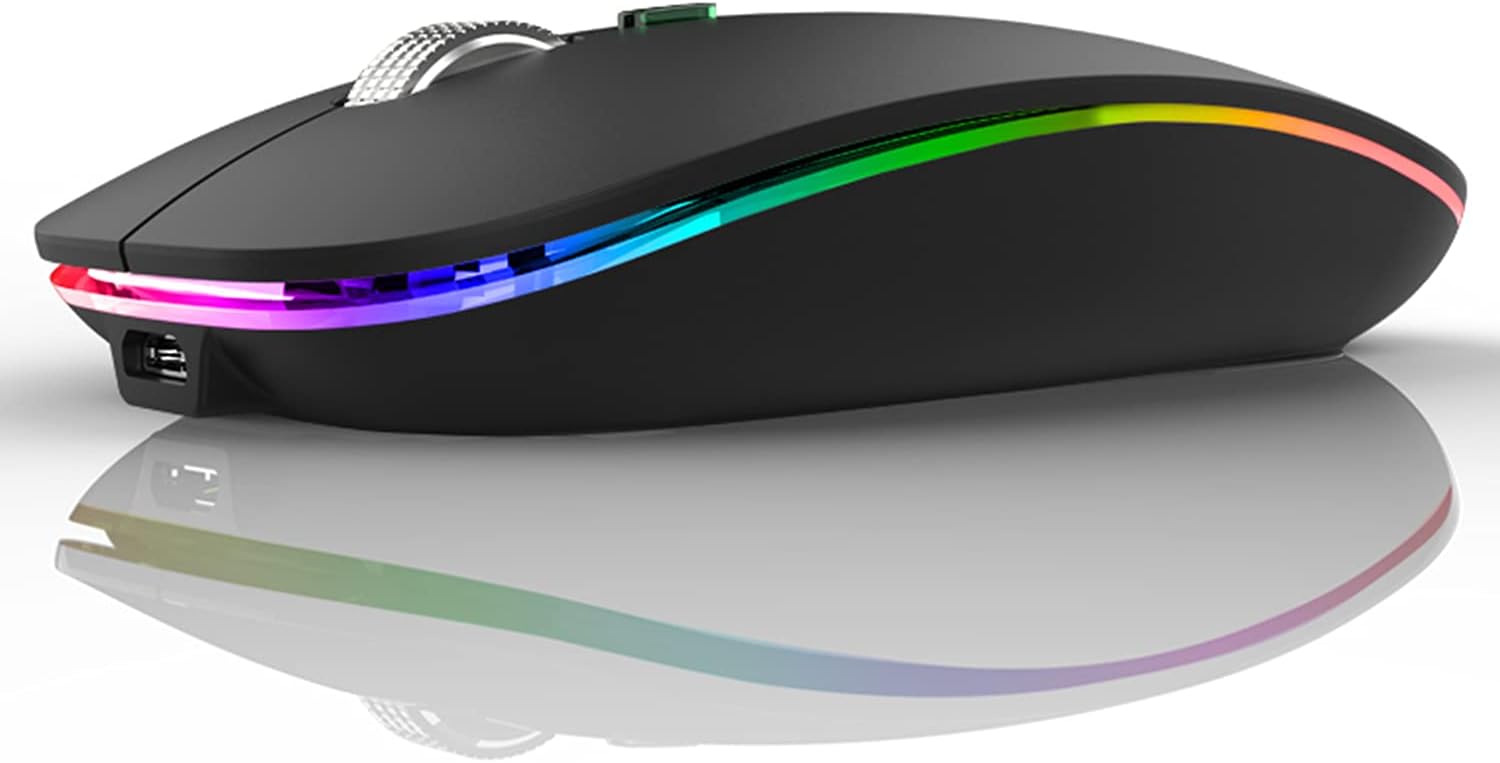
Uiosmuph LED Wireless Mouse, G12 Slim Rechargeable Silent Mouse, 2.4G Portable USB Optical Computer Mice with USB Receiver and Type C Adapter (Matte Black)
$9.99
Related Products




Product description


1 Plug and Play
2 How to Use
3 LED Light
 Battery Indicator
Battery indicator light tells you the power level.Simply charge the mouse before it’s out of power.  USB C Rechargeable
With built-in rechargeable battery, simply charge the mouse with Type C charging cable (included).No need to change batteries.
 Silent Cilck
Silent click for left and right buttons creates a quiet environment at home or office.Yon can use the mouse efficiently and won’t be bothered by the annoying clicking sound.  LED Wireless Mouse
7 different LED color changes randomly while in use, you can turn off the LED light to save power.Simply plug and play. The USB receiver is stored at the bottom of the mouse and Type C adapter are included in the package.
The video showcases the product in use.The video guides you through product setup.The video compares multiple products.The video shows the product being unpacked. hero-video Merchant Video
Note: For USB C port, simply plug the USB receiver into the type c adapter, then plug adapter into your device, turn on the power switch and the mouse will work.
Where is the USB receiver?
The USB receiver is stored at the bottom of the mouse, you need to take it out.
How to use the mouse on USB C port device?
Simply plug the USB receiver into the type c adapter, then plug adapter into your device, turn on the power switch and the mouse will work. (Type C adapter included)
How to charing the mouse?
Please use computer’s USB interface to charging the wireless mouse. The blue light beside the scroll wheel will be on while charging, and then goes off when the mouse is fully charged.
Uiosmuph Wireless Mouse
Add to Cart
Add to Cart
Add to Cart
Add to Cart
Add to Cart
Add to Cart
Add to Cart
Customer Reviews
4.0 out of 5 stars 112
4.2 out of 5 stars 547
4.2 out of 5 stars 53
4.0 out of 5 stars 112
4.2 out of 5 stars 547
4.2 out of 5 stars 53
4.3 out of 5 stars 74,247
Price
$9.99$9.99
$13.99$13.99
$15.99$15.99
$9.99$9.99
$13.99$13.99
$15.99$15.99
$12.99$12.99
Connection
USB Receiver / Type C Adapter
2 in 1 USB and USB C Receiver
Dual Bluetooth / USB Receiver
USB Receiver / Type C Adapter
2 in 1 USB and USB C Receiver
Dual Bluetooth / USB Receiver
USB Receiver / Type C Adapter
LED Light
No LED Light
No LED Light
No LED Light
No LED Light
No LED Light
No LED Light
7 color LED Light
DPI Level
1000 – 1200 – 1600
1000 – 1200 – 1600
800 – 1200 – 1600
1000 – 1200 – 1600
1000 – 1200 – 1600
800 – 1200 – 1600
1000 – 1200 – 1600
USC C Charging
✔
✔
✔
✔
✔
✔
✔
Home Botton
✘
✘
✔
✘
✘
✘
✘
Rechargeable: Built-in rechargeable battery, no need change battery. Special soundless design for the right and left buttons, won’t disturb others.
Colorful Light: 7 different color changes randomly while in use, offering soothing lighting, creating cool and fancy atmosphere for work and play.
Energy Saving: The mouse will be in sleep mode in 8 mins of inactivity. And the LED light can be turned off by the bottom light switch.
Slim & Portable: About 4.4 x 2.2 x 0.79 inches, Suitable for travelling carry and it can be easily put into your laptop bag and ultra-space saving.
USB A and USB C Connection: This wireless mouse is packed with USB receiver (stored at the mouse bottom) and USB C adapter, works for computer with USB A or USB C port. For USB C connection, simply plug the USB receiver into the adapter, then plug adapter into your device.
Widely Compatibility: This rechargeable mouse works for Windows 7/8/10/XP, Vista, Linux, Mac OS, Chrome OS etc. It’s compatible with most of the computers with USB C port, like MacBook Pro after 2016, MacBook Air after 2018, Chromebook and more.
10 reviews for Uiosmuph LED Wireless Mouse, G12 Slim Rechargeable Silent Mouse, 2.4G Portable USB Optical Computer Mice with USB Receiver and Type C Adapter (Matte Black)
Add a review

$9.99
Jennifer M –
As excellent as previous model
This is the second time I’ve bought this product. The first one had was charged through micro-usb and after a few years of using it worked fine. Till I dropped it a few times and eventually the middle button wouldn’t work anymore.This second time around, nothing about the appearance has changed except for the battery indicator underneath letting you know how much of it is charged. It’s still very comfortable to use and as quiet as the first. Also lights up as nice. The battery seems to last a while too. Very importantly, the fact it’s now charged with usb-c means I can use my phone charger.
GrandmaJ –
STILL Love this Mouse
ANOTHER UPDATE:It’s April 1, 2024, and this mouse is still great. I read a review about the lack of USB ports for charging, but all one has to do is buy a USB extender. They are inexpensive, and great for adding a whole lot more things to the computer. Just plug the extender into one of the USBs, and in my case, I now have four more that I can use. I use 3 max, with an extra, just in case.Also, if you think your mouse is not working, charge it or use it while charging. Even if it acts like it doesn’t want to work, detach the dongle (or whatever you may call it) from the USB port, turn the port off, reattach the dongle, turn the port back on, then turn the mouse off, then back on. It works every time for me. You are simply resetting the connection.I STILL love this mouse! I have no complaints, whatsoever.UPDATE – AGAIN: 7-7-22 I STILL love this mouse. The fact that it can be recharged is, well, saving me money on batteries. I can even leave it plugged in and use it. For those who say it quits working, if you make any change, unplug the dongle and plug it back in after a couple seconds, then turn the mouse on/off. Works perfectly. Never have a problem with it.UPDATE: 12-16-21: I love this mouse! I know. I said that already. Great product.One thing to be aware of. If I let my laptop sit for a while, logged in, when I come back, the mouse won’t register. I found that all I have to do is turn it off, unplug the receiver from the USB port, re-plug the receiver, then turn the mouse back on. Same thing, If the mouse runs out of power and you recharge it when it’s off. Mouse won’t register. It’s not broken, as some said on here. Just reset the same way. It’s never failed me yet.Also, I use an old mouse pad for laser mouse because some surfaces make the pointer bounce all over the place. I bought Finger Pads from Amazon, multi-sized pack, and since my fingers are very dry they won’t turn that wheel much. Those old-style filing finger pads work perfectly.
Nikki Taylor –
I love this quiet mouse!
I was skeptical at first to get the quiet mouse because I tend to like the click noise of the mouse (when I’m the one gaming lol) but the sound and feel of the click on this mouse is SO satisfying! I definitely won’t be switching back to my normal loud mouse. It moves really smoothly and feels nice in my hand. The only downside is that I wish the scroll wheel was just the tiniest bit easier to scroll as I find myself accidentally clicking down on it just trying to scroll which then wildly scrolls the page. Not the biggest deal, maybe I’m just heavy-handed.The LED feature is really cool though I don’t find myself ever using it. I have no clue what the button under the scroll wheel does, it doesn’t seem to do anything but maybe it’s just programmable.I didn’t need anything super fancy so this is perfect, I’m really happy with my purchase.Edit: after using this mouse for a few weeks, I do have just one small complaint. On the bottom of the mouse is the power switch and there are three positions that it can be in: On with LED on, On without LED, and Off, in that order. My only complaint is that the On without LED option is in the middle. I rarely use the LED because I’m afraid it will drain the battery and I just don’t need it, so it would be much more convenient if the On with LED was in the middle position instead so you could just switch it easily On/Off.I bring my mouse to work every day and the other day I accidentally switched it to On with LED instead of off and put it in my bag. When I got home a few hours later it was completely dead and I had to recharge it.
J. Brown –
Nice little player for the money
At this price point, this is a nice little player. Sure, you could spend 5x the money for a nicer player with a better DAC, but this is a perfectly nice device. The interface is basic Android, easy to navigate, access to Google’s Play Store, 128GB SD for music storage, and a nice little form factor. Once charged it was a quick setup, deleted some pre-insralled apps, updated the other apps, and installed a couple more. Loaded up music via USB, and was using the device without issues.
Peter S –
Great budget mouse for home and portable option
I bought this mouse to keep downstairs for when I take my laptop away from my main desk setup, and it has exceeded my expectations. For such an affordable option, it feels surprisingly comfortable and has a good size—unlike some cheaper mice that feel too small in the hand.Performance & SensitivityThe adjustable pointer sensitivity is convenient, with a central button on the mouse that lets you switch levels quickly. I did need to fine-tune the settings on my laptop because the default options felt either a bit too fast or too slow, but once adjusted, it worked perfectly.Battery Life & Auto-Sleep FeatureThe battery life is much better than I expected. I’ve gotten almost a full week of daily use before needing to recharge. The auto-off feature definitely helps with that—after a few minutes of inactivity it goes to sleep, and you just need to move it or click to wake it back up. It’s very quick and becomes second nature once you’re used to it.OverallFor the price, this is an excellent mouse—comfortable, reliable, and convenient for anyone who moves their laptop around the house.
Cliente de Amazon –
Está muy bonito y funciona excelente!
Karen Alicia García –
Llegó antes de la fecha y a buena hora, se entregó bien embalado, no tiene defectos ni hendiduras. Funciona muy bien y viene con su manual. Lo recomiendo ampliamente.
José Taméz –
Se maneja fácilmente. Muy adaptable y cómodo.
Cliente Amazon –
Arrivato con 2 giorni di ritardo; per il momento sembra essere un buon prodotto!
alfonso –
Calidad precio