

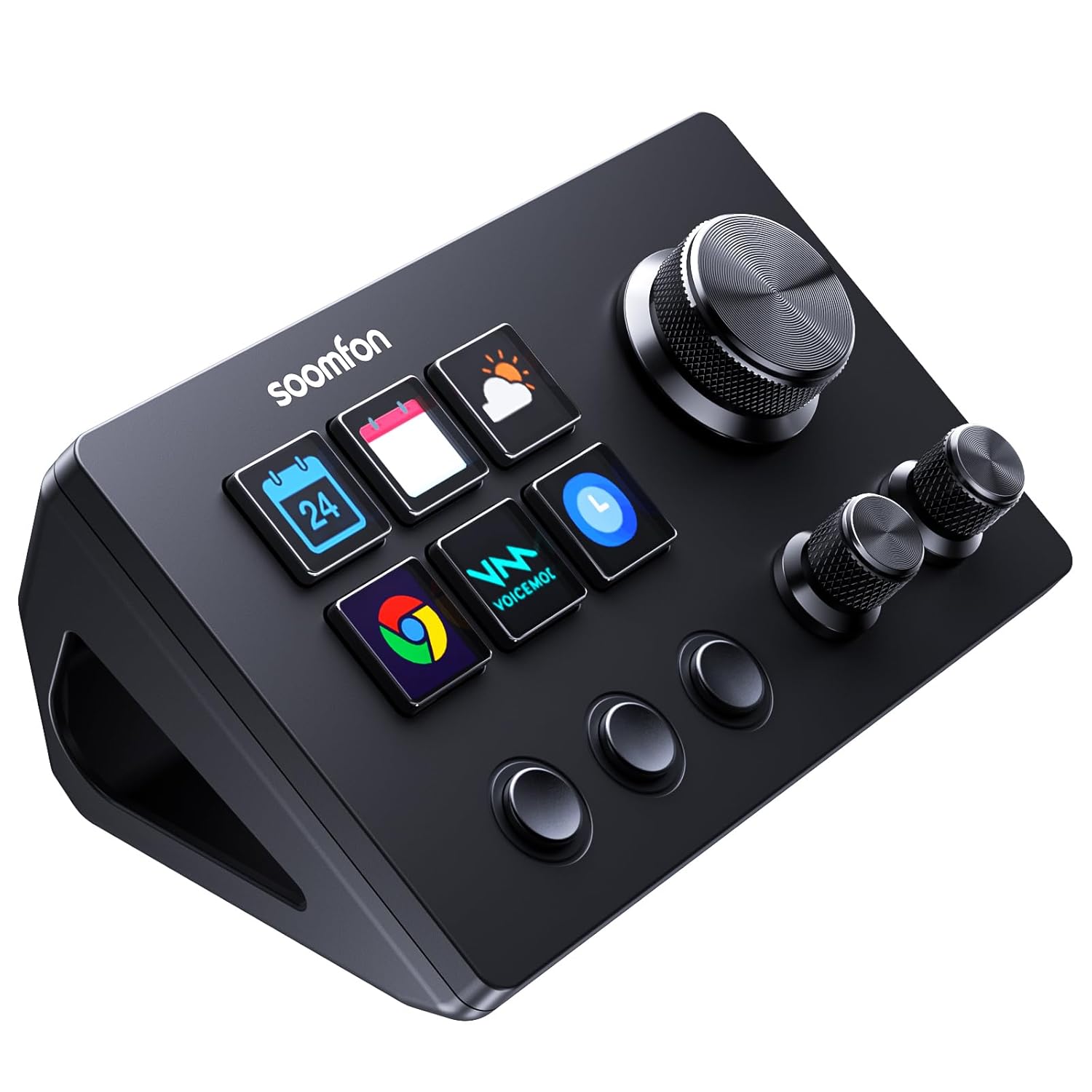
SOOMFON Stream Controller SE Stream Control Deck with 6 Customizable LCD Macro Keys to Trigger Actions in OBS Twitch YouTube for Content Creators Streaming Gaming Compatible with PC & Mac
Original price was: $59.99.$55.99Current price is: $55.99.
Related Products



Product description


【Customizable 6 LCD Keys】Stream Control Deck is equipped with 6 fully customizable DIY LCD buttons. You can customize the buttons to your liking. 3 additional changeover buttons and 3 knobs also allow you to customize the settings.
【Wide compatibility】Compatible with PC, Mac and leading software. Integrated support for OBS Studio (Windows 10 64-bit or higher; MacOS Catalina 10.15 or higher), Twitch, YouTube, Twitch, Discord, Spotify, Voicemod and more. The included software is very easy to install and operate.
【Easy to Use】Tactile control, visual response.With our 6 customised buttons, you can open programs, web pages, software and files with one click, drag and drop. Three switch buttons can switch the previous page, next page and home page in the default scene. Rotatable knob can customize the operation settings such as volume, brightness and so on. Meet your diversified needs.
【Intelligent design and user-friendly】The SOOMFON Stream Controller SE comes with a removable 40° stand that allows you to customize it to your needs. You can lay it flat on the stand and connect it to your computer via USB.We also include a removable adhesive that you can attach to your desktop. It won’t slide around on your desktop even if you don’t use the stand.
【Extensive Plugins Marketplace】This Stream Control Deck is equipped with a wealth of plug-ins for you to download. Configuration files, icons, ready to install. The applications inside can be customized for multiple application scenarios, functions and layouts to meet your diverse application needs.
【Important Notes】① This stream controller supports macOS High Sierra 10.15 or higher, and Windows 10 64-bit or higher systems only. ② To use Spotify integration, you must have an active Spotify Premium account. ③ If you encounter any issues during setup or use, please don’t hesitate to contact us. Our customer support team is available 24/7 to assist you with anything you need.
13 reviews for SOOMFON Stream Controller SE Stream Control Deck with 6 Customizable LCD Macro Keys to Trigger Actions in OBS Twitch YouTube for Content Creators Streaming Gaming Compatible with PC & Mac
Add a review

Original price was: $59.99.$55.99Current price is: $55.99.
Brandon Motika –
SOOMFON Stream Controller SE: The New Standard in Workflow Control
For professionals in content creation and digital production, optimizing workflow efficiency is paramount. The SOOMFON Stream Controller SE emerges as a superior control surface, offering a refined and robust solution that surpasses existing alternatives.The SOOMFON SE distinguishes itself through its comprehensive control layout. It features six customizable LCD keys, which provide clear visual feedback, alongside three dedicated physical switch buttons for immediate tactile response. It’s inclusion of 3 knobs for precision control is also very appreciated.The accompanying software for the SOOMFON Stream Controller SE is intuitive and highly compatible. It seamlessly integrates with popular applications including OBS Studio, Twitch, YouTube, Discord, and Spotify. Configuration of macros and shortcuts is straightforward via its drag-and-drop interface, ensuring rapid deployment into existing workflows.Beyond its primary role in streaming, the SOOMFON SE proves invaluable as a versatile macro pad for general computing tasks, advanced video editing, and controlling various software applications, thereby maximizing its utility across a broad spectrum of professional demands.Conclusion: A Strategic EnhancementThe SOOMFON Stream Controller SE stands out as a highly capable and professionally tool while still being affordable. In time, I believe it’ll become the preferred tool for those who desire a good quality product while on a budget.
Caesar –
Good stream deck, very functional
Haven’t had any issues with this stream deck, love the look of it, has a little adhesive on the bottom of the housing to keep it from moving around your desk. Wish the housing was were made of something other than plastic to give it a more premium feel.
MoMo –
Worth it.
This is a great tool with Lightroom/Photoshop and editing photos. I had a bit of a problem assigning keystrokes to buttons but after a full restart of computer (after installation) it was able to recognize keystroke shortcuts. Utilizing with MacBook Pro. Definitely recommend.
Arpboy –
Fantastic Deck for the Price.
Excellent bang for the buck! I picked this up to help with my video and photo editing. The controls feel very good; the software is very good, better and more stable than some more expensive options.Because of the price, there are some compromises: the knobs have no label (such as a touch screen next to them). The non-labelled keys at the bottom left can be customized, but again there’s no label or lights to indicate status or anything. Those are reasonable compromises for the price of the keyboard.I really liked having a larger knob, plus the smaller ones. I set it up to be able to jog back and forth in my timeline for my video editor.After a day or two, I realized that my needs were bigger than this keyboard, so I returned it, but NOT because of quality or performance; it was just understanding what it could and could not do. If they had a similar keyboard retaining the large knob, but having labels and a few more keys, I’d have probably jumped that way.Don’t let the fact that it’s a lesser-known name fool you. This is a good product.
Billie Hawkins –
Great support
These are great!!The good: they do so many great things on both my Mac and PC. I have 3 now!!One of these sadly crashed on me and the customer service was great. In 2 days I had a replacement directly after they tried to help me fix it.
Bewing –
Perfect combination of a big knob, little knobs, configurable LCDs/switches and buttons.
This is a great controller! The large volume knob is perfect for an “emergency” grab, and the assemblage of other controls makes this the perfect companion for (or even replacement for) a Stream Deck XL. I initially had problems getting it to control my XR18 via OBS but Customer Support was extremely helpful and patient.
Balakay –
Meh
Hard to learn how to use still cannot get it to work correctly
Bap –
It’s fine.
Works fine. Looks good. Build quality is a bit lackluster but for the price it’s okay. Functionally is does what it’s supposed to. After having it for some time now, I definitely would like a stream control with more buttons. I am not a streamer extremist. I have it for casual purposes only. I’m gonna call it average.
Ash –
Bought this recently and I have to say it’s absolutley brilliant.Easy to setup, plugin’s are great, plenty of them and they are open to suggestions. The rotary encoders and touch screen are really useful. Has some weight to to it and the knobs are metal so it feels well made, screen angle is adjustable too. Has a USB hub on the back, so no need to grab a seperate hub to plug things into. I’ve even setup a timer for my cuppa tea to brew.Also, I asked customer service a question and they were super helpful and quick to respond.In a nutshell, I have no problem at all recommending this at all.
Magnus Giertz –
Easy to install! Does the work! Nice price! I can recommend this product
DJ –
Awesome little tool.Bought this to use with my office PC. Simple set up, easy to assign buttons using the app. Basically will open anything you want, or perform any macro you assign very easily. Looks great, buttons feel nice. Solid budget stream deck for sure
Alessio Bixio –
Questo controller ha confermato subito le mie aspettative: le 3 manopole programmabili sono molto utili usando software di modellazione 3D e fotoritocco…credo sia un accessorio praticamente indispensabile!Nella confezione è presente il supporto inclinato, un cavo usb (in tessuto di colore nero) con connettore usb-c e adattatore usb-a ed un piccolo manuale di istruzioni in varie lingue (incluso l’italiano).Sia i 6 pulsanti LCD sia le 3 manopole (che si possono ruotare e premere) risultano essere personalizzabili utilizzando l’apposita applicazione di controllo del Control Stream Deck di SOOMFON disponibile per PC Windows o Mac OS. Sottolineo che ognuno dei 6 pulsanti quadrati contiene un piccolo, ma dettagliato, schermo LCD da personalizzare con i propri file grafici preferiti con una buona risoluzione.Le manopole si prestano a diversi utilizzi, dal classico “controllo volume” alla possibilità di regolare la dimensione di una matita o pennello in un software grafico oppure la possibilità di scorrere una timeline in un programma di montaggio video. Tramite il programma di gestione, totalmente gratuito, si possono creare diversi profili di configurazione e si può decidere, ad esempio, che vengano attivati quando si utilizza un determinato software nel proprio computer.Segnalo di avere rilevato problemi collegando la usb del controller ad un hub USB: meglio collegarsi direttamente ad una porta fisica del computer.
Thomas –
Le top ! Pour ceux qui ne veulent pas dépenser une fortune chez le concurrent, foncez ! Vous pouvez configurer de nombreuses pages, tout est réglable et réactif ! Évidemment pour le prix, ne vous attendez pas à avoir une qualité incroyable sur les écrans, mais à part ça, le produit répond parfaitement à ce qu’on lui demande !