

6.13” Carta1300 AiPaper Reader with 4G Connectivity, Ultra-Thin & Light E Ink eReader Device, AI Integrated, 300PPI, Adjustable Front Light, 128GB Storage
Original price was: $279.99.$249.99Current price is: $249.99.
Related Products





Product description


The video showcases the product in use.The video guides you through product setup.The video compares multiple products.The video shows the product being unpacked. Long-Press AI Button for Voice Input Merchant Video
Talk Directly to AI Long-Press AI Button for Voice Input
Long-press the side AI button to ask questions using your voice. Perfect for quick, hands-free interaction.
The video showcases the product in use.The video guides you through product setup.The video compares multiple products.The video shows the product being unpacked. Screenshot and Ask AI Merchant Video
Quick Answers from Screenshot Content Screenshot and Ask AI
Whether you’re reading local documents, browsing the news, or using third-party apps, click the Picking floating icon to capture a specific area of the screen. Select the desired screenshot region and ask AI for instant insights. Picking feature is an exclusive and innovative design by VIWOODS, enhancing the smart reading experience.
The video showcases the product in use.The video guides you through product setup.The video compares multiple products.The video shows the product being unpacked. Save Insights to Your Knowledge Base Merchant Video
Save Insights to Your Knowledge Base Create Your Personal Knowledge Library
Save AI responses directly to your Knowledge Base. Organize and categorize insights to build a personalized library for easy access anytime.


1 Nighttime Reading 2 In-Flight Reading 3 Relaxing at a Café 4 Outdoors


Does it support handwriting with an stylus pen?
No, it does not. The AiPaper Reader is designed to offer users a portable and immersive deep reading experience, rather than serving as a portable notebook.
Does it have a speaker for audiobooks?
To achieve an ultra-thin and ultra-light body for a more comfortable grip, AiPaper Reader does not include a built-in speaker. Users can connect Bluetooth headphones to enjoy audiobooks.
What AI models are supported? Are AI features free to use?
The AiPaper Reader supports multiple advanced AI models, including the latest Chat GPT 5, Chat GPT 4O, 4Omini, Gemini-2.5-flash, 2.5pro, Deepseek-R1, and Deepseek-V3. All AI features are free to use.
Does the AiPaper Reader have warm light?
The AiPaper Reader has a single front light with a color temperature of approximately 5000K.
Can AiPaper Reader be used for calls after inserting a 4G SIM card?
The AiPaper Reader’s 4G functionality is designed to allow users to access reading materials and AI services anytime, anywhere. Call performance may vary depending on the user’s location.
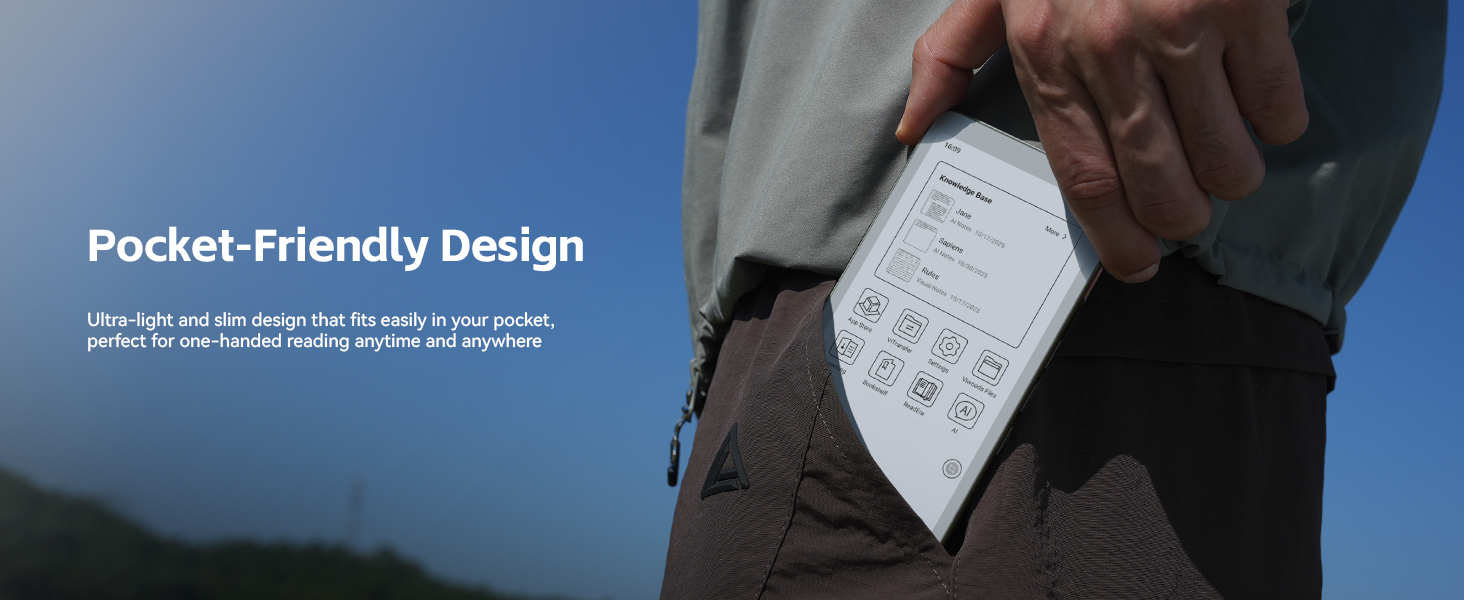
Ultra-Thin & Lightweight Design: Weighing only 138g with a super-slim 6.7mm body, the VIWOODS e reader features a compact 6.13-inch screen that perfectly balances portability and usability. Its sleek design fits effortlessly in your pocket, making it ideal for commuting, traveling, or enjoying your favorite reads anytime, anywhere
Stunning Carta 1300 Display: Enjoy a premium reading experience with the advanced Carta 1300 E-Ink display. It delivers faster refresh rates, reduced glare, and a true paper-like feel for comfortable, long reading sessions
Adjustable Front Light: Read comfortably in any environment with 20 levels of adjustable cool light, designed without warm light. Whether in low light or bright sunlight, the VIWOODS e-reader adapts to your needs for strain-free reading
AI Button for Instant Assistance: Access AI-powered assistance with ease using the dedicated AI side button. Long-press for voice input or short-press for text-based queries, providing you with quick solutions, learning tools, or helpful summaries in seconds
AI Screenshot Q&A: Struggling with a complex topic? Simply take a screenshot, let the AI analyze it, and receive a detailed summary or explanation. Dive deeper into any subject with follow-up questions, making learning easier than ever
Personal Knowledge Library: Save AI interactions and Q&A sessions into your personal knowledge bank. Build a searchable repository of insights and information over time, perfect for lifelong learners and professionals alike
High-Resolution 300 PPI Display: Featuring a 300 PPI high-resolution display, the VIWOODS reading tablet ensures sharp, crystal-clear text and images, making every word and detail easy to read and visually stunning
What’s in the Box: The VIWOODS AiPaper Reader includes a protective case, A-to-C adapter, card tray eject tool, and quick start guide
Note: Does not support handwriting or built-in speaker. Compatible with Bluetooth headphones for audiobook playback
8 reviews for 6.13” Carta1300 AiPaper Reader with 4G Connectivity, Ultra-Thin & Light E Ink eReader Device, AI Integrated, 300PPI, Adjustable Front Light, 128GB Storage
Add a review

Original price was: $279.99.$249.99Current price is: $249.99.
Amazon Customer –
The best small-screen Ereader currently available
This VIWOODS AiPaper Reader is impressively lightweight, feels like half the weight of my smartphone. Easily slips into a pocket. The metal frame give it a premium feel with no hint of plastic, making the overall build quality excellent. As far as I know, VIWOODS is the only one using the latest Android 16 processor, which makes using third-party apps for reading seamless, both Kindle and Kobo work perfectly without any issues. The AI feature has been helpful, especially during study sessions, and I’m looking forward to future software updates that could add even more functionality.
Laura Zhuang –
Amazing experience
I’ve been using the Viwoods AiPaper Reader as my carry everywhere ereader. It’s slim, surprisingly light, and looks really sleek. The system is very quick and responsive, and the text is sharp and clear with great contrast. I also love the page-turn buttons; they’re perfectly placed and give a nice tactile option instead of always swiping. Pretty impressed with Viwoods entry into the ultra-compact, portable e-reader market.
Morgan Akers –
Nice reader but missing some key features .
I just bought a Palma 2 when this new ready came out so I purchased this one as well given the longer support for the OS.It’s thinner and has a nice metal frame and the fingerprint reader seems to be both more responsive and better.There is some weirdness with the OS as you can’t register the device as an Android one due to something along the lines of it not being as known Device type. There are also lots of places for settings that don’t make a lot of sense like color and contrast. I still have seen any changes when I adjust the contrast for example.The one thing is the screen- it’s a real deficit there isn’t a way to adjust color temp. The white screen isn’t bad but even just slightly warmer colors especially at night would make a big difference.If the Palma 2 was running a more recent OS I’d pick it over this. There is better polish on the software and overall feeling as a reader. But I’m still on the fence because I think the Viwoods is a nice device but I’m still not sure it’s a good alternative.The picture attached shows the same book page with Viwoods on the left and Palma 2 on the right. Same brightness but warmth added on the Palma 2 side.
eric zhang –
fast,accurate,and super easy to use
The AiPaper Reader turned out to be exactly what I needed! The more I used it, the more it became part of my daily routine.One of the most refreshing aspects is the lack of constant notifications, apart from calls and messages. Starting my day without being bombarded by alerts and only checking updates later on my computer has made mornings feel much calmer and more focused.The device itself is incredibly well-made. The e-ink screen is sharp and clear, making it perfect for reading eBooks, while being far gentler on the eyes than regular screens. So far, I’ve experienced no bugs, and the overall experience has been smooth.I also use the device to read French articles for study purposes, and the built-in AI feature has been surprisingly helpful. When using third-party apps to read, I often take screenshots of useful information to organize into my knowledge base. Annotating these screenshots allows me to quickly reference important points later, which has made studying much more efficient.This device strikes a great balance between functionality and simplicity, and it’s become an invaluable part of my daily life.
BS Detector –
An OS update seems to have significantly improved the initial experience.
I originally posted that it’s a “mixed bag,” but the most recent OS update seems to have significantly improved speed and battery life.Thin and light! Android 16!Crisp screen! Only blue light, no warm.Great build quality, but no speaker.Be warned: getting the Google Play Store to work the first time (and thereby any account that uses Google to log in) is a multi-step, somewhat-confusing chore.BUTTONS: The buttons are *FAR* too loud/clicky, and the ‘AI’ button — which I will never /intentionally/ use — is in the way, both when picking up the device and when wanting to use the “volume down” button to turn pages.NICE BITS: The included case is nice and makes the otherwise slippery device easier to hold. The fingerprint reader seems to work well.Final Thoughts: I was excited to get a super-light handheld reader that didn’t have unnecessary things like cameras and bloatware, and that I could use to open multiple reading apps. I am going to keep it and use it, but I think I like the form factor and feature set on the Boox Palma 2 better.
Eric –
This is my second Viwoods e-ink device, and once again, it doesn’t disappoint. I was first drawn to the brand by the 10.7″ AiPaper I picked up last Black Friday. That device won me over with its truly paper-like writing experience—it brought back the joy of reading in a way I hadn’t felt in years. Even the AI features, which I hadn’t expected much from, turned out to be incredibly helpful. They deepened my understanding of what I was reading without pulling me off-topic. I ended up recommending it to my colleagues.That said, I still couldn’t avoid reading on my phone, especially when I was out and about. The arrival of this phone-sized AiPaper reader fills that gap perfectly. It’s similar in size to an iPhone—slightly larger than my iPhone 14 Pro—but noticeably slimmer and lighter. It feels great in the hand and is extremely portable. The e-ink display significantly reduces eye strain during long reading sessions, which is exactly why I don’t mind carrying an extra device solely for reading.The app store offers 42 apps, which is more than enough for everyday reading needs and a handful of essential tools. Power consumption has been impressive so far; after several hours of reading, I didn’t notice any meaningful drop in battery life.It comes with a protective case, though the fit is a bit tight when sliding the device in. I also find myself wishing it supported a stylus—I often get the urge to jot something down, and I’d love to play with something like Sokudo on this device someday.Once again, the built-in AI is a real bonus. It enriches my reading comprehension and provides helpful depth without disrupting the flow.Overall, this is a fantastic device for reading on the go!
Mary –
While I appreciate some aspects of this e-reader, there are a few annoying design flaws that really affect the user experience. The AI button on the side sticks out quite noticeably and keeps getting pressed by accident, which interrupts my reading flow more often than I’d like. I rarely use it, so it just feels unnecessary and intrusive.The e-ink screen also leaves something to be desired, especially compared to the Kindle Paperwhite. I miss the adjustable color temperature, which makes nighttime reading so much more comfortable on the Kindle.I also tried to use this device as my main phone and connect it to my car, but unfortunately, my car couldn’t detect it at all—so that was a letdown for anyone hoping to consolidate devices.Lastly, the bottom allocation makes it awkward to read while lying sideways in bed. After a while, my forearms actually felt sore from holding it in an uncomfortable position.Overall, while the idea is good, these design choices make it hard to recommend for serious readers or as a phone replacement. I hope future versions will address these issues.
Dammy –
It is almost beyond my expectations. Super handy and lightweight. The Viwoods AiPaper Reader has quickly become my favorite on-the-go reading companion. It’s easy to slip into any bag, which makes it perfect for commuting or short breaks.The AI features are surprisingly helpful — they add context to what I’m reading. It really makes my reading more interesting. And it is funny the kids like to ask for jokes from ChatGPT and read.It is a cool product I am satisfied with so far.