
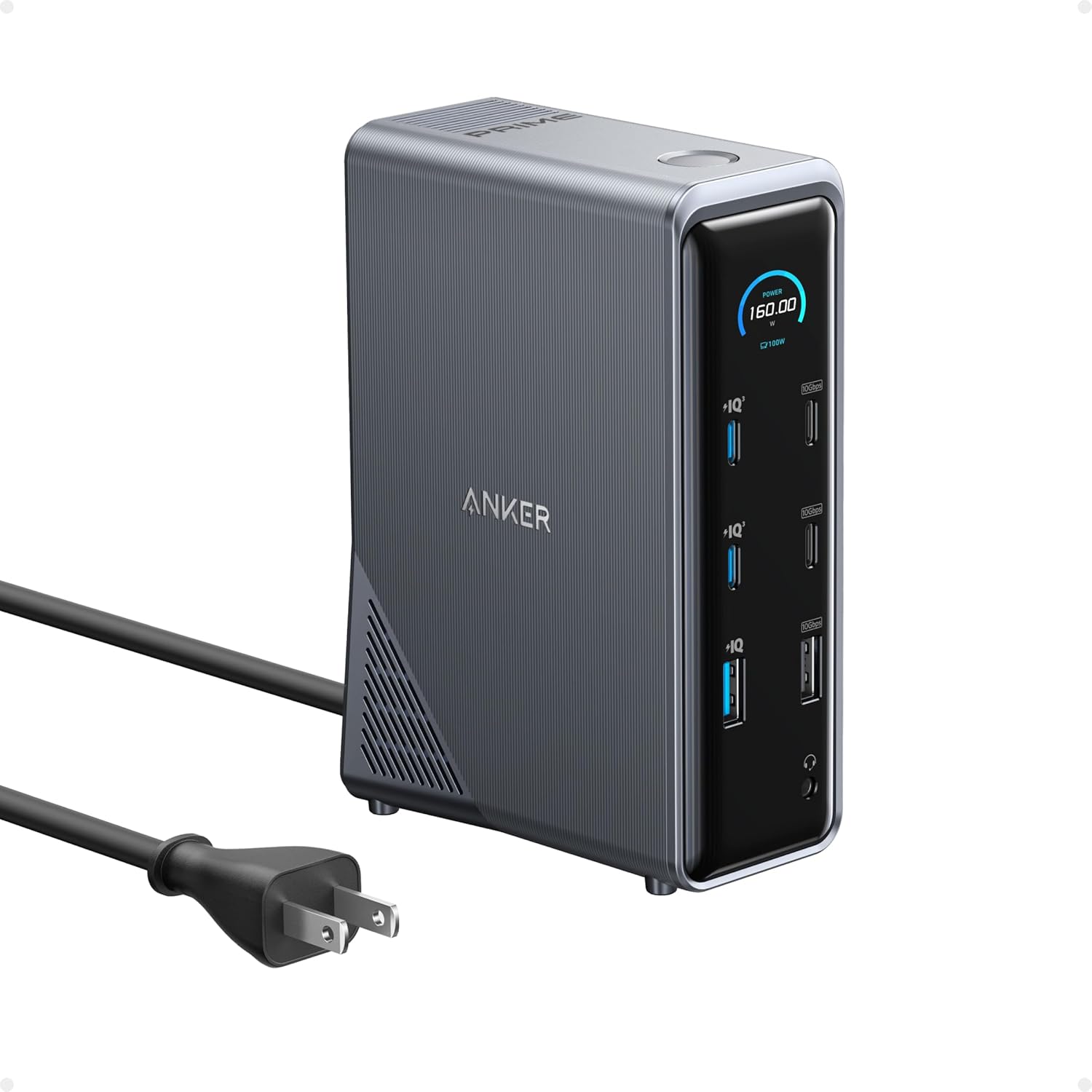
Anker Prime Docking Station, 14-Port with 160W Max Output, 10Gbps Fast Data Transfer, Real-Time Smart Interface, Audio and Ethernet Ports, Dual 4K Displays for Dell, HP, Lenovo and More
$269.99
Related Products
![Magnetic for iPhone 17 Pro Max Leather Case,Built-in Invisible Stand [Compatible with Magsafe] Protective Slim Kickstand Phone Cover for iPhone 17 Pro Max,Brown](https://bestdealsavvy.com/wp-content/uploads/2025/12/71RZBA1TRiL._AC_SL1500_.jpg)


From the brand


Fast access to today’s prime
Power to Drive Your Prime
Ultimate Power to Keep Giving
Doubly Fast in a Snap
Pro Fast Charging in a Nano
Anker’s Sustainability Plan
Get Powered Up Now
Series 7 I Future Technology
Series 5 I Higher Quality
Series 6 I Unique Experiences

14-in-1 Connectivity: Bring together all your devices with a 14-in-1 solution, perfect for charging, transferring data quickly, and managing dual displays.
Ultra-Fast Docking Station: Deliver a powerful charge with 160W of total output, capable of charging up to four devices simultaneously through three USB-C ports at 100W max each and one USB-A port at 12W max.
Master Your Data Flow with 11 Ports: Efficiently manage data across multiple devices with versatile ports offering speeds up to 10Gbps, complemented by dual 4K display and audio options.
Dual Display: Connect to the dual HDMI ports to enjoy crystal-clear streaming or mirroring across 2 displays at up to 2K@60Hz with a DP 1.4 laptop or 1080p@60Hz with a DP 1.2 laptop. Note 1: This product does not support a 5120*1440 monitor. Note 2: For macOS, the display on both external monitors will be identical.
Compatibility: Supports USB-C, USB4, and Thunderbolt connections. Compatible with Windows 10 and 11, ChromeOS, and laptops that support DP Alt Mode and Power Delivery. Note: 1. For macOS, the displays on the both external monitors are identical. 2. This device is not compatible with Linux.
What You Get: Anker Prime Charging Docking Station (14-in-1, Dual Display, 160W), USB-C cable for upstream port (3.3 ft, 100W, 10Gbps), safety sheet, and our friendly customer service.
9 reviews for Anker Prime Docking Station, 14-Port with 160W Max Output, 10Gbps Fast Data Transfer, Real-Time Smart Interface, Audio and Ethernet Ports, Dual 4K Displays for Dell, HP, Lenovo and More
Add a review

$269.99
Aaron Mills –
Fantastic Dock For Microsoft Surface 6 & Any Desk Setup
I’m a huge Anker fan and when my Dell docking station for my work laptop died, I decided to look at what Anker had to offer. I found this docking station and it seemed to fit everything I was looking for in a replacement.I’m using it with a Microsoft Surface Laptop 6 for Business. Outputting to 2 screens via the two HDMI ports and 3 USB A devices (web camera, keyboard/mouse, Plantroincs headset). So far I’ve had zero issues after weeks of use with anything working as expected. The docking station has also left me a little room to grow with a USB A port and 2 USB C ports still available.The icing on the cake with this docking station is the additional USB A & C ports for charging on the front of the device. I’m using the USB A port to charge my wireless headset and one of the USB C ports to keep my iPad Pro charged. Charging these additional devices and my laptop is only around 30W of usage, so plenty of room to charge my phone and other devices as needed.What do I like about this docking station? It’s very compact on my desk, taking up a tiny footprint of space. The screen is a nice addition to know what’s being charged and at how many watts. For my work setup, I also think it has the perfect number of each type of port, allowing me to connect everything I need. I was also expecting from a temperature perspective it could get hot, but overall it’s been cool to the touch.What could be improved? Very little. I wish the screen would stay set on the mode you set it to. I’ve noticed if I toggle to the screen to show the watts output, after awhile it toggles itself back to what it’s providing per port. Another nice to have from a screen standpoint would be the devices temperature. Some of Anker’s newer chargers show this. The only other thing that would be nice is if it shipped with a larger USB C to C cable to connect to your laptop. I setup my docking station originally too far away from my laptop and had to move it closer. So plan on keeping it around 3ft away.Overall it’s a fantastic little dock.
Scythe –
Excellent dock!
This is an extremely solid, well built docking station. I’m honestly shocked at how well constructed and designed it is. It just works, and that’s exactly what you want from a docking station. Tons of ports, lots of options, etc.
Jed Y –
Anker 14-in-1 Docking Station – The Ultimate Solution for Power Users with Multiple Devices
As someone who uses a laptop as my main computer and has a growing collection of gadgets, I was running into serious port and charging limitations. I needed a docking station that could handle my wide range of devices, from my mechanical keyboard and speakers to my smart watch and Bluetooth earbuds, all while keeping things organized. The Anker 14-in-1 Docking Station has been a perfect fit for my setup.Pros:Handles All My Devices: This docking station has more than enough ports to connect and charge everything I use daily—my DAC/amp for headphones, speakers, mechanical keyboard, webcam, and mouse. It even allows me to charge smaller devices like my Oura ring, smart watch, and wireless Bluetooth earbuds without cluttering my desk with multiple adapters.Convenient Front Ports: The front-facing ports are a game-changer. I can easily connect my USB thumb drives, Yubikey, or charge my iPhone and smart watch without digging through cables or rearranging things behind the dock. It makes swapping devices quick and hassle-free.Smart Charging: One feature I appreciate is the smart charging capability, which automatically adjusts the amperage based on the device’s needs. I no longer have to worry about using the “right” charging adapter for each gadget. Whether I’m charging my iPhone, Oura ring, or Bluetooth earbuds, I can trust that the dock handles it safely and efficiently. Plus, the 160W total output means I can charge my laptop, phone, and watch simultaneously without any slowdowns.Fast Data Transfer and Dual 4K Display Support: The 10Gbps transfer speed across the 11 ports is ideal for quickly moving files between USB drives or external hard drives. Though I’m only using one display for now, the ability to support dual 4K monitors is a nice bonus if I decide to upgrade my setup.Smart Display: The dock’s real-time display gives me immediate feedback on power levels and connection statuses, which keeps me confident that everything is working as it should. It’s a thoughtful feature that ensures I can focus on my work instead of managing devices.Cons:Size and Price: The dock takes up a bit of desk space, so it might not be ideal for smaller workstations. Also, while it’s packed with features, the price might feel high if you don’t need all 14 ports or the power delivery capabilities. That said, for someone with a wide range of devices like me, it’s worth the investment.Final Thoughts:The Anker 14-in-1 Docking Station has solved all my port and charging issues. From my mechanical keyboard and DAC/amp to my smart watch, Bluetooth earbuds, and Oura ring, it keeps everything connected and charged in one place. With its smart charging feature, I no longer need to juggle different adapters for each device. If you’re a power user with a variety of accessories and devices, this dock simplifies everything and makes managing your setup a breeze.
Rhyalus –
Great dock, rock solid so far – minor things missing
I really like this device… I moved from a “no name” system that worked very well, but didn’t provide enough power to my new laptop.Pros:*Front info screen shows total watts and port by port demand. Super cool. You can also turn it off by holding the button down*Really interesting to see how devices reduce their power demand as they charge to 100%*There are data ports and simple power ports on the front of the device. It’s great that there are power only ports (USB C and A)*The device is fairly small – some people have complained it is too big, but except for it being vertical and not horizontal, I don’t think it is too big*Network connection has been totally stable*Video signal out to an LCD screen running at 120Hz (1080p) has been totally stableCons:*No display port – only HDMI*No SD card reader*Stands vertical – I guess you could lay it down, but then the display would be sideways*Runs a little warm, but not too bad*The speed (while noted at 10 Gb/s) is not Thunder bolt 4 quality (40 Gb/s)Over all, I am very pleased with the purchase, and may get another unit or two for my other installations.R
Sonny –
superb docking station with sufficient ports. Many of the docking stations lack sufficient USB ports on top of the main plugs. Anker Prime Docking Station has enough ports to keep up with a good setup for both business laptops and gaming laptops.
Orc –
Anker kalitesi ve işlevliği tartışılmaz. Çoklu bağlantı ihtiyaçlarınız için kaçırmayın. Kompakt boyutu, hızlı şarj seçenekleri ile aynı anda 3 cihazı şarj ederken, hem ikinci monitörü, iki SSD aynı anda bağlayabiliyorum.
israel Mendoza –
It is amazing having everything in 1 thing
Irving Acosta –
It works and helps a lot to charge the devices without so much hassle, and it also charges my laptop at 80W so that’s amazing on that front. The problem is that when I connected it to my laptop (2022 model) I have some problems recognizing my keyboard or the display every time I restart it. I have to unplug and plug it back in for it to recognize it. My laptop may be too old for the new transmissions, but it’s supposed to have Thunderbolt 4. Overall, I recommend it if you buy it for less than $180 Canadian. It fails less often than others I’ve tried.
boneill –
So far so good ! I had a small portable unit before this that wasn’t getting my external 2K monitor to display at it’s full resolution – this replacement fixed that problem. The LED’s stats are cool, but it’s not like anyone is really watching them.