

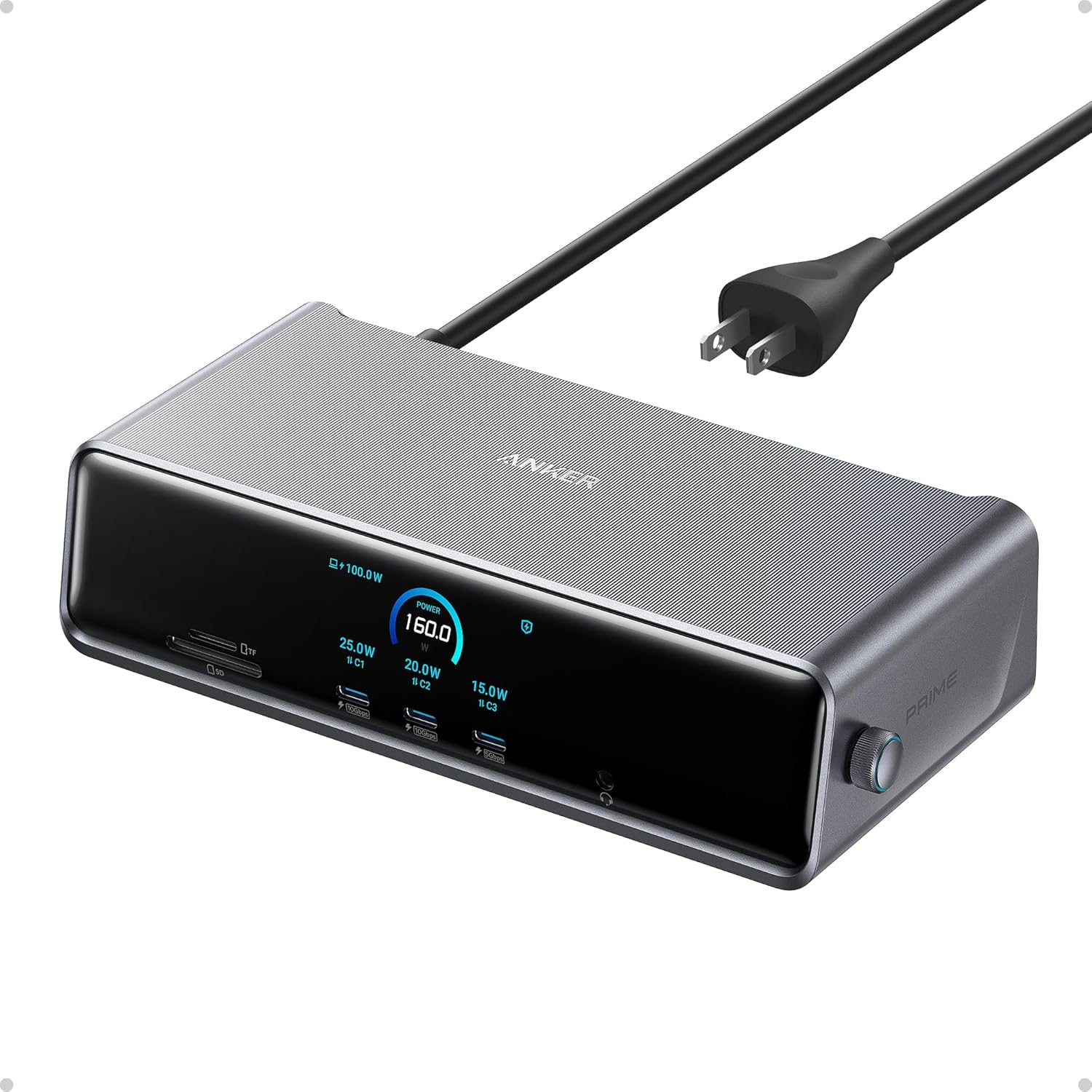
Anker Prime Docking Station (DL7400), 14-Port Triple Display with DisplayLink, 140W Max, Smart Display, Triple 4K 60Hz, Cooling Fan, for macOS and Windows (The Latest DisplayLink Driver Required)
Original price was: $299.99.$239.99Current price is: $239.99.
Related Products







From the brand


Fast access to today’s prime
Power to Drive Your Prime
Ultimate Power to Keep Giving
Doubly Fast in a Snap
Pro Fast Charging in a Nano
Anker’s Sustainability Plan
Get Powered Up Now
Series 7 I Future Technology
Series 5 I Higher Quality
Series 6 I Unique Experiences

14 Powerful Connections: Designed for modern setups, featuring a 140W 10Gbps USB-C upstream port, two 100W 10Gbps USB-C ports, one 100W 5Gbps USB-C port, two HDMI ports, one DisplayPort, two 5Gbps USB-A ports, one 480Mbps USB-A port, a 2.5Gbps Ethernet port, a headphone and mic combo jack, plus SD and TF card slots for complete desktop connectivity. It is recommended to plug the mouse/keyboard receiver into the 480Mbps USB A port.(Note: always use the included USB-C 3.2Gen 2 cable; other cables may cause issues.)
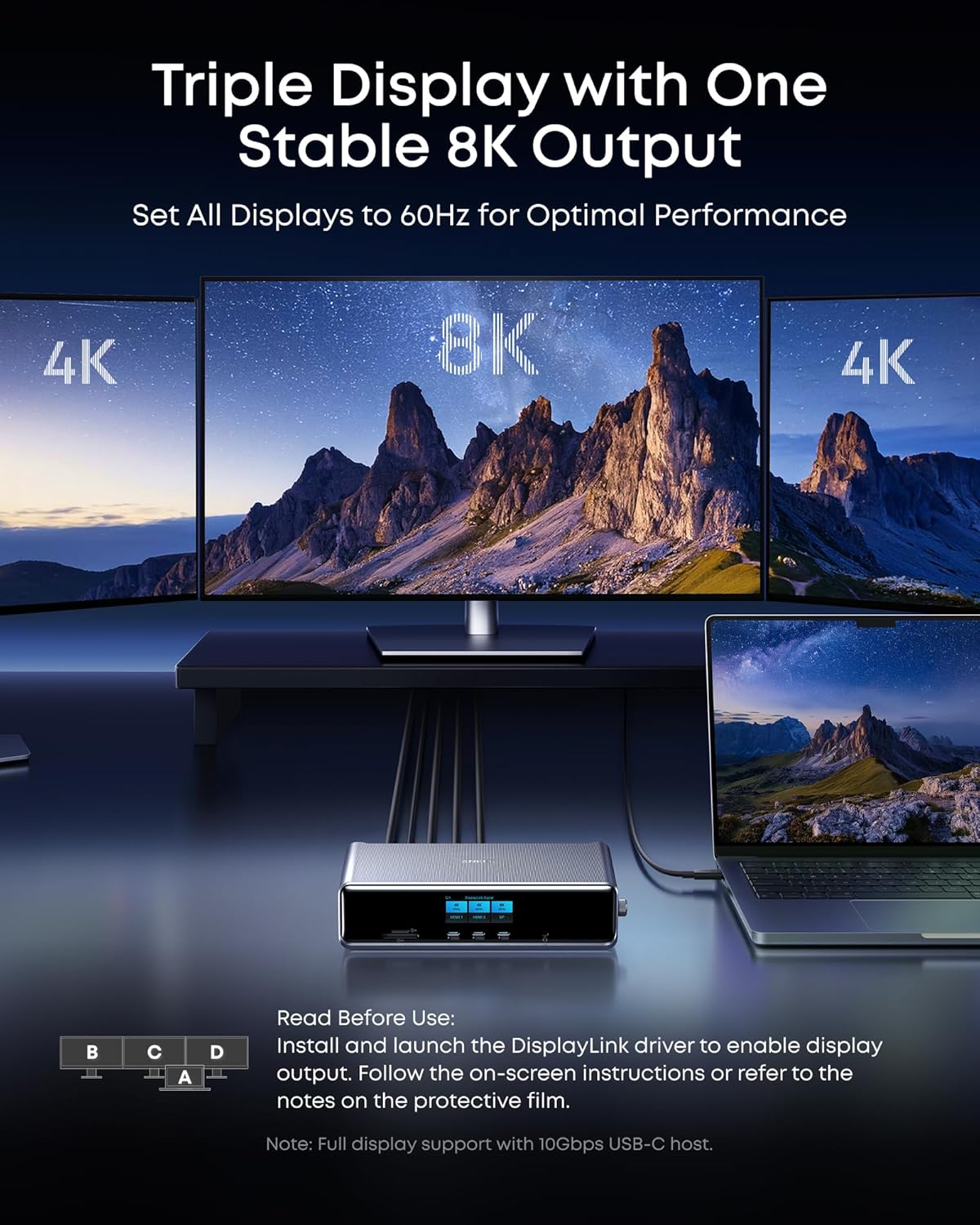
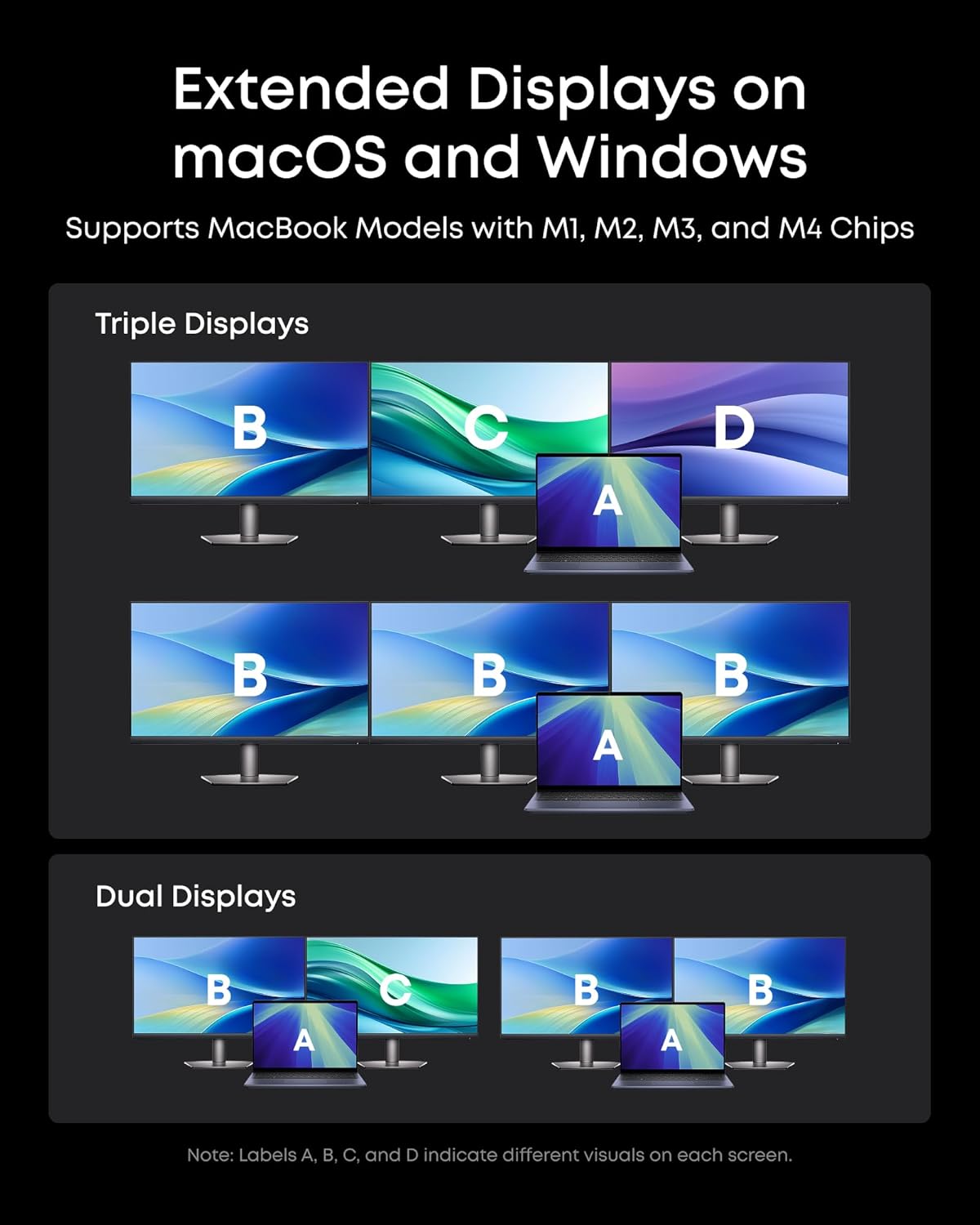
One 8K Output, Triple Display Versatility: Power up three external monitors at once, including one in 8K, for ultra-efficient multitasking. Compatible with both MacOS 13.5 or later and Windows 10/11.(Note: The latest DisplayLink driver installation is required.)
Each Port Powers and Performs: Every USB-C port supports both charging and data transfer. Power your laptop with up to 140W via the upstream port, while each front USB-C port delivers 100W of high-speed charging. (Note: The front USB-C ports do not support media display.)
Always Cool, Always in Control: View real-time updates on charging power, display performance, fan cooling mode, and settings directly from the smart display. The built-in fan and ActiveShield 3.0 help keep your device running cool and stable.
What You Get: Anker Prime Docking Station (14-in-1, Triple Display, DisplayLink), USB-C to USB-C 3.2 Gen 2 cable for upstream port (3.3 ft, 10 Gbps), 6ft AC power cord, safety sheet with user manual QR code , 24-month warranty, and our friendly customer service.
12 reviews for Anker Prime Docking Station (DL7400), 14-Port Triple Display with DisplayLink, 140W Max, Smart Display, Triple 4K 60Hz, Cooling Fan, for macOS and Windows (The Latest DisplayLink Driver Required)
Add a review

Original price was: $299.99.$239.99Current price is: $239.99.
Damo –
Great product, worth to buy
The docking station works great. The external style gives me the good memory of those days with the radio stations. I can easily adjust the different clock face or check the charging status of each USB port. I have both Mac and Windows laptop need to be used and both can drive 3 display very smooth. No any issue found. It also has enough power to charge multiple device at same time. It charged my laptop and phones very quick. This is a great product to be recommended.
Christopher Simpson –
Great stylish functional docking station
First and foremost, I want to clarify a crucial point: you absolutely need the display link driver for this device to function properly with your device. I’m a big fan of Anker and have been building a collection of their products. This dock is incredibly powerful and can supply more than enough power to charge my MacBook, iPhone, and Surface Pro 11 simultaneously, leaving me with some extra power to charge a fourth device. The dock is also very stylish and complements your desk decor. You can switch between about five different clock screensavers or opt for an off option. Additionally, you can manually turn off the display by holding down the dial while it’s still in use.Through my testing, this dock works exceptionally well with my MacBook, Surface Pro 11, and gaming desktop computer. I haven’t noticed any input lag for the keyboard or mouse during gaming. Please note that I’m not using the display link driver because I’m not using the dock for video output; for gaming, you typically connect directly to your graphics card.I highly recommend pairing this product with the Anker Nano charging station, which includes two built-in retractable USB-C cables. This combination provides a comprehensive range of capabilities while minimizing cable clutter.
Anthony Gasbarro –
Worked with linux before but broken suddenly after a few days
Worked great for one day with a macbook, linux laptop, and windows computer.After a couple days it still works with the macbook albeit a little funky because its a bit slow and seems to be using some sort of “screen recording” way to display on the external monitor.When connecting to the linux laptop now it keeps saying that my displaylink driver is not detected or out of date. It was working a few days ago just fine and the laptop works well with every other device that uses displaylink for outputting to a monitor. The displaylink driver is up to date with the latest available.This is very frustrating that for the price being charged, this dock works worse than other options that are less than 1/3 the price.
Joseph Yingling-Alvarado –
Will Buy Agian
PROS: Using on my mac mini and works great. Just download the software and it does everything i need it to do! Charging on the front or Data transfer and makes it very easy instead of having to get up and move everything around to plug something in.Cons: Make sure you have Free space on your HD. I was making data transfers and my mac HD filled up to almost full. about 2gb left and it turned the screens off. I had plug everything back into the mac to finish the job and then put back into the dock.
Cello –
It works perfectly!
Solid product. I’ve gone thru several different brands of docking stations over the years and they usually end in frustration or having to accept something wacky to make it work. This product delivers as promised, it works and it works really well. Make sure to download the display link app to each pc you are adding to the dock and everything else is seamless.
Logan Doan –
Software Required. Otherwise, a fantastic dock.
The dock itself is fantastic with excellent build quality and features. However, you are required to install software on your computer to enable external monitor support which will be an issue if you’re using a work laptop that restricts you from installing software on your own. If you’re unwilling or unable to install software to enable the dock’s monitor support, I would suggest some of Anker’s other dock options.
Justin –
Love Wukong
Awesome limited edition product finish, I loved the game and have been looking into a dock for a while so I had to get this when I say it. I had my macbook air connected to my dual monitors and running flawlessly in about 20ish minutes, SSD speeds are great using the dock, have my mouse/keyboard plugged into the rear with no issues
BA –
The Anker Prime Docking Station connected seamlessly to my Windows Surface Pro. The Anker Prime Docking Station (DL7400) is a powerhouse for anyone looking to expand their laptop or desktop workspace. The build quality is impressive—the metal housing feels solid and premium, and the compact design keeps the desk looking clean and organized.Setup is straightforward, though it’s important to install the DisplayLink driver for full multi-monitor functionality. Once configured, it handles up to three displays with ease, including an 8K output, well above my 2–4K monitors, making it ideal for multitasking or complex workflows. The range of ports is remarkable: high-speed USB-C charging, USB-A for peripherals, HDMI and DisplayPort for video, plus Ethernet and card slots. Every port feels robust, and the front USB-C ports provide clear, real-time feedback on charging speed.The built-in fan runs quietly while keeping the dock cool, and the smart display adds a professional touch, showing useful information such as wattage, fan speed, and connected devices. Power delivery is exceptional—enough to charge multiple laptops and devices simultaneously without slowing down performance.If you’re using a newer laptop, this dock is seamless and extremely reliable. Older systems may face some limitations due to DisplayLink compatibility, but for modern setups, it’s a premium solution that justifies the price. A sleek, functional, and well-engineered addition to any workspace.Pros:Solid build quality and premium materialsSupports up to three displays including 8K outputExtensive ports and high-speed charging optionsQuiet, efficient cooling with smart display monitoringReduces cable clutter while maximizing connectivityCons:Requires DisplayLink driver for full functionalitySome older laptops may experience compatibility issuesOverall, this is one of the most capable docking stations I’ve used—it transforms a standard workspace into a professional, multi-screen setup with fast charging and smart monitoring.
Canadian Dad of 2 Boys –
I was worried that I might have issues using this in my home office with my work laptop as I’m unable to download and run any drivers without my work’s IT Department.However, I plugged it into the electrical wall outlets for power and plugged the USB-C into my laptop and it charged my laptop, and my 2 external monitors worked as well without needing any driver downloads.1 monitor is 4K and the other external monitor is 1080p.I like how with the dial, I can move to a screen that shows me that information.I like the screen showing me the time as the default Screensaver.I use one of the USB-c ports on the front to connect to another USB hub which has 2 USB-A dongles for my wireless keyboard and mouse.I believe there is another driver that can be installed that is optional to give even more customization options and the ability to upgrade firmware.For my relatively simple usage of needing a traditional docking station to power my laptop and extend my laptop’s display to 2 external monitors, it does the job well.
Barry Tranquada –
Was not able to power bigger laptop and the display on the dock quit after a few hours use – would no longer display readings for power draw etc. seemed like a good buy at first but I had to return it.
Minh Tang –
This is a DisplayLink dock, so it will absolutely require the DisplayLink driver. I tested the three display output and none of them work without the DisplayLink Manager running. Some other dock I tested has a Hybrid USB Alt Mode and DisplayLink support so at least one monitor would be functional if the DisplayLink Manager is not active. This is not the case here. None of the display will work without the Display Link Manager running.There are two important things to know about the DisplayLink dock. First, it’s only for productivity. The DisplayLink technology basically encodes the video and sends it through a data stream over USB. The encoding process adds latency, can cause artefacts, there could be drop frames if there is not enough bandwidth, takes CPU cycles and takes some system memory. If you start a game, the GPU will render to VRAM but then the frame buffer will have to be copied back to system memory for the DisplayLink to encode the frame and send it over USB to the dock. The end result is a very laggy and inconsistent framerate. Second, HDCP playback is not guaranteed. It will depend on your OS and a bunch of other factors. On Mac OS, you will get a black screen if you play a movie on Netflix.The only advantage of a DisplayLink dock is that it can bypass hardware limitations. For example, the MacBook Air M1 can have at most one external display, but if it is hooked to a DisplayLink dock, it can have multiple displays. In this case, it can have three.Note that all of the advantages and disadvantages above are not unique to this dock. The same is true for all DisplayLink docks.The set of ports on this dock is pretty decent. There are 2 x USB-C 10Gbps, 1 x USB-C 5Gbps, 2 x USB-A 5Gbps, 1 x USB-A 2.0, 1 x 2.5Gbps Ethernet, 2 x HDMI, 1 x Display Port, SD Card slot, and a headphone jack. This is not Thunderbolt speed, but for office work, it’s plenty fast.I used it for the past two weeks. For the most part, it works well enough. I did have a bit of stuttering at the beginning, but it fixed itself after a few days. I didn’t update drivers or firmware, so the only thing I can think of is that I was running low on memory. My big issue, however, is that I can’t watch any Netflix, Prime Video, or Disney+. I use a Mac, and HDCP is not supported over DisplayLink on Mac.The thing that is very unique to the Anker Prime dock is the integrated power supply, the OLED display, and the companion Anker Dock App. As opposed to other docks that have a large power brick, the power supply is integrated in the Anker Prime. It makes the dock heavy and stable. The downside is that such a strong power supply requires cooling, so there is a fan in the dock. The Anker Dock App is available for Windows and Mac. It will let you monitor the USB power output and change some settings directly. For example, you will be able to change screen resolution, refresh rate, and screen orientation. The OLED display is used to show USB power, USB speed, display resolution, and system temperature.Overall, unless you absolutely need a triple display setup, you are okay with all of the downsides of DisplayLink, and you really want that OLED display, I wouldn’t recommend this dock. There are better options at a lower price available.
ShopholicGuy –
I was looking for a docking station that could power my PC and handle dual displays without extra hassle. I got this Anker Prime Docking Station to expand my workspace and keep all my devices connected. The build quality feels solid, and it runs quietly while keeping everything powered smoothly.Pros- Handles dual or triple‑monitor setups with clear, stable output- Solid metal housing with a smart display showing power and connection info- Built‑in cooling fan keeps performance consistent under load- Provides multiple ports, including high‑speed USB‑C, HDMI, DisplayPort, and Ethernet- 140 W USB‑C port easily powers a laptop while running peripheralsCons- Requires DisplayLink driver installation for full display capability- No Thunderbolt support, which limits video over USB‑C- Slight delay when waking monitors from sleep- OLED screen doesn’t add much functional value for basic users