
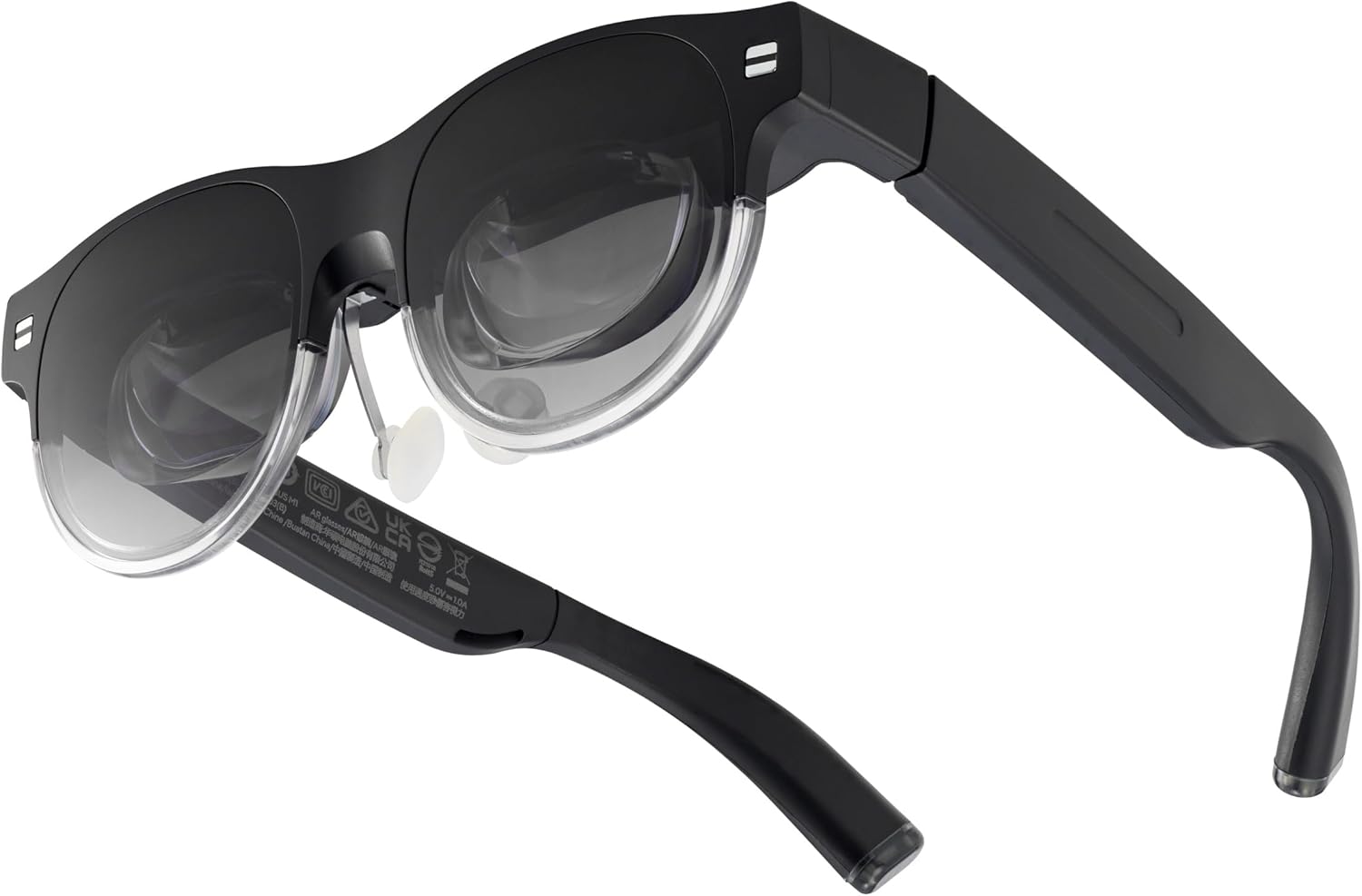
ASUS AirVision M1 Smart AR Glasses – 100″ Micro-OLED Wearable Display, 1100 nits, Multi-Screen, Speakers, USB-C, Magnetic Shade, Designed for ROG Ally/Steam Deck/PC/iPhone 16/15/Android/Mac/Tablet
Original price was: $699.00.$539.74Current price is: $539.74.
Related Products






Discover a new dimension of digital interaction. Elevate both productivity and gaming with a device that provides an expansive, immersive experience beyond conventional screens.
Immersive Display Experience: Up to a 100-inch display with 1,100 nits brightness and 95% DCI-P3 color gamut for vivid, lifelike details.
Productivity on the Go: Multi-screen work anywhere with Type-C notebook compatibility in a versatile, lightweight design.
Enhanced Gaming Integration: Seamlessly integrate with ROG Ally for superior visuals and gaming performance.
Versatile Functionality: The AirVision App supports multi-screen setups, screen distance adjustment, and pupil distance customization.
Versatile and Lightweight Design: Weighing just 87g with built-in speakers, noise-canceling mic, and high transparency for safety.
9 reviews for ASUS AirVision M1 Smart AR Glasses – 100″ Micro-OLED Wearable Display, 1100 nits, Multi-Screen, Speakers, USB-C, Magnetic Shade, Designed for ROG Ally/Steam Deck/PC/iPhone 16/15/Android/Mac/Tablet
Add a review

Original price was: $699.00.$539.74Current price is: $539.74.
Sebastian –
Very disappointed, Asus
+ fairly comfortable nose piece- blurry image- low quality audio- lackluster software- annoying touch interfaceI own several Asus laptops and accessories which have impressed me with their quality, so I had been following the release of these AR glasses with excitement. Unfortunately, their flaws render them basically unusable.Upon unboxing, the packaging is nice quality. I followed the directions to get the software set up, which wasn’t the easiest to find on their website, but worked without issue.The issues started when I first put on the glasses. The image was extremely blurry, and the edges were cut off. I messed around with the software ipd adjustment to no avail. While I do have a slightly above average ipd, I haven’t had issues using vr headsets. Experimenting, I found that I could get a clear image in one eye by moving the glasses far to the left/right, but in that position, my other eye would be near the edge of the screen resulting in a blurry and cut off image. Without physically modifying the screen spacing there would be no way I could use these.In the hour I was wearing these and hoping I could find a way to make them work, they were at least comfortable. They fit well and I liked the material and adjustability of the nose piece.I tried watching a movie to see if the image quality would be adequate for media consumption, but with the blur and cutoff image, I’d rather watch something on my phone.Comparing the perceived screen size to my computer monitor, it was roughly the same as sitting 2-3 feet away from a 27″ screen.I was surprised how low quality the speakers were, especially considering the price. I’ve bought $10 earbuds that sound far better.The software was alright, but not the most intuitive to use. I got them shortly after release so it’s possible it will get better with future updates.The touch interface on the glasses was annoying. The glasses often wouldn’t recognize multiple taps/holds, and just register a single tap instead. I’d much rather have a few buttons to press for the main functionality.Overall I was very disappointed with these Asus AR glasses. I had high expectations for them given their high price and my great experiences with Asus products in the past. I opted to return them as the blurry image rendered them unusable.
Yen-po Lin –
ASUS AirVision M1 Smart Glasses: Why I Love ‘Em!
Man, the ASUS AirVision M1 glasses are straight-up awesome! They throw up a huge screen just like my own mini movie theater go with me to anywhere . Watching Youtube and Netflix on my phone thanks to the good bright it looks so good with 1080p and rich colors like crazy . Gaming on my Ally X! Insane! my games runs buttery smooth , no lag or choppiness. High transparency while still letting you peek at the real world.AirVision hook up to my phone or laptop like a charm(Notice: USB-C with DP Alt-Mode or Thunderbolt 4).when I get started to use M1 First, position the glasses to get a clear view, then adjust the nose pads and the nose pads tweak to fit perfectly, The wight with perfectly balanced design, I can’t feel the weight when wearing M1, even for long time watching video on my sofa with comfortable position.The AirVision App although only can use on Windows OS but lets me juggle multiple screens for work or gaming. Another awesome things is the Airvision app create multiple screen can keep the position in the glasses you can watch different screen by swivel your head. Nobody else sees my screen, which is clutch for privacy. These glasses make movies and games feel massive and fun—totally worth it for any screen junkie!
Julian C Weber –
Asus what are doing?
The lenses are thick and curved, so it’s almost like you have 2 different prescriptions on your face that are not made for you.Which caused my eyes to hurt really bad, on top of that, even with these curved lenses, the display still came out very blurry at the cornersThe speakers the glasses sound like a 1990s Nokia phoneExtremely disappointed, and this product usually asus has the great quality stuff, not sure what’s going on. I was so surprised by the lack of quality of this product for the money I’ve spent. You can just get a pair of Xreal air 2 and it is way better quality with clarity with stero speakersfot half of the price. trust me when I say do not buy this product.
Lin –
Absolutely a complete gamechanger, you don’t need monitors anymore!
I’ve got Ally X, a Windows-based setup, and managed to install the glasses software on it. In game mode, the glasses show super-wide screens and lock the image in place, making racing games feel incredibly immersive! The setup was a bit tricky at first, but it got much better once I got the hang of it.I even recommended it to one of my buddies, but he mentioned the image looked blurry. I didn’t have that problem. I think it’s because his IPD is wider, he tends to adjust VR settings wider than I do. Besides that, it’s actually pretty solid.
Byron –
I have not had a timely and efficient response from customer service.
The glasses don’t work with any operating system. I’ve written to customer service in Spanish and English, and they’ve resent me an update procedure that I’ve already told them doesn’t work.Las gafas no funcionan con ningun sistema operativo. He escrito al servicio al cliente en español e inglés y me reenvian un procedimiento de actualización que ya les he indicado que no funciona.
Francisco G. –
Dissapointing
Maybe I was overestimating these but they are uncomfortable, tried every setting and could not get the text to not be blurry. I feel more nauseous wearing these than a VR headset. I think I am beginning to understand why these quietly dropped, as the user experience leaves more than a lot to be desired. Will be returning.
Tidnus Uhtoson –
Potential positive influence on vision for portable gamers.
It’s a nice device to have if you want to watch some media when you’re out and about. It works really well with portable games like the steam deck. The screen feels like it’s an appropriate distance from your eyes, which is really helpful for avoiding the vision deterioration from having the smaller game screen too close.
Jay Q. –
Do NOT waste your time
Do no waste your time on this prototype product, its 99% useless
Kevin –
Definitivamente este es el futuro, pero aún estamos muy atrasados, el concepto es de lo mejor, la idea es de lo mejor, pero aún no funcionan bien, de un ojo se ve borroso por más que le intente calibrar la pupila, así mismo las orillas se ven borrosas amenos que cierres el ojo , ves un poco mejor, es extremadamente casado utilizarlas, terminas con los ojos rojos, la inmersión no es laMejor, por lo cual si ves a tu al rededor ves que no es una pantalla grande, el audio es pésimo, y el tiempo de refresco, si estás en un juego elAudio se atrasa o se adelanta, el concepto me gusta, y como concepto me dejé llevar pero aún no esta listo, espero que en unosAñosMejoren