

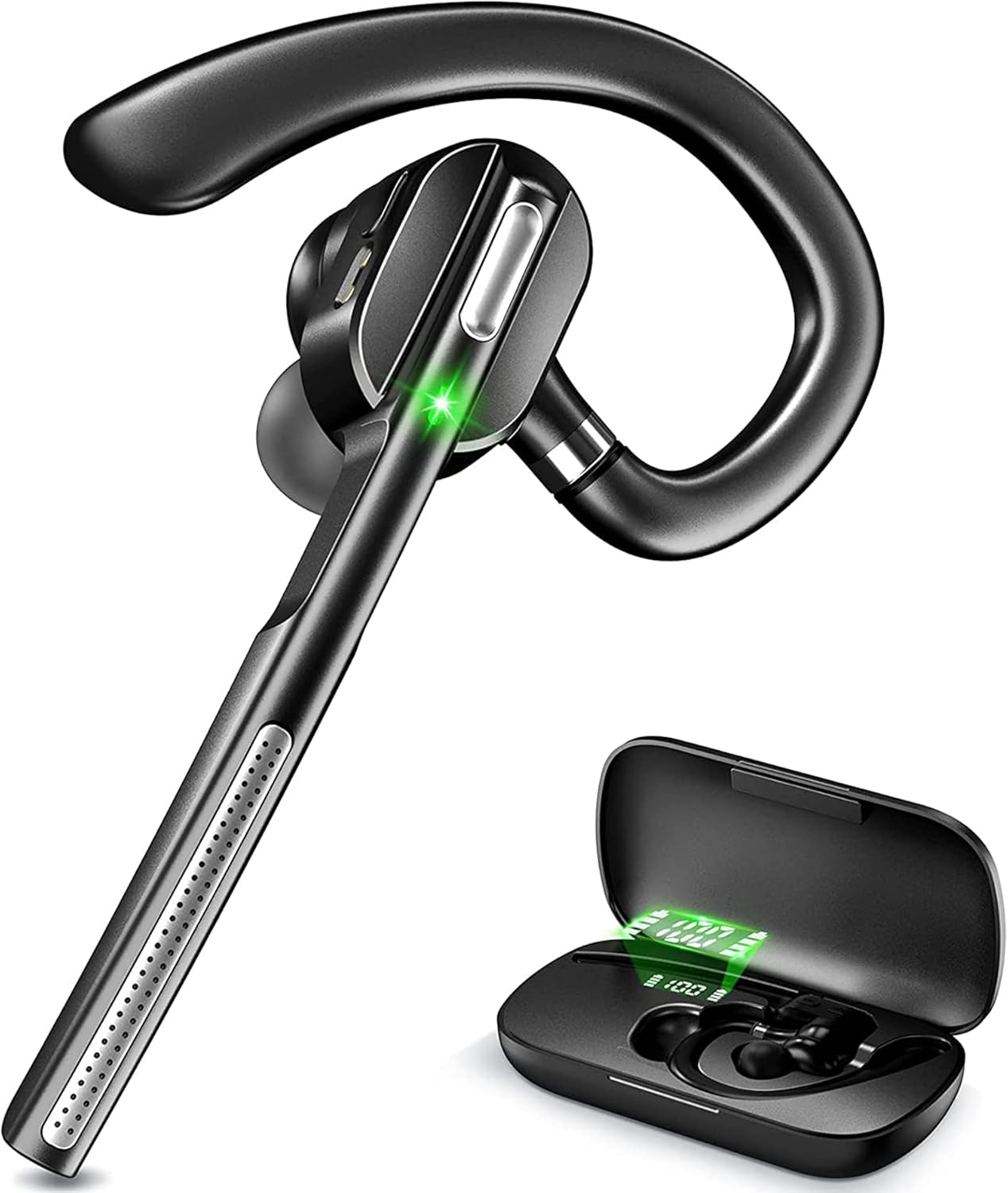
Bluetooth Headset V5.1, Wireless Headset with Battery Display Charging Case, Bluetooth Earpiece with Noise Canceling Mic for Driving, Office, Business, Compatible with Cell Phone and PC
Related Products



Product description


Clear Calls and Voice Assistant
Make convenient, hands-free calls. Over-ear control buttons give ultimate convenience when you want to change volume, tracks, or answer/hang up phone calls.
Volume Control:
For IOS: Headset volume and IOS device volume are synchronized, so you can modify volume by headset or by the IOS device. For Android: Headset volume and android phone volume are not synchronized.Even if headset volume full blast, you can still increase volume on android phone.
Mute Function:
Please note the mute button can only work on cell phones, if you want to mute while using on PC, please mute through the software you use.
Specifications: Headset battery capacity: 55mAh Talk time: 12hours Music play time: 10 hours Headset charging time: about 1.5 hours Charging case battery capacity: 500mAh Standby time: 240 hours Bluetooth Version: V5.1 Operating Range: up to 33 feet

How to connect with two devices simultaneously?
1. After pairing with the first device, turn off the bluetooth on first device, the bluetooth headset will enter pairing mode again.
2. Turn on the bluetooth on the second device, then connect it with the bluetooth headset.
3. Turn on the bluetooth on first device.
4. Turn off the bluetooth headset and turn it on, it will automatically connect with two devices

Tips to help you get a better experience:
1. Our bluetooth headset only work with computers that have Bluetooth function. But you can use a bluetooth dongle if your computer has no Bluetooth function.
2. Poor sound quality and Bluetooth connection occur sometimes when Bluetooth Driver is not updated to the latest version.
3. The buttons on the bluetooth headset only work while using with cellphones. If you need to mute on Skype or other softwares on PC, please mute/unmute through the software you are using.

How to connect with computer?
Step 1: Download a bluetooth driver depends on your computer system and update it to newest version.
Step2: Plug in the Bluetooth dongle, at this point, the gray Bluetooth icon will turn to blue.(Note: If computers have Bluetooth function, you don’t need to use Bluetooth dongle)
Step3: Hold and press ” MFB” button for several seconds till the LED light flashes red and green, the headset will enter paring mode.
Step4: Right click on the computer interface, select the “search” equipment, the headset must be in pairing mode ( LED light flashes red and green) , then the computer will search for all nearby Bluetooth devices and find the “G5” signal

Battery Display Charging Case: The clear digital display allows you to easily monitor the battery level of the charging case, ensuring timely recharging. The earpiece comes with a 500mAh charging case, making it convenient for travel and eliminating the need to frequently search for a charging port. The case also protects the headset from damage and helps prevent loss.
Bluetooth 5.1 and QCC Chipset: Equipped with a high-performance QCC 3020 chipset. This wireless headset effectively reduces background noise, ensuring your voice comes through clearly during calls. With Bluetooth 5.1 technology, it offers fast and stable connections to iOS and Android smartphones, tablets, laptops, and MP3 players within a range of 33 feet (10 meters). The headset also supports dual-device pairing, allowing seamless switching between two connected Bluetooth devices.
Comfortable Wearing: This Bluetooth headset with mic is ergonomically designed to fit either ear, with a retractable ear hook and a rotating flip-boom arm that swivel for a secure and comfortable fit. The lightweight design ensures it can be worn comfortably for extended usage. For a personalized fit, the headset comes with three sizes of soft ear gels (one pre-installed) to provide a snug and secure feel.
Flexible Buttons and Hands-free for call: Easily mute or unmute with the touch of a button. Voice prompts provide notifications for battery level, connection status, mute/unmute status, and even announce the caller’s phone number. This Bluetooth headset with mic also supports Siri and other voice assistants, which can be activated by pressing the mute button twice. The easy-access controls ensure a truly hands-free experience.
Easy to Use: Just take the Bluetooth headset out of the charging case, it will automatically enters the pairing status, turn on your Bluetooth on your phone and choose”G5”, and it will be connected with your cell phone.
3 reviews for Bluetooth Headset V5.1, Wireless Headset with Battery Display Charging Case, Bluetooth Earpiece with Noise Canceling Mic for Driving, Office, Business, Compatible with Cell Phone and PC
Add a review

Neil Gunter –
Great Value for a Solid Product
For the overall cost of the DECHOYECHO Bluetooth Headset, this device delivers a very solid product.Here is what I tested:The device arrived charged at 100%, which was a great start. Charging is simple but unique—there’s no USB-C port on the headset itself. Instead, the charging connector is located on the device, which must be seated inside the charging case. The case connects to a USB-C adapter for charging. While I personally prefer the option to plug in directly, this design works efficiently.The headset also comes with various earbud sizes. I swapped out the default medium ear tip for a larger one to get the perfect fit. The audio quality is very clear. The first thing I did was listen to an audiobook while doing some tasks around the house. I then continued listening in the car while running errands. During this time, I made a couple of phone calls, and the audio on both ends was crystal clear.For my phone tests, I used an iPhone SE 2020, and the pairing process was effortless. The middle button worked seamlessly for answering calls. Again, the call quality was excellent, and those on the other end had no issues hearing me.Next, I connected the device to my MacBook Pro for remote work calls. While I didn’t speak much during the meetings, the audio was solid for listening. It’s worth noting that using Bluetooth devices on computers can vary based on configurations, so while it worked well for me, others may have different experiences depending on their setup.Overall, I give this headset five stars for its amazing price and performance. It’s a wonderful device for phone conversations and audio listening. Keep in mind that it’s a one-ear device, so it’s not designed for stereo sound or activities like jogging that require both ears. However, you can easily adjust it for use in either the right or left ear.The only slight drawback is that you can’t charge the headset directly with a USB-C cable—it must be seated in the charging case. While this is more of a preference than a flaw, it’s worth mentioning.I also own the prior version of this device, and that was a great product too. The new version improves on it in several ways, making it a fantastic value for the price!
David –
Great product, great price, excellent performance
I searched around for a lot of different headsets. I was looking for a reasonably priced option that would be used solely in the office for conference calls and meetings (zoom/teams/webex). Many options are bulky, don’t fit properly, have poor battery life, are uncomfortable to wear for long periods of time, etc. Over the ear noise cancelling ones block out too much sound and make it difficult to gauge how loud/soft you are speaking. iPods, Beats, Plantronics and such are expensive and many don’t have the battery life to last a full day on the phone.I found these headphones to be an excellent choice. They are light enough and comfortable enough to wear all day. I have put them in my ear and used them for a full day without removing and never had any discomfort or other issues that sometimes happens with in-ear headsets. The ear loop fits well without irritation, and the set is light enough that it doesn’t pull, need to be adjusted or fall out. Sound quality is excellent. On other headsets I have used the volume needs to be cranked up to properly hear the conversation. On these you can set it in the middle of the range and it is sufficiently loud enough while still giving you room to make louder if necessary. Battery life is good and the case provides a nice digital readout of charge level.Overall an excellent product at a fraction of the price of others
Missmissy –
Easy, fits good sound
Easy to use, good sound. Comfortable, definitely good purchase. I use it in my jeep the Bluetooth in my jeep sucks so I bought this.