

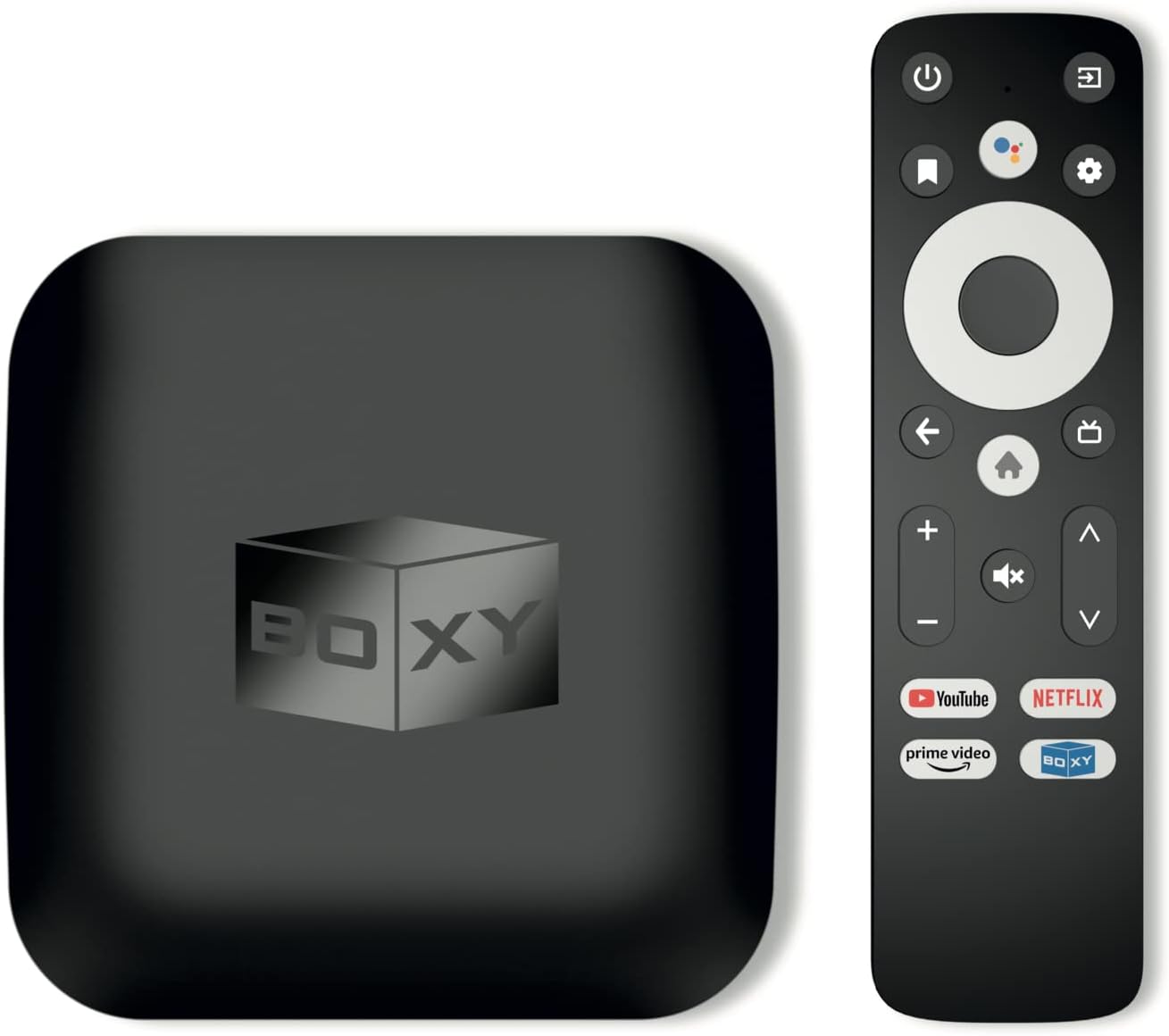
BOXY Android TV Box, Streaming Media Player 4K, Dune HD Media Center, Mini PC, AV1, USB 3.0, Ethernet, MKV/ISO DV P7 FEL AFR, HDR10+, DTS, Netflix in 4K Dolby Vision & Atmos, Voice
$54.90
Related Products





Product description
BOXY Android TV 11 Box Streaming Media Player

Key Features
Unique 2-in-1 combination of Netflix-certified Android TV streaming media player and advanced Dune HD media center
Using just this one device, you can both watch Netflix, Amazon Prime Video, Disney+, Apple TV+, HBO Max and various other streaming services in maximum quality (up to 4K Dolby Vision and Atmos), and play local library of media files in the most advanced formats (up to ISO 4K Dolby Vision FEL and full disc menu) – via the advanced Dune HD media center software.
Official Netflix and Google Android TV 11 certifications
The official Netflix, Google and other certifications ensure excellent support for Netflix and other streaming services (such as Amazon Prime Video, Disney+, Apple TV+, HBO Max and many others) with best possible audio and video quality (up to 4K Dolby Vision and Atmos). The modern Android TV 11 OS version with the official Google Android TV certification ensures excellent compatibility with all Android TV applications and features, and also gives a very powerful “Chromecast built-in” technology.
Dune HD media center
In addition to all standard Android TV features, you can also use Dune HD media center software, technically implemented as a concurrently running (in a special virtual container) Linux-based Dune HD OS, and easily accessible via a special app. This software provides functionality similar to standalone Dune HD media players and includes a lot of features which were developed for standalone Dune HD media players during more than 14 years. This includes advanced file browser, advanced file player, full menu support for movie ISO files and disc structures, advanced support for playback of Dolby Vision files, ability to view the local library of video files as a nice-looking Netflix-like catalog, Dune Control mobile app, smart home integrations, and many other features.
Newest technologies (AV1, Dolby Vision & Atmos)
This media player includes a lot of newest technologies: AV1 video codec, VP9 profile 2 video codec, Dolby Vision, Dolby Atmos, Dolby MAT. Many other media players do not have some or all of these technologies.
Rich connectivity (Ethernet, USB 3.0)
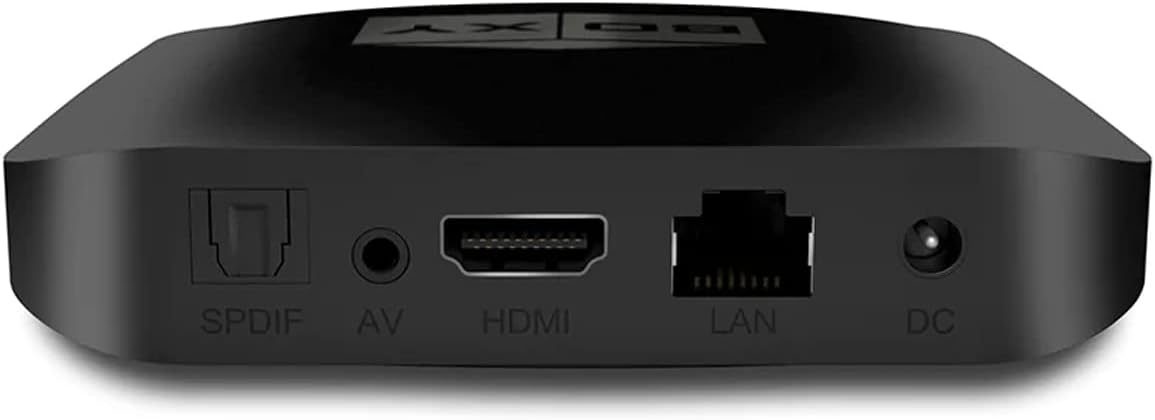
Contrary to simpler devices (such as simple “dongles”), this media player provides much more connectivity options. Besides of the usual HDMI, Wi-Fi and Bluetooth interfaces, this media player has also Ethernet port, two USB ports (USB 3.0 and USB 2.0), micro SD card slot, S/PDIF output port and A/V output port.

Hardware and Technologies
S905X4-J media processor (special version with all Dolby licenses)
S905X4-J media processor is an advanced version of the latest media processor from Amlogic which includes all Dolby technologies and licenses: Dolby Vision and Dolby Atmos. Many other media players based on S905X4 use a stripped down version without all or some of these licenses.
Dolby Vision and HDR10+
The media player supports not only HDR technology (supported by the previous generation of media players), but also the most latest and advanced Dolby Vision and HDR10+ technologies. In conventional HDR technology, the brightness range is set at the beginning of the film and does not change during the film, so completely dark and completely bright scenes may have insufficient detail. In the latest Dolby Vision and HDR10+ technologies, the brightness range can vary from frame to frame, so the maximum picture detail is provided even in scenes that contain only dark or only light elements.
Dolby Atmos
Dolby Atmos is the most widely used advanced technology for surround sound. Dolby Atmos draws you in deeper, so you hear more and feel more, for a more realistic and immersive audio experience. This media player supports Dolby Atmos sound both when watching streaming services such as Netlix and when playing files from your local library (in formats such as ISO, BDMV, MKV, and so on).
Newest Dolby MAT technology
This media player includes the newest Dolby technology for multichannel surround sound – Dolby MAT. Using Dolby MAT technology, the media player does not just output the fantastic Dolby Atmos audio to your TV or A/V receiver, but also performs partial decoding of the audio directly on the media player. This improves A/V synchronisation, reduces latency, and improves compatibility. Nowadays this approach for audio output is recommended by Netflix and Google.
AV1 video codec
The media player supports the very newest AV1 video codec, which helps to get up to 50% video quality improvement without increasing video bitrate (or requires up to 50% lesser bitrate for the same video quality). This new video codec is already used by YouTube and will be increasingly important for various services.
YouTube 4K HDR and VP9 profile 2
The media player supports the modern “VP9 profile 2” video codec, which is used by YouTube for HDR content.
2 GB operating memory
Ensures excellent performance of Android apps.
16 GB flash memory
Provides a lot of space for Android apps and other needs. 2x more than in many other simpler Android TV devices.
USB 3.0 host port
Allows you to connect USB storage devices (such as flash drive, HDD or SSD) and ensures fast data transfer and smooth playback of high bitrate video. Connected USB storage devices can also be accessed from local network via SMB file server function built-in into Dune HD Media Center.
Ethernet port (100Mbit/s)
Allows the use of a wired connection to the home network for stable data transfer and video playback.
Wi-Fi 802.11ac 2T2R (2.4 + 5 GHz)
The built-in dual band 2.4 Ghz + 5 GHz Wi-Fi module supports the modern 802.11ac standard and 2T2R MIMO technology with two antennas for improved wireless performance.
Bluetooth
The built-in Bluetooth interface allows you to easily connect various remote controls, wireless keyboards, mice, joysticks, audio speakers, headphones, headsets and other devices.
Bluetooth remote with microphone and customizable app button
The remote controls the media player via Bluetooth (which means you do not need to direct the remote towards the media player and that the media player can be hidden). The built-in microphone enables Voice Search functionality. A special customisable app button can be configured to quickly launch any app. Besides, the remote can use IR channel to control TV and A/V receivers.
IR control
The media player has the built-in IR receiver and can be controlled also by IR commands (Google IR codes). This means you can use 3-party programmable or learnable remote of your choice to control the media player, or integrate the media player with your smart home via IR. For example, you can integrate the media player with a smart speaker by using an IR emitter device controlled by the smart speaker.
Chromecast built-in
The media player includes “Chromecast built-in” technology, that lets you stream your favorite entertainment and apps from your phone, tablet or laptop right to your TV. This technology can be used on both Android and iOS devices (via Google Home app) and also on any laptop or a PC (via Chrome web browser).

Dune HD Media Center features
Dune HD user interace
Dune HD user interface, developed during more than 14 years, specially optimized for the use on TV screens, tuned for the best possible usability, makes it easy and convenient to use the media player. It is a convenient, powerful and easy-to-use way to work with your local media library and other features of Dune HD media center.
Dune HD movies organizer and movies encyclopedia
“My Collection” function organizes a user’s movies collection into a nice looking catalog. A comprehensive movies encyclopedia provides the information about hundreds of thousands of movies with detailed descriptions, posters, cross-links between movies and persons, trailers, direct links to online video services, etc. Advanced file browser automatically recognizes movies.
Integration between Dune HD media center and Android TV streaming apps
Dune HD media center not only coexists with Android TV in one device, but also integrates with Android TV streaming apps to provide conveniences, which would be impossible when using two separate Android TV and media player devices.
Widest support for Dolby Vision file formats
Dolby Vision is supported for all popular file formats (MKV, MP4, TS, M2TS, ISO, movie folder structure). All popular Dolby Vision profiles (profile 5, profile 7 MEL and FEL, profile 8) are supported. In all cases, the important Dolby Vision information (Dolby Vision RPU metadata) is extracted and transmitted to TV to ensure the proper Dolby Vision picture on the TV.
Dolby Vision profile 7 FEL
Dune HD media center supports direct playback of Dolby Vision profile 7 FEL double-track and double-layer files. This is the most advanced Dolby Vision format. Dune HD media center plays video in this format using both tracks/layers. The important Dolby Vision information from the second track/layer (Dolby Vision RPU metadata) is transmitted to TV together with video data from the first track/layer. The passed video data uses 10-bit color depth – the maximum color depth supported by OLED-panels in OLED TVs, i.e. this fully uses the capabilities of OLED TVs. Combined with the full use of DolbyVision metadata this gives an excellent Dolby Vision picture on the TV screen.
Playback of Dolby Vision movie ISO/folder structures
Dune HD media center supports direct playback of movie ISO/folder structures in Dolby Vision format (Dolby Vision profile 7 MEL and FEL), including playback in full menu mode.
Movie ISO/folder structure playback
Dune HD media center has support for playback of movie ISO/folder structures. A special playback engine provides full menu support and helps to ensure smooth playback of the entire movie w/o any audio/video interruptions even when playing movies with complicated structure.
Automatic framerate/resolution switching
Dune HD media center can automatically switch output framerate and resolution to match the played content. This helps to ensure absolutely smooth video playback in all cases and use the best way for video resolution upscaling (resolution upscaling by the the media player or by the TV). Dune HD media center implements an advanced approach for video mode switching, which bypasses the limitations of Android TV 11.
Flicker-free framerate/resolution switching
Dune HD media center implements its own advanced flicker-free approach for automatic framerate and resolution switching, which switches video mode before the start of file playback (rather than after). Many other media players switch video mode after the start of file playback, which causes unpleasant flickering.
Dolby and DTS audio
Dune HD media center can play Dolby and DTS audio tracks in all formats (up to Dolby TrueHD with Atmos and DTS X). All formats can be output as multi-channel audio (output is in formats up to Dolby Digital Plus with Atmos and DTS). All formats can also be output as stereo (downmix).
DSD and other advanced music formats
You can play music in various advanced formats, including Super Audio CD (SACD), FLAC, WavPack, APE, ALAC. SACD music files, encoded using the advanced DSD audio codec, are supported in all popular formats (ISO, DFF, DSF) (stereo) including files which use the DST compression. DSD files can be output to HDMI and S/PDIF as stereo PCM.
Dune HD Android Playback Accelerator technology
This Technology intellectually manages the resources of Android OS to minimize the influence of Android OS on the media playback engine and ensure smooth and high-quality video and audio playback.
Dune HD mobile app
The Dune HD mobile app (Dune Control) for iOS and Android mobiles devices provides full access to all functions of Dune HD media center in a very convenient and powerful way. It fully replaces the standard remote, allows browsing and choosing the media content directly on your mobile device (the menu shown on the mobile device mirrors the menu shown on the TV screen), and includes Now Playing section for convenient media playback control.
Built-in SMB file server
Dune HD media center has a built-in SMB file server, which allows access to all connected storage devices (such as USB HDD) and internal memory of the media player from local network.
Parental controls
Dune HD media center has a built-in parental controls functionality. You can use it to lock access to the entire media player (including all Android TV apps) by a schedule (or example, allow your kid to use the media player only from 14:00 to 16:00 and from 20:00 to 22:00).

Dune HD Media Center specifications
Video file formats: MKV, MPEG-TS, MPEG-PS, M2TS, VOB, AVI, MOV, MP4, QT, ASF, WMV, ISO, movie folder structuresDolby Vision playback: Profiles 5, 7 (MEL and FEL), 8; various containers (ISO, movie folder structure, MKV, MP4, M2TS); DTDL (double-track double-layer), STDL (single-track double-layer), STSL (single-track single-layer). Double-track/double-layer video (profile 7 MEL, profile 7 FEL) is played with the use of data from both tracks/layers: video data from the first track/layer (with 10-bit color depth – the maximum color depth supported by OLED-panels in OLED TVs), extended Dolby Vision information (RPU metadata) from the second track/layerAutomatic framerate and resolution switching: yesAudio decoding: MPEG-1/2 layer I/II/III, AAC, LPCM, FLAC, FLAC, Vorbis, WavPack, APE (Monkey’s Audio), ALAC (Apple lossless), SACD DSD (stereo), stereo PCM, Dolby and DTS formatsDolby and DTS formats: Audio tracks in the following Dolby and DTS formats can be played: Dolby Digital, Dolby Digital Plus, Dolby Digital Plus with Atmos, Dolby TrueHD, Dolby TrueHD with Atmos, DTS, DTS HD HRA, DTS HD MA, DTS X. All formats can be decoded by the media player and output to HDMI as stereo uncompressed PCM (48KHz). Multichannel-audio can be played by outputting the bitstream in the following formats: Dolby Digital, Dolby Digital Plus, Dolby Digital Plus with Atmos, DTS. Dolby formats can also be output as multichannel-audio using Dolby MAT technology (multichannel PCM with Atmos) when the receiver supports it.Audio file formats: MP3, MPA, M4A, AAC, WAV, FLAC, Ogg/Vorbis, WavPack, APE (Monkey’s Audio), ALAC (Apple lossless), SACD ISO (stereo), SACD DSF (stereo), SACD DFF (stereo), AC3, DTS, DTS-WAVSubtitle formats: SRT (external), SUB (MicroDVD) (external), text (MKV), SSA/AS (MKV, external), VobSub (MP4, MKV, external SUB/IDX), PGS (ISO, TS, MKV)Online subtitles: Automatically download subtitles from InternetPicture file formats: JPEG, PNG, BMPPhoto viewer functions: Slideshow, transition effects, picture rotation, zoom, view playlist, repeat, shufflePlaylist file formats: M3U, PLS, CUEPlaylist functions: Build playlist from selected folders and files, build playlist from selected playlist files, view playlist file, view current playlist, quickly jump to next/previous or selected playlist item, repeat, shuffle, playlist of photo files, playlist of audio files, playlist of video files, mixed playlist of audio and video filesNFS client: Browse NFS servers/shares, manually connect to NFS share, directly access and play files.SMB client: Browse SMB servers/shares, manually connect to SMB share, directly access and play files. Guest and password-protected access.SMB server: Share local storage devices and internal memory. Guest and password-protected access.iOS and Android mobile apps: Control Dune HD media center via the powerful Dune Control mobile applicationIP control: Integrate Dune HD media center into Home Automation systems via IP Control interface.
* To use Dune HD media center functions, an app should be installed. You can download the Dune HD Media Center application from the official Dune HD website.
👍 Using just this one device, you can both watch Netflix, Amazon Prime Video, Disney+, Apple TV+, HBO Max and various other streaming services in maximum quality (up to 4K Dolby Vision and Atmos), and play local library of media files in the most advanced formats (up to ISO 4K Dolby Vision FEL and full disc menu) – via the advanced Dune HD media center software
🚀 The official Netflix, Google and other certifications ensure excellent support for Netflix and other streaming services (such as Amazon Prime Video, Disney+, Apple TV+, HBO Max and many others) with best possible audio and video quality (up to 4K Dolby Vision and Atmos). The modern Android TV 11 OS version with the official Google Android TV certification ensures excellent compatibility with all Android TV applications and features, and also gives a very powerful “Chromecast built-in”
😍 In addition to all standard Android TV features, you can also use Dune HD media center software (You need to install it from the Dune HD com support site by selecting BOXY media player from the list.). This software provides functionality similar to standalone Dune HD media players and includes a lot of features such as: advanced file browser, advanced file player, full menu support for movie ISO files and disc structures, advanced support for playback of Dolby Vision files, ability to view the local library of video files as a nice-looking Netflix-like catalog, Dune Control mobile app
🛸 This media player includes a lot of newest technologies: AV1 video codec, VP9 profile 2 video codec, Dolby Vision, Dolby Atmos, Dolby MAT
📡 BOXY media player offers a wide range of connectivity options. In addition to the usual HDMI, Wi-Fi and Bluetooth interfaces, this media player has an Ethernet port, two USB ports (USB 3.0 and USB 2.0), a micro SD card slot, an S/PDIF output port, and an A/V port
📋 Media processor: Amlogic S905X4-J with Dolby Vision and Dolby Atmos licenses, CPU: ARM Cortex A55 4-core, Operating memory: 2 GB, Flash memory: 16 GB, Ethernet: 10/100 Mbit/s, Wi-Fi: 802.11b/g/n/ac, Dual Band 2.4+5 GHz, 2T2R, Bluetooth: 5.0, USB ports: 1x USB 3.0 + 1x USB 2.0, HDMI output: HDMI 2.1 up to 4Kp60 HDR / HDR10+ / Dolby Vision, HDCP 2.2, Analog A/V output, S/PDIF output, Micro SD slot
10 reviews for BOXY Android TV Box, Streaming Media Player 4K, Dune HD Media Center, Mini PC, AV1, USB 3.0, Ethernet, MKV/ISO DV P7 FEL AFR, HDR10+, DTS, Netflix in 4K Dolby Vision & Atmos, Voice
Add a review

$54.90
Neil –
Good Little Beast
Does everything it claims it can do. Runs good. It has a few hiccups here and there, but what doesn’t (my $1000 phone does once in awhile for example). Overall, a quality item that I am satisfied with.
Thomas L. Upmeier –
For the price this one is a winner
Leaving 5 stars because this is easily the best cheap streaming device I’ve ever used. I would tell someone to buy this over a Roku Ultra and a Firecube tbh. I’ve used Roku Ultra, Apple TV 4K, Firecube 3rd gen and even the Shield TV Pro and this one comes the closest to the audio prowess of the Shield. Picture quality is lacking but the audio more than makes up for it. I use a Samsung Q990D soundbar so I do hear everything. I bought this mostly to see what the Dune Media Center was all about and from what I can tell it’s better for people with their own home media servers. If you’re on a tight budget or just don’t want to spend a lot of money on a device this is a good one.
Movie Fan –
Crazy Value – Amlogic S905X4-J loaded gem.
Forget the Dune HD software app. Kodi works perfectly.The real shine is the performance with the Android TV implementation. I hope this thing doesn’t turn into some heinous trojan horse.I have tested this on a 4k UHD 3 Laset UST projector, and a 4k UHD LED Dumb Tv. After a bit of fiddling my conclusion is this little Amlogic box provides better picture and sound than my NVIDIA TV Shield Pro.It seems finally the streaming box has finally caught up to UHD display technology.I have been using streaming boxes and dongles for years alway looking for the next big thing…with NVIDIA stagnant on TV Shield development it was only a matter of time before some chip maker leap frogs past the venerable TV Shield. Looks like Amlogic has done so with the S905X4-J & K chip.Quite surprised at how well this thing works. All of the issues that nagged me with NVIDIA, ROKU and other boxes and dongles have vaporized Particularly the “Greening” of scenes in movies due to poor performing codecs trying to render HDR10+ and beyond content. Or being locked out of Dolby ATMOS and Dolby Vision because your streamer isn’t compatible with the newest codecs. My laser UST projector was showing the chinks in the armor of NVDIA’s Shield…this inexpensive box, made the annoying color shifts disappear.Getting working perfect isn’t hard for long time streaming box and Kodi users. DOn;t expect it to be perfect without digging into the menu of your TV or projector and the Android TV settings menu.Making sure the HDMI port is HDMI 2.0 and above capable. You are using high speed HDMI cables. You set the audio in Android TV setting to AUTO. Setting to passthrough will not enable streaming apps from recognizing the device as Vision and ATMOS capable.Only thing I found lacking was Paramount+ was not available for this device from Google Play store…not sure why. NEtflix, MAX, PEacock, Disney, Apple+, Fandango all stream extremely well.Watching Premier League is nearly life like. Gone are the over saturated reds and lack of detail and contract in shadows of under displayed dynamic range of HDR content. Finally England in all is drab muted glory.Isn’t that the Bees knees…
The Branca’s –
⭐ BOXY Android TV Box (Dune HD Media Center, 4K, Mini PC, AV1, USB 3.0)
Hello,Let me save you some time and frustration — this BOXY Android TV box is a complete disaster. Don’t think for a second that you’ll plug it in and be streaming Netflix in 4K bliss. Nope. What you’ll get is a front-row seat to tech hell.I don’t know who wrote the ad for this thing, but they deserve an award for Best Science Fiction. The BOXY Android TV Box is advertised like it came straight from the 29th century — “Netflix-certified,” “Dolby Vision,” “dual operating systems,” “Chromecast built-in.” In reality, it performs more like a smart toaster — lots of buttons, nothing to show for it, and a good chance it burns your stuff.They promise “plug and play,” but it’s really plug and pray. You’ll spend your weekend digging through sketchy websites to find two firmware patches just to get basic sound. The first patch I downloaded fried my brand-new USB drive. Totally dead. Thank God it didn’t fry my TV, too.The remote? Won’t sync with your television, so you’ll be juggling two remotes like it’s 1998. Google sign-in? Forget it. And don’t bother looking for BOXY customer support — it doesn’t exist. You have to contact Dune HD, which is like buying a Chevy and being told to call Ford for service. I emailed them for help… ten days later, still nothing. My message probably went through a Star Trek: Voyager wormhole and got vaporized.The ad boasts about Dolby this and Atmos that, but if you can’t get stable HDMI sound, who cares? The interface looks like it hasn’t been updated since Windows 95, and the Wi-Fi drops more often than a bad cell call. They brag about all the ports — USB 3.0, micro SD, Ethernet — but half of them act like decorations.To be fair, maybe I just got two bad units. But more likely, the “updated 2025 model” is just a dressed-up dud. They claim it’s a $150 device, but it’s selling for $59 for a reason: that’s what a plastic brick costs.I’ve read glowing reviews that make it sound amazing — maybe those folks got the old version, or maybe they’re paid to smile. I had to write this review just to get some peace of mind.Bottom line: They marketed it like a spaceship, but it performs like a toaster. Skip the patches, skip the pain, and save your TV.Billy B.
johnnyC604 –
Bargain price with superior performance.
At this price a reql bargain with a more powerful soc than Google Streamer or ONN. Same SOC as in the Homatics boxes. Very snappy response with BT remote. Dolby Vision/Atmos, DTS, HDR 10+ and Andoroid 11 TV OS with launcher, or Dune Media Center OS. Excellent overall.
Phil Sheridan –
The BOXY is a 2-in-1 network media player combining a Netflix-certified Android TV streaming device with the advanced Dune HD media centre software. It is a really small and powerful media player that out performs my Nvidia Shield TV 2017. I am very happy with the end results when playing on an LG OLED full Dolby, picture and audio, hooked up to my Sonos Beam 2. Awesome movie play back. Good value for money. Really nice remote control, can also be controlled with my LG TV remote. It has improved playability (over my shield tv) and enhances my movie viewing.
Viktorin loic –
Parfait pour le prix! Les piles de la télécommande sont fournis avec, c’est appréciable!
Ledoux Patricia –
Fonctionne parfaitement bien
Hakan Özcan –
Mükemmel, harika bir cihaz.Bağlantı, görüntü,ses ve diğer tüm testlerden başarıyla geçti.Yorum yapan diğer arkadaşların aksine, aşırı bir ısınma sorunu yok.Tüm görüntü ve ses formatlarını destekliyor ve sorunsuz bir şekilde oynatıyor.64 TB’lık bir arşivim var.Ancak test edebildim.O yüzden yorumum biraz gecikti.Dune HD Media Center cihazla birlikte kurulu olarak gelmiyor.Bunun için bilgisayar da Google arama çubuğuna Dune HD Media Center yazdıktan sonra APK. dosyasını indirip Flaş belleğe kopyalamak gerekiyor.Kurulum,sitenin sayfasında madde madde anlatılmış.ATD-Baltics ve Amazon’a sonsuz teşekkürler.Hayırlı çalışmalar,bol kazançlar diliyorum.
Guillermo –
Tan solo comentar que este Boxy Tv de sistema android funciona tal y como muestra la descripción. De modo que podrás disfrutar de todas las plataformas de streaming de vídeo populares (netflix, Disney, prime, Filmin, Movistar, etc). Por supuesto, permite la descarga de otras Apps de música o juegos. En mi caso solo he probado Spoty y al igual que las otras, va fluido. Y lo que era muy importante para mi, con muy buena calidad de imagen y sonido. Buscaba un dispositivo con codecs actuales de sonido (DTS, Dolby, Flac, etc) e imagen HD.Reproduce archivos pesados de vídeo y audio sin problema. Y su conectividad permite sacarle mucho partido conectándolo a otros sistemas de sonido o discos duros.Solo llevo con él uno a días, pero puedo afirmar que hace muy bien su trabajo.