

Product description
artfone Flagship Store C1+4G Cell Phone for Seniors丨Large Button & Easy-to-Use
The video showcases the product in use.The video guides you through product setup.The video compares multiple products.The video shows the product being unpacked. artfone C1+4G Cell Phone for Seniors Merchant Video
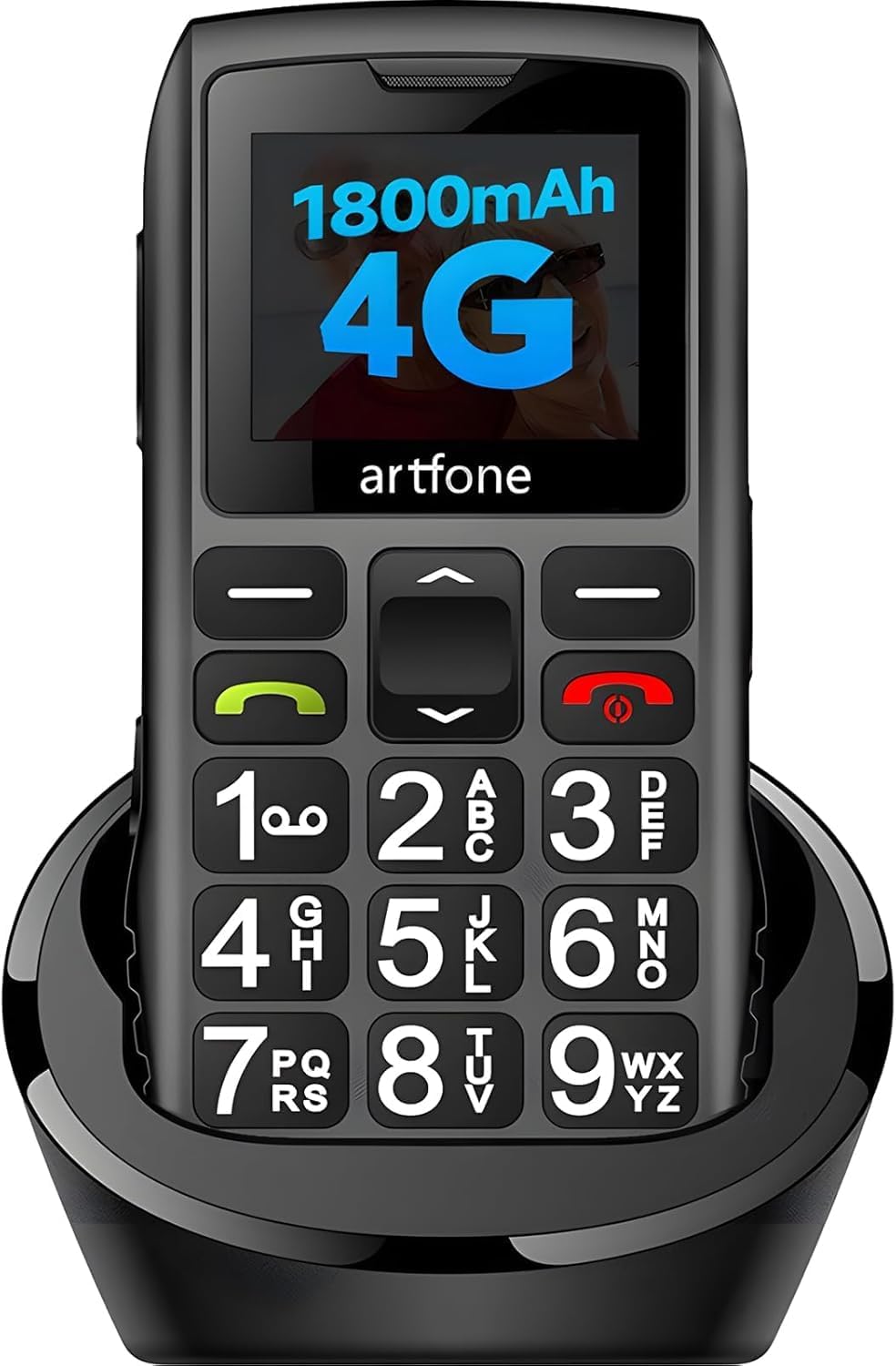
Enjoy an easy to use mobile phone with big buttons, large font and SOS Emergency button, Widely separated, high contrast keys make calling and texting easier, and HD Voice enables clearer conversation at both ends of the line.
SOS Emergency Call & Speed Dial 
On the back of the phone is the SOS button, which can be set to up to 5 emergency numbers. In an emergency, press and hold the SOS button for 3 seconds, a loud alarm tone will sound, and the phone will automatically dial the first number in the list. If no one answers, it will dial the next number.
Two Charging Mode Mobile Phone丨Popular Sought After Mobile Phone for the Elderly
Speed Dial and Oversized Buttons
Numbered buttons 1-9 define a one-touch call.
Super large 15mm PU button.
Loud Volume Clear Call Quality
High-quality speakers, loud and clear calls, suitable for the elderly with hearing loss.
USB-C & Chaging Dock
No need to worry about charging your phone. C1+4G is also equipped with a USB Type-C detachable cable and charging dock, you can just put your phone on the dock to charge.
Phone Specification & Operation Methods of Related Functions
Bands 4G Bands: FDD B2/4/5/12/13/17/26/66+TDD B38/B41 — 3G Bands: 850/1900/2100 MHz — 2G Bands: 850/1900 MHz Supported Languages English, German, French, Italian, Spanish, Polish, Dutch, Czech, Portugal, Arabic, Russian,etc. Size 4.80×2.05×0.55 inches — Camera: No Photo Contacts Contact – Add new contact – Modify Icon Configuration Functions Making Calls, Time Reporting, Bluetooth, Wireless FM, MMS/SMS; SOS Emergency Button; Speed Dial; Alarm Clock; Calendar; Calculator, Torch, Volume Side Button, Sound Recorder, Image Viewer, Video Player, Airplane Mode, Wallpaper, LCD Backlight, Keyboard Light etc. Basic Parameters Chipset: Spreadtrum T107 — Flash memory: 128 + 48 MB — CPU frequency: 1000MHz — Display: 1.8 inches QVGA Battery Life and Charging Mode Battery Capacity: BP-4L 1800 mAh — Standby Time: 240-300 hours (10-12 days) — Charging Mode: USB-C & Chaging Dock Card Slots Does not include: Single Nano SIM card + 1 SD card — Micro SD Card: Support (expands up to 64GB) Hardware Configuration Speaker: 2030 Box & Stereo — Receiver: 2030 Box & Stereo — Keypad: 21 — Keypad backlight: white(8 lights) — Bluetooth: 2.1+EDR — Headphone Jack: 3.5 mm Date Format/Restore Factory Default setting is Day/Month/Year. — Standard US date format: Menu → Settings → Phone Settings → Time & Date → Date Format → Month/Day/Year丨Menu → Settings → Phone settings → Restore factory settings → 1234 Shortcut Functions of Buttons Silent/Vibration/Normal Mode: Long – press the 0 button to switch the volume mode. — FM Radio: Long – press the * button to activate the radio function (a 3.5mm headset needs to be inserted). — Flashlight: Slide the right – side button up or down. — Airplane Mode: Long – press the red power – off button to switch to airplane mode, or power off/restart the phone. Voice Time Announcement: Long – press the volume + button. The time will be announced in the local language (when not in silent mode). Language/Blacklist Settings Menu → Settings → Phone settings → Language settings → Menu → Settings → Security → Blacklist Turn on Speakerphone After answering a call, press the upper – right – hand button to switch between speakerphone and handset modes. Set Speed – Dial Contacts Long – press the */# button or number buttons 2 – 9 to call the pre – set contacts. Or, you can operate as follows: Menu – Settings – Speed dial Emergency Contact Settings Menu → SOS → SOS status/on → SOS number list. After adding up to 5 contacts, in case of an emergency, long – press the SOS button on the back of the phone. The phone will automatically dial the number of the first contact and send a distress message. If the call is not answered within 20 seconds, it will automatically dial the number of the second contact, and so on.
What time is it now?
Long press the volume button and the real-time voice broadcast function will read out the time.
BP-4L 1800mAh
Long Battery Life than Similar Products: 1800 mAh, up to 240 hours standby, 420 minutes talk time.
Highlight Flashlight
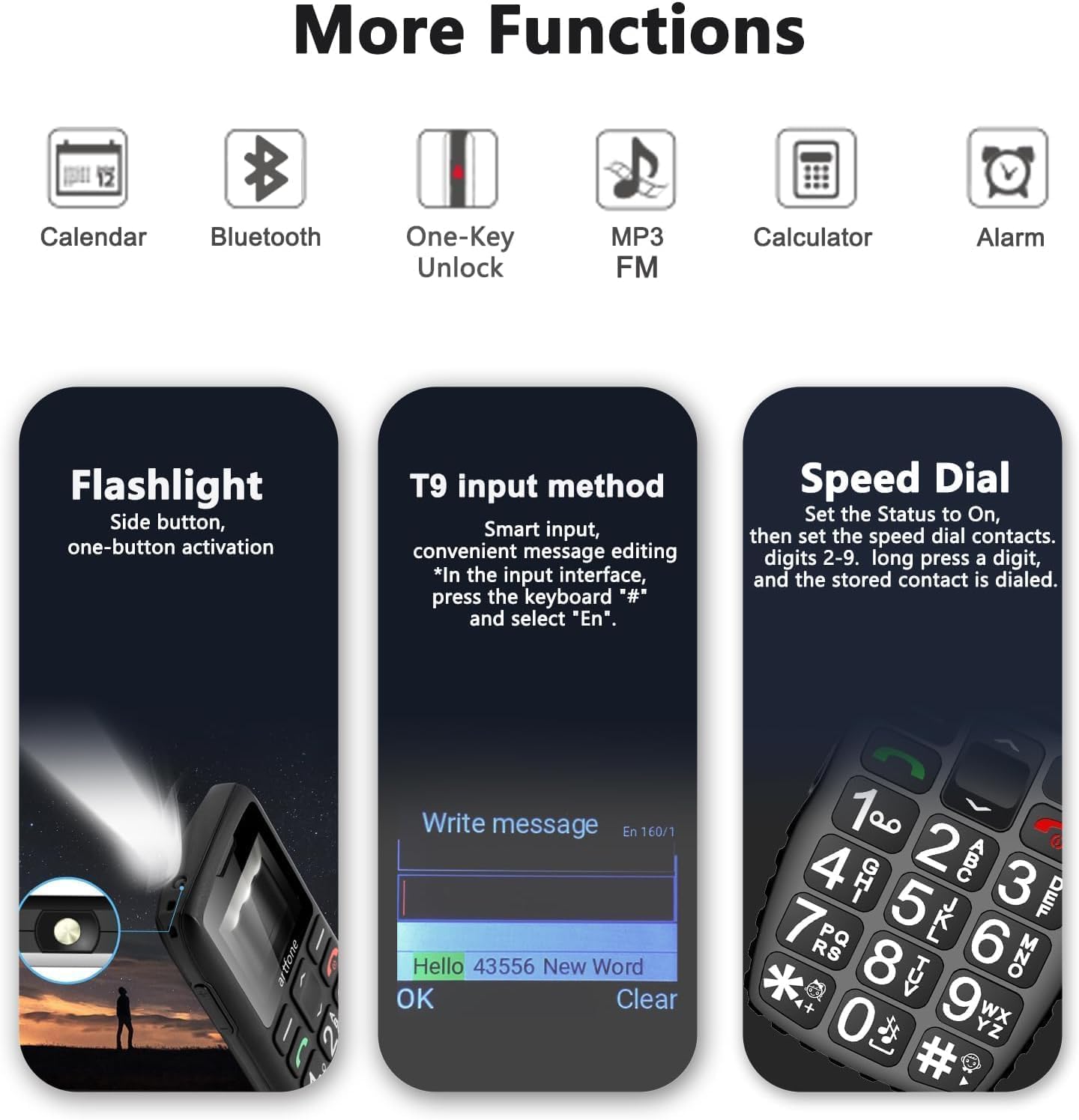
A flashlight button on the right side, slid upwards to turn on/ off
Convenient and safe for elderly
AAC Receiver, 2030 Large Speaker Box
Solve the problem of poor call quality and low volume, similar to the iPhone’s AAC receiver.
Multifunctional Cell Phone
Built-in telephone, SMS, Bluetooth, calendar, calculator, alarms, FM radio, speed dial, SOS button
1 Voice Time Function
2 Battery
3 Flashlight
4 Receiver & Speaker Box
5 Functions

Intimate button function design
Backlit keyboard: The keyboard has a white light so you can see it at night.Voice dialing: When the button is pressed, the number corresponding to the button will be broadcast.When typing, the ‘#’ key allows you to switch to T9 input mode, enabling text prediction for faster input. 
Speed Dial
Speed Dial:Use *# and 1-9 keys to call your favorite contacts with just one tap.Long press the button to dial.Set the Status to On, then set the speed dial contacts. 8 contacts are able to be stored in digits 2-9. On the start screen, long press a digit, and the stored contact is dialed.
4G Unlocked Senior Mobile Phone without Contract 丨Best Gift for Seniors 
Large Screen
The bright 1.8-inch screen makes it easy to check your phone, making it easier for seniors to read.

Shockproof Design
The anti-slip side design acts as a buffer when the phone falls and provides good protection.

Stable Quality and Performance
High-end Chip T107
Improve the phone’s network signal
Does not malfunction or freeze during operation
Handle multiple tasks smoothly and efficiently

High-quality Lithium Battery
Long-lasting Power
Each battery comes with a tested under strict quality control standard
Prevent from over-charging, over-heating and other defects.
【Exclusive Design with Large Buttons for Senior-Friendly Mobile】The 2025 C1+4G Pro model features a brand-new UI operating system and a keyboard with 21 backlit, raised buttons for an exceptional tactile experience, minimizing errors during dialing and texting. It includes green and red buttons for easy call initiation and termination, designed with simplicity in mind for seniors, children, and the visually impaired
【Extended Battery Life and Convenient Charging】Powered by a 1800mAh high-capacity battery, it outperforms similar products in battery life, supporting 7-8 hours of talk time and offering exceptional endurance on a full charge. Along with the included USB-C charging set, it also comes with a charging dock for added convenience, ensuring seniors are never worried about battery life
【Dual Care for Vision and Hearing】This unlocked phone comes with a 1.8-inch color LCD eye-care screen, displaying clear icons and large fonts to reduce eye strain. Equipped with a high-resolution speaker, it delivers loud and clear call quality, ideal for seniors, especially those with hearing difficulties. A side-mounted flashlight button allows easy activation in dark environments
【User-Friendly Voice Time Announcement and Speed Dial】The artfone senior phone boasts a unique one-button time announcement feature, activated by holding the volume + key for 3 seconds to audibly report the current time. Dedicated */# keys and numbers 2-9 facilitate speed dialing, allowing quick access to frequently contacted individuals without the hassle of manual input
【Photo Contact Design & T9 Input Method】It supports contact photo display for easy caller identification, simplifying communication. The phone can store up to 1000 contacts and includes a blacklist feature to block unwanted calls. The physical keyboard combined with T9 predictive texting ensures fast and accurate message input, reducing keystrokes for efficient communication
【Simple Phone with SOS Functionality】This button-operated, contract-free device does not support internet browsing but excels in calls and messaging. It features an SOS button on the back for emergency situations, capable of dialing 5 emergency numbers and sending distress messages, providing security for seniors. Additional features include audio, video, Bluetooth, FM radio, calculator, alarm, and calendar functions
【Versatile Connectivity】Supports 2G, 3G and 4G LTE networks, allowing you to stay connected wherever you go, compatible with T-mobile and it’s virtual operators only, not work with AT&T or Verizon. This phone is unlocked, but it is not compatible with locked SIM cards, such as government subsidized cards with free monthly plans. If you have questions about carrier compatibility before purchase, please contact us
【Keyboard Lock Function】By sliding the side key, you can lock the screen and keypad to prevent any unintended screen activation in your pocket. This effectively eliminates mishaps like accidental calls or message sends and safeguards your personal privacy. This straightforward feature also helps conserve power for extended battery life. For elderly users, it provides a reliable safeguard by ensuring the phone remains inactive until intentionally awakened
13 reviews for C1+4G Pro Black – Big Buttons Cell Phone for Seniors丨Basic Phone with SOS Button丨Charging Station丨1800mAh丨Loud Speaker丨Talking Clock丨Speed Dial丨Hands-free丨Large Font丨Unlocked Phones丨FM Radio
Add a review
$56.99


Faye –
Straight, Simple to Use Phone.
Not a bad little phone, does what it should do, easy to use, voice mail, simple phone. Easy for older folks to see and with the voice letting them know what phone number they are calling is a bonus in my book. If flip phones make them flip out,(sorry, bad pun), and smart phones are tossed across the room in frustration, this is a viable option.
Margaret –
Basic.
My grandma, who prefers the old crank style wall phone from her youth, was able to successfully make a call on this phone because it is so simple.
Cathy –
Easy phone for elderly
This phone was the perfect concept for my mom, who has early dementia. We tried a variety of smart phones and flip phones, but they were too complicated. This phone has large buttons that are easy for her to use, unlike the touchscreens. Initially, we were able to program family members on a one button speed dial, but after 2 weeks of use that function no longer seems to work. There are no online instructions for use with this phone, and the ones that come with it are not complete. The biggest challenge we had with this phone was finding a phone company to carry it. I went to the T-Mobile store and they said they didn’t support this phone. AT&T, Verizon, and MINT also did not support it. We were able to find a SIM card at Walmart that works, and interestingly, it’s with T-Mobile. However, the plan comes with 100 bells and whistles that don’t work with this phone, and is very expensive. We need her to be able to stay in touch with the people in her life for as long as she is able, so for now, this is working. I really wish phone manufacturers would consider making simple, push button phones that have easy speed dial capability for the elderly. This is as close as I have been able to find.
Everyday user –
Serves the purpose
Handy
John C. –
Not actually AT &T compatible
Not actually AT&T compatible in spite of what the product description says. It could be free and still not be a good value.
Amazon Customer –
Very professional
Very professional
Lathrop –
Seemed good for cognitive decline, but mfr. didn’t spoon feed their target audience well
Purchased for an older person developing cognitive issues. On the surface it seemed like the perfect solution for someone who spent their prime years using simple rotary and pushbutton telephones. But unfortunately even this was a phone that confused her easily, which astounded me to hear. Her partner has an iPhone and handles it pretty well, but the setup on this was very challenging and less friendly and documented for him than I had hoped. Even sliding in and out) the SIM became a major project for him. Between their unfamiliarity with all the menus, the need to manually enter all the contact info using T9, and apparently the lack of a very, very simple and friendly setup manual/instructions- they threw up their hands and gave up.I wasn’t in their area when they went through this, and the people who help them locally with these things were not a big help in helping set it up and making it understandable to them. Not having physically seen the phone it’s difficult to comment much on the quality and functions, but I was very frustrated with the process and trying to walk them through things for which I didn’t have a manual.I’ve been doing calculations as I write this to determine where the issues are with this phone. Assuming it’s for elderly people with vision and cognitive problems for whom a dumb flip phone is too much, I think the manufacturer would benefit by having a simple cartoon quick start guide that gets users up and running. Perhaps the ability to either sync an address book or the ability to pair a Bluetooth keyboard for entry. Many older people are rarely comfortable doing any sort of programming, and adding names and numbers through a keyboard like this is intimidating and error inviting. The SIM slot is probably standard, but simple things like large pictures of guidance for this process would be helpful for old fingers and eyes. I passed on the camera option version, but later realized perhaps it would be better to be able to add photos of people she knows and can push a button to dial. The screen display itself would benefit a LOT to stop looking like DOS and have an interface with colors and logic that helps find their way around. I was guiding an older person to the “reset phone” part of settings and he spent 5 minutes circling around in “contacts” (which was the other button. And he uses an iPhone regularly.All this said, from what I see of the phone itself, it seems a better form factor and options over the Jitterbug. You also are able to use the carrier of your choice with this rather than the high prices and carrier capture of Jitterbug. But with certain elderly people, phones like this are still too complicated to be accepted and set up without a lot of outside help. Personally I would design a quick start and user manual that makes it fun, approachable, and encourages the new user along to get used to this tech. USB-C is fantastic, and again the size seems right for people who commonly lose stuff.Unfortunately, it had to be returned. If it happens that I’ll be in their vicinity some day then perhaps I’ll order the camera version and try setting it up for them myself then coaching them along. “You can lead a horse to water but you can’t make them drink.” I got tired of the complaints that they couldn’t reach their spouse on the phone, hoped this would go a long way to solving that problem for them, but now I think they would rather complain than take the time and attention to learn enough to make this work.
Grace Chin Yet –
User friendly
Very user friendly
marion P. –
Téléphone très pratique pour les personnes âgés.Je l’ai pris pour mon grand père et les chiffres sont très gros et il est facile d’utilisation
Pilar –
Fenomenal para mi padre. Cuidado con las redes pues compré el artfone C1 y lo tuve que devolver pues solo funcionaba con 2G y donde yo vivo no hay. Este 4G funciona muy bien, se oye Fenomenal, mi padre está contento.
Frontana alaminos sandra –
Fait son travail
valeriane –
parfait
S. G. –
Einfach zu bedienen