

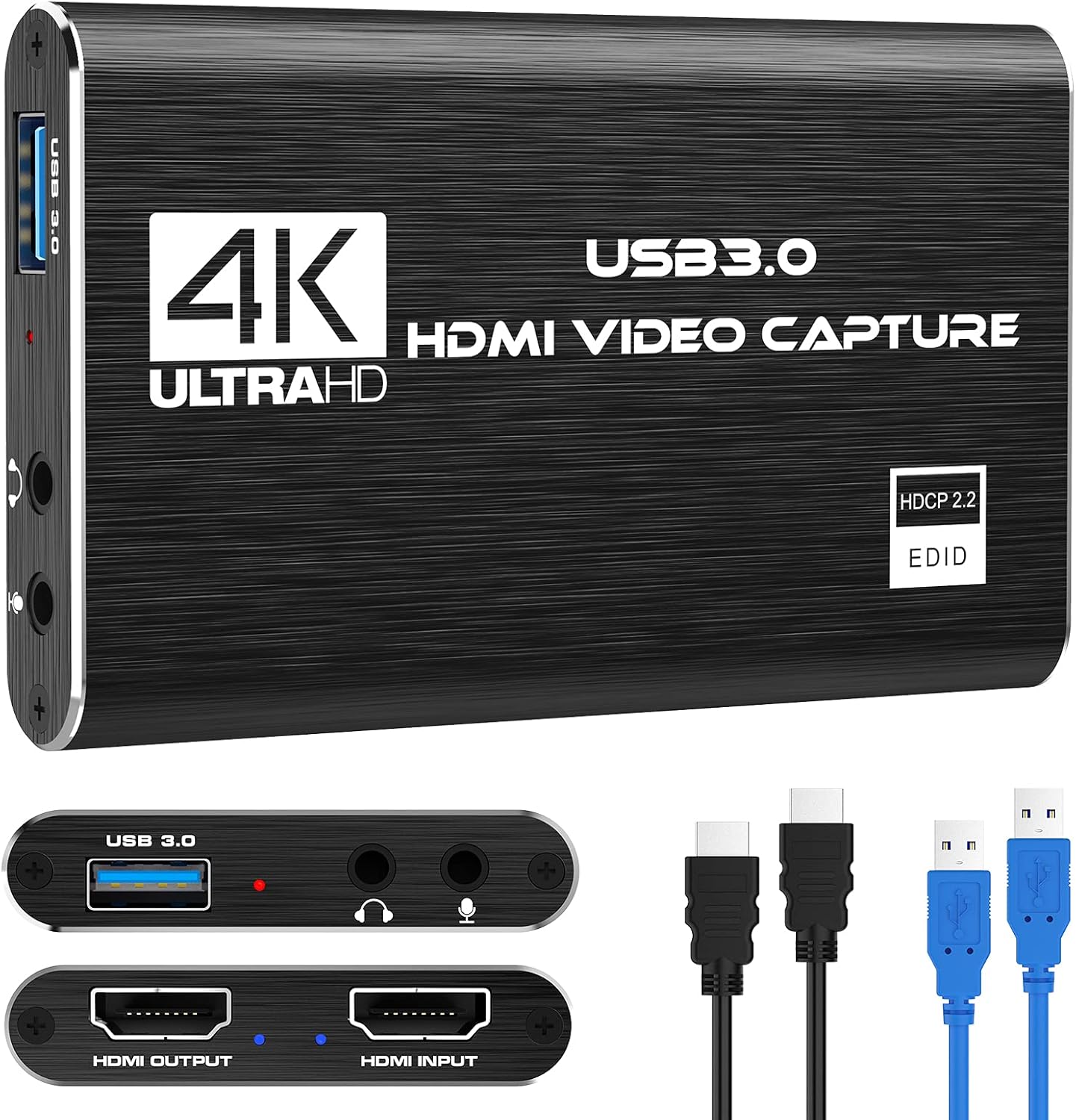
Capture Card Nintendo Switch, 4K HDMI Video Capture Card, 1080P 60FPS, HDMI to USB 3.0 Capture Card for Streaming Work with Camera/Xbox/PS4/PS5/PC/OBS
$27.99
Related Products

![JISULIFE Handheld Mini Fan, 3 IN 1 USB Rechargeable Portable Fan [12-19 Working Hours] with Power Bank, Flashlight, Pocket Design for Travel/Summer/Concerts/Lash, Gifts for Women (Pink)](https://bestdealsavvy.com/wp-content/uploads/2025/12/51E76z7oaWL._AC_SL1500_.jpg)


Product description


No Delay
Video live broadcast without delay, no lag, professional-level video capture solution

Stable working performance
Reliable performance, no lag, record important content anytime and anywhere, avoid the trouble of losing important information due to lag, perfect

4K HD Capture
It is suitable for you to capture high-definition video at any time, with 4K 60FPS input and 1080P output, which is much clearer than 720P products, and the colors are more delicate and elegant
Add to Cart
Customer Reviews
3.8 out of 5 stars 20
—
4.3 out of 5 stars 1,640
4.0 out of 5 stars 120
4.3 out of 5 stars 33
Price
— no data
— no data
$27.99$27.99
— no data
— no data
PC Hardware Interface
USB3.0 + HDMI USB3.0 + HDMI USB3.0 + HDMI USB3.0 + HDMI USB3.0 + HDMI
Operating System
Windows 7,8,10,11,X Mac OS 10.9 or later, Linux,Android 8 or later. Windows 7,8,10,11,X Mac OS 10.9 or later, Linux,Android 8 or later. Windows 7,8,10,11,X Mac OS 10.9 or later, Linux,Android 8 or later. Windows 7,8,10,11,X Mac OS 10.9 or later, Linux. Windows 7,8,10,11,X Mac OS 10.9 or later, Linux.
Input interface
HDMI HDMI+3.5mm Mic+3.5mm AUX HDMI+3.5mm Mic+3.5mm AUX HDMI HDMI
Maximum input resolution
4K 60Hz 4K 60Hz 4K 60Hz 1080P 60Hz 1080P 60Hz
Maximum output resolution
1080P 60Hz 1080P 60Hz 1080P 60Hz 1080P 60Hz 1080P 60Hz
Supported input format
MJPG,MJPEG MJPG,MJPEG MJPG,MJPEG YUV,MJPG,MJPEG YUV,MJPG,MJPEG
Support acquisition software
VLC、OBS 、Amcap, etc VLC、OBS 、Amcap, etc VLC、OBS 、Amcap, etc VLC、OBS 、Amcap, etc VLC、OBS 、Amcap, etc
Conversion Type
1.HDMI TO HDMI loop out, 2.HDMI TO USB3.0 1.HDMI TO HDMI loop out, 2.3.5mm Mic TO 3.5mm AUX, 3.HDMI TO USB3.0 1.HDMI TO HDMI loop out, 2.3.5mm Mic TO 3.5mm AUX, 3.HDMI TO USB3.0 1.HDMI TO HDMI loop out, 2.HDMI TO USB3.0 1.HDMI TO HDMI loop out, 2.HDMI TO USB3.0
Work Best With
Game console, DVD, digital audio, TV, set-top box, DV, camcorder Game console, DVD, digital audio, TV, set-top box, DV, camcorder, Live streaming Game console, DVD, digital audio, TV, set-top box, DV, camcorder, Live streaming Game console, DVD, digital audio, TV, set-top box, DV, camcorder, Live streaming Game console, DVD, digital audio, TV, set-top box, DV, camcorder, Live streaming
Accessories
1.Video capture card, 2.USB3.0 male to male data cable 0.6M with PE bag, 3.multi-language manual 1.USB3.0 male to male data cable 0.6M with PE bag 2. The HDMI cable (the length of the cable is 1.2M) is equipped with a PE bag 3. multi-language manual 1.USB3.0 male to male data cable 0.6M with PE bag 2. The HDMI cable (the length of the cable is 1.2M) is equipped with a PE bag 3. multi-language manual 1.Video capture card, 2. The HDMI cable (the length of the cable is 1.2M) is equipped with a PE bag 3.multi-language manual 1.USB3.0 male to male data cable 0.6M with PE bag 2. The HDMI cable (the length of the cable is 1.2M) is equipped with a PE bag 3. multi-language manual
【1080P HD High Quality】Capture resolution up to 1080p for video source and it is ideal for all HDMI devices such as PS4, PS3, Xbox One, Xbox 360, Wii U, DVDs, DSLR, Camera, Security Camera and set top box.
【Plug and Play】No driver or external power supply required, true PnP. Once plugged in, the device is identified automatically as a webcam. Detect input and adjust output automatically. Won’t occupy CPU, optional audio capture. No freeze with correct setting.
【Compatible with Multiple Systems】suitable for Windows and Mac OS. High speed USB 3.0 technology and superior low latency technology makes it easier for you to transmit live streaming to Twitch, Youtube, Facebook, Twitter, OBS, Potplayer and VLC.
【HDMI LOOP-OUT】Based on the high-speed USB 3.0 technology, it can capture one single channel HD HDMI video signal. There is no delay when you are playing game live.
【Support Mic-in for Commentary】Kedok capture card has microphone input and you can use it to add external commentary when playing a game. Please note: it only accepts 3.5mm TRS standard microphone headset.
4 reviews for Capture Card Nintendo Switch, 4K HDMI Video Capture Card, 1080P 60FPS, HDMI to USB 3.0 Capture Card for Streaming Work with Camera/Xbox/PS4/PS5/PC/OBS
Add a review

$27.99
Tony Chilcoat –
10/10 Great Price
I recently bought this HDMI Capture Card for my Xbox Series X, and it has quickly become an essential part of my streaming setup. If you’re a gamer or content creator aiming to take your streaming and recording to the next level, this device is definitely worth considering. Whether you’re streaming from the comfort of your home or on the move, it captures gameplay footage with impressive clarity and quality.Setting it up is a breeze: just connect your Xbox to the capture card, then link the card to your PC or laptop. I especially appreciate how smoothly it records and streams without any noticeable lag—something crucial when you’re broadcasting live. This seamless performance keeps the gaming experience enjoyable and stress-free.What really stands out is its compact and portable design. It fits neatly into my setup and easily travels with me when I stream away from home. Plus, its compatibility with popular streaming software like OBS makes it accessible for both beginners and seasoned streamers alike. Overall, this capture card delivers on its promises and is a fantastic tool for anyone serious about streaming their gameplay.
Amazon Customer –
Better than expected, 4K pass through (only 60fps) but full 4k streaming, No drivers needed. 10/10
Overall best bang for the buck. READ THIS REVIEW!So I couldnt find any info on what hz this could run at and that was important to me. I run 4k displays and wanted to record things from time to time. For my girlfriend this works great, and for many tasks it works fantastic. Read until the end for my view.Facts:Using numerous cables I got the same results on pass through:4K 60F HZ / FPS, no noticeable latency (did not measure), also I dont believe HRD passed through I will verify and update my review.1080P HZ / FPS. This is sufficient for most higher end gaming if you are doing a live broadcast. Which I will address below.I personally just use an OBS with a remote stream typically but I wanted any easy to plug in, low work, low effort solution when I needed to plug in fast. This product did EXACTLY that. For simply making a video tutorial, recording my screen for desktop use, server use, etc. This was amazing. And not only that at this price point it is cheap enough to use this to remotely manage video out on my servers. +2 points right there.I wish it would handle 4K pass through (not record I dont care about getting over 30-60FPS which I was able to get) to my main display when I play a game for when friends want to watch. But thats fine I can do a remote stream for them if it is important for me to get 4k @ 120-240hz which most cards barely handle anyway.Now the best part. I plugged this into my pc, multiple Mac machines. No setup, no drivers needed. My obs 100% picked it up immediately. From opening the box to streaming I was setup within 5 minutes. Cables were supplied. I wish they had a newer one (which they might already have) with USB c or at least a higher HDMI pass through.Due to how cheap these were and how reliable / easy it was for compatibility I actually plan to buy some for remote sever management uses instead of using long HDMI cables when I needed to do bare metal work for servers without network based management.Overall everyone told me to not buy this. Wrong, buy it until you are ready to commit to a higher priced product if you need the resolution / Frame rate. The recording quality was 100% spot on of what I saw on my gaming computer, connection was easy as can be, streaming was the easiest thing I have done yet.
Cadi –
Took some troubleshooting, but works great!
I want to start off by saying that this was a bit tricky to set up. I’m not sure if I misunderstood the instructions or if they just weren’t written well, but the USB needs to be plugged into your PC for the actual stream setup. The HDMI output is just if you need an additional monitor output (if you don’t want to look at your game through the OBS window). Once I got that figured out, it was super easy to add the source to OBS and get it to stream. I do want to add that if you are NOT using the HDMI output and only using the monitor within OBS, you need to adjust the audio settings for the source so that it outputs to both capture AND monitor, or else it just will not play into your headphones/computer speakers. I will also add that my switch did not work with this capture card through a third-party portable dock, it only worked with my Nintendo switch dock. I haven’t tried this with my iPad using an HDMI-to-lightning adapter, or something else that would need an additional adapter to HDMI.Once everything was set up there was no lagging or any kind of glitching. I’m glad that it was plug-and-play, with no extra downloads or anything either.
Jae –
Device is awesome, directions are not
I actually really love this capture card! Video quality is great, heat stays low, no lag, connections good. The capture card itself works great for what it is. However, I’m taking away a star because the DIRECTIONS are misleading. When using OBS, the directions say to click the +button under sources and to select USB3.0 device from the drop down menu.. there IS no option to select USB3.0 for everyone. If it does not pop up for you as an existing device, then you must CREATE a new source, name that source, and THEN you are able to select USB3.0 from a drop down menu. I run MacOS but I am seeing many PC users with this same problem. It took me forever to figure this out, just create a new source of its not coming up for you! Maybe they need to look into this and update their directions!One more thing.. do not use any audio from the capture card device, set up your audio peripherals from your OBS device. The capture card audio sucks!Still happy with the device and would buy another one.