

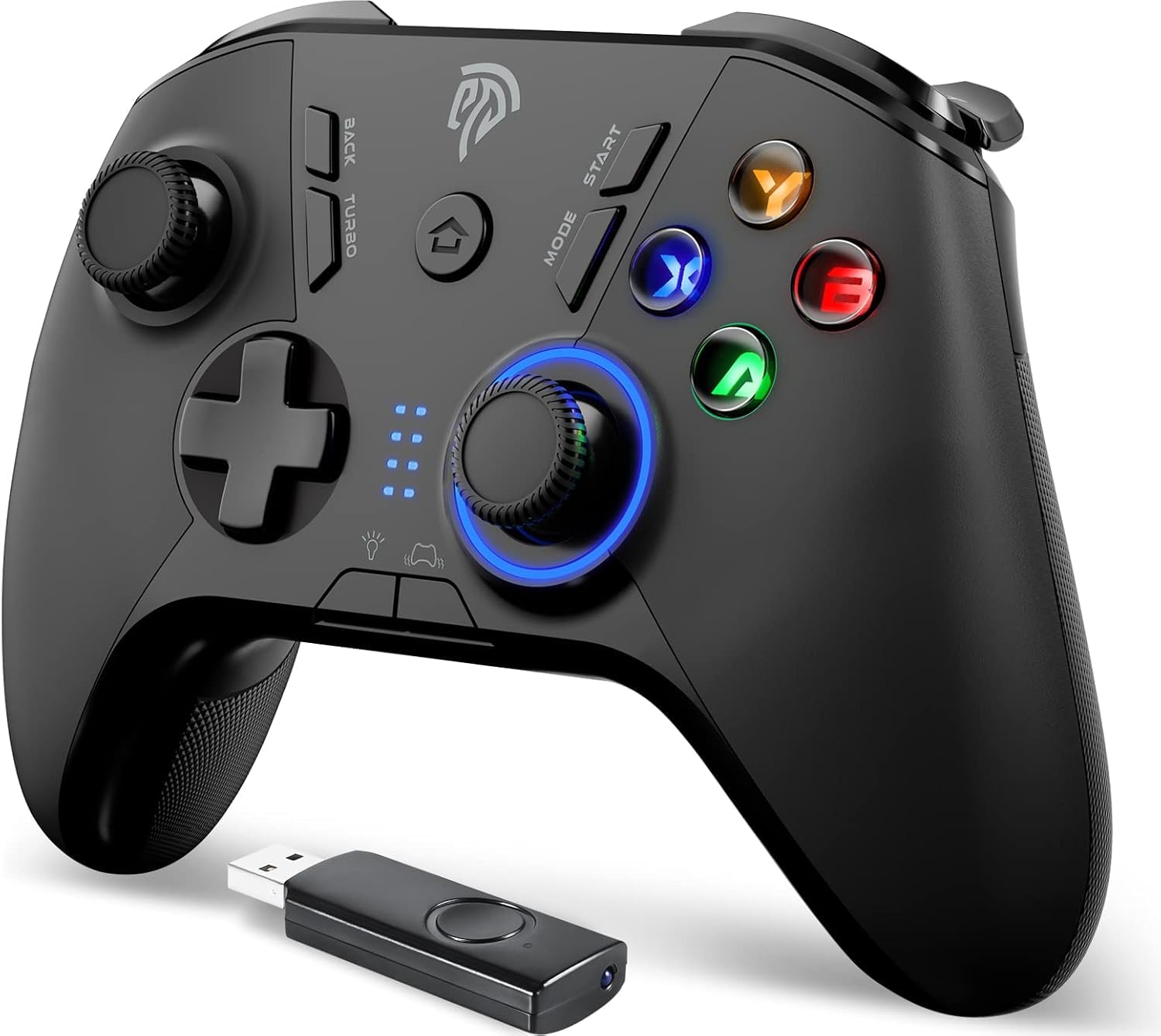
EasySMX Wireless Gaming Controller for Windows PC/Steam Deck/PS3/Android TV BOX, Dual Vibrate Plug and Play Gamepad Joystick with 4 Customized Keys, Battery Up to 14 Hours, Work for Nintendo Switch
Original price was: $28.07.$23.99Current price is: $23.99.
Related Products








Product description
The video showcases the product in use.The video guides you through product setup.The video compares multiple products.The video shows the product being unpacked. EasySMX 9110 controller overview Merchant Video


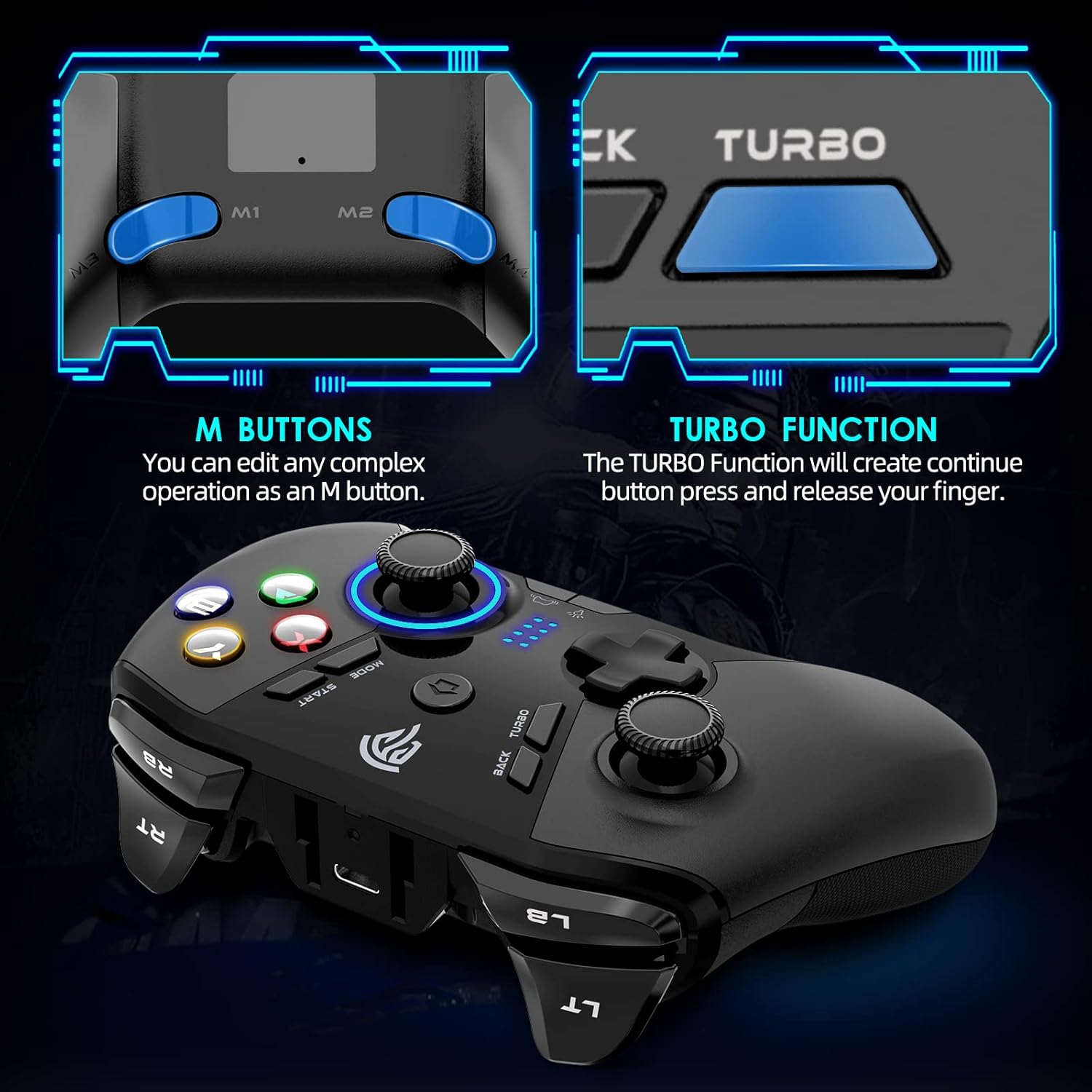
1 Turbo Function
2 Adjustable Vibration
3 Adjustable LED lights
4 Ergonomics Design





1 Enjoy relaxing time 2 with your loved ones 3 with playful kids 4 with close friends
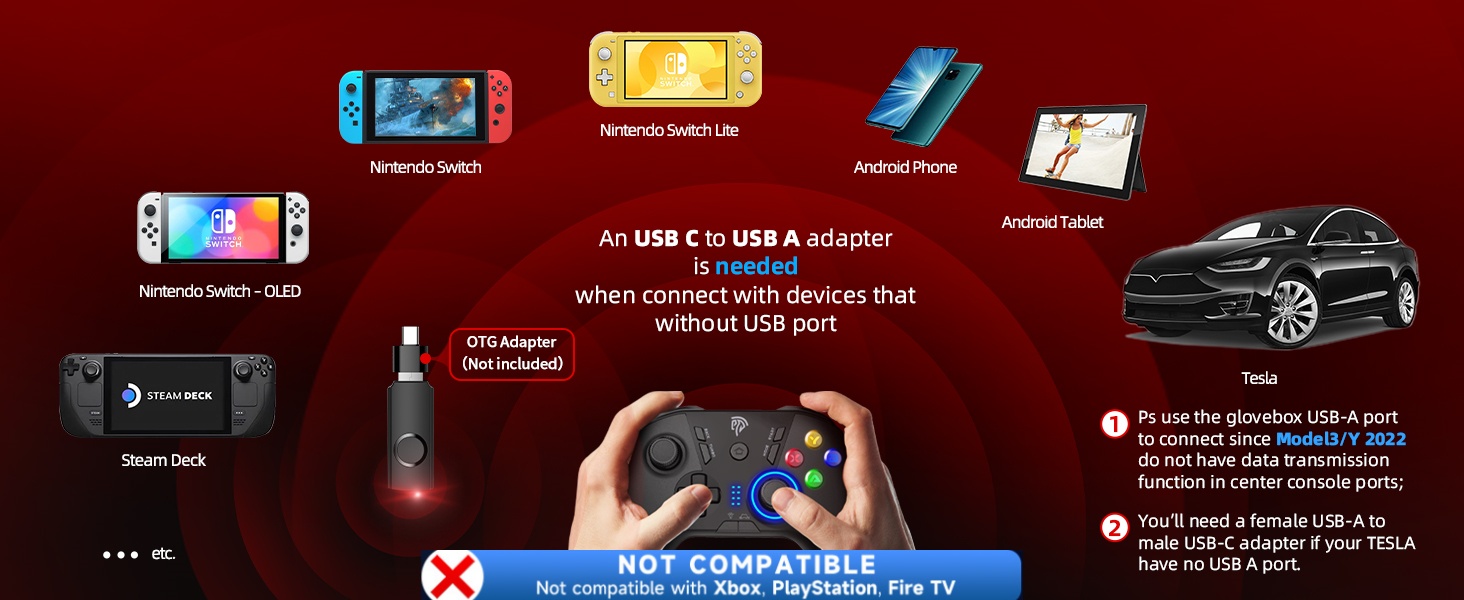
1. Does this work with a Xbox
No, EasySMX Controller does not support Xbox, Playstation, and Fire TV.
2. Does it support Bluetooth?
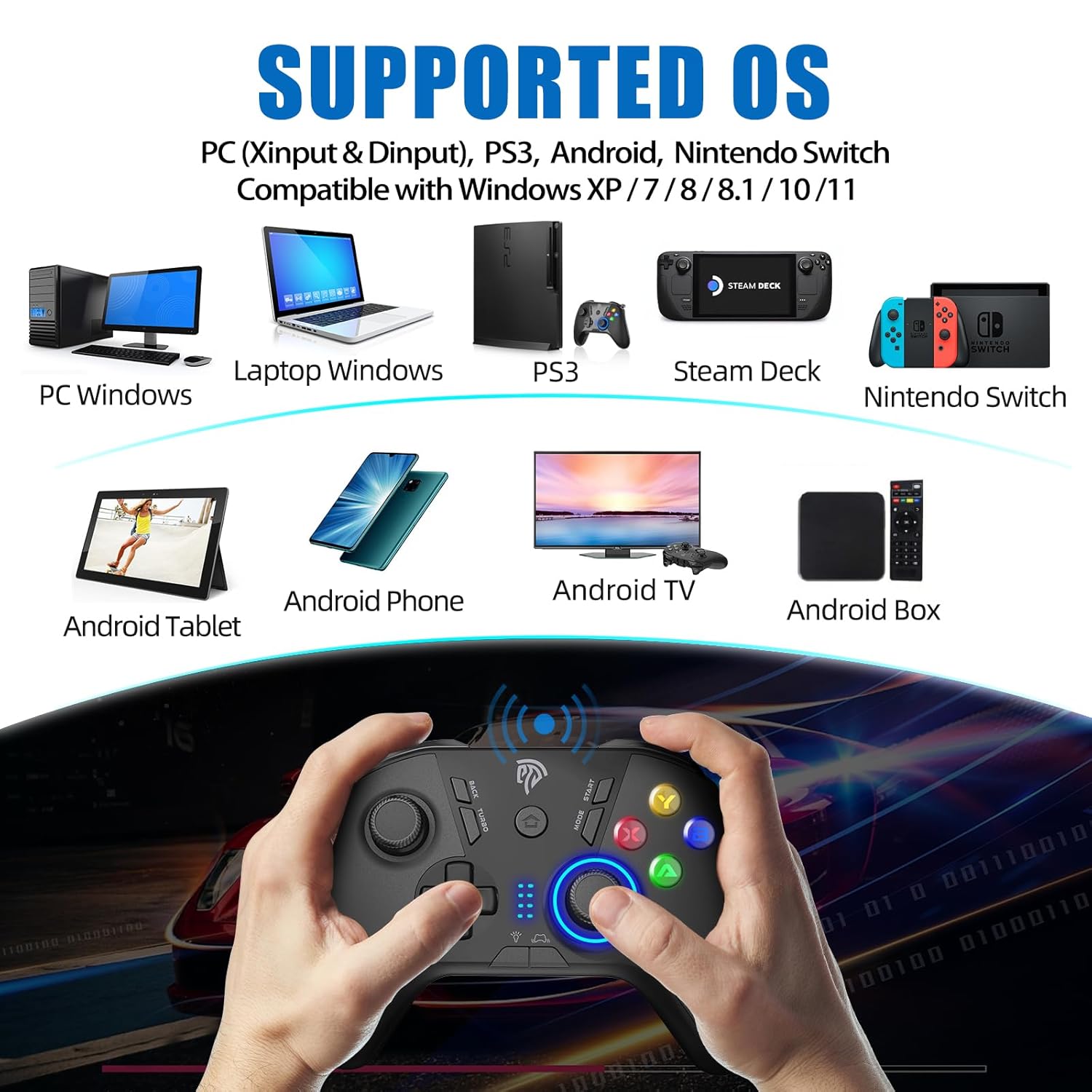
No, it only connects via a 2.4GHz USB receiver or through a Type-C cable in wired mode
3. Will this works with Tesla
Yes, Ps use the glovebox USB-A port to connect since Model3/Y 2022 do not have data transmission function in center console ports.
You’ll need a female USB-A to male USB-C adapter if your TESLA have no USB A port
4. How to change mode if i play with a different console
Press and Hold the MODE button for 5 seconds to switch mode
5. How can I turn off the controller
It turns off automatically after 5 minutes of inactivity
Hold down the Home button for 30 seconds, it will turn off
💔Not Not Not Compatible with Xbox, PS4, PS5, Fire TV, Firestick and Nvidia GeForce Now💔
🎮【Programmable Button】There are four programmable buttons on the bottom of the handle: M1 M2 M3 M4. It is difficult to operate with one button, which makes the game player level up instantly and enjoy the game pleasure.
🎮【Broad Compatibility】 Compatible with Windows XP/7/8/8.1/10 PCs, PS3 and Android (phones, tablets, TV ) that support OTG and run Android 5.0 or above. Also works with Android Smart TVs. 【Note】 EasySMX 9110 controller does not support Bluetooth and must be used with the included 2.4GHz USB receiver.
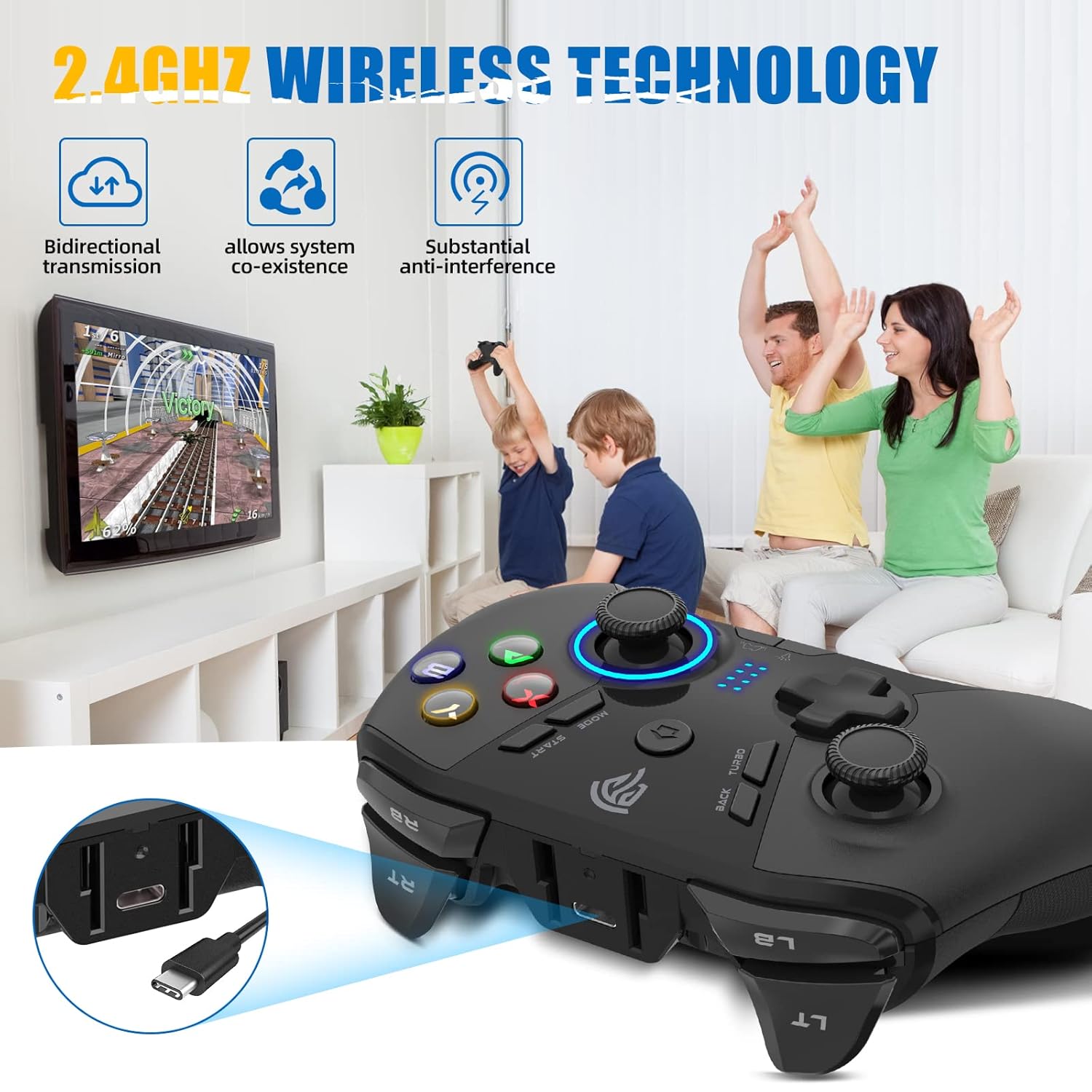
🎮【Wireless Connection】The Gaming Controller adopts 2.4G wireless transmission technology, which has the characteristics of stable signal, strong anti-interference, long connection distance and delay elimination. The handle is plug and play, no additional drive required
🎮【Adjustable LED Light】ABXY button and right joystick of wireless controller gamepad with cold LED light, 5 brightness adjustable
🎮【Adjustable Double Vibration】Built-in asymmetric double-vibration somatosensory motor, vibration intensity can be adjusted in five steps, real experience of collision, vibration, shooting and other scenes in the game
📧📧Customers may encounter problems due to incorrect use of the item. Please contact the seller in advance if you have any questions before returning it.
🎮【Programmable Button】There are four programmable buttons on the bottom of the handle: M1 M2 M3 M4. It is difficult to operate with one button, which makes the game player level up instantly and enjoy the game pleasure.
9 reviews for EasySMX Wireless Gaming Controller for Windows PC/Steam Deck/PS3/Android TV BOX, Dual Vibrate Plug and Play Gamepad Joystick with 4 Customized Keys, Battery Up to 14 Hours, Work for Nintendo Switch
Add a review

Original price was: $28.07.$23.99Current price is: $23.99.
Jesse –
Pleasantly surprised!
I ordered this controller to replace my current OEM Xbox controller.Pros:What made me choose this were the extra M1-4 buttons on the back of the controller, as well as the extra QOL functionality and compatibility with multiple device types. Initial impressions are that this controller does NOT feel cheap. It feels more premium than my ORM Xbox controller. All of the buttons and triggers have a satisfying, but not annoyingly loud, click. The RT and LT buttons have a neat trick which allows you to turn either (yes – individually or both) trigger into a smooth, longer travel press (like the OEM Xbox controllers) or into a short travel press similar to the RB and LB buttons. This switch can be made in real time with a physical switch on the controller, located near each trigger but comfortably out of the way. You will not easily find yourself accidentally switching them to different travel.The color and vibration controls are intuitive and can be changed on the fly at any time as well with shortcuts built into the controller itself. You can also turn off the RGB if you want to conserve battery life or just isn’t your thing.The Hall joysticks are held on with a magnet, and easily are removed for cleaning by just pulling up. But I can confidently say there is no danger of the joystick head coming off when you don’t want it to during more intense gameplay. I attempted to push hard in all directions to see if this would happen and had no feeling that i could make it happen.Cons:If I had to make any suggestions for improvement, I would say….The dedicated C (color) button and Screenshot button placements should be swapped with their partner buttons – Screenshot with Select and C with Start. This would make transitioning from using a traditional Xbox controller much simpler for more people. I’ve been using it for a few hours and have found that I need to retrain myself to place my thumbs a bit higher on each side of the controller to hit these buttons, because i keep hitting the C and Screenshot buttons which are located where I am already naturally activating the Select and Start buttons to be.The USB C port for charging and wired use is a great choice, but the port itself is recessed inside of a hollowed out area that makes some USB C cables unable to fit inside and connect to the port. It seems you either must use their included cable, which to be fair is of reasonable quality, or own another USB C cable that happens to be able to fit inside of the recessed hole that the port lives in. Just raise this port up to be level with the rest of the controller body so all USB C cables can be used.Small nitpick, but because of how the A, B, X and Y buttons display their letters, if I or anyone else (perhaps a person not as familiar with game controller layouts) needed to peek down and look at the button letters, it is not possible to read the letters on the buttons without tilting your controller to be directly facing your eyes. As in, they cannot be read properly from a diagonal angle, which most people tend to be relaxed back in their chair or couch with their hands down near their lap. So this means you MUST tilt the controller toward your eyes when looking down, opposed to just looking down. Making these more pronounced and readable from an angle would just be a niche but easy QOL change to improve the design,Overall, great first impressions and seems very much like a great value when compared with the competition – particularly from big brands like Xbox, Razer, etc.
Richard Garcia –
100% Worth it.
The EasySMX S20 controller has quickly become one of my favorite gaming accessories. It feels solid in the hands, the buttons are responsive, and the overall design makes long gaming sessions comfortable and enjoyable. For its price range, the quality genuinely exceeded my expectations.I did encounter a minor issue with my initial unit, but I was blown away by the customer service. I reached out to their support team, and they were incredibly quick to respond. Within just 24 hours, I had a brand-new replacement in hand no hassle, no waiting. This level of customer care really stood out to me and makes me feel confident in my purchase.Overall, I’m thoroughly impressed with both the product and the service. The EasySMX S20 is a great controller that performs well, and the customer service just adds to the value. Highly recommend!
Amarok#13 –
Solid third party controller for the price
As far as wireless PC-friendly controllers go, I’ve been very impressed with this one. I’ve been able to set it up via Bluetooth and use it on several platforms, from my Android phone, to my PC, to an ASUS ROG Ally X, all without issue. It has interfaced seamlessly with Steam and other third party launchers like HoYoPlay with minimal or no configuration needed. It actually works better as a controller with my ROG Ally than the built-in one, though they both do separate things well enough.For the controller build, it’s very sturdy and doesn’t feel cheap. I haven’t had an XBOX since the 360, but it feels just about the same in my hand as those controllers did, if not a bit better because the bumpers on this controller don’t feel like they’re flimsy and barely held on. It’s comfortable to hold, and the location of the 4 additional buttons on the back/bottom of the controller are easy enough for me to reach if needed.The sticks are a great value, as they are consistent and reliable. They can be set to 2 different heights based on the angle they’re turned when you place them on the stick’s ball joint. I’ve owned the controller for about 6 months, and while I’m not a particularly frequent gamer, I haven’t ever dealt with any stick issues or drift. The sticks themselves or only held on by gravity and a token amount of friction between the bottom of the stick and the ball joint, and while you need to be careful during transport, they’ve been reliable when gaming and haven’t come off the controller or anything like I originally feared. If they do pop off, you might need some trial and error again to make sure you’ve replaced the stick at your preferred stick height, since as far as I know there’s no easy way to tell how you’ve set it at just a glance.The trigger buttons are solid as well. The LB/RB bumpers seem to be pretty decent quality, though I don’t have much frame of reference since I haven’t owned many XBOX-style controllers. The trigger buttons can either be pressed as they usually are, or locked in place and “clicked” like a mouse button. Anecdotally, it feels to me like the locked mode requires more force to click than if the button is used as a trigger, but YMMV.That being said, there are a few negatives that stopped me from giving it 5 stars. This is a personal preference of mine, but the ABXY face buttons feel a bit mushy and require being pressed down relatively far before triggering a button press. They’re mechanical, but I wish they were a bit firmer or the actuation point was a bit higher vertically on the controller. As someone with CTS, my right thumb has occasionally had an issue providing enough force for the X button to register in more fast-paced games like Silksong. The d-pad face buttons are serviceable, but I wouldn’t use them for anything that relies on the d-pad heavily for movement. Mentioning Silksong again, I use the stick for control in that game due to how much better the HE sticks feel compared to the d-pad, even for 2D platforming.The other buttons are fine, they aren’t pressed frequently enough to really impact my review. Programming the back buttons is a bit unintuitive, but once you figure it out it’s pretty easy to do. It’s done by holding down the “C” button along with the button you want to program, waiting for the vibration, QUICKLY (and that’s the key part) pressing the button (or combination!) you want to use, and then pressing the C button/programmed button again to set the action. If you wait for a couple seconds to program and set a button/combination after putting it in “programming” mode (the first vibration), then the input ends up really glitchy and useless and will need to be reprogrammed. To un-bind the button or combination you already set, put it back in programming mode, press the button (without “C”) to clear the set button, and “set” the programming. That all said, if it’s programmed properly it works flawlessly; I personally use a “down + attack” combination on my left grip button for Hollow Knight, Silksong, and other similar platformers, and it works perfectly. However, due to the way I hold the controller, the right grip button gets pressed on accident fairly frequently, and I keep that one unprogrammed for that reason. It would be awesome if the grip buttons had a lock or something that prevents them from being pressed on accident. Also, if mapping your controller buttons via software is something you prefer, then I’m sorry to say it’s nowhere to be found. I’m not sure how the controller’s firmware is updated either.Finally, the RGB and battery: I’m not a fan of the always-on RGB, personally. It works fairly well to let you know if the controller is on or off, but I feel like the battery would last a bit longer if the RGB could be disabled. Right now, it requires fairly consistent charging when used in Bluetooth mode. When wired, you need a cable that can handle transmitting power too or else the controller won’t work. I lost the dongle shortly after purchase, so I can’t review how well that works or not. If you like to game in a darker room, the RGB intensity can be a bit distracting. As far as I know, I haven’t been able to find a way to dim or outright disable the RGB settings.Overall, in a vacuum I’d say this is a solid choice for controller, however there are a couple small “personality” quirks that haven’t let me commit to using this controller permanently. I’m making a fairly large leap to the new Flydigi Apex 5, which is in a completely different price/operability bracket, so I won’t be able to make an apples-to-apples comparison there either. This will make a solid backup controller in case anything happens to the new one, though, and I won’t be bummed if I end up having to use it again at some point in the future.
jayJ –
Cant go cheaper after using
I wanted a controller with gyro aiming that is as good as the steam controller from 2018, but there is not one with the open face xbox style, The playstation controllers dual shock 4 and newer supposedly have nice gyro aiming, but still not the same as steam controller. Despite having poor gyro aiming, the x20 is awesome, the design and parts are uniquely luxurious, xyba buttons are imploded into the cavity giving it a 3d look, and d pad is also unique and has a nice depth in appearance, the 4 buttons on back are what I really like. The custom lights are awesome, has wireless, blueetooth, turbo, multi button macro- i didnt think it would macro a command like hold right bumper and press x , but it does. Its all a controller needs, and nothing useless. It would be GodLike if it had better Gyro function.
Deepak Arya –
Quality is good and comfortable in handling.Makes gaming easier
Bander –
Amazing value for money . It punches way above it’s price range and without weird gimmicky featuresThe triggers can be super easily switched from hall effect ( long travel ) to microswitch ( super tiny travel)
Sharath –
Great value controller with Hall effect sticks and triggers. The controller has mech switches so the tactile feedback is good. One plus point no software required just plug and play. To change any settings just use the button shortcuts to adjust brightness turbo mode etc.
DJ-Jav –
Review For: EasySMX PS3 Controller, 2.4G Wireless Gamepad:I don’t use game controllers but use Razer gaming keypads, but I bought this for a family member to connect to my computer when they visit. Controllers have come a long way in 30 years, this one is great for the PC and the extra buttons are so convenient. Not had any problems with lag or connection and works every time.
Xavi –
Comando espectacular corresponde bem as minhas espectativas…