

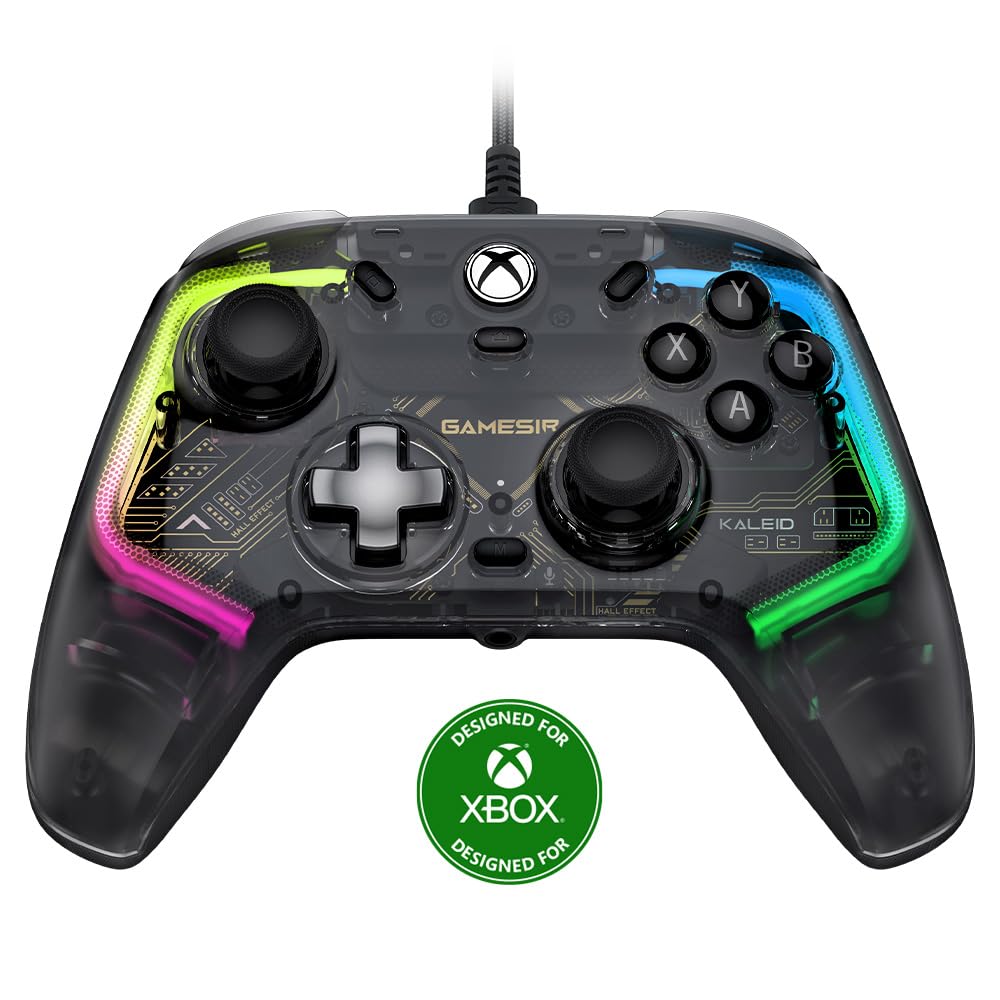
GameSir Kaleid Wired Controller for Xbox Series X|S, Xbox One,Windows 10/11 & Steam, Plug and Play Gaming Gamepad, Transparent Video Game Controller with Hall Effect Joysticks/Hall Trigger
$43.22
Related Products
![Apple Watch Series 11 [GPS 42mm] Smartwatch with Rose Gold Aluminum Case with Light Blush Sport Band – S/M. Sleep Score, Fitness Tracker, Health Monitoring, Always-On Display, Water Resistant](https://bestdealsavvy.com/wp-content/uploads/2025/12/6110Jv9wqeL._AC_SL1500_.jpg)




Product description
The video showcases the product in use.The video guides you through product setup.The video compares multiple products.The video shows the product being unpacked.


GameSir Kaleid for Xbox
Comparison
Transparent
COLORWAY
White
Hall Effect
STICKS
Hall Effect
Micro Switch
ABXY BUTTONS
Membrane
Mechanical
D-PAD
Membrane
Laser-engraved
GRIPS
Laser-engraved
Xbox, Windows 10/11
COMPATIBILITY
Xbox, Windows 10/11
3.5MM AUDIO JACK
Transparent
COLORWAY
Black
Hall Effect
STICKS
ALPS
Micro Switch
ABXY BUTTONS
Micro Switch
Mechanical
D-PAD
Mechanical
Laser-engraved
GRIPS
Rubberized
Xbox, Windows 10/11
COMPATIBILITY
Xbox, Windows 10/11
3.5MM AUDIO JACK
Transparent
COLORWAY
Transparent
Hall Effect
STICKS
Hall Effect
Micro Switch
ABXY BUTTONS
Micro Switch
Mechanical
D-PAD
Mechanical
Laser-engraved
GRIPS
Laser-engraved
Xbox, Windows 10/11
COMPATIBILITY
Switch, Android, Win
3.5MM AUDIO JACK
GameSir G7 SE for Xbox 
GameSir G7 for Xbox 
GameSir T4 Kaleid 
What platforms does it support?
It supports Xbox Series X|S, Xbox One X|S, Windows 10/11 and Steam.
Does it have analog triggers?
Yes, Hall Effect analog triggers with GameSir precision-tuned tech, with 100% response area and best-in-class. There’s also a quick switch to hair trigger mode by holding M + LT / RT for 2s, perfect for FPS and action games.
What is the speciality of the light effects?
In the GameSir Nexus app, a diverse range of custom light effect sets is available for gamers to choose from based on their moods and game types. Additionally, gamers have the option to combine various light effects according to their preferences.
What are the special features of the sticks?
Algorithm-optimized Hall Effect sticks, with 0 Fluctuation, 0 Deviation and 0 Circularity error. You can even easily set 0 Dead,zone and switch between Default and the exclusive “Raw” mode via the GameSir Nexus software.
Are action buttons microswitches or membrane?
Microswitches buttons
🎮 Multi-Platform Compatibility: The GameSir Kaleid works seamlessly with Xbox Series X|S, Xbox One, Windows 10/11, and Steam, delivering a smooth and lag-free gaming experience without battery anxiety.
🎮 Hall Effect: Featuring Hall Effect sensing sticks, the GameSir Kaleid offers anti-drift performance and exceptional durability. The precision-tuned Hall Effect analog triggers provide enhanced control for precise in-game actions.
🎮 Plug and Play: Enjoy hassle-free connectivity with our detachable 3m (9.8 feet) USB-C cable. Eliminate tangled cords and complex setups to enhance and simplify your gaming experience.
🎮 Four Distinct Motors: With four actuators—two in the grips and two in the triggers—the GameSir Kaleid delivers realistic and subtle vibrations, providing precise feedback for impacts, gunshots, and driving over surface irregularities.
🎮 Ultimate Personalization: Showcase your style with the GameSir Kaleid’s four ultra-personalized light effects. Adjust the brightness to match different gaming environments and switch up the look to suit your mood and style.
🎮 Comfort. Control. Compete: The laser-textured design on the grips and triggers ensures a secure hold during intense gameplay. This textured surface provides all-day comfort and prevents sweat or slipping, keeping you in firm control.
8 reviews for GameSir Kaleid Wired Controller for Xbox Series X|S, Xbox One,Windows 10/11 & Steam, Plug and Play Gaming Gamepad, Transparent Video Game Controller with Hall Effect Joysticks/Hall Trigger
Add a review

$43.22
Ryan –
No regrets. Will buy again if needed.
Totally worth it. Better than console brand controllers in every way. Be sure to download the Gamesir nexus app and update the firmware and you won’t have any issues. You can also calibrate the joysticks and triggers easily in the app. My primary use is only on Windows 11 gaming PC.Pros:- Responsive and spam able x,y,a,b buttons.- Triggers and joystick can be calibrated to avoid dead zones via the Gamesir Nexus app- Triggers are accurate as advertised. You can even test it in the app, down to 1% pressure/usage.- Price is better than overpriced console controller- LED’s look great- USB cord is long- Great vibrations. Just as good as console controller. No noticeable difference. May even be better.Cons (if any):- I personally don’t like buttons behind the controller which I accidentally hit while holding but is an added feature that some people may find use.- Can be a new experience for those used to console controllers. Not sure if these buttons are exactly mechanical but they are as responsive. Some may confuse this with cheap feeling (chiclet style?) x, y, a, b buttons.
Nick –
One of the best controllers I’ve ever used, with a few very small issues
This controller is amazing, and I’ve been through pretty much all of the paces as far as controllers for Xbox goes. Elite Series 2, Scuf, Gamesir G7, modded original controllers, and even some PC controllers using an adapter. This beats ALL of them. The Elite Series 2 and Scuf are still the best for the “look and feel”, but as for the function, this controller is the best. The buttons are mechanical, which feel amazing to me. This difference means that instead of the button slowly depressing and then at some point making contact and giving input, a very specific amount of weight will make the button go down immediately, potentially giving you a tiny boost in reaction time. All of the buttons are mechanical, except for the home button, remappable buttons on the back, and the thumbstick buttons. Next, the thumbsticks and triggers. They are next level. The part you’re going to notice most is the thumbsticks, as you’ll be able to lower your dead zone in all games to zero or 1 without getting any drift. That is simply impossible on a normal thumbstick, since the standard margin of error for the dead zone of those style sticks is usually around 7%, meaning you’ll get drift in some direction anywhere under that number. Having no dead zone means every single tiny movement on the thumb stick is very accurate, allowing you to control recoil and aim better. Third, the look and feel of the controller is actually really good! As I said before, it doesn’t beat the Elite 2 or Scuf at all, but the clear plastic is surprisingly thick and has a quality feel. The mobo is on black PCB which looks nice. And the lights are an added touch, with a ton of customization, all the way down to making multiple color “phases” for one lighting profile so you can make all sorts of patterns and stuff. Overall, this controller is going to be the #1 all around controller in my books for a while, probably until Gamesir releases something else or maybe if Microsoft actually decides to make an Elite with hall affect sticks. We shall seeThere is, however, one critical flaw. On the current firmware, my controller sometimes turns my Xbox back on when I shut it down. It seems to happen intermittently so there may be a specific thing I’m doing that I’m not aware of, but that means it could probably happen to you too. The only way to stop this loop is by unplugging the controller. Furthermore, when the console is successfully turned off, the controller won’t wake the console up from sleep unless you plug it in. Pretty annoying but a price I’m willing to pay for a great controller. I’m hoping this could be fixed with a firmware update, but we’ll have to see.
Grim Kolibaba –
Connection and Platform Compatibility
I purchased the GameSir T4 Pro because I already had a GameSir G3W and really liked the build quality, but wanted something wireless. I also wanted a full-sized controller with a few extra buttons. The two additional trigger buttons under the controller work well for N64 and Genesis emulation, as well as FPS games.Personally, I wish the controller were a little bigger. I previously purchased a SteelSeries Nimbus I returned almost immediately because it was far too small to fit my hands. Comparatively, the GameSir T4 Pro is more comfortable. Back when I was a teenager, I used to really dislike huge controllers – like the Dreamcast, original Xbox, and Sega Saturn controllers. They all felt like unwieldy platters I’d sooner eat off of than use as game pads, but even back when I had smaller hands, I could get used to them. As an adult, there’s no getting used to controllers which are too small; the result is always accidental button presses and impercise control. While the GameSir T4 has required some getting-used-to, inaccuracy hasn’t been a problem.Build quality is excellent – just like the G3W. The plastic is thick and the controller doesn’t bend under stress. The button action is smooth, analog sticks are solid and don’t drift, and the Dpad is very high quality. One thing I’ve always noticed with most 3rd party controllers is that the buttons generally slide around or stick in place. That’s not a problem on Gamesir controllers. My only two gripes are that the RB and LB shoulder buttons are placed a little too high for easy access, and the M1 and M2 buttons underneath the controller are very clicky.Okay, I have one more gripe actually; Compatibility. I purchased the M4 to pair with an Nvidia Shield TV Pro, and while it does connect, it’s pretty finicky. While the T4 Pro does list compatibility with Windows, Mac, Android, and Nintendo Switch, each connection is achieved in different ways, which can be a bit complicated. It actually comes with a radio frequency USB dongle that has to be plugged into Android devices to connect. That’s not an issue with my Nvidia Shield because it features standard USB ports, but compatibility over Bluetooth will highly depend on which version of Android your device runs, and the included USB dongle may be troublesome for folks wanting to use the T4 Pro with a smartphone running a recent version of Android.I’ve also noticed that despite a full battery and connection to the RF dongle, disconnects are pretty frequent. If you set the controller down for more than a couple of minutes between game titles, it’ll completely disconnect and need to be resynced. That wouldn’t be an issue if the controller featured a quick-connect button, but GameSir has opted to use cryptic button combos to turn on the controller and connect it with various platforms. Each platform requires a different button combination, and it’s tough to keep those memorized when swapping between Android, Windows, and game consoles like the Nintendo Switch. I think it’s pretty rad the T4 Pro is compatible with so many different platforms, but getting the controller connected and keeping it connected are a bit of an annoyance.I’ve got to say, though – I was surprised when I opened the box and found out the T4 Pro does indeed include a USB-C charging cable. That’s one of the many reasons I’ve returned previous controllers. If I’m spending $35-50 on a game controller, I don’t want to make a second trip to the store for an additional $20 charging cable. Kudos, GameSir! Thank you for being considerate!The Gist: All things considered, I think the GameSir T4 Pro is an incredibly well-built controller and features an attention to detail rarely found in other 3rd party game pads. I could easily be fooled into thinking the T4 Pro was manufactured by a 1st party company like Nintendo, Sony, or Microsoft; it feels that good.Connecting the controller could be easier, and it’d be nice if the RF could work across the 5GHz band since 2.4GHz is usually pretty saturated in tech-savvy households, but I can’t say I’ve ever experienced a disconnect mid-game. I have noticed some input lag on specific platforms like Android, but I believe that has more to do with my Android devices then the controller itself.It’s neat that the T4 Pro supports built-in button-remapping on specific platforms, but good luck doing that without reading the manual every time. I would suspect most players are going to opt for a software remapping solution instead. I do find it a bit troublesome that there’s a potentiality slipping and hitting the wrong combination of buttons while in a game could result in accidental button remapping. What’s worse is that once the controller is accidentally reprogrammed, there’s no simple button combination to reverse the effect.If you’re on-the-fence about a purchase, I would highly recommend GameSir’s entire product line; not just the T4 Pro. I’ve purchased multiple controllers from GameSir, and they’ve all been a joy to use.
Revanth Reddy –
The controller works perfectly. Great value for money
Edwin –
First problems: xbox bottom is constantly flickering and it’s annoying. 2: the had courtesy to put and xbox ultimate game pass inside but it’s region locked to USA and i can’t redeem itNow good things: the most beautiful game controller that i had, it’s plastic but it doesn’t feel cheap. Bottoms are tactile and very responsive. If you come from xbox controller it’s going to take time to use to new hall effect sticks. On xbox my sensitivity was 70 with this is on 20 and still feels faster. I’m happy with my purchase hope it works for long time and next time guys put game pass inside that we can redeem not a regional locked one
Resist The Kalergi Plan –
I was recommended this controller by an American i play Division 2 with on the PC, and i assumed it was a ‘Turbo Fire’ type of controller, as in, you just hold the button down and semi-automatics like pistols and rifles would fire like fully automatics do. Sadly, it’s not that type of ‘full auto’.Forget about the LED lighting. It’s nice, but it’s not what you’re using to play your games. It’s just a nice touch. I have mine set to ‘solid white’ which of course as with any other LED lighting, gives off a very light blue tint, which is fine.My only issue is with the software. The controller still works as it should without the software, but if you want control lighting and set trigger options, and just see what is actually going on, you need the software.Not everyone has a Microsoft store account, and not everyone can get around downloading the files from their own site and cobbling it together.I downloaded it from their site first, and it didn’t work. The program wouldn’t start at all.Then i tried it from the Microsoft store, and again, it didn’t work. Then for some strange reason, i booted up my computer, and all of a sudden, it works. I don’t even know LOLWith everything up and running, i have to say, depending on how long it lasts of course, if it meets expectations, then i’d buy another one of these controllers instead of an Xbox controller.Also i have to say, for a “Made In China” product, to not be put off by this at all. It’s very well made, and i have to also give credit to the sticks, triggers and buttons. Compared to an Xbox controller for PC, this beats the Xbox controller easily. The lentgh of the cable is great too, i actually can just sit back in my chair, which is around 7ft away from the big screen TV, and not worry about the cable one bit.This whole idea of people being wary of products “Made In China” has always been silly. It has nothing at all to do with China or the Chinese folks. Instead, it has everything to do with the Western companies who order things to be built in China to whatever specifications they desire. The complaints everyone has about products made in China, only exist because companies are the ones cutting corners, ordering products to be built with lower quality parts and materials.and that’s that.
Bob –
Some interesting choices but a very capable controller. I hope it lasts many years and so far, I have no reason to believe it wouldn’t.The latency is amazing. XInput reports 0.955ms. I purchased this on the latency claims and the controller delivers. I have now swapped over from the Gulikit KingKong 2 Pro for the 90% reduction in input latency that is definitely noticeable. I opted for the wired T4 Kaleid over the latest wireless Gamesir offerings as they are limited to 250hz polling I believe.Joysticks and triggers are great, smooth, no resistance, definitely hall effect.All the face buttons are micro-switches I believe. So ABXY feel like mouse clicks instead of a standard rubber dome controller face button. Weird but weighted nicely and very responsive. No complaints.The D-Pad switches are softer, feels more like a rubber dome switch setup but all feels good.The rear macro buttons can be assigned to another button or a series of buttons on the fly. Also clicky micro switches but placed nicely and very responsive.Build quality is great. The textured and gloss plastic all looks and feels great. No soft touch coatings to deteriorate and become sticky. The cable is a standard, replaceable type C cable. The type C port is also recessed quite far into the body of the controller to protect the port from cable stresses. Finding a replacement cable may be more difficult but the port should be protected from most drops etc.The screen printing on the exposed internal circuit boards looks great. A shame that the actual electronics aren’t visible but still looks cool.Lighting is bright and colourful, maybe a little excessive but looks great. I setup a slow light profile in the software with a max brightness of 5% on each LED. Less blinding now.The windows software just about works. Windows thinks it has crashed every time it opens. Once it loads and recognises the controller, click into a profile and set the polling rate to 1000hz! The software holds 4 profiles and only one is loaded onto the controller at a time. Each profile can remap each button, adjust joystick and trigger output range (dead zone), vibration intensity, adjustable gyro output and have 4 lighting modes.If you want the reliability of a wired controller, I have found nothing better then this one so far.ORDER PLACED 29 September 2023TOTAL £35.69
Abu Hafsa –
This is my first gaming controller and I’m very impressed that it is compatible with so many consoles and platforms, even the Nintendo Switch and PC games. It also comes with its own phone clamp that securely attached to the controller so no need to purchase seperately, I just wish the clamp had more angle available since its a little too upright for my liking, but nevertheless since I mostly play on my iPad its not a big issue.Gaming is very enjoyable especially first person shooter games like COD is very playable here and the buttons are very responsive, there are even extra remappable buttons and a turbo function just in-case your weapon isn’t an automatic, you can convert it. Though the Turbo function also affects the toggling of the scope, in that it continues to cycle between scope on/off when you keep holding down the assigned button. No other issues encountered. I mostly don’t do lengthy reviews but I enjoyed using this controller very much, I believe it could easily sell for more so it’s amazing that they’re offering it at such an affordable price for its functionalities.UPDATE: i realized that some games are only playable on iOS with this controller. If you have an Android phone, you’ll have to install another app to enable proper controller function, and that is tedious.. still a great game companion though!