
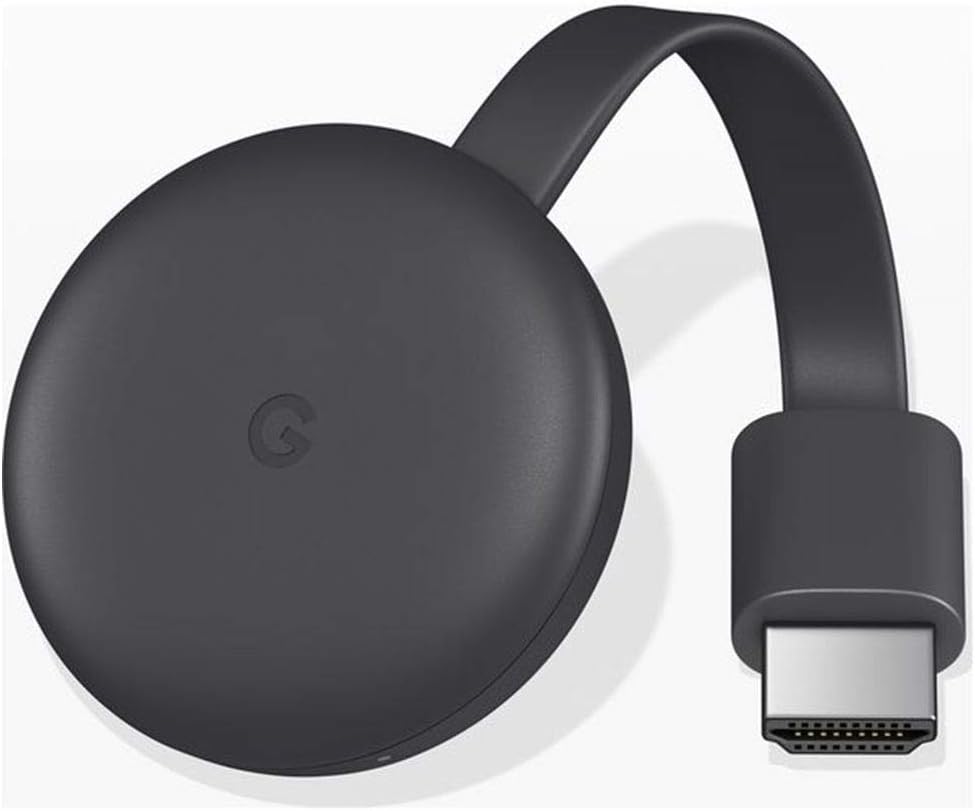
Google Chromecast (3rd Generation) Media Streamer – Black
$29.99
Related Products




Google Chromecast (3rd Generation) Media Streamer – Black
Expand your home entertainment without buying a new TV; Google Chromecast lets you stream your favorites from your phone, tablet, or laptop; no remote needed
Chromecast is easy to set up up; just plug it in, connect to Wi-Fi, and start streaming to turn your TV into a smart TV; it works with almost any TV that has an HDMI port
Works with the apps you already know and love; enjoy shows, movies, music, games, sports, photos, live TV, and more from over 2,000 streaming apps in up to 1080p
With Chromecast, you can stream, pause, play, or adjust the volume right from your phone with just a tap; while you’re streaming, you can still use your phone as you normally do
Mirror your laptop screen or turn your tablet into an even better entertainment system; surf the web or see your media on the big screen

Amazon Customer –
Streaming quality
Bought this one is for a while but still love when i use it. Great for entertainment & ease for use. Good streamming
Dave L –
Just as good as the first revil.
I ordered this to update to the latest version and because my smart tv doesn’t have Chromecast built in. The box it came in looked like it came off the shelf. Brand new condition. You can see its from Japan. Not problem as the instructions are easy to understand. If your new to Chromecast the best way to install the app on your tv after you hook it up to your hdmi port and usb power is to install it through you google home app. Make sure your tv is on the right hdmi input that you hooked up to, Once inside the app all you have to do is let the app find your Chromecast, when it’s found just fallow the on screen prompts until setup is finished. That’s it. Just remember when you want to use Chromecast you have to switch to the hdmi it is setup on. It works flawlessly.Hope this helps. Enjoy.
Alec –
Seamless Setup and Good Quality
This product has, hands-down, the most seamless and effortless setup I’ve ever experienced, despite the packaged instructions being entirely in an Asian language. There are English instructions online, and you don’t even need instructions if you’re using the Google Home app. When I opened my Google Home app, it immediately found the device without any user input from myself and I was able to set it up within minutes.The streaming quality is quite good by my standards and I haven’t noticed any significant buffering or image quality issues yet. The only complaint I have is that it does take a decent bit of time (20-60 seconds) to actually start streaming once you cast to the device. Likewise, any updates you make (pressing pause/play, rewind/fastforward, etc.) seem to take a little bit of time to take effect as well.
JMilwaukee –
Third Generation is Terrific!
This Google Chromecast third generation is always a win! We have one on each television in our home. They are super easy to set up and the connection into the back of the television is secure. I say this because when I dust the back of the television, the Google Chromecast has never fallen out. This is a win!
Justin M –
Unreliable and very glitchy.
Restarts multiple times daily for “updates” or just randomly drops the connection to your phone or internet.Update: It’s going in the trash. Each streaming service has their own glitches when linked to the chrome cast. Sometimes you can pause a show with either the streaming service app, the apps notification bar or the chromecast bar, but usually not the first one you try. In order to rewind a program you have to disconnect from the TV, then rewind on your phone, wait for playback to resume and then reconnect to your TV or else you will wind up with a Neverending loading bar that requires a power reset of the chrome cast. I give up, I’m gonna try roku.
Miguel Eduardo Vilar –
Some issues when casting from web players
I first bought it because My Samsung TV didn’t have the crunchy roll application so I needed to cast it from my cellphone, and that worked without an issue, the only complaint that I have is that with some web players, the cast won’t work, it will just get stuck no matter how many times to try to press “Play”/”Resume”.
Beatriz –
Buenísimo
Bueno
W. V. –
Cast from your device to your smart TV.
Use this to watch a video stream from a smartphone, laptop or tablet on a smart TV. (Note that this version of the Chromecast only supports 1080p resolution. If your TV is better than that, get the latest version.)Plugs into your TV’s HDMI port and can be charged from the TV itself if the TV has a charging USB port.By selecting that HDMI port for the TV’s source, you can watch whatever you are sending to the chromecast device from your iphone etc.All the streaming apps will display a “cast” button that you can use to send them to the Chromecast. It doesn’t work well (if at all) from video players in browsers, but does work with various apps on an iphone like YouTube, Netflix, and Amazon Prime Video.My instructions were all in Japanese, but it was simple enough to figure out how to use it without being able to read them.
Amazon Customer –
This is Made in USA product and sincerely i was amazed that i received a USA product. Good quality. Works very well where i can cast YouTube from my mobile to my LED Tv. The plug of the adapter is US style. So please buy a travel adapter or plug as per UAE requirement else you cannot power onnthe product.
Sinan BİLEN –
Orijinal değildir Çin ☹️😢☹️
Renzo –
Dopo averne provati (e resi) due di altre marche, finalmente con questo ho risolto il problema e ottenuto il servizio che cercavo, cioè trasmettere immagini e video dallo schermo del tablet (ma anche dello smartphone) a quella della tv con buona qualità di immagini. L’ho acquistato già usato (nuovo aveva un costo parecchio superiore) ma per ora, dopo diversi utilizzi, funziona egregiamente. Consigliato.
Balachandran –
No remote. Not value for the money.
Ahmed –
so useful