

IKPEK 6 Pack Analog 3D Joysticks Replacement for PS5 Controller, Joysticks Part with Repair Screwdriver Kit for Playstation 5 DualSense Controller
Related Products
![Ailun Screen Protector for iPhone 16 / iPhone 15 / iPhone 15 Pro [6.1 Inch] Display 3 Pack Tempered Glass, Dynamic Island Compatible, Case Friendly [Not for iPhone 16 Pro 6.3 Inch].](https://bestdealsavvy.com/wp-content/uploads/2025/12/71S7Ej-DfQL._AC_SL1500_.jpg)
![iPhone Charger Fast Charging 2 Pack Type C Wall Charger Block with 2 Pack [6FT&10FT] Long USB C to Lightning Cable for iPhone 14/13/12/12 Pro Max/11/Xs Max/XR/X,AirPods Pro](https://bestdealsavvy.com/wp-content/uploads/2025/12/61D9UFpTAEL._SL1500_.jpg)


Product description

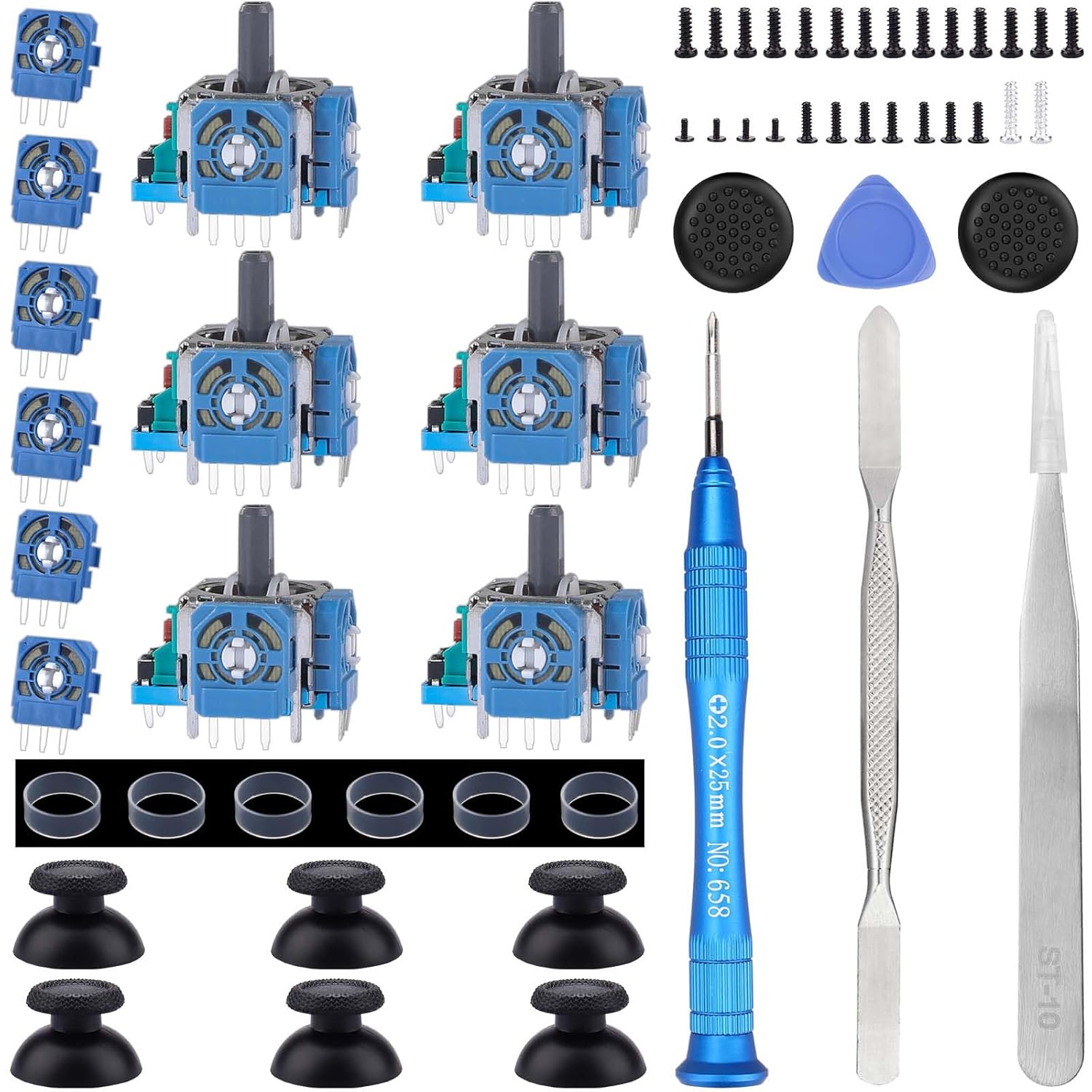
What you get –6 x Joystick, 6 x 2K3 Ohm Potentiometer, 6 x Thumbstick Cap, 6 x Protective Ring, 2 x Thumbstick Grip, 27 x Screw, 1 x Metal Cross Screwdriver, 1 x Metal Tweezer, 1 x Metal Pry tool, 1 x Pry bar.


Protective Ring — 0.1 Ultra-thin protective ring compatible with PS5, PS4, Switch, Xbox controller.
【Compatible model】– Replacement analog joystick compatible with PS5 Controller Only (NOT FIT for PS4 Xbox One Xbox One S/X Controller).
【What you get】Package include — 6 x Joystick, 6 x 2K3 Ohm Potentiometer, 6 x Thumbstick Cap, 6 x Protective Ring, 2 x Thumbstick Grip, 27 x Screw, 1 x Metal Cross Screwdriver, 1 x Metal Tweezer, 1 x Metal Pry tool, 1 x Pry bar. (You also need a soldering tool which isn‘t included in the kit.)
【6 × 3D Analog Joystick】– Ikpek joysticks replacement’s model number is EL6 for PS5 Controller, and the Potentiometer is 2.3K ohm. Repair your worn-out, damaged, drift, blind spots, dead spots, can’t center analog joystick . Quality Guarantee — The joystick replacement was test before shipment. And it is made of high quality metal, ABS plastic material. Make it has longer working life and used more accurately.
【6 x 2K3 Ohm Potentiometer】Design for PS5 controller — Solve Most Joystick Problem: Stick drift, stuttering, dead zones, creeping, blind spots, non centered.
【6 × Thumbstick Cap + 27 x Screw for PS5 Controller + 6 x Protective Ring】Thumbstick Caps — Made of premium ABS material, enduring and practical. Ideal replacement for your broken or cracked controller thumbsticks. Screws — Replacement of screws can better help you repair the controller. Protective Ring — 0.1 Ultra-thin protective ring compatible with PS5, PS4, Switch, Xbox controller,it will protect controllers from wear and tear, avoid powder, extend the life of controller.
3 reviews for IKPEK 6 Pack Analog 3D Joysticks Replacement for PS5 Controller, Joysticks Part with Repair Screwdriver Kit for Playstation 5 DualSense Controller
Add a review

Amazon Customer –
Solid kit – first time fix and new potentiometers work great
Normally I don’t give a 5, but I can’t complain about this kit. Got really tired of having to fix the drift by opening up the controller, bending back the potentiometers, and cleaning them. First it was cleaning them once a year, then once every couple of months. Then after the 5th cleaning, the right controller would not move all the way to the left even though the stick is all the way there.Instead of replacing both gimbals assemblies, I just bent back the four potentiometers and replaced them. Works great, no drift. (I will come back to edit this review if the controllers start drifting again).Anyone who does this fix needs to make sure they have:- Flux- Solder/Solder Gun (30W)- Solder Wick- Isopropyl Alcohol – for cleaning up the fluxPro Tip: The PS5 factory solder has a rather high melting point compared to the stuff you bought for this project. I’m not into heat guns or that solder sucker tool.1. Bend the old potentiometers back and forth until they snap off.2. Drop a dab of flux on the solder point.3. Cut a piece of wick and coat it in Flux.4. Apply wick on top of point and heat with gun.5. Repeat 1 through 4.6. Occasionally re-solder the point – I know this is counter-intuitive but your solder will “mix” with the original solder and will actually make the wick more effective.7. Eventually the remaining piece will wiggle and you can pull it out with the tweezers8. Be patient.Good: The screw driver is slightly magnetic which is nice for pulling out the screws. The tweezers are fairly hefty!
Stan H –
Stick drift issue fixed!
The tools were much higher quality than expected. It has a lot of replacement pieces, but I only needed to use one of the potentiometers (white disc) to fix my stick drift. Just watched a YouTube video and followed the instructions. Pretty easy. No soldering required. It saved me from buying a new PS5 controller.
VDS Vital Link –
Good quality and includes everything for the repair
This joystick replacement kit for the PS5 controller worked great for me. It comes with 6 analog sticks and the screwdrivers needed to complete the repair—no extra tools required.The joysticks are compatible with the DualSense controller and feel responsive after installation. I was able to fix two controllers that had stick drift, and now they work like new.Installation takes a bit of patience, but if you follow an online guide, it’s totally doable at home.Great option for anyone looking to repair their controller instead of buying a new one.