
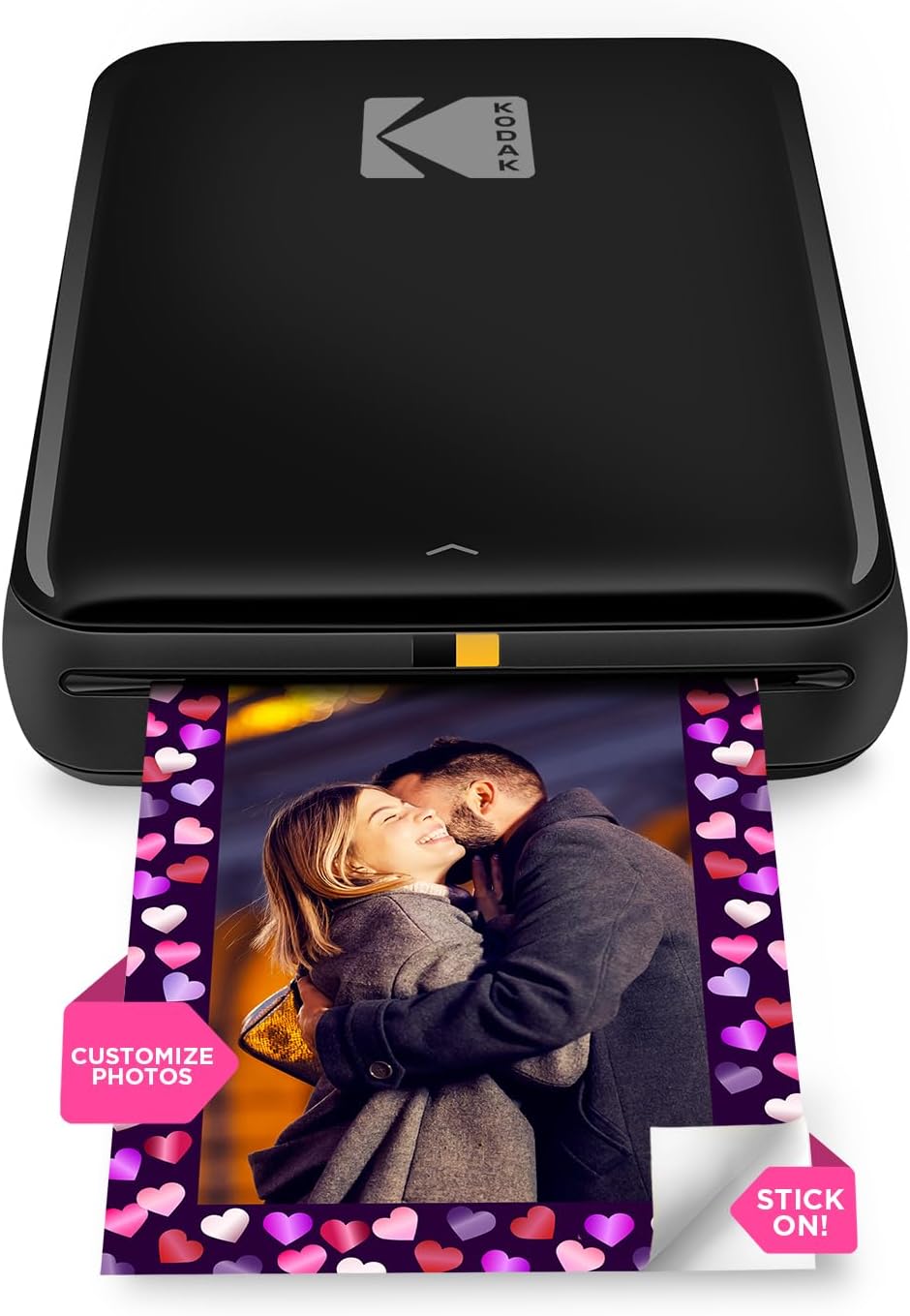
KODAK Step Instant Smartphone Photo Printer – Portable Mini Color Wireless Mobile Printer – Zink 2×3” Sticky-Back Photos – Bluetooth Compatible with iOS & Android Devices – Fun Editing App – Black
$79.99
Related Products
![JISULIFE Handheld Mini Fan, 3 IN 1 USB Rechargeable Portable Fan [12-19 Working Hours] with Power Bank, Flashlight, Pocket Design for Travel/Summer/Concerts/Lash, Gifts for Women (Pink)](https://bestdealsavvy.com/wp-content/uploads/2025/12/51E76z7oaWL._AC_SL1500_.jpg)



Print life one step at a time!
Whether you’re an avid traveler, social influencer, nostalgic scrapbooker or on-the-go photographer, one thing is certain—printing pictures takes too many steps! Now, with the KODAK Step Printer, printing full-color photographs is faster and easier than ever. Just pair with any Bluetooth- or NFC-enabled smart device, and stunning full-color photo prints are in your hand in under 60 seconds. ZINK Zero Ink technology eliminates the need for expensive inks, toners and ribbons, delivering cool 2”x3” photographs you can peel and stick to any surface.
Photos come out clear, bright, colorful and covered with an extra layer of protective coating to prevent smudges, rips and water damage. The KODAK app also lets you customize photos far beyond the usual ‘flip’ and ‘rotate’ of your smartphone. Use our extensive editing tools to apply flattering filters, cutesy stickers, decorative frames and other personalized flair. With mobile printing so quick and simple, you’ll be jamming at concerts, weddings, parties—everywhere but the actual printer!
Includes 5 Sticker Frames – Patterns may vary.
STEP UP YOUR PRINTING GAME | No more making plans to print tomorrow. | Kodak step printer connects to any ios or android smartphone, tablet or similar device [via Bluetooth or NFC] so you can print pics instantly | Turn your selfies, portraits, social media posts & other images into physical photos
AMAZING ZERO-INK TECHNOLOGY: ZINK innovation eliminates the need for pricy ink cartridges, toners or ribbons. 2” x 3” sticky-back paper with embedded dye crystals delivers high-quality, durable, affordable, beautifully detailed prints that are resistant to moisture, rips, tears & smudges
FULL EDITING SUITE VIA APP | Download the free Kodak App to create collages & customize your snaps with stunning filters, interesting borders, cool stickers, funny text & other personalized flair; Edit photos in your camera roll, then send to step for instant printing in less than 60 seconds
TAKE YOUR PROJECTS TO GO: Skip the Computer Connections, Messy Wires & Clunky Equipment. Our palm-sized printer weighs less than a pound, sets up fast & delivers gorgeous prints you can peel & stick everywhere. Great for decorating a fridge, laptop, locker, scrapbook, notebook & more
CUTE, COMPACT & COLORFUL: Step printer is designed for photo-loving influencers & crafters of all ages & skill levels. Portable, lightweight device features built-in lithium-ion rechargeable battery Prints 25 Photo on a Full Charge: Available in a Variety of Colors—a Fantastic Anytime Gift Idea.
Form factor: Premium Photo Printer
Max print speed black white: 1.0 pages per minute
Max print speed color: 1.0 pages per minute
Printer technology: Zink Technology
13 reviews for KODAK Step Instant Smartphone Photo Printer – Portable Mini Color Wireless Mobile Printer – Zink 2×3” Sticky-Back Photos – Bluetooth Compatible with iOS & Android Devices – Fun Editing App – Black
Add a review

$79.99
KS –
Love it! Amazing!!
Totally in love with it. It comes with 5 sheets starter pack. Easy to use, had to charge it completely before first use. I ordered a pack of 50 sheets, we can peel off the back cover and stick it easily. Though I haven’t used it in that way as of now!! Amazing for those who love to create a scrapbook or memory book or display cute little pics anywhere on the room ❣️. Already in love with it. Colors won’t be exactly how it seems to be on the phone but a definite buy if you are not much in to checking on 100% color match. Look of the pics is too good to fail in love. No paper jam and smooth operation for sure. Comes with a USB for charging, it’s *not* a C-cable so have to ensure you keep it properly (unless you have the old charging pins still 😉). I just got it yesterday so it’s a quick review after 1-2 use and around 6-7 prints.
aokinak –
Gwammy’s toy
I am driving across country right now. I like to send postcards to my grands showing them where I am to promote conversations about this wonderful country that we call home. I take a picture, print it out on this little printer, stick it on the postcard, add a few lines telling why it’s cool and then mail it off! The print is as good as the photo and the printer is so easy to use that even a 71 year old can use it without having to call the IT guy in the family. I bought a little case for it to keep it safe. I can definitely recommend this little printer if you’re looking for little prints.
GoGirl66 –
Love it
Love this travel size printer, easy to setup, paper quality color prints well and noise level low, wonderful product! This could make a nice gift especially for someone that love taking pictures!
Starseed –
Good choice
Great little printer. Pictures are so cute and fit perfect into a 2.5×3.5 frame. My only complaint is they come out a little darker than the original picture. I tried using the edit and adjusting the brightness but that does not work, it just glares out the entire picture.
P –
Great for casual journaling
I ADORE my little picture machine. I just need it to add pics to my journal, and it’s so much easier than having to go to Walgreens or something.The quality is about what you would expect from a small and relatively inexpensive printer but I’m not looking to hang gallery art here, it’s more than good enough for journaling. I had a blast and used up all fifty of the extra papers I got on the first day.I have noticed that the color tends to lean toward pink by default, but if I take a second to edit the color values of a picture to be a bit blue-ish before printing then I can get the original photo color pretty accurate.After the first ten there came a bit of streaking but it went away.Anyway, highly recommend. It’s easy to use and just what I need for daily, informal pictures.
sldnac3857 –
Kodak pictures for cell phone
This is worth the money. The pictures are small but very clear. Set up is easy.
Brunn –
Broken after a month, Kodak will offer no solution.
Update: Do not buy! When this product breaks, Kodak will do nothing about it. When I contacted them, their only suggestion was for me to purchase more paper to try and follow the same cleaning procedures I had already done, which was how I used up the last of the paper I already had for it. Basically, I told them my product was broken and did not work, to which they suggested I GIVE THEM MORE MONEY to buy accessories for a product that is broken and does not work. Uhm, no thanks? And now that I’m directly asking for a refund, they will not respond to any of my messages. As far as I’m concerned, this product is a scam. Kodak has scammed me, then tried to scam more money from me on top of that, and their customer service is terrible. Do not buy this.Also, on further research while trying to fix this broken hunk of junk, I discovered that the zinc paper photos apparently fade extremely quickly compared to other photo options. So it was never a good option to use in my journal anyway. Great.Original review below.I loved this when I first got it. The tiny photos printed on sticker paper were exactly what I was looking for to use with my journal, and it was great fun being able to add memories to it with such ease, sent right from my phone to the printer. Everything was perfect.Then suddenly after about a month, it just kind of stopped working? It constantly reads as out of being out of paper, despite having plenty. Adding more or less paper doesn’t help. Gently flexing the paper to ensure that it is flat doesn’t help. I followed the instructions from Kodak’s support page to clean the roller inside, which basically involves wasting a sheet of Zinc paper, uncovering half the sticky on it, and running it through so the sticky side can pull dust and debris off. Having only had the device around a month and keeping it in a case when not in use, there wasn’t much debris to clean out, and it was a waste of time and paper that solved nothing.I can sometimes get the printer to work if I hold it upright at a bit of an angle, so that the paper ejects out the bottom. Obviously not ideal, or the way it’s intended to work. And it also does nothing to help the streaks the printer is now leaving on my photos, which aren’t present in the original images. Either a single or white line, or many, as if it just didn’t print in those spots.I’ve used up all the paper I had for it, a lot of it while trying to sort out the sudden issues with the device, and am now faced with buying more expensive paper for a printer that may or may not work, and now works badly when it does print. I have contacted Kodak’s support, and will update if a resolution is reached. I absolutely do not recommend this product, as it went from perfect to essentially useless in a month.
A. Hageman –
Love it
Love how well this prints the images are clear, it’s easy to connect too. We originally bought a cheaper non brand one, and this is much more durable and the photos print much better. Definitely worth the splurge, love that the paper is peel and stick it’s great for scrap booking
Eric –
Een fotoprinter waar je fotootjes mee afdrukt (paspoortformaat) Kan je bewaren en bekijken bv in je portefuille .Je installeert gewoon de app kodak step , en je laad snel op met de bijgeleverde oplader .Alles in kleur met het beste resultaat!Een printer om U tegen te zeggen! Fantastish!
Maria –
my daugther loves it ❣👍but the film is a Little bit pricey 🥲
Elizabeth W. –
Easy to use and connect to mobile app. It’s about the same size as a small portable hard-drive, and lightweight.Picture quality is great, not brilliant but perfectly fine for a relatively cheap mini photo printer. If you’re looking for something that prints top quality photographs, then a printer that uses non-zinc paper, like ones made by Canon would be better, though they are pricier.To place the photo paper in:Slide back off the printer and place the paper in with the blue calibration card first facing down and then the photo paper on top (back facing down – ie. plain white side facing up)App is downloadable on the AppStore using the QR code found in the quick start guide. There are several other Kodak apps, so make sure it’s the Kodak Step Prints app.NB: if you don’t have the QR code to hand, then simply connect to the printer via Bluetooth via your mobile settings (press and hold power button on the side of printer until white light shows) and it will take you to the AppStore link.Charges via USB, but no plug adapter is included, so will either need to plug directly into a USB charge socket, or use any other plug adapter (phone, camera etc) that has a USB port.Can’t speak for Android, but have had no problems connecting to the app using iOS. There size of the photos are 2×3, so may need to edit photos, but can do so easily in the app which has a useful indicator of what will be printed. There are other editing tools within the app and the ability to add borders too. Also included with the pack are five sticky borders that you can stick onto the photo.Very pleased with this so far! Only downside is that there are only five photos sheets included so will need to purchase more!Edited to add more info:Still going strong several months later – occasionally a thin line will appear on the prints. If this happens, just recalibrate the device with the calibration card.Also, the printer will take any 2×3 zinc paper so it doesn’t have to be the Kodak stuff. Only thing to note here is that you’ll need to keep the original blue Kodak calibration card as the other cards (i.e. Canon do not work).
İzmir –
Ürün İzmir’e 1 haftada teslim edildi. DHL Express ile geldi, gümrükte 2 3 gün kadar bekledi ve %30 vergi ödemem gerekti.Benzer ürünler burada çok daha pahalı, vergi ile birlikte bile daha uygun oldu.İçinden 5 tane fotoğraf kağıdı çıkıyor. Telefona indirilen uygulaması ile fotoğraflar editlenerek baskı alınabiliyor, güzel ve kullanışlı.
Pao –
Llego mucho antes del tiempo estimado de entrega. Es muy ligera e imprime las fotos muy lindo. El único defecto que le veo es que el instructivo es muy general, tuve que buscar un tutorial para ver cómo es encenderla porque no encontraba cómo, incluso llegué a pensar que no servía 🥴