

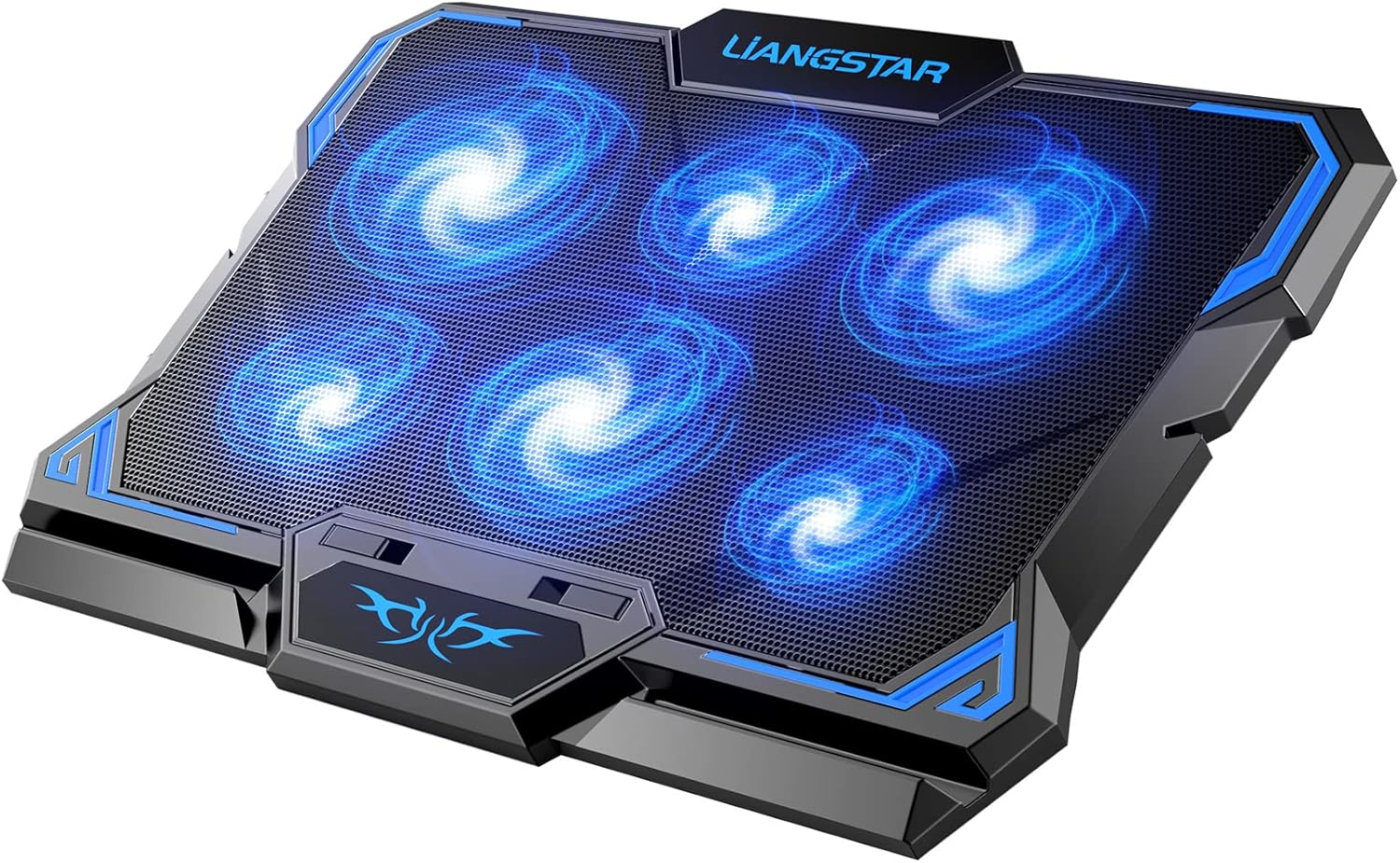
Laptop Cooling Pad, Laptop Cooler with 6 Quiet Led Fans for 15.6-17 Inch Laptop Cooling Fan Stand, Portable Ultra Slim USB Powered Gaming Laptop Cooling Pad, Switch Control Fan Speed Function
Related Products





Product description


 Two separate switch control fan speed
No.1 Swith control 3 big fans speed from 0 to max freely.
No.2 Swith control 3 small fan speed from 0 to max freely.
 Two USB ports allow to connect other devices
Provides extra USB ports to allow you plug extend devices like mouse, keyboard, headset stand.


✔【6 Super Cooling & Quiet Fans】Laptop cooling pad has 6 noise-free fans, with blue LED, not only beautiful but also show fan is working. Very quiet rapid cooling effect prevents your laptop from overheating under different use situation.
✔【Adjust Fan Speed & Cooling Pad Height】Our laptop cooling pad 6 fans can work together, or 3 big fans and 3 small fans run separately, two separate switch control fan speed from 0 to max freely. The pad have 2 height for you select, free adjust suit different laptop.
✔【Unique USB Port Design】Laptop cooling pad with built-in two USB ports, allows to connect other USB; using nylon braided cable, more cool and durable, also easy to set into storage box.
✔【Ergonomic Design & Non-Slip Baffle】Laptop cooling pad with ergonomic design is comfortable in all-day using. Laptop cooler stand can be hidden when you don’t use it. Two non-slip baffle can prevent your laptop following down on slanting surface. Also have enlarged and thickened anti-skid pad at the bottom keep laptop stable.
✔【Wide Application & Support】Our laptop cooling pad suitable almost all 12”- 17.3”notebook, such as Dell, MacBook Pro, Alienware, ThinkPad, Lenovo, HP, ASUS, etc. Just feel free to contact us when have any question about laptop cooler.
9 reviews for Laptop Cooling Pad, Laptop Cooler with 6 Quiet Led Fans for 15.6-17 Inch Laptop Cooling Fan Stand, Portable Ultra Slim USB Powered Gaming Laptop Cooling Pad, Switch Control Fan Speed Function
Add a review

Sarah –
Solid Cooling Pad With Adjustable Fans and Impressive Durability for the Money!
This laptop cooling pad is the second one that I’ve purchased from this brand and seller, and I returned to this brand for a reason. My first one (the multi-colored fan light version that is also available from this same seller) worked beautifully for over four years, which is impressive compared to other fans I’ve tried (that barely lasted a year). That kind of reliability matters when you work long hours like I do. I’m self-employed and often on my laptop all day long. My laptop computer runs hot enough to fry an egg (or at least make your skin very red and uncomfortable), and in Carolina heat, that’s the last thing anyone needs.This cooling pad does the job. It has six individual fans — three large and three smaller ones spaced perfectly to cool the entire base of my laptop. You can choose to run just the three large fans, the three smaller ones, or all six at once, depending on how much cooling power you need. The dual on/off dials on the back make it easy to control. The fans are quiet, steady, and well-built. The whole unit feels solid.I’ve traveled around the globe with my previous model (it travels well) and I have dropped it more times than I care to admit. No matter how hard I (accidentally) tried, it still held up. This cooling fan feels just as durable and actually feels like it may be more powerful than the last one (which only had five fans). Though I admit that I forgot that I could adjust the fan buttons on the old model too, so I may not have had it on full power since I have not intentionally changed them since I first started using the last one (4+ years ago).Pros: powerful cooling, adjustable settings, quiet operation, and great durability. It is excellent quality for the price. It has little pop up prop arms (I don’t know what they are called) that you can use to prop your laptop up a little bit for added space/improved airflow.Cons: none so far.Overall, this cooling pad earns a strong ⭐⭐⭐⭐⭐ from me. It’s dependable, effective, and a must-have if your laptop tends to run hot or overheat.
Annonymous –
A powerful, near-silent cooling solution for serious laptop users
This laptop cooling pad is a fantastic investment for anyone who relies on a 15.6-to-17-inch laptop for demanding work or gaming. It does its core job—keeping your laptop cool—with exceptional efficiency and without the annoying noise that plagues many other coolers. The adjustable stand and extra USB ports are valuable additions that make this a genuinely useful accessory. If you need a powerful, quiet, and reliable cooling pad, this one is tough to beat.
Timothy B. Elliott –
Great Cooling Pad with Adjustable Fans
This is a solid cooling pad, especially for the price. It fits my 16″ gaming laptop perfectly and does a great job keeping it cool during longer sessions. One of the standout features is that you can control the fan speed in two independent zones, which lets you fine-tune cooling based on where your laptop gets hottest. It’s low profile, doesn’t raise the laptop too high, and the fans are relatively quiet even at higher speeds.My only complaint is that the RGB lights can’t be turned off independently, they always come on when the fans are running. It’s not a dealbreaker, but it would be nice to have a no-light mode, especially when using it in a darker room.Overall, very efficient, quiet, and customizable, and I’m happy with the purchase. Would give five stars if the lighting had its own control.
Frank Santanella –
Hot laptop? Buy it. Works great!
TLDR : It’s definitely worth the purchase and does its job perfectly.I recently got into computer gaming for the first time. I quickly realized my computer gets pretty hot really fast, despite the massive intake and exhaust for the internal fans. A friend highly recommended I get a cooling fan so I did some shopping. I played for an hour or so tonight and when I shut the game down, I left the fan running while I perused through steam to see what was on sale. No more than 5 minutes later, I couldn’t even tell the computer was just running a massive game. It keeps it significantly cooler during play as well. Before using this fan, my hands would be uncomfortably hot on the keyboard. It obviously makes some noise, but it’s not even half as loud as the fans in the computer itself. You can’t see the lights in the fans while your laptop is on it,, but they do look cool and make it easy to ID which fans are currently running. The added height is also nice when gaming on the desk. If you game on a laptop or use it frequently and it gets hot on you… hands down, you should have one of these.
Amazon Customer –
Marvel Rivals was burning up my laptop
This cooling fan works REALLY well for my laptop. My laptop has adjustable fan speeds itself but I noticed that when playing marvel rivals that my laptop (even on turbo speed) was too hot to touch, so I bought this to help it out and it keeps it at a comfortable temperature! No other game was causing that or even needed to be at turbo speed, which I have had this laptop since 2019 and have played Xbox, epic, steam, EA, and etc platforms on it without issues. If you are wondering if this is the cooling fan for you then I would highly recommend you get it! The sound can be loud, but it was also combating my turbo speed laptop fans, so I feel that is okay with me. The lights on the fans aren’t noticeable, so no worries on that.
Rowan –
Very affordable and works wonders for my gaming laptop as it was burning my legs when I set it down on my legs while gaming, mind you I played not crazy high rise games… but this helps it from overheating by a lot and was a worth while purchase as I had to choose between a cooling pad and a mouse at the time, I got the cooling pad and it worked wonders.
Ahmed –
مناسبه وليست جيده
Eduardo –
Cumple con la función básica
Ferdinand P. –
Construction is sturdy enough, yet light.The six fans are quiet, not noticeable at all when playing games.Playing games without the cooling pad, the laptop becomes very hot, too hot to touch. But when the cooling pad is turned on, the laptop cools down, barely warm to the touch. Of course, the room temperature has to be cool, otherwise the fans will simply blow hot air around.The provided USB cable is about 70cm long (not mentioned in product page).The “About this item” section is incomplete. You need to scroll down to find more technical details in the “Product description” section. It says that the required input power is 4.5W (see also attached photo). Since USB operates at 5V, the current required is 0.9A (900mA). That means the USB cable should not be connected to the laptop USB port that produces only 500mA, otherwise the fans will not operate at full speed. So I connect it instead to a power bank that can regulate its output to meet the required 0.9A.