
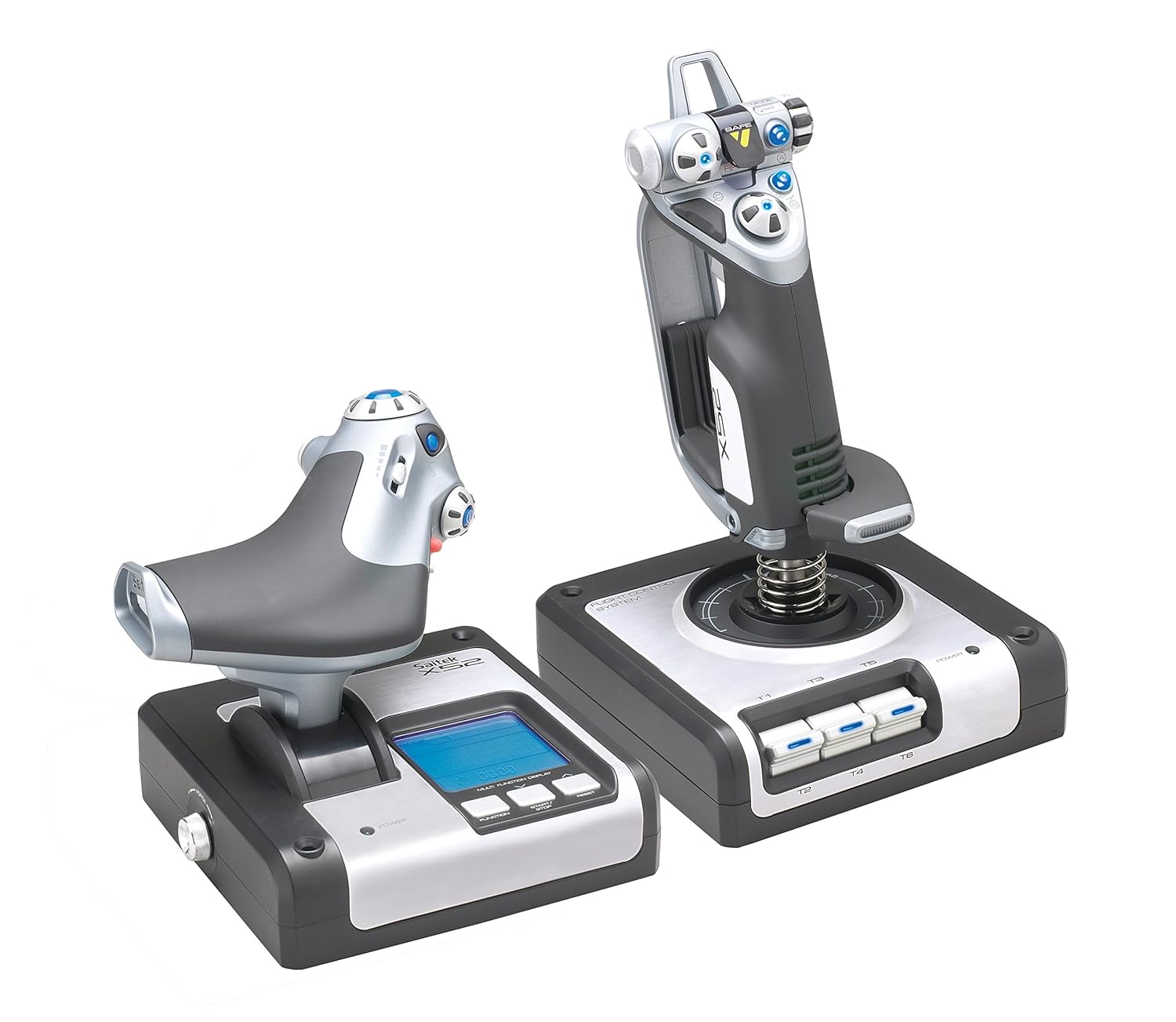
Logitech G X52 Flight Control System – Standard Packaging
$169.99
Related Products


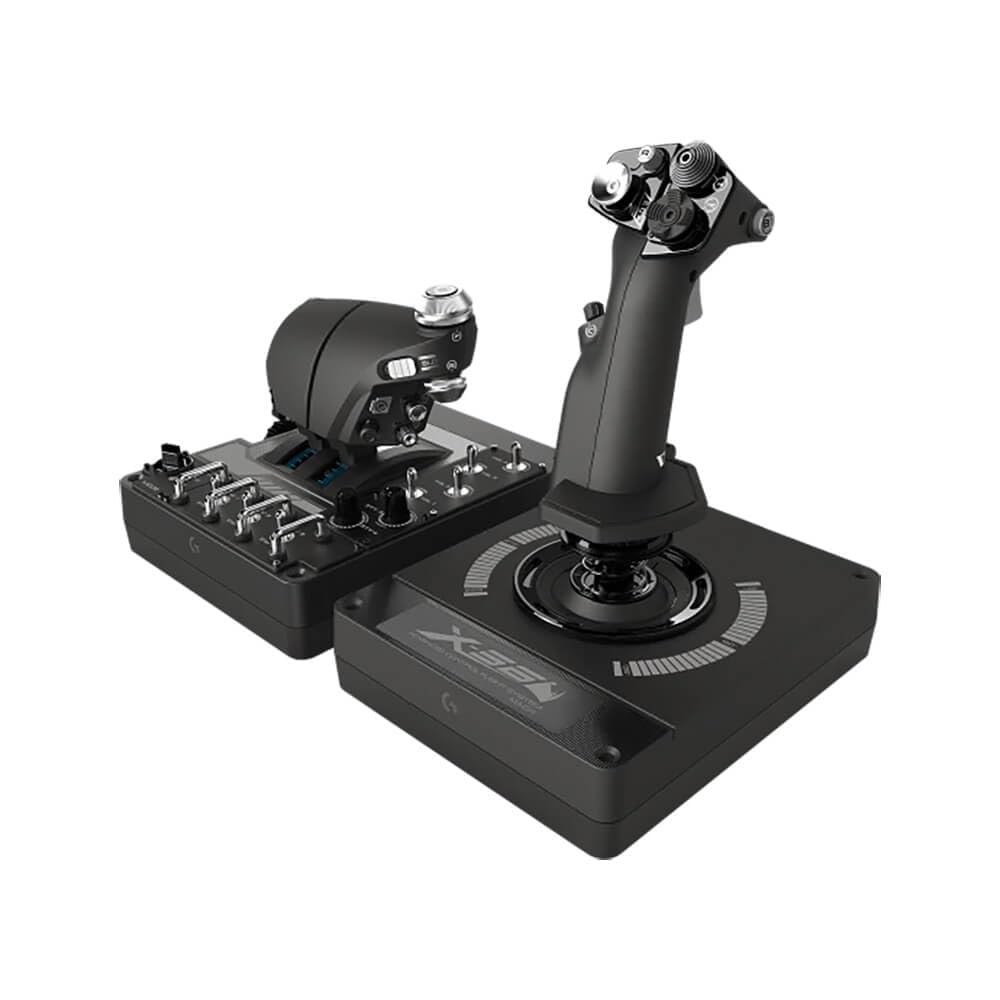
All the features of the x52 combined with premium engineering and advanced multi-function display (mfd) for real flying interaction. 2 dedicated mfd buttons and 2 rotary dials with in-built buttons to control additional game functionality; mfd displays data directly from games, including radio stack info from Microsoft flight Simulator 9 and 10; Software development Kit included for creating game-specific programs to interact with the mfd; choice of red, Amber or green button illumination; illuminated buttons and mfd – ideal for low light environments; throttle unit illumination varies depending on throttle position; enhanced mfd backlighting; improved cable management system. Joystick: precision centering mechanism, non-contact technology on x and Y axes and constant spring force reduce free play, improve control and increase durability; 2-stage metal trigger; 2 primary buttons in 1 convenient position; 4 fire buttons including Missile launcher with spring-loaded safety cover for instant access; conveniently positioned metal Pinkie switch provides shift functionality to double up on programmable commands; 2 x 8-way Hat switches; 3D rudder twist; 3-position Rotary mode selector switch with LED indicators; 3 spring-loaded, base-mounted toggle switches for up to 6 programmable flight commands; 5-position handle adjustment system to suit all hand sizes. Throttle: progressive throttle with tension adjustment, detents for Afterburner and Idle; 2 fire buttons; scroll wheel with built-in button; mouse controller/ Hat switch with left mouse button; 8-way Hat switch; 2 x Rotary controls; smooth-action Slider control; clutch button Initiates ‘safe mode’ to allow on-the-fly profile selection, or to display button functionality without activating. Compatibility: Windows 10, Windows 8.1, Windows 7, XP/XP64, and Vista
Advanced multi-function display (mfd) for real flying interaction. 2 dedicated mfd buttons and 2 rotary dials with in-built buttons to control additional game functionality
Joystick with precision centering mechanism, non-contact technology on x and Y axes and constant spring force
Progressive throttle with tension adjustment, detents for Afterburner and Idle; 2 Fire buttons
Works with: Windows XP, XP64 and Vista (all versions) and Windows 7, Windows 8.1, Windows 10 or newer
Stick dimensions is 6.7 long x 6.7 wide x: 10.9 high in inches, weight is 2.3 pounds and cable length is 4.6 feet. Throttle dimensions is 6.7 long x 6.7 wide x 7.5 high in inches, weight is 1.6 pounds and cable length is 4.6 feet

Douglas –
Yea I got it for Elite Dangerous
This is a first impression review with little use time. Things may change with more stick time.First off, Gees these things are expensive. It’s been years since I bought a flight controller for a game but I don’t remember them being this expensive. So this thing had some pretty big expectation. So first off I was a little disappointed when the box arrived and saw all that the shipper did was put a label on the flight controller box. Given that the box was then left on my front door step for half a day letting anyone walking by that it was a ~$300 flight controller sitting there. Fortunately the porch pirates where busy in another sector so my package was sitting there when I got home.Setup was a little painful but not for the reason you may expect. The USB cable on this does not come off the flight stick but off the throttle control. Unfortunately for my setup my computer is on the right side of my desk and this puts the USB cable on the left side. Generally this isn’t a problem because modern devices usually have fairly long cables. This thing does not. If my computer was on the left side of the desk it wouldn’t have been a problem but since it’s not it meant it’s cable was about two feet too short. I lucked up in that my monitor has two utility USB ports on it’s back so instead of running to the computer I just had to run to the monitor, got lucky there. The take away here. This thing has a short USB and is on the left side so keep that in mind when purchasing for you build.Following another reviewers recommendation I did not install the drivers for this device and I wasn’t prompted either so that was a win. When I did fire up Elite Dangerous I did expect that the game would work immediately with no issues, that didn’t happen. The condoler was dead in the water. Head over to the controls panel to start the tedious process of mapping every command onto the controller when I notice something. In the pull down for the different configurations (was going to see if I could make a custom one) I noticed one called Saitek X52. The game actually came with a preloaded setup for this controller. Welp, that was easy.Overall impression of this thing is a bit overwhelming for someone that doesn’t use flight controllers much. Some of the buttons seem a little unintuitive and I’m still looking at just about every button I’m pushing to know what I am doing but I’ve only had it a day so yea. Build wise, this thing is beefy. The stick didn’t seem to move any being on my mouse pad but the throttle did seem to move over time and need to be repositioned. I did try the suction cups on the throttle but all the did was prevent sudden moves not a gradual over time which is not unexpected. It’s not annoying enough to down rate for but something that does need mentioned. The LCD display on the throttle is not lit by default (might not actually be lit) so it’s next to impossible to see what is going on with it beyond the fact that it’s also at a weird angle when sitting on a desktop.Beyond that there isn’t much to say at this point. This controller didn’t make be a better in-game pilot (lost a couple ships prove that point wrong) but honestly wasn’t expecting it too. We’ll see how it goes and if need an update as required.
Huy –
Good money to pay for this joystick!
Best joystick ever, work flawlessly
Farran –
Works for me!
I have been using this to play Elite Dangerous, mostly. I had to step up from a cheapo T-Flight HOTAS X because the stick started registering random input occasionally, which was really frustrating.This is a pretty good flight stick/throttle combo. I ended up removing the detents on the throttle because they are really annoying, and it is an easy procedure. Makes the input very smooth. Incidentally, if you want to do that, they now put holes in the rubber feet so you do not have to poke through them or remove them in order to do so.The pinky trigger has never worked for me, and after my previous flight sticks I felt like the button placement was odd, but I got used to it. I am having some weird behavior with the lights. Specifically, the lights never all turn back on after the computer wakes up from sleep mode, the “i” button light turns off after being used at all, and holding the “i” button causes one of the hat switch lights to flicker rapidly. None of these are big problems; I actually would like it if I could turn the lights off entirely because they are pretty bright.As far as build quality, though, the stick is solid and I have not had any problems yet with the stick becoming loose, which I had with the last couple of sticks I played with. I think I still have no deadzones set after a good number of flight hours on it. It is fairly comfortable to use, and I know quite a few people who play with it and love it.Also note: The USB input cord comes from the throttle, and it is not very long, so I had to put it on a wired hub to reach my computer (which could explain some of the light weirdness, though it has caused no other issues). So, if your desktop sits to the right of your desk, be prepared for that.
Alkad Mzu –
Updated review. Love it for elite dangerous
I left the original review because the subsequent comments helped a lot and without the original review they would not make much sense…I love this unit. I am not a flight sim player I only play Elite dangerous. I went ahead and removed the throttle detente because I really dislike the strange resistance in throttle at the 90 and 10%. It was super easy to remove but I wouldn’t attempt to do it before fully understanding that he warranty would be void.. What’s funny is that the warranty is useless (I say that with joy) because there’s no way I’ll ever return this unit as it is just awesome.The GOOD!: Very light. Like I said before I’m not a flight sim so I wouldn’t know what to look for in a realistic flight stick experience. I am however not fond of too much resistance and this unit is nice and centered, it has a light bounce back and the entire movement feels smooth with no serious resistance. I feel it contributes to accuracy. fully compatible with elite dangerous, all of the buttons are programmable. Can be mounted to a custom rig. Mainly because the unit is so light weight; you can either purchase one or engineer your own and I promise that this unit’s weight isn’t going to be a factor or cause an unforeseen element when mounted.the SO SO: The unit come with suction cups for fastening it to your desk surface. I have a wooden desk and I consider it moderately porous. despite that I feel the suction cups hold for a long while. you eventually have to push down to fasten it again and If you continue to use the suction method then you’ll need to get use to it.The software drivers. I installed the drivers that came with the unit (CD rom) and then later went to the saitek website and downloaded the update. Once you install the drivers and profile manager your pinky trigger will stop working. DONT WORRY all you have to do is go into the profile manager. Some recommend that you delete all of the profiles, add a new one then find the pinky trigger field and set it to not-programmed. Whether deleting all profiles is necessary or not will have to be up to you. I did it and never suffered from it. Overall; NO regrets. I love this for elite dangerous and I’m inspired to try other flight games just to use this unit more often. I really love it.*****Original review: I don,t know where else to leave this complaint but when i purchased this unit it was listed as the X52 Pro. Even the picture they’re using still shows the X52 Pro. I received an X52 and now they seemed to have corrected the issue so -even though the picture still shows the X52 Pro- they’ve conveniently removed the “Pro” from the item listing.. with this new development a return would only result in an exchange for the X52 again. I honestly thought I was purchasing the x52 Pro at a reduced price but infact I was just purchasing the x52 that by the way I thought to be not worth the price. I’m now stuck with the X52. bummer. I never wanted the x52.
Marianne –
Already putting in around 50 hours with this HOTAS and its been amazing. My one complaint is the suction cups aren’t the best, and it would be better to simply screw in the setup into something. Getting a specialized chair for this is something I would recommend.Other than that, everything works well. There’s enough buttons to map almost every control you need in most games, the bottom trigger on the stick itself is adjustable, and the overall feel of this is great.
Christiano Barbosa –
O produto é excelente e a Amazon também com o tempo de entrega e atendimento.
Kristian –
Other than the front facing cables, overall solid product. handles being jostled around rather well, and maintains a perfect deadzone.
Francisco –
Tiene mas botones y funciones de las que pude haber esperado, pero es necesario dedicar un buen tiempo a ponerlo a punto.La calidad y precisión de los ejes deja un poco que desear pero nada que una configuración de zona muerta no pueda resolver. la funcion de scrolling y mouse incluido esta excelente, no se cuantos HOTAS lo incluyan pero aqui funciona muy bien por si acaso llegas a necesitar fucniones adicionales, puedes configurarlos como si estuvieras en el mouse. Lo comprè para usar Flightism2020, DCS, Xplane 11 y Elite Dangerous en VR. Aùn no termino de configurar todo lo que trae.Ojala los fabricantes revisen la clidad de l ainyeccion del plastico del que esta hecho, en algunas partes se siente con rebabas.
Mike –
Absolutely perfect as with most Logitech products.