
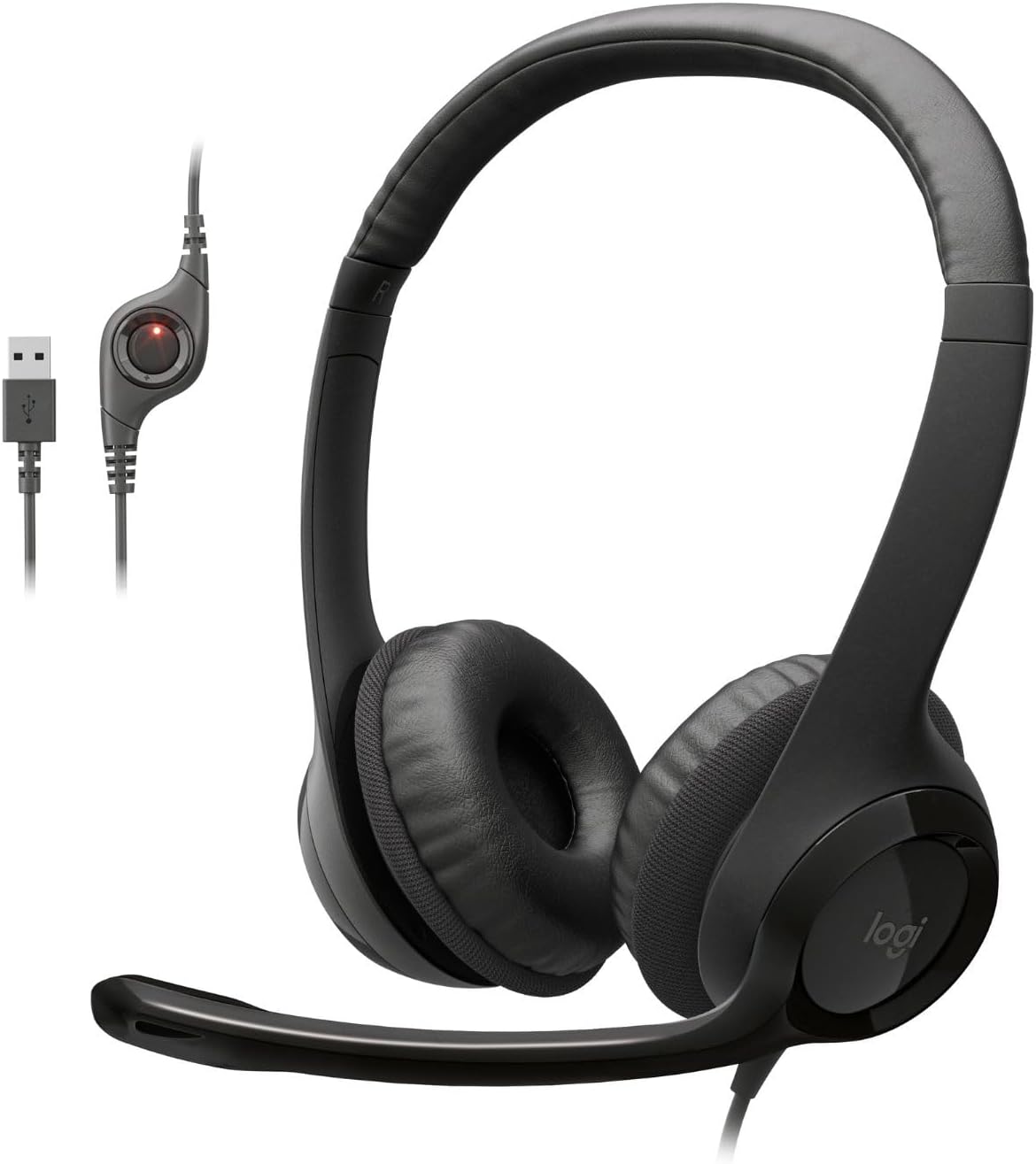
Logitech H390 Wired Headset for PC/Laptop, Stereo Headphones with Noise Cancelling Microphone, USB-A, in-Line Controls, Works with Chromebook – Black
Original price was: $24.99.$19.59Current price is: $19.59.
Related Products

![Apple Watch Series 10 [GPS 46mm case] Smartwatch with Jet Black Aluminum Case with Black Sport Band – M/L. Fitness Tracker, ECG App, Always-On Retina Display, Water Resistant](https://bestdealsavvy.com/wp-content/uploads/2025/12/61bJZx1v8GL._AC_SL1500_.jpg)


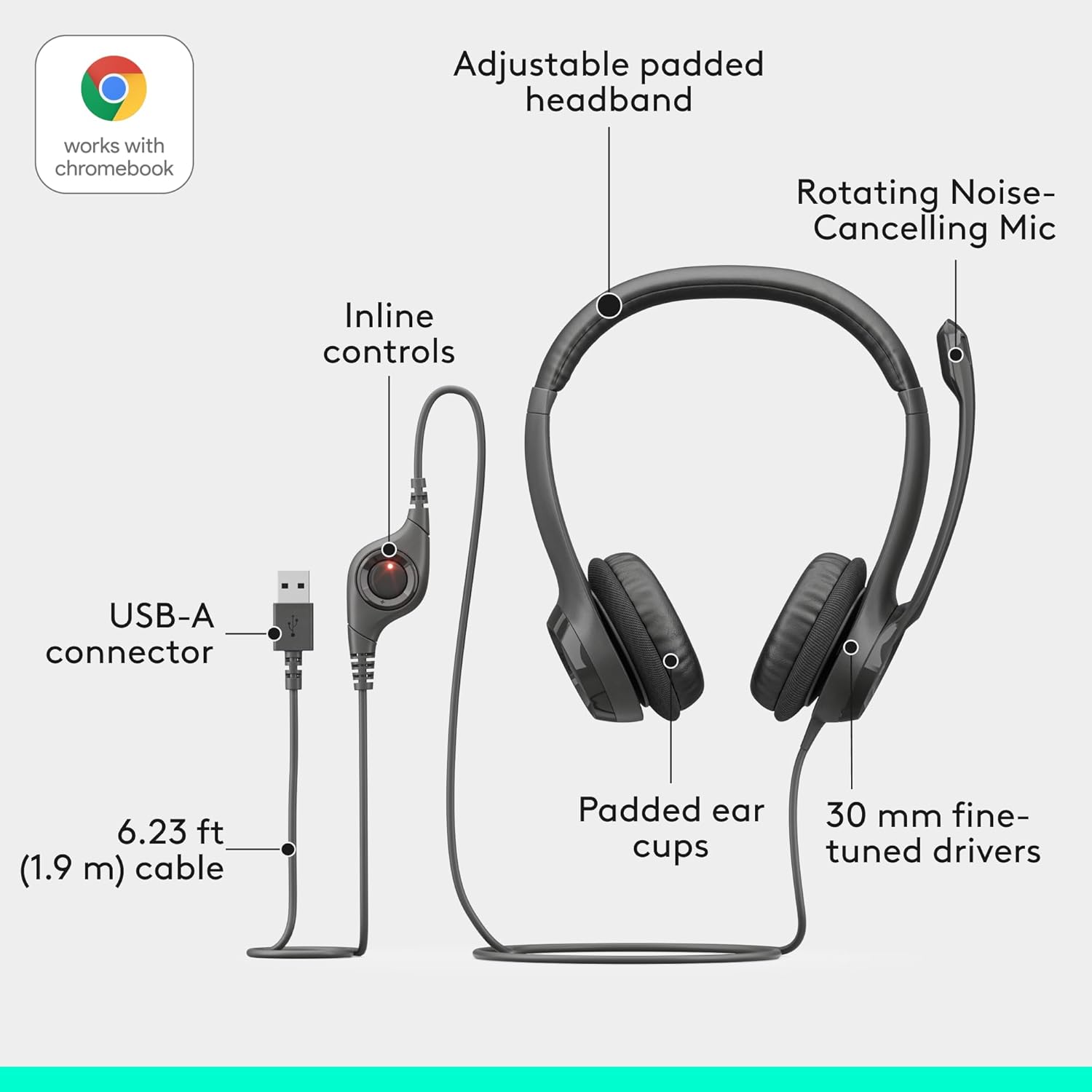


Experience clear audio with our wired gaming headset. This gaming headset with mic provides crystal-clear communication, great for gaming sessions. The computer headsets design provides comfort during long hours of use, making it a great choice for marathon gamers. The headset for PC offers noise cancelling technology that allows for uninterrupted focus whether you’re deep into gameplay or on a conference call. Our stereo headphones provide enhanced digital audio for your gaming, music, and movie experiences. The wired headset connects easily to your computer or gaming console with a USB-A wire. The Logitech H390 wired headset corded headphones feature leatherette ear cushions, providing a comfortable wearing experience during extended periods.
Handy In-line Controls: Simple in-line controls on the cable of these over ear headphones let you adjust the volume or mute calls without disruption; they’re great as gaming headsets for PC and microphone noise cancelling headphones for work
Rotating Noise Cancelling Mic: The computer headphones minimize unwanted background noise for clear conversations. The rotating boom arm can be tucked out of the way when you’re not using the computer headset with microphone
Comfortable Headphones: These headphones for gaming feature an adjustable headband, swivel-mount, and leatherette ear cushions for comfort; they are easy to clean and are great as a noise-cancelling call center headset with a microphone
Digital Stereo Sound: Fine-tuned drivers in these headphones with microphone provide enhanced digital audio for music, calls, meetings and more
Plug-and-Play USB Computer Headset: Simply plug the USB-A connector of this PC headset with mic into your computer and you’re ready to talk or listen without the need to install software
12 reviews for Logitech H390 Wired Headset for PC/Laptop, Stereo Headphones with Noise Cancelling Microphone, USB-A, in-Line Controls, Works with Chromebook – Black
Add a review

Original price was: $24.99.$19.59Current price is: $19.59.
Andrea –
Great pair of headphones!
These are my go-to headphones for work. They are comfortable on the ear (I work 8-10 hour shifts, 5 days a week), the sound quality is clear, and they’re fairly good at blocking outside noises. They also don’t require a charge, they’re easy to adjust, and the cord is long, so you don’t have to worry about limited reach. I buy a new pair about every 3 years due to wear and tear of consistent usage, but it’s more from cosmetic damage than any issues with sound or mic quality. I recommend these to all my coworkers who ask for one.
Diane Reeder –
Pretty in pink 🩷
Perfect color. They are comfortable to wear. Ear cushions are very soft. Sound quality is great. They function good. Noise cancellation is easy and quick. Price was good. Easy to connect with USB connect.
T –
Really Great Sound For the Price
I listen to music frequently, and these headphones perform well for everyday use. The audio quality is clear, allowing individual instruments and the bass to be heard distinctly. For the price, the sound amplification is impressive. The microphone does pick up voice input, but it requires being positioned very close to the mouth, which is the main drawback. Overall, for watching videos and listening to music, these headphones are a solid option. I have bought multiple pair even for working from home.
Elianna James –
High quality, easy to wear
Great sound quality. Easy to control. I like the mute feature. When I am on long calls I can mute, clear my throat and go back on sound in a seamless way.
Deena –
Great quality and value
Works great and a good value for the price. People can hear me clearly and much better than when I use the computer microphone. However, they are not bunny proof. I had to buy three of them recently because my rabbit can sever the cord in a split second and they can’t be repaired. I now guard the last one very carefully.
MP –
Great Sound, Clear Mic, and Perfect for Office Use!
The Logitech H390 headset has been one of my best work purchases. The audio is clear, the microphone works really well, and the USB‑A connection makes it truly plug‑and‑play with no setup issues. It’s comfortable enough for long meetings, and the in‑line controls are super convenient.I recommended it to my colleagues, and they ended up buying the same headset—now practically everyone at work uses these. They’re reliable, affordable, and perfect for office meetings, virtual calls, or interviews.
Mongo KILL –
Some help with deteriorating ear pads
I couldn’t change the rating number, but now I’d rate the set, etc, ****I have 10 months’ left on my warranty on this headset/mic. I have used them for gaming and net phone calls with excellent results for the past year and four months.About a week ago, the covering on the ear pads started to deteriorate. Today I tried to remove them as the first step to replacement or just tidying them up and putting them back on.ABSOLUTE TOTAL FAILURE!!!!The pads are similar to others, in that the pads have a stretch material which is affixed behind the speakers. However, as I examined it and began to try to pull off the first pad, I noticed that not only was the stretch material holding the pad to the speaker, the plastic fittings on the base of the earpiece, which hold the swivel speaker in place, were somehow PUSHED THROUGH the stretch material, making the ear pads impossible to remove without unsnapping the speakers from the base. This did, in fact, occur, but happened so suddenly that the two fine speaker wires both separated from their respective speakers. Hopeless, right?Not quite yet. I resoldered the wires, but could not reattach the speakers to the bases as there was no way to reconnect THROUGH THE MATERIAL because you couldn’t see the connection holes with the stretch material in place over the speakers. Many attempts resulted in more detached wires, resoldering, etc, etc, etc. I finally got the whole thing together, holding the speakers/pads/base together with my hands. I plugged it in. NADA!!! Probably got the wires crossed, but no matter since the phones would no longer hold together.Tried to email Logitech re the warranty, but the site refused to accept the email unless the value of the headset was included. Unfortunately for me, THERE WAS NO LINE ON THE FORM IN WHICH TO INPUT ANY VALUE!! Sometimes this is called a “Catch 22” situation, but it seems to me that Logitech just doesn’t want any email from its customers. I looked at the phone numbers (all toll calls) which I could make for one cent a minute (Yahoo Messenger) IF MY HEADPHONES WEREN’T BROKEN!!! aaarrrrghhhh!I’m going to call Logitech Sales tomorrow (800 number), and see if the rep can help me out.If I continue chasing my tail, I’m writing to Logitech USA and the CEO at Logitech headquarters in France with ear-burners. Worn out earpads should not mean the death of a headset.ADDENDUM, 8/11/09: I called the 800 sales number this morning. I spoke with Donna, who advised me that the earpads on this headset “are not listed as a replaceable item”, which matched my conclusion after my damaging attempt to remove the pads. I asked her if she could put me in touch with the warranty section, and she gave me two phone numbers, one a toll number and one an 800 number. 8-D I called the 800 number and spoke to a nice guy, and after some discussion, he agreed that Logitech would replace the entire set with a brand new one!!!! OK, success.I hope you all have as much good luck as I did. Before I write the number, let me tell you a little more. As was thrashing through the Logitech stuff, I came across the Logitech customer forum discussing the lack of toll free numbers, etc. One poster advised that he just calls 1-800-936-0033 (same number Donna gave me) for all his Logitech needs. Then a Logitech supervisor or something posted that that 800 number should not be used because “the phone lines would become jammed” and if everyone used that phone number, “Logitech might have to raise its prices”….WHAT??What a crock!HERE IS THE TOLL FREE PHONE NUMBER FOR ALL THINGS LOGITECH:1-800-936-00331-800-936-00331-800-936-00331-800-936-0033SECOND ADDENDUM: Today’s date is May 3, 2013. I came across this old review and figured an update might be good. Here it is:My Logitech headphones, the ones replaced above, are still working perfectly for me. I do not use speakers with my comp, all sound coming via the headphones.A couple or three years ago, the thin covering over the headphone pads wore through again. I guess the warranty was up, so I decided to try to refurbish them myself. I had a can of black Plasti-Dip (less than $10 at any hardware store) on hand. I used tweezers to get the remaining bits of the orig covering off, masked the ear pads off from the speakers, and painted the “naked” pads with the Plasti-Dip. The pads are open cell foam, so it took two coats, but it worked like a charm. I have had the earphones ever since, with no more deterioration and continuous perfect performance.If I could, I’d raise my rating some because of the excellent sound quality. But the pad problem is still present (not in mine, now), and that would keep my rating down.
Erika –
Calidad de sonido excelente. El botón de muto y de subir y bajar el volumen se agradecen enormentemente. Nunca he tenido un problema de audio con ellos
Bruce –
Works well and are very comfortable
nerma –
أنا كنت طالبة اللون ال pinkو وصلي لون الابيض في الاختلاف الاسعار أصلا ما بنهم
Abdullah Moh –
Easy to use and it can work for years
AngelyDemonio –
Me encanto, son estéticos, funcionan muy bien, se nota la calidad de audio y material, me son muy fusiónales.Gracias