

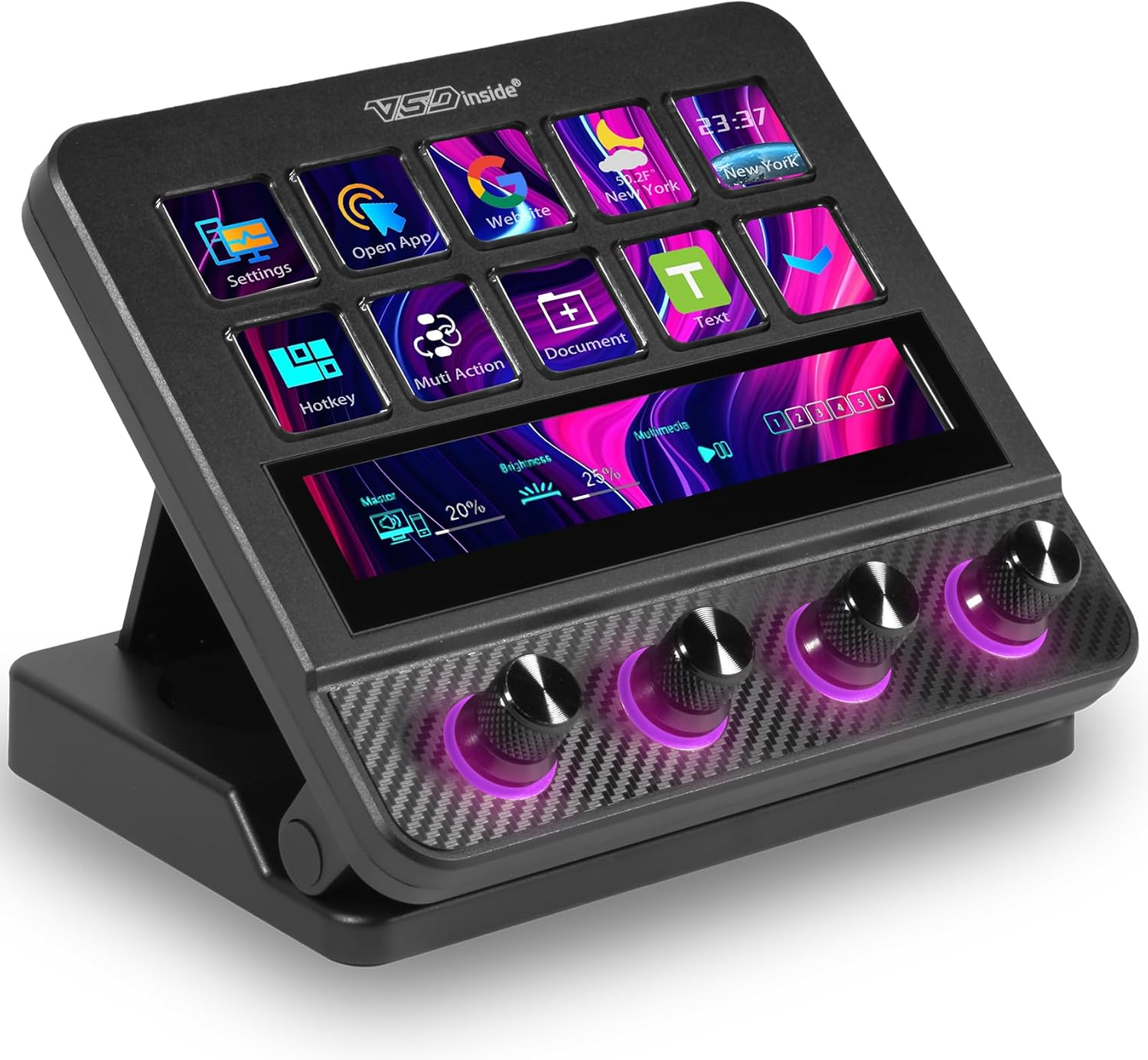
Macro Pad, Streaming Deck Stream Controller Soundboard Keypad, Programmable Keys USB Shortcut Keyboard for Gamer Streamer, Audio Mixer for OBS, YouTube, Office Desk Setup, PC, Mac
$129.99
Related Products


Product description
VSD N4 Pro Stream Dock:
Pro-Grade Tactile Macro Controller for Gamers, Streamers & Content Creators
With this live-streaming device, enjoy:
10x faster streaming setup!
Director-free streaming management!
One-click sound effect control!
Instant background music switching!
Seamless live screen transitions!
Single-hand camera control!
Lightning-fast message replies!
Once you experience the VSDinside STREAMING DECK smart console, you’ll find live streaming is no longer possible without it. Every button can be customized, transforming this device into your personalized personal assistant and elevating the experience of controlling APPs, external devices, and MIDI devices to a new level. It’s not just for live streaming, when retouching in Lightroom or editing videos in Final Cut, you can design a unique control interface for it. It can become any form you envision.
One Interface, Limitless Possibilities
The VSDinside macro keypad empowers you to take charge of your workflow with a single, intuitive interface. Say goodbye to complex setups and hello to a streamlined experience that saves you time and effort. With its fully customizable macro keys (10 LCD keys & 4 Knobs & Touchbar screen), you can create shortcuts, macros, and commands tailored to your specific needs, whether you’re live-streaming on Twitch, Youtube, editing videos, or managing intricate tasks.
VSDinside Streaming Deck – Your Ultimate Workflow Companion
Elevate your content creation, gaming, and productivity to new heights with the VSDinside Stream Controller Deck. Designed with precision and innovation, this multifunctional visual AI keypad is a game-changer for gamers, streamers, and professionals seeking seamless control and efficiency.
Key Features:
Programmable Keys Macro Keypad & Custom Icons
The heart of the Streaming Deck lies in its customized shortcut keys (10 visual LCD & 4 Knobs & Touchbar screen). These keys offer unparalleled flexibility, allowing you to assign individual or a series of actions to streamline your workflow. Whether it’s executing game combos, launching apps, or controlling media, the possibilities are endless. You can even personalize each LCD key with different images and animations (JPG, PNG, GIF) for enhanced recognition and memorization.
One-Touch Operation
Efficiency is at your fingertips with the Stream Dock’s one-touch operation. Instantly launch macros, input text, open files and websites, control media, or switch scenes in OBS with a single click. This intuitive design makes it perfect for gamers, streamers, and professionals who need to execute tasks quickly and accurately.
One-Click Multi-Hotkey Macro Pad
The Streaming Deck’s one-click multi-hotkey macro keypad is a game-changer for gamers and content creators. Use hotkeys (shortcut keys) to streamline your game combos, video editing, music production, photography workflows, and more. The “Operation Follow” feature allows you to execute multiple macro operations simultaneously or in a specific sequence, giving you complete control over your tasks.
RGB-Knobs with Dynamic Visuals
The 4 knobs of the VSD N4 Pro Stream Controller Deck feature customizable RGB lighting, supporting both automatic color cycling and personalized color configurations to infuse your setup with sleek style and ambient flair. What’s more, building on custom icons, you can also add independent dynamic backgrounds (compatible with MP4, MOV, GIF, etc.). Whether gaming in low light or burning the midnight oil on work, it crafts a visually striking ambiance that amplifies your overall experience.
Ergonomic Stand, USB Hub & Beyond:
As VSDinside’s latest stream dock model, it introduces an array of enhanced practical features. An adjustable stand lets you fine-tune viewing angles for optimal comfort, while a carbon-fiber-like overlay elevates its premium aesthetic. Complementing this are toggleable key haptics for tactile feedback control, plus a 2× USB 3.0 + 1× USB-C non-powered hub to expand connectivity(compatible with mice, keyboards, USB flash drives, and more) – seamlessly merging sleek design with everyday functionality.
Compatible with Both Windows and macOS:
The VSDinside PC control board’s AI shortcut keyboard is compatible with both Windows 11 and above, as well as macOS 11.0 and above, making it a versatile choice for users across different platforms. Simply connect it via a USB-C cable and start using it in seconds. It seamlessly integrates with popular software such as OBS, Streamlabs, YouTube, Twitter, Discord, Excel, Word, and Photoshop, ensuring that you can use it with your favorite tools and applications.
Premium Quality at an Unbeatable Value
Despite its advanced features and capabilities, the VSDinside keyboard macro pad offers premium quality at an unbeatable value. It is built with high-grade materials and undergoes rigorous quality control to ensure long-lasting performance. Additionally, it comes with a variety of versatile plugins, including schedule reminders, clock, stopwatch, weather, calendar, and more, making it not just a high-tech productivity tool but also the perfect desktop companion for your computer setup.
One-Touch Macro Execution & Unlimited Layout Customization: Launch system commands, web actions, apps, files/folders, text input & GIFs instantly – eliminate repetitive tasks with a single press. GIF-supported icons, unrestricted scene pages, 10 LCD keys, 4 knobs (with touch displays) & editable TouchBar per scene.
Custom Hotkeys & Multi-Step Workflows: Execute chained operations (e.g., stream setup, video editing shortcuts) in one tap; no coding required.
500+ Plugin Ecosystem: Seamlessly integrate with OBS, Discord, Spotify, plus utilities (clock, weather, calendar, stopwatch) for all productivity needs.
RGB-Knobs with Dynamic Visuals: Customize knob RGB colors; sync dynamic backgrounds & audio-reactive visuals for immersive desktop ambiance.
Premium Build & Utility: Carbon-fiber-like overlay, toggleable key haptics, 2× USB 3.0 + 1× USB-C non-powered hub – blend style with practicality.
Ergonomic Stand & Cross-Platform Support: Adjustable stand for optimal viewing; plug-and-play with Windows 10+ & macOS 11.0+ via USB-C.
8 reviews for Macro Pad, Streaming Deck Stream Controller Soundboard Keypad, Programmable Keys USB Shortcut Keyboard for Gamer Streamer, Audio Mixer for OBS, YouTube, Office Desk Setup, PC, Mac
Add a review

$129.99
Greg R –
Great Customization and Easy to Use
I started using this macro pad to simplify my streaming and work setup and it has made my daily routine noticeably easier. I appreciate how quickly I can switch between tasks with just one tap. Setting up my shortcuts was straightforward and I liked that I could personalize each key to match the way I work. I noticed right away that having dedicated controls helped me stay more focused during my streams. The interface feels smooth and responsive which makes it enjoyable to use throughout the day. I found myself relying on it more than I expected especially when juggling multiple applications. It has also helped reduce small repetitive actions that used to slow me down. I like that I can organize different layouts for different projects without feeling cluttered. The knobs add another layer of convenience and I enjoy using them for quick adjustments. I appreciate the clean look it adds to my desk since it blends in nicely with the rest of my setup. The unit feels sturdy which gives me confidence that it will hold up over time. I also enjoyed the subtle lighting that makes it easy to see the keys in a darker room. I found the customization options to be flexible enough for both casual use and more detailed workflows. This tool has become a reliable part of my streaming routine. Overall I feel that it has added genuine value to both my productivity and my entertainment setup.
Omar A. Perez Ruiz –
Awesome device for programming and editing shortcuts
I’m not a streamer—just a software developer—but this device has become a great productivity booster. I used to rely on four macro keys on my keyboard, but I quickly ran out of shortcuts. With this, I can create multiple pages of customized buttons for personal tasks, work, and development tools.The build quality is solid. The buttons have a firm, industrial feel, and each one is a small display so you can use custom icons or text. The software is also easy to learn; I had it figured out in about 15 minutes.My only complaint is that you can’t easily move button setups from one page to another. Adding a simple “move” option would make the experience even better.Overall, even for non-streamers, this is a powerful tool for organizing shortcuts and speeding up your workflow.
Simon –
REally Powerful and Stylish Macro Pad
I picked up this Pad to simplify my streaming setup and daily tasks and it has been a total upgrade. With 10 programmable LCD keys and 4 knobs that light up with customizable RGB colors it looks sleek and feels solid with its carbon-fiber-like overlay. What I love most is the one-touch macro execution. Launching apps, adjusting scenes in OBS, or sending quick text snippets is effortless and saves me tons of time.I do not have to worry about complicated coding either. Setting up multi-step workflows is straightforward. The integration with OBS and Spotify makes it perfect for streaming but it is also handy for work. Everything from editing videos to managing calendar reminders is easier now.Plus, the adjustable stand and USB hub add great flexibility to my desk. Whether you are a gamer, content creator, or just want to level up your productivity this macro pad is a fantastic upgrade!
Danielle –
Good instructions, look cool and lots of good function!
Awesome stream dock for computer, gaming, streaming, making videos it does so many different things and lights up so it looks super cool too! Good instructions and easy to use as well!
Pickerofamazon –
Awesome macro prad beautiful design.
Awesome size, great working software, beautiful design and easy to use.So far loving this for speed. You can customize it to your liking. Highly impressed with the quality.
Carlos Adames Luciano –
Great deck for decent price
The VSD N4 Pro Stream Dock is positioned as an exceptionally flexible tool. But for me It goes beyond being a simple macro keyboard; it is an intelligent, visual control center. Like an aircraft cockpit, The combination of animated LCD keys, dynamic RGB knobs makes it fun and dynamic, with the integrated USB hub establishes it as a premium solution for anyone looking to automate and simplify their interaction with complex software, since we all want to have it easy not just in streaming, but across any intensive digital workflow, I don’t have any complaints with the device so far, highly recommended
Austin –
Productivity and workflow enhancer
Whether you are a streamer, gamer, editor, or just value efficiency. This stream deck controller is extremely nice. You can set it up to open specific desktop apps. Adjust all types of different input and output volumes. Along with this you get multiple different pages of screens so I have a page that goes specifically with Photoshop with all my shortcuts. Then I have a specific page for desktop shortcuts. All in all this is extremely nice and just makes things so much easier. No more searching for shorten shortcuts or apps all you have to do is push some physical buttons that are always next to you. It just makes things a lot quicker and easier. I highly recommend.
Prince –
Fantastic Deck for Daily Use
The size of this stream deck is perfect for my desk setup because it doesn’t take up much space but still feels comfortable to use. The keys and knobs are very quiet, which I really appreciate during long work, streaming, and gaming sessions since there’s no distracting clicking noise. Everything feels solid and well-built without being bulky. It’s become one of those tools I didn’t know I needed until I started using it.