


Mocagen MC1 Phone Controller for iPhone/Android Support Phone Case, Mobile Game Controller with Led Light, Upgraded Joysticks, Turbo, Handheld Gaming Gamepad
$39.99
Related Products






Product description
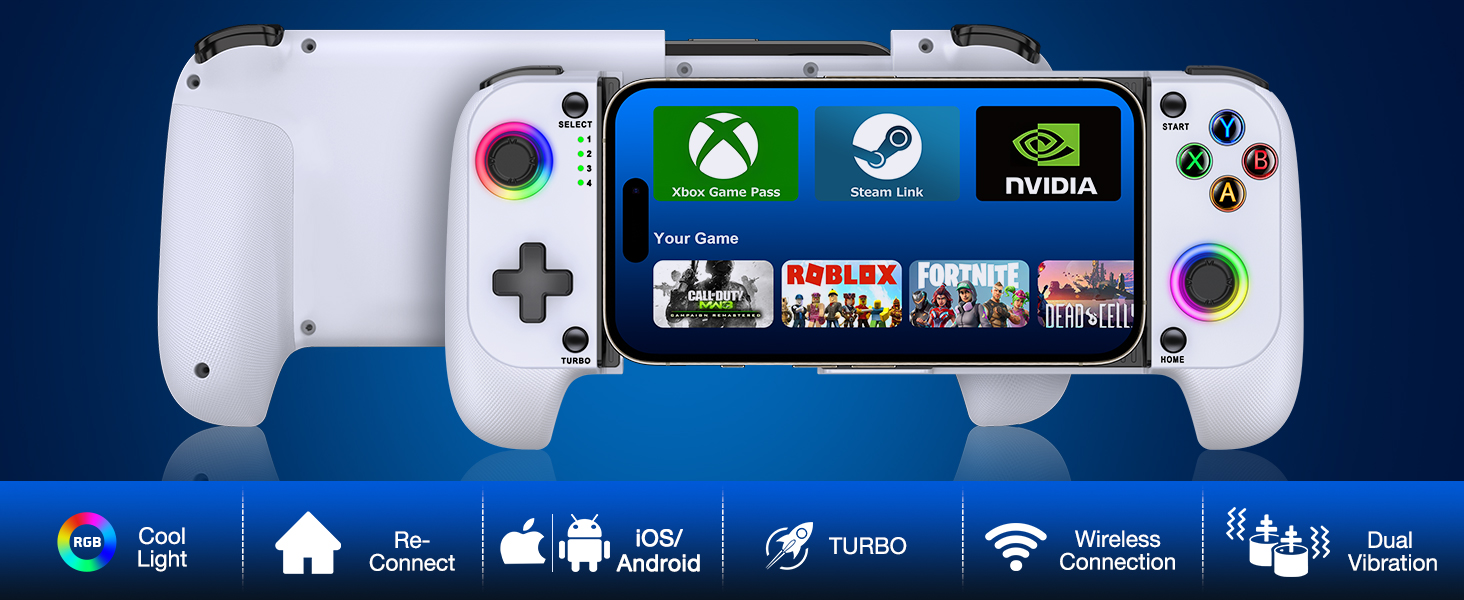


1 Cool Light
2 No Deadzone Joysticks
3 Turbo Function
4 Connection Way
5 Vibration with Dual Motor


Mocagen Game Controller for iphone/Android/Switch
Add to Cart
Add to Cart
Add to Cart
Add to Cart
Customer Reviews
4.2 out of 5 stars 304
4.4 out of 5 stars 110
4.2 out of 5 stars 304
4.6 out of 5 stars 35
Price
$39.99$39.99
$44.99$44.99
$39.99$39.99
$34.99$34.99
Compatible
iPhone/Samsung/Pixel/OnePlus
iPhone/Android/Switch/Oled
iPhone/Samsung/Pixel/OnePlus
Switch/Switch Oled
Function
Turbo/Vibration/Support App
Programmable/Turbo/Vibration
Turbo/Vibration/Support App
Programmable/Turbo/Vibration
Joystick & Trigger
No Drfit + No Analog Triggers
No Drfit + Analog Triggers
No Drfit + No Analog Triggers
No Drfit + Analog Triggers
Connection
Bluetooth
Bluetooth
Bluetooth
Bluetooth
Cool Light
✔
✔
✔
✔
Paly & Charge
✘
✘
✘
✔
Are phhone controllers good for gaming?
Mocagen iphone 17 controllers support most of controller games like Fortnite, Minecraft, Call of Duty, Roblox and other handheld games
Can I connect the mobile controller to my phone?
1, Press and hold HOME buttons till the led4 flashing
2, Find the bluetooth name to click on pairing
Please reference the manual with more details
My phone case is very thick, do I need remove it while playing?
No, this phone slide controller has enough space for Phone Case & Camera. ( stretch length:7in max, thickness:0.78in max). It is perfect for phone camera bulge problem
ENOUGH SPACE FOR PHONE CASE & CAMERA — Mocagen phone controller is the perfect solution to the phone camera bulge problem. The extra large space on the left side of the iPhone game controller allows you to easily fit the case together with your phone. So You don’t need to remove the phone case every time. Adjustable stretch (4-7 inches) can hold almost any phone except iPad/tablet and prevent it from coming loose during gameplay
BLUETOOTH CONTROLLER FOR IPHONE/ANDROID — This phone controller works with iPhone including iphone 17/16 series and Android. Make sure the iPhone controller is not charging before connecting Bluetooth. Step 1. Press Home button til the led4 light flashes. Step 2. Find the matching bluetooth name on your device, then click pair. After that, just press HOME button to wake up it again (please contact us if there is a problem about connection)
COOL LIGHTING & BIG GRIP CONTROLLER FOR IPHONE/ANDROID — Comfortable grip with this iphone game controller is more ergonomic, allowing you to enjoy long time to play without feeling your hands get tired. Mocagen mobile gaming controller provide multi-colour changing aperture on the Joysticks even ABXY buttons. Android phone game controller create your own exclusive gaming atmosphere while playing games
PLAY MOST CONTROLLER GAMES ANYWHERE — Our iphone controller for gaming supports Xbox Game Pass, Steam Link, GeForce NOW, Apple Arcade and other cloud gaming platforms. These handheld controllers for iphone gaming allow you to interact more with your phone and play multiple games like Fortnite, Call of Duty, Roblox, Genshin Impact and more anytime, anywhere, with anyone. It is also a present for Chritmas or other holidays
ADVANCED JOYSTICKS WITHOUT DRIFT — These upgraded Hall Joysticks of android phone game controller don’t have dead zones, drift, wear out. Easy to perform precise movements during gameplay. And the iphone gaming controller buttons are responsive and sensitive to control(Note: L2/R2 are not analogue buttons). If your joysticks and buttons have any technical problem, please contact us anytime
LONG LASTING GAMING TIME — Our phone controller for iPhone has a built-in recyclable rechargeable battery and usb c charging port, the game controller for android phone can be quickly fully charged within 2 hours and play games for 15 hours without interruption (because it connects wirelessly to the mobile phone device, it does not support charging the mobile phone directly, so it won’t damage the mobile phone’s charging port)
3-LEVEL TURBO FUNCTION & DUAL VIBRATION — Portable mobile game controller has three speeds per second. You can set Turbo + A/B/X/Y/L/ZL/R/ZR buttons to easily win in shooting and fighting games. Long press the TURBO button for 5s can clear all buttons TURBO function. Dual motor vibration to enhance the game immersion for the ultimate mobile gaming experience with our phone controller for Android
8 reviews for Mocagen MC1 Phone Controller for iPhone/Android Support Phone Case, Mobile Game Controller with Led Light, Upgraded Joysticks, Turbo, Handheld Gaming Gamepad
Add a review

$39.99
Brittany Giacchina –
Revom
Works great, I just play some casual games and its relieved the pressure off my hands so much. The controller has a good weight to it – enough to not feel cheap but not so much that it fatigues your hands. Connected super easy and the controls are customizable if the game has controller compatibility.
Scottiegirl05 –
Iphone users I hope I can answer
This is an excellent little controller. I’ve been playing Infinity Nikki nonstop thanks to this!Phone I’m using : iPhone 14 Pro Max. There is room for the giant camera and the phone fits comfortably with a MagSafe case on. Hand grips are ok comfort wise and the buttons feel solid.Can be paired as a pro controller: Initially I was dismayed because I am not used to PlayStation controls. If you hold the Y and home buttons (vs the B and home as the instructions state) it registers as a pro controller.Buttons CAN be remapped via iOS settings: No matter if you are using it as a ps4 or pro controller, you have the option to remap buttons. I prefer Nintendo layout as I am just naturally used to that. After pairing the controller, go to settings – general – game controller, and set up a profile (I just swapped A/B and X/Y when it was paired as a pro controller) and then choose the paired controller in the list and apply that profile you just created.Bottom line I was skeptical about this device at first but it was better once I did some general research online. I do wish the manual had more info like this, but I hope this helps anyone who has an iPhone and is a Nintendo person like myself.
Averill –
Prefect for the price
Works well. Havent had any issues. One thing i would change is to turn it on i wish you had to press and hold the button. Instead it accidentally get turned on sometimes.
Laura Ann –
Amazing. Hands down. Great feel !!!
Im …. the backbone is what I use daily for my IPhone 14 plus…This, this device right here is amazing. Let me see how long it lasts since my backbone is now 2 years old and still fine, besides making noise with the cons.Here’s a video of a Samsung Galaxy Ultra 5G in it, after I had won a crown in fortnite. FIRST solo crown…… using this, this gaming controller I thought would be trash..The joy cons are AMAZING feeling with no pull, no push, just flow and ease as you glide them, so amazing feeling did I say?…. the buttons, oh the buttons feel like im tapping a keyboard and its so fascinating and nice not hearing “CLICK CLICK CLICK CLICK CLICK CLICK” NOW say that faster… no even faster … ok. Got it 🤣I shall update in a month or so if this stays amazing 👏Yah u can add me on fortnite , 21 over ! Lol I see my name is out there.
Ginette Williams –
Perfect, Until It Wasn’t
I bought this to use with my iPhone 14 Plus as there are certain games that play better with a controller. It was perfect until it wasn’t. I got this on August 1, 2025. By September 16, it stopped working. First, it would keep disconnecting from my phone. Then, it stopped charging. I tried everything, and it just basically died. I owned it for less than two months, and then it was no good. I am very disappointed. Hopefully, if this is a known issue, the company fixes it. Otherwise, the little bit of time I used it for, it was awesome.
brandon mcneil –
Way more easy to use please try it
Good 😊
moospatrol –
Good starter
I have never played a game on my phone that needed a controller. I went with this as the price was good. This is a good starter however the sticks are very soft. I am use to regular controllers. This is a great value and I would recommend to any one starting out with a controller for phone. I have a Samsung 24 so it can handle almost any phone.
MELANIE L HUMMEL –
Works well
Bought for my nephew when we went on vacation. He loved it. Feels like a regular controller and no problems connecting it to different devices