

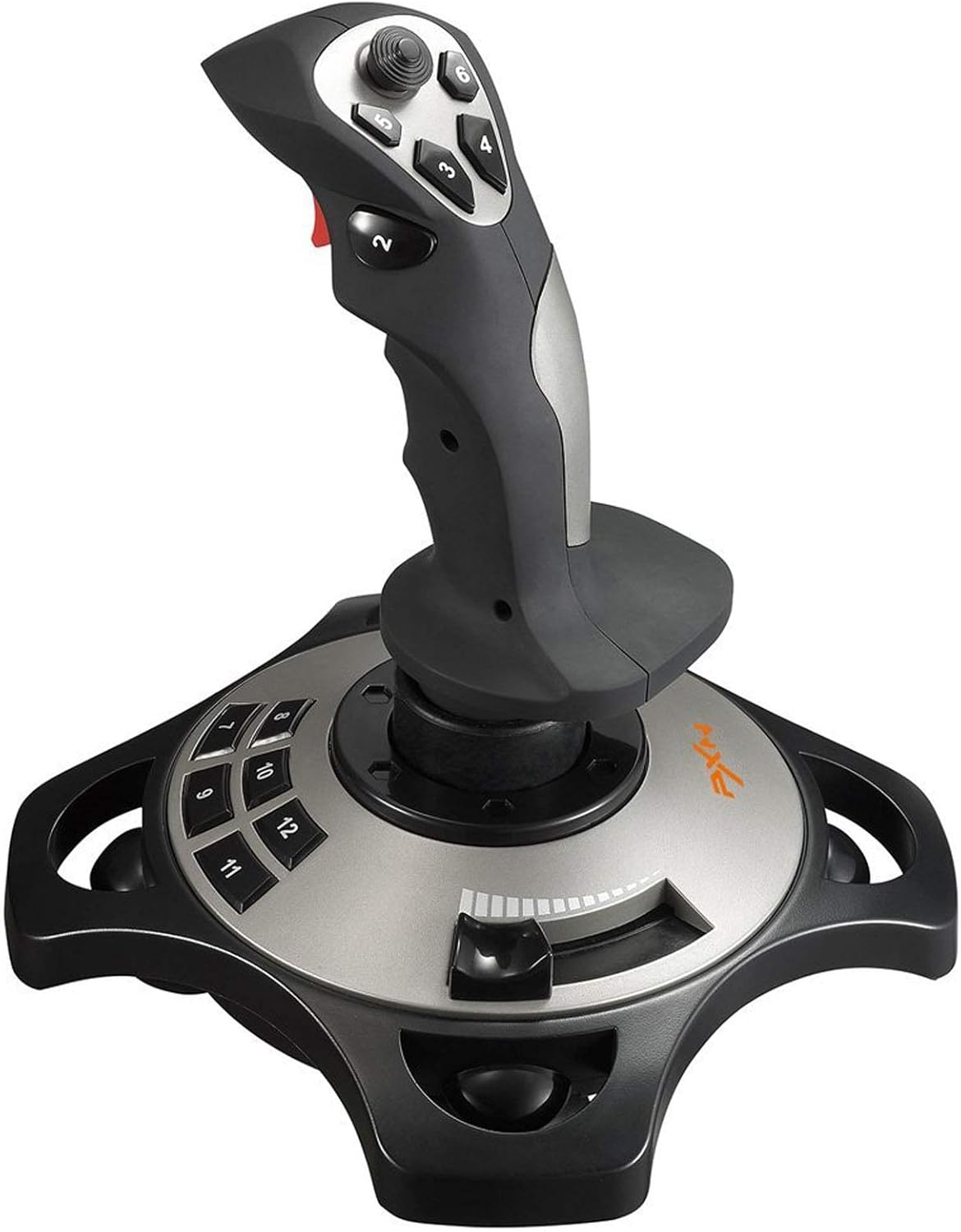
PC Joystick, USB Gaming Flight Simulator Game Controller with Vibration Function and Throttle Control, PXN 2113 Wired Gamepad Flight Sim Stick for PC/Computer(Windows Only, Not for Apple Devices/PS4/PS5/Xbox One/Switch)
Original price was: $71.99.$55.99Current price is: $55.99.
Related Products




Product description

Updated PXN 2113 PRO Gaming Joystick with Vibration Function – Professional Flight StickFor PC Computer Laptop Compatible with Windows 7/8/10Specifications: 1. Size: 18.5 x18.5 x22.5 CM2. Unit Weight: 495g3. Charging Power: DC 5V4. Interface: Wired USB Note: 1. Please turn on your PC first and then connect with the joystick.If plug in joystick before starting PC, some computers may not identify this joystick.2. Vibration Switch is at the bottom,please switch to “ON”.Please set the vibration strength in the driver to 50% or higher.3. The game must have vibration function and signal transmission of vibration.If no vibration signal,please try another game with vibration function or tell us the name of your game,we will check for you soon.4. Test the joystick’s vibration function:install the driver,and then please see “Vibration function” in the manual and follow the “Vibration test” to check.5. No need to install the driver and can play games directly.If you need driver, please contact Fengying(Contact Seller). Also you can find the download link in “Installation” section of the manual, please check the English manual in colour box.


【With Vibration Function】This flight stick is ONLY for PC/Computer and ONLY compatible with Windows 7/8/10/11 (Mac/Apple computers/Apple devices/PS3/PS4/PS5/Xbox One/Switch not supported).PXN2113 PRO gaming joystick for pc will never let you down with realistic fly experience. Compatible with many flight joystick pc games: World of Tanks,World of Warplanes,War Thunder,Assault Horizon,Microsoft Flight Simulator,X Plane 10,etc. Vibration Switch is at the bottom,please switch to“ON”.If less than 20%,you will almost not feel the vibration.Please set the vibration strength in the driver to 50% or higher for this joystick pc flight simulator.
【Immersive Fly Experience for Your Flying Dream】You can make the right moves with rapid fire trigger,4 axis controlling,8-Way hat switch and 12 programmable buttons of this computer joystick for gaming pc flight.Advanced software,Support various custom adjustment and keyboard mapping,enjoy exciting joystick flight simulator controls for pc games now! Not only a game, but also a dream of flying!
【Comfortable to Hold, Agile to Operate】This usb joystick for pc is with a solid and smooth feeling,very comfortable.Four power-grip suction cups at the bottom of this pc joystick for flight simulator pc games,they can fix firmly and easily when the table is smooth.Precise throttle control,Ergonomic design,Single hand control full function with this flight joystick for pc games.(Note:Force Feedback/Minecraft/Asphalt 8/Ace Combat 7 not supported).This Flight simulation pc controller with Friendly and Easy-to-Reach Customer Service.If any problem,please contact us directly(Contact Seller),Fengying will reply within 12 hours.
【FAQ】:Q1:Why doesn’t it work on my pc/Xbox? A: It is ONLY for PC and Windows 7/8/10/11(Not for Mac/Apple devices/Xbox).Please turn on pc First and then connect with this joystick.If not,some pc may not identify it. Q2: How to install the driver? A: No need to install the driver and can play games directly.If you need driver,please find “Installation” section in manual or follow below steps: 1:Visit PXN official website→Support→Driver→Find PXN-2113PRO driver to download. 2:Extract the driver and install. 3:Plug joystick into PC USB port,pc will identify new hardware and install automatically. 4:Play games or set the joystick in driver.The drive can test and calibrate the pc flight joystick.
【Setup Guide for Microsoft Flight Simulator】For PXN 2113 flight sim joystick pc setup in Microsoft Flight Simulation,please refer to below images and follow below steps: Step 1: Launch the game and click”MENU.FLOWBAR_ OPTIONS”,select“MENU.OPTIONS CONTROLS”. Step 2: Except the keyboard and mouse mode, also have joystick mode in game.Please click“GENERIC USB JOYSTICK” to map the key. (Note:The joystick should be plugged into PC before this setting). Step 3: For function settings,take “INPUT.KEY_ _SWITCH_ CAMERA”as an example,scroll down to select“Select an input”,click No.12 button,finally click“VALIDATE”to save.
13 reviews for PC Joystick, USB Gaming Flight Simulator Game Controller with Vibration Function and Throttle Control, PXN 2113 Wired Gamepad Flight Sim Stick for PC/Computer(Windows Only, Not for Apple Devices/PS4/PS5/Xbox One/Switch)
Add a review

Original price was: $71.99.$55.99Current price is: $55.99.
Helanie Tresidder –
high quality
good for flight sim games its a good fit for my sons hand and very good for its price
Smiley –
USELESS to ANY PC Windows Application
UPDATE:I promised to update this and give customer service a chance to resolve the situation. Now (two days before the refund period ends), it’s in the mail back to Amazon.This Chinese joystick manufacturer is not well versed in English. I contacted customer service daily for the last 28 days. I have received nothing in return, not even an automated ticket response.Avoid this item at all cost. I purchased the Logitech 3D PRO flight stick. Comparing them (side by side and unplugged), Logitech simply seems higher quality in weight, detail, and movement. It’s also $20 less than this item. It’s universally supported by every game on my laptop, even older legacy games or games you wouldn’t expect to use a joy stick perform flawlessly right out of the box.The only thing this stick claims to offer that the Logitech 3D does not is vibration. I can confirm there was a switch on the base labeled as vibration. Yet I was unable to use or test said feature. When there is no driver or method of calibration for your joystick, the vibration is just as useless as everything else.I suppose you could sit and program every button and axis one by one, then do it all over again on your next game, but why should you? This joystick isn’t a bargain and it’s not well made. There are cheaper and better choices that perform flawlessly right out of the box.Please don’t make the same mistake as I did. If even one person reads this and it saves them from wasting their time on this piece of garbage, I’ve done my job.AVOID THIS JOYSTICK. Nearly any other option in the category will give you a better experience than this useless hunk of joystick shaped plastic.My original review consists as follows:A Well Made & Good Looking Stick Lacks the Software Needed to WorkAs stated by other reviewers, it lacks the proper driver to be recognized by Windows 10. I am running the newest OS build, version 2004. The software included crashes during the configuration process. Windows will recognize it only as a generic joystick. I bought it for X-plane 11 and it works, but you must map each axis and button. I tried it on non flying WoW type MMO games and it was useless. I reached out to the Chinese based customer service for assistance and have had no response after 5 business days. I will likely return the item if I continue to receive no support.It’s a shame because it looks and feels like a great joystick for the price. Without being properly configured, however, it’s nothing more than a paperweight. I recommend buying a joystick by a better known manufacturer such as Logitech.I will gladly edit this review if anything changes.
Coolkidakame –
It is not compatible with Xbox
Doesn’t work with Xbox, but it works fine otherwise. Use it on pc only okay. Everything works, very realistic and fun the buttons are clicky and their is a throttle for you. Also the joystick is held in by some rubber with slight resistance
Psychopath Nextdoor –
Joystick review. Quality product.
For me, the product was fantastic. It was exactly what I was looking for. Most of the reviews on this are less than 3 and ask because of software issues that can be resolved by an illiterate monkey. You need the software to work. Most people don’t have a CD drive now and panic when things don’t work. The drivers are on the website CLEARLY ON THE BOX, INSTRUCTIONS, AND CD so no real reason to be having problems. If it’s breaking for you spend the extra effort on the equipment that you are going to be using, and treat it with care.My only quam is the suction cups being unable to be removed, and I’d you have a fabric desk/mousepad on your desk it’s a bit problematic. And the suction cups are in awkwardly (but evenly) placed under the feet ( still stable as hell tho so it’s more of an aesthetic thing) and are a bit hard to un-cup.All and all great product. No issues so far, and I’m an illiterate monkey so we’re going good so far!
Logan –
Very basic.
Wasn’t great, wasn’t terrible. It’s very okay. It gets the job done. I used it to fly in ARMA 3. 6/10
Ed S. –
Weeks well with FLT Sim X
Works extremely well with Microsoft flight simulator X. Most buttons are already programmed for most used aircraft functions.
M –
Excelent value for the money
Works perfect with Flight Simulator! Its extremely accurate, feels comfortable in the hand, the commands are easy. Great value for the money.
A. R. DeLaVergne –
incompatible with pc/all drivers are in chinese
This product is physically comfortable to use and pleasing to the eye. However, the drivers won’t interact well with any games I’d like to play with a joystick. Two such games were Ace Combat 7: Skies Unknown, and Arma 3. Not only did I install the drivers of the CD that accompanied the flight stick, I searched online for the most recent drivers. No joy. Not only is this a Chinese product with all support in chinese, including the drivers and installers, but Windows was not able to map the stick itself. For Ace Combat 7, the stick was functional but obviously limited. I could not bind most of the buttons, and the ‘thrust’ did not work whatsoever, and no matter how it was bound, would act as though it were a button, not an axis.Attempting to launch Arma 3 with this product plugged into the PC causes a crash. Plugging this item into the PC while Arma 3 is running is fine, but as soon as you attempt to detect the controller through the Arma 3 menu, the game crashes.This product is cheap. However, I didn’t end up paying for a cheap flight stick; I ended up wasting money on a product that does not interface well with modern games or computers.
Boulau –
Beau bon pas cher.
Greedy418 –
Très bon article le qualité prix ,les ventouses sont limite mais sinon je recommande!
Amazon Customer –
Perfect
Happy Pictures –
I had high hopes for this product, but it ended up being one of the most frustrating tech purchases I’ve made in years. In 2025, you’d expect any modern device to be plug-and-play — but this was anything but that.Straight out of the box, it did absolutely nothing. No recognition by the system, no automatic driver prompt, no clear guidance, and no quick-start help. I spent 30+ minutes trying to get it to work before finally giving up and initiating a return.This kind of experience just shouldn’t happen anymore. A device at this price point ($80) should work smoothly, or at the very least, come with clear instructions or a support path that doesn’t require hours of troubleshooting or forum-diving. It feels like a budget version of something that only starts making sense if you’re willing to spend 3x more for a better model.In short: this product feels like it was rushed, poorly supported, and ultimately not worth the money or the mental stress. Strongly recommend avoiding it unless you’re prepared to fight with setup from day one.
Terrance Steere –
It is very specific on programs that work with it check the games list before you but