

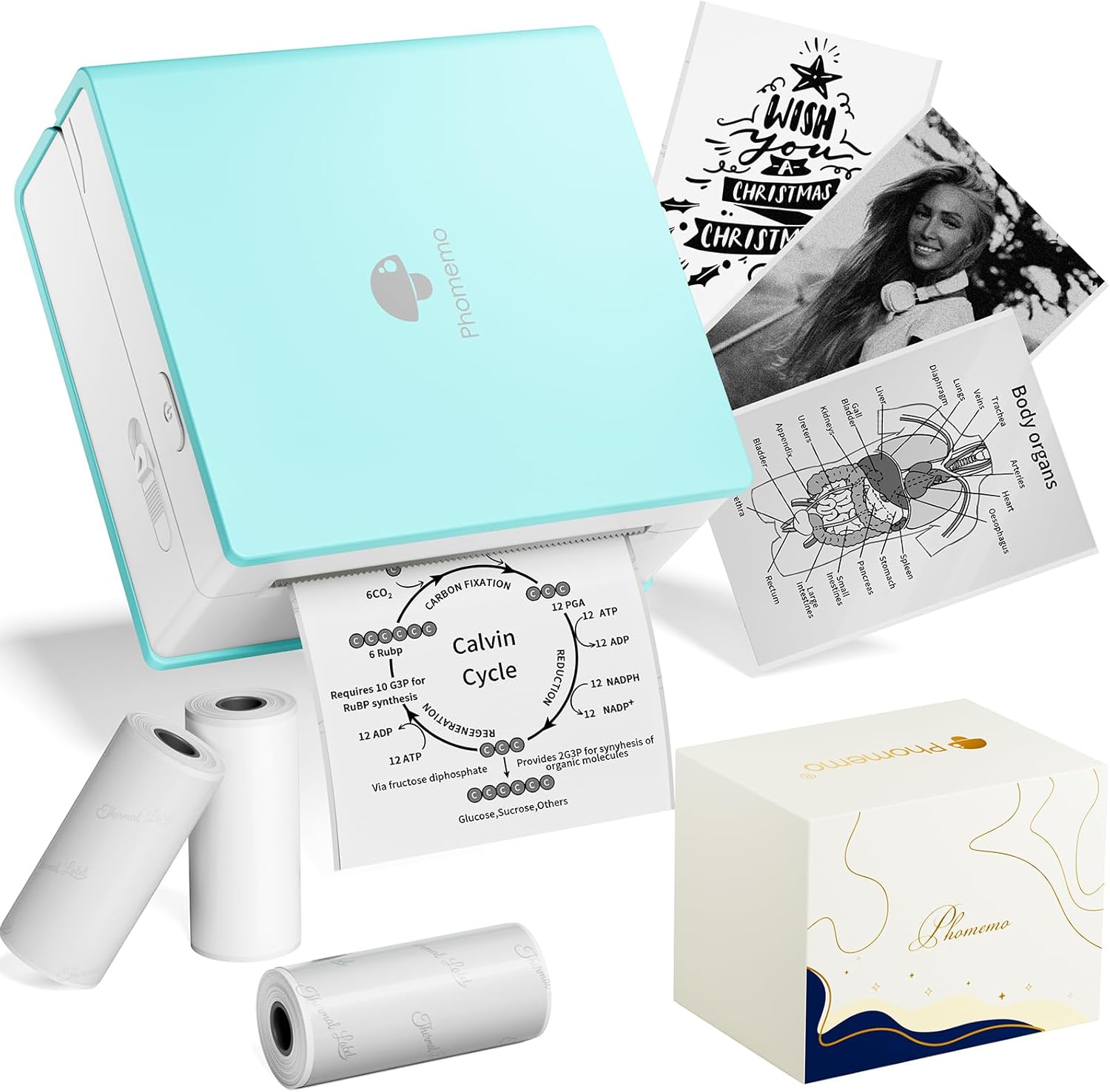
Phomemo Sticker Printer- Mini Sticker Printer Maker Machine, Mini Pocket Printers Instant Print for DIY Creation, Study Notes, Photos, Gifts, Portable Thermal Printers for Kids/Students/Teacher
Original price was: $51.99.$34.19Current price is: $34.19.
Related Products





Product description


1 For Studying
2 For Early Education
3 DIY Creation
Connect with Phomemo APP to discover more DIY creative moments!


More Sticker Options
Add to Cart
Add to Cart
Customer Reviews
4.2 out of 5 stars 1,454
4.6 out of 5 stars 6,622
4.6 out of 5 stars 6,622
4.6 out of 5 stars 6,622
4.6 out of 5 stars 639
4.3 out of 5 stars 17
4.6 out of 5 stars 6,622
Price
$34.19$34.19
$12.59$12.59
$18.99$18.99
—
$14.49$14.49
$20.99$20.99
$19.89$19.89
Product Color
Green
White
Transparent
Blue/Pink/Purple
Purple/Orange/Pink
Transparent Blue/Green/Pink
Transparent Gold
Compatible with
50-53mm Thermal Paper
M02/M02S/M02Pro/M03/M04S/M03AS
M02/M02S/M02Pro/M03/M04S/M03AS
M02/M02S/M02Pro/M03/M04S/M03AS
M02/M02S/M02Pro/M03/M04S/M03AS
M02/M02S/M02Pro/M03/M04S/M03AS
M02/M02S/M02Pro/M03/M04S/M03AS
Size
86x84x42 mm
50 mm x 3.5m
50 mm x 3.5m
50 mm x 3.5m
50 mm x 3.5m
50 mm x 3.5m
50 mm x 3.5m
Number of paper rolls
3
3
3
3
3
3
3
Sticker Paper
✔
✔
✔
✔
✔
✔
✔
Bluetooth Mini Thermal Printer- for cell phones and tablets with Bluetooth connectivity, compatible with Android 7.0 and iOS 13.0 or above.The Phomemo M02 sticker printer machine is an inkless wireless printer, you don’t need any ink or toner. Not only is it suitable for white self-adhesive and thermal paper (only black and white colors can be printed), but it can also print patterns and text on colored and transparent paper rolls (special paper rolls can be printed in a single color)
Embrace a livelier life- the inkless pocket sticker printer turns pictures, memos, shopping lists and study notes into peel-off stickers. It dresses journals with keepsake charm, gives photos instant style, sorts schoolwork in seconds and captures happy moments on the spot. A perfect gift at Christmas, Children’s Day and Thanksgiving, it brings easy joy to kids, students, teachers and DIY lovers alike
Portable Size and Fashion Design- M02 pocket printer simple and stylish shape with mini size (3.39 x 3.31 x 1.65 inches) slips neatly into your pocket. This sticker printer shares joy with family and friends during leisure moments, holiday moments
Mini Mobile Printer with Powerful APP – One-touch printing saves time and effort, phomemo M02 sticker maker machine can print text patterns and photos instantly after connecting to the APP via Bluetooth, Phomemo APP provides thousands of patterns, fonts, filter effects and themes, which brings more fun to your creative printing
Phomemo Sticker Printer for Students of All Ages- can be used to print study notes, anatomy cards, chemistry, geography, physics, math and excerpt charts. The mini sticker printer can also be used to help students learn by using the ‘scan’ feature to clearly print study graphics
Custom Label Maker- creative ideas ready to print, just a pair of scissors can cut the printout into any shape and size of labels, meet all your labeling needs in school, home, office
13 reviews for Phomemo Sticker Printer- Mini Sticker Printer Maker Machine, Mini Pocket Printers Instant Print for DIY Creation, Study Notes, Photos, Gifts, Portable Thermal Printers for Kids/Students/Teacher
Add a review

Original price was: $51.99.$34.19Current price is: $34.19.
Nadira Persaud –
Just buy it.
Wasn’t sure how I would feel about this thermal sticker printer but I freakin love the little thing. I originally bought it for my nursing notes that I wanted to add diagrams and drawings and not great at drawing so thought this would help. Well let me tell you this thing is amazing. And comes with so much paper. I been printing pictures on it lately and love it. Even stuck some on my school laptop and it’s been on there for 3 months so far with no issue. Only thing is I’m sure after time it will rub the images off so might seal it somehow. Can use this thing for many things. Def worth the price. Easy fast connection to the app. The app is self explanatory. You can customize your pictures. Change the filters on the picture before you print. I’ve had this printer for about a year now and I love it. Wish I would’ve bought this little thing a lot sooner. I uploaded the app and how it looks when you upen it, then click print images and pick the picture you want from your phone or laptop and pick a filter if you like and hit print. That easy. It’s not color but I love that I don’t have to buy ink ever
Sarah –
compact, fast, fun and functional
i love this thing.it’s cute, fast, quiet, and super easy. the app is simple and easy to use and free – although i suspect some extra features are behinda paywall.based on the reviews, i was worried about the tearing capability but it’s actually fine as long as you’re using a standard black/white roll.see attached photos for different types of print qualities.only cons:- it does waste some of the roll between images.- not super hi res but will get the job done- have to cut anything printed on the transparent materiali would buy this again! if you’re on the fence – go for this one.
Michelle Marquard –
Very Handy!
The set up was a bit tricky but the printer is now working perfectly. A few words of advice to preserve paper and your sanity. The roll goes in paper-side down, the thermal sticker should be facing up. It may seem a bit odd but it works. The direction of the feed is toward the metal serrated edge for tearing off the printed sticker (although scissors are cleaner). The print is of reasonable quality and so small I’ll be able to take it with me wherever I go.I’m using mine to label seeds so I can include a picture and the Latin name that I can never remember.Happy printing!
Marie –
Perfect for Organizing College Notes!
I use this sticker printing paper to create labels and visual aids for my college notes, and it’s been a game changer! The print quality is clear, the adhesive sticks well without damaging pages, and it works great with my home printer. I make tabs, diagrams, and even mini checklists—super helpful for staying organized and making study time more efficient. It’s affordable, easy to use, and makes my notes look clean and professional. Highly recommend for any student who loves to keep things neat and creative!
Alexis –
Buy it!
My expectations we’re super low but I love this printer and was very surprised by how well it works. I did a lot of research and for the price, this one had the best reviews. I read the bad ones though and it was mostly the stickers people complained about. Well the stickers aren’t the greatest and do come up on the corners, but if you apply some heat they stick better. It also depends on the surface you sticker on.Very happy, 10/10
Minnie Charm –
Not for highly detailed pictures
Little to no use but at least it can print basic things that have simple details.I don’t suggest printing pictures or detailed things. i suggest using this for QR codes, business, or typing a message.The sticker is transparent.My experience:I printed the same image twice in different ink densities, heavy (top image) and dedicated (bottom image). Didn’t change much.
Stephen Jackson –
Labels are not transparent in resin but it is a decent little printer for basic use
This does what it is advertised to do. Simple labels and stickers. Print quality is what you would expect for the price. It is easy to use and has few options for print style which makes it easy for a non-technical person or child. The labels are good quality. I purchased additional transparent labels to use with resin projects but the labels show. Still experimenting with that. I also must say the support is very good. I have been emailing them with questions and get detailed personal responses. And I receive emails just simply asking if everything is ok.
Ni2JG –
Junk
I was excited to receive this. The instructions were very small print and very minimal, but I got the paper installed with the glossy side down. Plugged it in and the light blinked either fast or slow, no explanation why in the instructions. While charging, I downloaded the app with no problem. I decided to just do my name first: Nick. I typed it in the box and hit print. The phomemo made noise and paper came out. I tried to tear it off on the sharp, serrated edge to no avail. I had to hold the phomemo in one hand, and pull with the other. No luck, it wouldn’t tear. So, I got a scissors, pulled the paper out a little and cut it. Okay, no big deal – surely the print would look good. I turned the paper over – nothing. I thought I’ll separate the paper and it will show up – nope, nothing, nada. I tried again and again and again. I tried one of the funny faces and tried again and again. Each time, the paper would come out like a normal printer, but each time, there was nothing on the paper. Invisible ink? Do I have to add lemon juice or vinegar to get it to show up? And the serrated knife for tearing the paper is worthless. So, after a couple of hours fiddling with it, I put back in box, and got a return label. Cost was about $64 with shipping and tax. Interestingly I could not get a refund to my credit card, but has to go to an Amazon gift card! That hasn’t happened to me before. I bought this thing to label jelly jars for my wife. I can’t understand all the good reviews on Amazon. Usually, lots of good reviews bodes well for a product. But, not this time. Caveat Emptor, but thanks to Amazon for easy return. It will be to UPS before the New Year. I will have had it for less than 24 hours. Glad I decided to try it immediately.
SubjectSierra –
This is as good as a mini thermal printer gets. Quality is not bad at all, and prints lightning fast.Printer arrived partially charged and after installing the app and loading the paper, I literally printed my first print in under 1 minute.Doesn’t have to be plugged in to use, and the coloured rolls you can buy for the printer also work well.The app is really easy to use and comes with free templates, fonts, and graphics. Can’t recommend enough.
Kathleen Pellerin –
Granddaughter is printing and printing…no issues!
Doug n Ang –
Bought as a Christmas present was definitely enjoyable. It’s super cute small and seemed well built and she printed a photo from her iphone is seconds so set up and use seems to be a breeze. Small little photo was good quality enough for a great addition to journals ect. The print app it came with apparently has other generic printable images too. Definitely fun for a teenager or bullet journal lover!
Luce Charbonneau –
Il arrive que le cellulaire ne reconnaisse pas l’imprimante alors il suffit de scanner le code barre et la connexion se fait tout de suite. Elle fonctionne très bien et je suis satisfaite de mon achat.
Dragan –
Offers a lot of possibilities for kids.Prints good quality labels, photos, notes.