
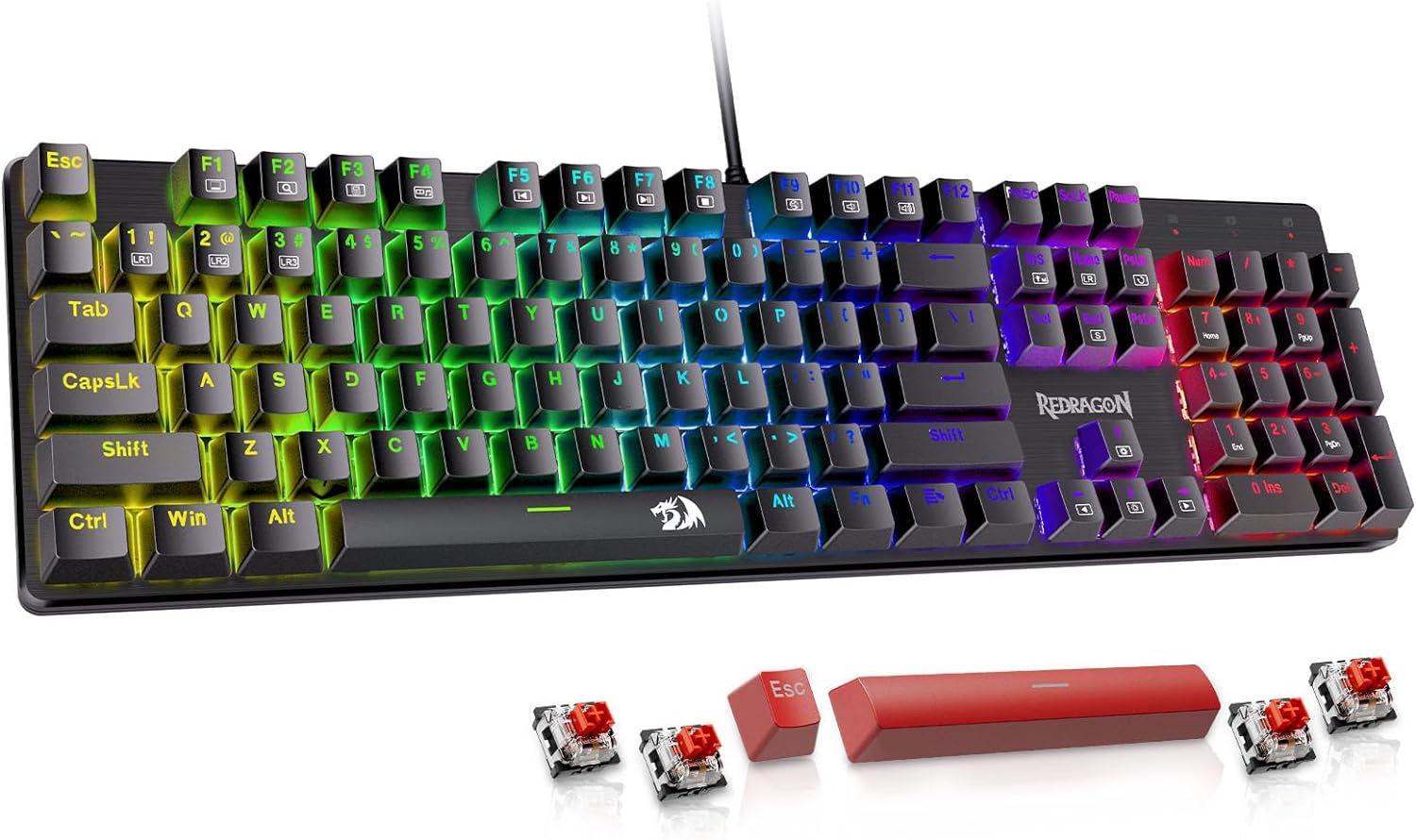
Redragon Mechanical Gaming Keyboard Wired, 11 Programmable Backlit Modes, Hot-Swappable Red Switch, Anti-Ghosting, Double-Shot PBT Keycaps, Light Up Keyboard for PC Mac
Original price was: $42.21.$30.99Current price is: $30.99.
Related Products




Product description
The video showcases the product in use.The video guides you through product setup.The video compares multiple products.The video shows the product being unpacked.


Linear feedback, response faster, ideal for typing and gaming
1 Cool Backlit Illumination
2 11 Backlit Modes
3 Responsive Red Switches


Note: The driver only supports the Windows operating system
 Spill-resistant Protection
Prevent accidental spills from interrupting your game
 Ergonomic Design
Make your typing and gaming more comfortable
 Full Key Anti-ghosting
All keys can work simultaneously, easily complete any combining functions without conflicting keys
 Double-shot PBT Keycaps
No concerns about keycap fading even with prolonged use
How to download the driver?
Follow the video instructions, download and install the software, plug and play.
Note: The driver only supports the Windows operating system.
The video showcases the product in use.The video guides you through product setup.The video compares multiple products.The video shows the product being unpacked.
How to use the software to edit your keybaord?
You can remap the key functions, add macro keys, change the light modes, and adjust the speed and brightness of the backlight.
NOTE: The backlight color can not be customized.
The video showcases the product in use.The video guides you through product setup.The video compares multiple products.The video shows the product being unpacked.
 Programmable Mechanical Keyboard
Redragon Mechanical Gaming Keyboard with Red Switches and equipped with strong programmable function will be your best teammate.
Redragon is always committed to providing the most suitable gaming equipment for every gamer to enrich and enhance your gaming experience.
What should I do if the keys do not work?
You can exchange the switch to fix it and the package includes 4 spare switches.
How can I change the backlight?
There are 11 backlights that can be chosen by pressing [FN]+[Ins] or the software, but the color can not be changed.
Brilliant Color Illumination- With 11 unique backlights, choose the perfect ambiance for any mood. Adjust light speed and brightness among 5 levels for a comfortable environment, day or night. The double injection ABS keycaps ensure clear backlight and precise typing. From late-night tasks to immersive gaming, our mechanical keyboard enhances every experience
Support Macro Editing: The K671 Mechanical Gaming Keyboard can be macro editing, you can remap the keys function, set shortcuts, or combine multiple key functions in one key to get more efficient work and gaming. The LED Backlit Effects also can be adjusted by the software(note: the color can not be changed)
Hot-swappable Linear Red Switch- Our K671 gaming keyboard features red switch, which requires less force to press down and the keys feel smoother and easier to use. It’s best for rpgs and mmo, imo games. You will get 4 spare switches and two red keycaps to exchange the key switch when it does not work.
Full keys Anti-ghosting- All keys can work simultaneously, easily complete any combining functions without conflicting keys. 12 multimedia key shortcuts allow you to quickly access to calculator/media/volume control/email
Professional After-Sales Service- We provide every Redragon customer with 24-Month Warranty , Please feel free to contact us when you meet any problem. We will spare no effort to provide the best service to every customer
7 reviews for Redragon Mechanical Gaming Keyboard Wired, 11 Programmable Backlit Modes, Hot-Swappable Red Switch, Anti-Ghosting, Double-Shot PBT Keycaps, Light Up Keyboard for PC Mac
Add a review

Original price was: $42.21.$30.99Current price is: $30.99.
matt –
Great mechanical keyboard. I bought two for my husband’s work and general pc. Easy to clean!
Fantastic. I got the first of this keyboard for my husband’s home office. He recently got a PC to replace his general use laptop. I am the one who cleans it so I specifically picked this product. It is easy to clean and very sturdy.It is the best mechanical full size keyboard for the price range.One of the best things is that it doesn’t have any frills or useless functions so common in keyboards and other computer accessories.I also love that it is wired. Wired is always more reliable and longer lasting than bluetooth or any wireless setup.The keyboard responsiveness is fantastic. The keys are too deep for my child size hands and fingers but great for him and others with normal size hands. I personally have to use a low profile keyboard to prevent finger pain-I use the brand, Redragon, Horus K618 a low profile mechanical keyboard.This brand is has the best affordable gaming mechanical keyboards by far.There are ones that are much nicer, but muuuuch more expensive!
Denise Strohl –
Buy it!!
I was looking for a replacement keyboard for my work desktop because the letters on the keys kept wearing off and it was getting expensive because I’ve tried 3 in the last year! Found this one and the letter W started acting weird after a month, typing 3 W’s instead of one or not showing up at all, I tried fixing it, reported it and they gave me some troubleshooting tips but it didn’t work so they sent a replacement! That’s what customer service is all about!! This company is amazing and I’ll def buy from them again. The replacement works perfectly!
Himantra –
Keys Sound Amazing But are a Tad Small
I’ve had this keyboard for a few weeks now, a replacement for a cheap Jellycomb Bluetooth that I bought and for some reason stopped working in the middle of a meeting. After realizing it was the Bluetooth getting finicky, I decided to replace it with a non-bluetooth keyboard. At first, I chose Red Dragon’s SHIVA brand, but I hated how mushy the keys felt (my job requires a lot of typing, so keys that are too mushy cause wrist pain). I returned that and tried this one instead. Luckily, I picked it up during a sale, so the price was actually better than a SHIVA. This is my first mechanical keyboard.The feel is great: the keys are responsive and nothing feels mushy. It’s a real joy to type on. It IS louder than other keyboards I have had, but I like it. The sound is a soothing “clack-clack-clack” similar to (but not as noisy as) a typewriter. If that kind of sound brings you ASMR joy, then you’ll likely enjoy this keyboard. However, if you want to type quietly because of a shared workspace or something, this may not be the keyboard for you.Another issue is that the keyboard keys are slightly higher and even with the angled feet open, my wrists get tired. I’m going to grab a wrist pad, and I think it’ll fix the issue.I enjoy the pre-settings. I’ve been trying to get things that don’t require a huge time-sink or setup commitment from me, and the fact that the pre-settings have stuff I use, like calculator and file manager, is great. I don’t have to set anything, it really is ready to go out of the box. That said, while it is plug and play, I recommend downloading the Redragon keyboard software from their website so you can change the presets if you want.The quality of the keyboard is fine for my purposes. I know some reviews mentioned it feels cheap. I don’t think it feels anymore cheap than any other keyboard in this price point. In fact, to me, the keys feel a bit better made. I don’t plan on moving the keyboard around — it’s hooked up to a desktop computer at my work desk — so I don’t know if that makes a difference.HOWEVER, the keyboard size is a tad small, in my opinion. I suppose this was done for a smaller footprint to save desk space, but as a result, the keys are *slightly* smaller than the average keyboard. While it is usually fine, I do find myself making typos more often as a result because my fingers (which are pretty average, not “huge” or “fat”) will miss the keys. Considering I type pretty fast (over 95 wpm), it is a big annoyance. People who 10-key type may not have this issue as much as I have, but honestly, if I had realized this earlier, I may have returned the keyboard for a mechanical one with larger keys. In fact, the same model has a $10+ one that looks like the keys maybe larger. However, considering I like almost everything else about it, it’s not a big sacrifice for me and I hope with more time on the keyboard typing, I’ll get used to the key size.
Bryan H –
Redragon is the Perfect Balance of Affordability, Functionality, and Fun!
This is overall an excellent keyboard choice. Redragon has consistently proved itself a real comptetitor in the keyboards and peripherals markets — Their products hold up well to comptetitors such as “Hyper-X” and “Logitech”. What I’ve found is that Redragon consistently offers a delicate balance of affordable value, functionality, and absolute fun. They have an incredible array of products to meet everyone’s needs and expectations, whether it be avid gamers and PC professionals alike.As a loyal Redragon consumer, I have rarely had issues with their product line, however, in this instance there was some damage to the exterior packaging, but it seems directly attributed to poor-handling as sometimes happens — This is one of many Amazon products participating in the sustainable program, so it does not arrive in extra-padded packaging. This is not the fault of Redragon and therefore doesn’t effect my star-rating.As a mention, I would also like to see the RGB backlighting perhaps improved on this model as well — While it is fully customizable as it relates to lighting and patterns (with or without Redragon Software), the brightness threshold is lower than most of us enthiusasts would like — Especially those who find themselves gaming or working in lessthan optimal lighting conditions.Additionally, given that this keyboard has hot-swappable keycaps and switches, perhaps Redragon will include the all-in-one dual-sided pulling tool in the future, rather than a separate keycap puller and U-shaped tool which is included with this model. The all-in-one puller tool is much more functional and effective in my experience. In fact, Redragon does include this tool with many of their keyboards.I brought these minor concerns to the attention of Redragon, to which they were very receptive and understanding. They backed up their quality product with a replacement. That too is something that really stands out with Redragon, they take customer satisfaction seriously. Thanks for reading and allowing me to share my thoughts and experiences with the K671 keyboard.
Jayden Tan –
The cable is different than advertised. The RGB is a single ugly static mode. The only customisation is to turn off or on specific keys RGB. For example the Q key is always an ugly yellow static backlight that can be turned off but not changed colours. The keyboard is hot swappable but good luck getting any of the switches out with how tightly they are fitted. This means that the board is effectively NOT hot swappable.
michael elliott –
Straight out the box some keys don’t work
Richard & Rebecca –
My 12yo son LOVES it for the multi-coloured light effect and my 17yo son nabs it at every opportunity! I’ve marked it down a star as I find the keyboard ‘clacky’ to type on but for gaming that’s not a requirement.