
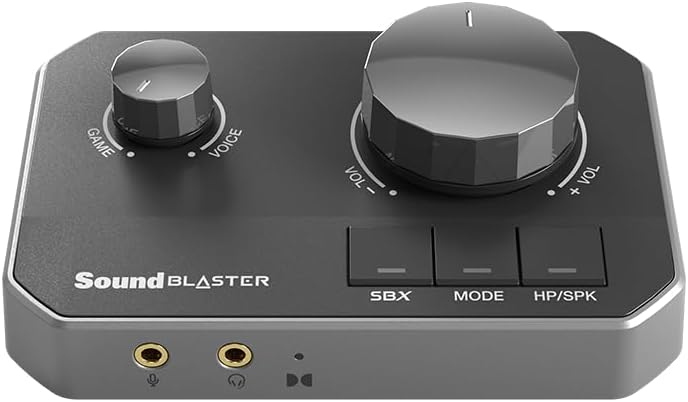
Sound Blaster G8 – Hi-Res Gaming USB DAC with Dual USB Audio Mixing and Fully Customizable Acoustic Engine and 10-Band Equalizer
$161.49
Related Products
![JISULIFE Handheld Mini Fan, 3 IN 1 USB Rechargeable Portable Fan [12-19 Working Hours] with Power Bank, Flashlight, Pocket Design for Travel/Summer/Concerts/Lash, Gifts for Women (Fuchsia)](https://bestdealsavvy.com/wp-content/uploads/2025/12/61D9HgfRiaL._AC_SL1500_.jpg)




Sound Blaster G8
10 reviews for Sound Blaster G8 – Hi-Res Gaming USB DAC with Dual USB Audio Mixing and Fully Customizable Acoustic Engine and 10-Band Equalizer
Show all
Most Helpful
Highest Rating
Lowest Rating
Add a review

Sound Blaster G8 – Hi-Res Gaming USB DAC with Dual USB Audio Mixing and Fully Customizable Acoustic Engine and 10-Band Equalizer
$161.49
Deniz –
Fantastic DAC for Both Headphones and Speakers
I’ve been using the Sound Blaster G8 for a few weeks now, and I’m genuinely impressed by its performance. I mainly use it with my Logitech Z623 speakers and a pair of high-impedance headphones, and the difference in clarity and depth is amazing. The G8 delivers clean, rich audio with powerful bass and detailed highs, even at lower volumes. It’s compact and built solidly, with intuitive controls and excellent customization through the software. The dual USB input and audio mixing features are perfect for gaming and streaming setups. I switched from onboard audio, and the improvement was instantly noticeable — everything sounds more dynamic and alive. It’s plug-and-play friendly, and works flawlessly on both PC and console. For the price, it’s an outstanding upgrade for anyone looking to elevate their sound experience.
Alejandro F. –
An upgrade from my previous X4 unit.
Upgraded from a soundblaster x4. First unit of the g8 I received had a hum when volume was set at 0 and I figured it was defective. I had been looking to upgrade my older x4 unit since it was over four years old and I figured the tech had advanced. I eventually reordered a few months later and the unit I have now has nice and crisp audio and is absolutely an upgrade. I utilize the sound for fps games, videos/movies, and music. It’s a nice compact dac with white leds that don’t turn off, but not bothersome. Easy to use. I did install the creative software, but don’t bother too much with it or the scout mode. The default mode works well enough. If you’re looking for a dac for your pc gaming and don’t want to rely on on board sound, I recommend this unit. Creative soundblaster has been around for awhile and makes good products.
Flemo –
Completely Underrated DAC – astonishingly good sound for both music snobs and gamers.
This thing is totally underrated in the external DAC space.It keeps things simple, but does not compromise on sound quality.If you play PC games and are somewhat of an audiophile, you will LOVE this.I have purchased many other known brand DACS with LCD screens and a lot more setting to adjust, and to be honest I prefer the simpler life.The included features (Acoustic Engine) in the software are simple, yet extremely powerful, yielding truly stellar sound across a range of headphones.Portable, functions superbly for both music and gaming and has tons of connection options to meet most needs. And the volume power and clarity is astonishing, I can’t believe this is a sound blaster product, I’m shocked how good it sounds.
Denver Nova –
Epic Sound Card with Incredible Virtual Surround Sound for Headphones
Tons of input options with great flexibility and easily the best virtual surround option for headphones that is available. I’ve tried every different virtual surround option out there from Razer’s THX to Dolby and DTS:X. Creative’s SBX has the absolute most natural and immersive sound by far. It does a great job of blending sounds over both ears instead of having those sharp, laser focused, sounds hitting a single ear in a weird unnatural way. Just because something is on your left making noise doesn’t mean your right ear can’t detect it as well, albeit quieter. Luckily Creative understands this concept. They have spoiled me to the point of literally refusing to game without one of these sound cards plugged in. The crystallizer is a cool feature as well but it is very unforgiving with poor quality samples and music. Definitely brings out all of the details in a song though. Just keep it low and I’d recommend turning off surround for music listening. Surround is definitely meant for gaming.
ADK –
Device has potential, but is crippled by poor drivers & software
OK, but super frustrating product with little support. I really, really want to love this device, but there are just too many quirks that are just as frustrating as the problem that this device solves (for me).I bought this because I use a Nintendo Switch along side my PC, adn they share one of my two monitors. Previously, I would run the audio from my Nintendo through the line-in on my internal sound card, however Windows 10 (and 11) seem to think that a line-in audio source must preven the computer from going to sleep, which I don’t like.I bought the Creative G8 to utilize it’s dual USB C inputs, one for my PC connection, and the second for the Nintendo connection. This works great to combine my devices and even has a balance knob to individually adjust volume for each source.The problems are:1) the game/chat volume adjustment is digital and software controlled, which I don’t mind except that it just kind of does what it wants. If I have the volume down on my Nintendo while listening to PC audio, it works as expected until the PC audio goes silent, at which point the Nintendo sound creeps back up to full volume even without adjusting the knob. When sound starts coming from teh PC again, the nintendo volume will suddenly drop back to the previously set low volume level. This is not desired behavior, and to my knowledge, there is no way to prevent it.2) Digital volume controls sometimes gets lost, like it doesn’t know the position of the knobs, and you have to make adjustments that would be otherwise unnecessary so the device can recalibrate the volume levels.3) When my PC wakes of from sleep, occassionally online video will not play correctly (no sound, extreme lag, pixelated image, or just nothing at all) and I finally figured out that it’s being caused my the G8, because once I press the “mode” button, everything goes back to normal, and video begins working correctly again4) Unintuitive, clunky, software that makees it very difficult to achieve the audio results you’re looking for. Any of the non-pure (equalized) modes result in muffled, muted audio. The sound is definitely equalized, but just sounds bad and requires excessive volume to hear5) sometimes the G8 unit simply doesn’t respond to the controls, requiring that I open the Creative software before it comes back to life.I’m super disappointed because this device has so much potential if not for the terrible drivers and control application. I expected a LOT more from a $160 device. I’m holding out for better and/or updated drivers, but I think Creative software package will always be bad, as that’s been their status quo since the early 90’s.
Kieran Bracken –
Very new to the world of audio and DACs. I’d been just using the headphone port on my tv up until recently. Plugged my headphones into my computer to play a game with friends and happened to listen to some music when I noticed that my headphones’ audio sounded much better and more full, for lack of a better word. Plugged them back into my tv to double check and sure enough, they sounded worse, lacking both bass and detail.Now I’m definitely in the minority on this, but my current setup is very much a couch media setup, with all my consoles any my PC connected to my living room tv. I needed something that could be plugged into my tv for all my consoles with an independently connected power supply cord and a separate connection dedicated to my PC which could carry both my headphone and microphone signals, and the Sound Blaster G8 checked all those boxes.Looked up some reviews and was pleasantly surprised to find that this one was recommended. Bought it, and I’m not at all disappointed with my purchase. My headphones’ audio sounds as good as, or better than my PC does by itself, but with the added benefit that I can now have my headphones and microphone connected to my PC while my headphones are also connected simultaneously to all of my other devices via my tv. It’s a perfect fit for my setup.The build quality was also surprisingly good too. I’d heard other people in reviews bemoan the plastic construction, but it’s not cheap-feeling at all to my hands and as long as it remains that way, I’ll be more than happy with it. One small issue I did have though was when I tried to plug in my digital audio cable for my tv, the door that’s supposed to close when there’s no cable connected seemed to snap and now won’t close. I also had some trouble connected the cable, likely as a side effect of this issue. That said, once the cable was connected, no further issues.Overall, if you’ve got an oddly specific living room multimedia setup like I do, I can definitely recommend this product. The two usb-c ports (a rarity on DACs like this from what I’ve seen) are a game changer, allowing my to have a cord connected to my PC and a separate power cord for all my other devices when my PC isn’t on. Not to mention the other incredible port selection variety. While I’m not planning to upgrade my headphones right away, I’m confident that this DAC will be able to drive them given the specs. Give it a try if it fits your needs.
Sherry L. –
Bought this to replace my current G6 (or use as a backup for G6). At first I didn’t notice the difference in sound quality, but after careful listening I did notice an improvement over the G6 sound quality. The sound stage appears to be deeper and wider over the sound of G6, and once you get used to it, it should be a good upgrade over the previous card.The only issue I had was that since my computer is a bit old, it only has one USB-C port, so using this sound card would take up the USB-C port and make it unavailable for other uses. However, once I replace my computer with extra USB-C ports in the future, this should no longer be a problem.(Note: I don’t play a lot of games and mainly listen to music using this device, so the review is based on music-listening experience only.)
M N –
Take any headphone to another level all together, be prepared though because it will make them capable of blowing your ear drums. Tons of options for customisation and adjusting, scout mode is amazing.
ROBERT HODDER –
Game to voice chat mix does not work. Only just tried to use it and now likely stuck with a broken DAC.*Update*1. Windows Sound ConfigurationBefore opening Steam, you must ensure Windows recognizes the dual audio endpoints of the Sound Blaster G8.Default Playback: Go to Windows Sound Settings and set Sound Blaster G8 USB-1 as your “Default Device.” This handles your game and system audio.Communications Playback: Set Sound Blaster G8 USB-2 as your “Default Communications Device.” This route ensures voice chat is isolated for the mixing knob to work.Recording: Set Sound Blaster G8 External Mic (or Mic-In) as your “Default Device” in the Recording tab.2. Steam Chat SettingsOnce Windows is configured, match these settings within the Steam Client:Open the Friends List and click the gear icon (Settings) in the top-right corner.Navigate to the Voice tab.Voice Input Device: Select Sound Blaster G8 External Mic.Voice Output Device: Select Sound Blaster G8 USB-2. This is critical for the “Voice” side of the GameVoice Mix knob.Voice Transmission Type: Choose between “Open Microphone” or “Push-to-Talk” based on your preference.In the end it was Gemini that found this solution. The reversal of the settings in Steam feels a bit non-sensible, but it works!
Amazon Customer –
Terrific product