
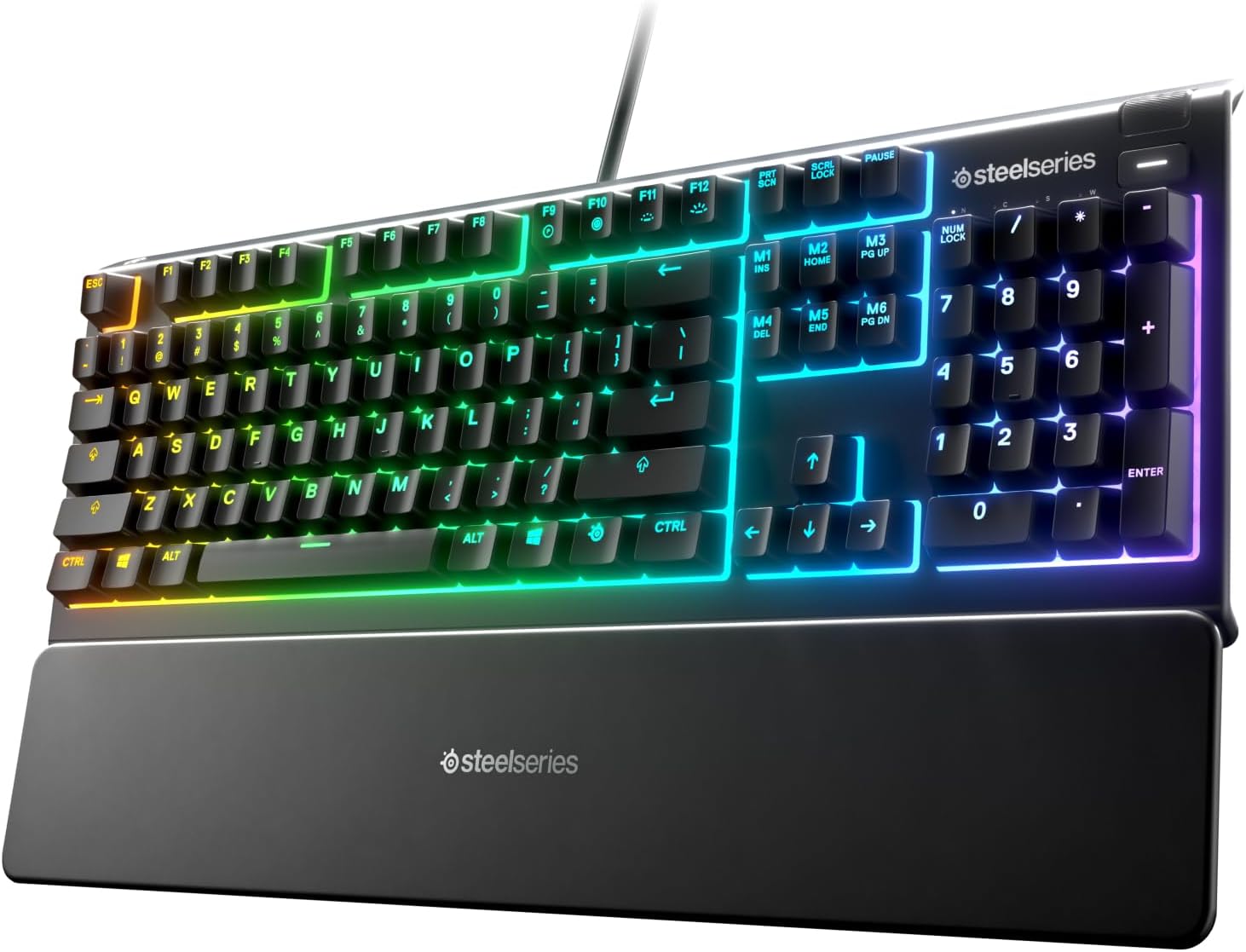
SteelSeries Apex 3 RGB Gaming Keyboard – 10-Zone RGB Illumination – IP32 Water Resistant – Premium Magnetic Wrist Rest (Whisper Quiet Gaming Switch)
Original price was: $54.99.$39.99Current price is: $39.99.
Related Products
![Apple Watch SE 3 [GPS 40mm] Smartwatch with Starlight Aluminum Case with Starlight Sport Band – S/M. Fitness and Sleep Trackers, Heart Rate Monitor, Always-On Display, Water Resistant](https://bestdealsavvy.com/wp-content/uploads/2025/12/61xkvg-RStL._AC_SL1500_.jpg)


The apex 3 is your first step into next level gaming. Built from the ground up with intuitive gaming-focused features like water resistance, 10-zone RGB, whisper quiet gaming switches, and gaming grade anti-ghosting, the apex 3 has just what you need to outshine, outperform, and outlast the competition.
Ip32 water resistant – Prevents accidental damage from liquid spills
10-zone RGB illumination – Gorgeous color schemes and reactive effects
Whisper quiet gaming switches – Nearly silent use for 20 million low friction keypresses
Premium magnetic wrist rest – Provides full palm support and comfort
Dedicated multimedia controls – Adjust volume and settings on the fly
Compatible with Windows, Mac OS X, Xbox Series S, Xbox Series X, PS4, PS5
11 reviews for SteelSeries Apex 3 RGB Gaming Keyboard – 10-Zone RGB Illumination – IP32 Water Resistant – Premium Magnetic Wrist Rest (Whisper Quiet Gaming Switch)
Add a review

Original price was: $54.99.$39.99Current price is: $39.99.
Douglas Taylor –
Perfect keyboard for dark settings
As a Keyboard snob and a very hard keyboard user, I really like this keyboard and this company overall. It has a nice break for each key and while the typing is not whisper quiet, it is much less than a cherry red mechanical. I can touch type easily and quickly as everything is where it should be. I also have a older Apex 5 keyboard with the Cherry Brown keys I believe – great keyboard as well, but noisy. I think this Apex 3 is superior in feel and typeability. I have never used the wrist rest before on any keyboards due to my very large hands, but this time I gave it a go, and it really improved the overall feel through my wrists. I am now a believer in the hard smooth angled wrist restsOne thing I really like about this keyboard is that you can get the white LEDs pretty bright so that I can program without overhead lighting and never not see the keys – it is bright enough and it looks legit while being bright. I am too old for the RGB effects, just give me bright white keys!On my Apex 5, I wore the keys to a high shine and it still hasn’t missed a beat. Steel series knows how to put out a extremely useable, high quality product every time. I have had virtually all the big names keyboards and they all have their charms, but for reliability and quality, none has surpassed this manufacturer in my experience, although some have equaled it.From a dollars and cents standpoint – this is a excellent value!
Rachelle Pennington –
Great keyboard
This is a very nice keyboard for the price. It is not a mechanical keyboard, but it still feels very nice to type on, and it sounds great! Great budget keyboard, the lighting looks very good and is easy to customize. You cant customize the individual keys, its sections across the keyboard the horizontal ways. Everything feels really good quality, it’s all plastic but nice plastic. I definitely would recomend this keyboard.
MHJ –
Quite and well built.
Incredibly silent with good tactile feedback. Great keyboard especially for the price. Decent heft and weight. I bought it because I am on conference calls/zooms all the time and wanted a less “clacky” keyboard – fits that bill perfectly. Would recommend.
Camilo Salazar –
SteelSeries Apex 5 – Almost a 5-Star Keyboard, but Not Quite (4.76 on My Scale)
The SteelSeries Apex 5 left a strong impression. It’s a well-built keyboard with some excellent features and clever design choices. The cable is thick, long, and even has a nice touch — the SteelSeries logo on the USB plug. The RGB effects are top-notch, with smooth transitions both on keypress and when idle. I was genuinely excited about all of this… until I noticed what was missing. And for me, that’s a big deal.Let’s break it down.😁### What Makes It (Almost) 5 Stars – The Good:😃- Excellent Media Controls: The volume wheel is fantastic: easy to reach, smooth to use, and includes a click-to-mute function. The menu button also works similarly to the playback controls found on many headsets with built-in microphones or hands-free kits. Super convenient.- Onboard Controls – No Software Needed: You can manage brightness, RGB colors, effects, profiles, and more — all from the keyboard itself. No software required. Only macros can’t be directly viewed or edited in menu, which is a small detail worth noting.- Smart OLED Display: It shows the status of Num Lock, Caps Lock, Scroll Lock, and whether the Windows key is disabled. Very handy (though there’s a small catch — more on that below).- Customization & Visual Feedback: Besides full per-key RGB customization and reactive effects, pressing the “Fn” key (the SteelSeries logo key) lights up related function keys in red for quick reference. It’s super helpful… but again, not perfect (you can’t change the color — more on that too).- Profile Memory Built-In: You can save up to 5 profiles directly on the keyboard and toggle them on/off without cycling through all of them. I personally use just two: one for gaming and one for productivity.### The Not-So-Good – My Gripes😒:- No Dedicated Context Menu Key: This is my biggest issue. A full-size keyboard should include the dedicated menu key (the “right-click menu” key). SteelSeries replaced it with their custom “Fn” key, which really disrupted my usual workflow. I ended up switching to Shift + F10 to keep things consistent across devices.- Fn Key Can’t Be Reassigned: The SteelSeries logo key, which replaces the context menu key, is fixed — it can’t be remapped. Personally, I’d have preferred having the Windows key only on the left, and using the right one for Fn, keeping the menu key in its usual place.- OLED Button Always Lit: The brightness of the button next to the OLED screen cannot be dimmed or turned off. If you’re working in a dark room or watching movies, this little light will keep shining at you — kind of annoying.- OLED Icons Overlap Custom Logos: If you upload a custom image to the OLED screen, the status icons for Num Lock, Caps, etc. may overlap your logo. Not a dealbreaker, but it limits how creative you can get with personalization.- No Visual Feedback When Windows Key Is Locked: Unlike other lock states (like Caps Lock), there’s no lighting change or visual indicator on the keyboard itself when the Windows key is disabled — just a small icon on the OLED. Feels inconsistent.- Function Key Highlight Color Can’t Be Changed: When pressing “Fn,” the related keys light up red — but that red is not customizable. If your RGB theme is red, this effect becomes basically invisible.- Slight Input Delay: There’s a small delay in key activation. I don’t notice it while typing or working, but for competitive gaming, it might matter. Rtings.com confirmed this in their testing too.- Non-Replaceable Hybrid Switches This is the most serious issue. The switches aren’t standard and can’t be replaced by the user. If a key fails, you’re stuck with relying on warranty, support… or scavenging another board. Not great.### Neutral Points – Might Be Good or Bad Depending on You🤷🏻♂️:- Actuation Distance: I switched from a keyboard with ultra-light 0.8 mm actuation, and I kept typing extra characters. The Apex 5 feels much more precise and helped reduce typos — a big plus for me.- Key Feel & Keycaps: The keycaps aren’t made from premium material, but they feel decent. Coming from linear switches, the tactile feel took a bit of getting used to — but I adjusted quickly.- Magnetic Wrist Rest: I don’t use it much, but the magnets are strong and hold it firmly in place.- Macro Labeling (M1, M2, etc.): Some keys are labeled as macro keys (M1, M2…), which can be confusing at first — but you’ll get used to it.- Customization Without Software: You can change basic RGB effects and profiles directly from the keyboard. The software adds more depth, but it’s nice that you’re not forced to use it.- USB Plug with Logo: A small but smart touch: the SteelSeries logo on the USB plug helps you spot which device you’re plugging in.- No Physical Lock LEDs: The lock indicators (Num Lock, Caps, Scroll) have been moved to the OLED screen, and you can set those keys to change color when active. Some might miss the old-school LED lights, but I’m fine with it.### Final Verdict 💸😇 The SteelSeries Apex 5 is a well-built, visually polished keyboard with great RGB, useful media controls, and a solid set of features for gamers and professionals alike. Still, a few oversights — especially the missing context menu key and the non-replaceable switches — keep it from being a perfect 5-star device in my eyes.If those flaws don’t bother you, then this keyboard is an easy recommendation. Just know what you’re getting — and what you’re not
Joshua Courter –
Nice, customizable, but whipser quiet? Really?
The SteelSeries TKL keyboard is a nicely build accessory for laptop gaming. That is what I primarily use it for when traveling. It is lightweight, sleeps into my laptop backpack, and doesn’t take up much room. Once you download their software, you can customize the lighting patterns, which is a very nice touch. They do have several pre-programmed lighting options, but you ultimately can customize it all. Well done!My only complaint is what they are calling “whisper quiet”. I was skeptical about how quiet it could be. I type this review on my Microsoft Ergonomic Keyboard (wired) and the sound from typing the keys sounds exactly the same as the SS TKL. They keys are not as pronounced as the SS TKL, but I was expecting to hardly hear them. Now when gaming, I don’t notice it at all. I am too focused on the gaming. However, when browsing the web or doing in-game chat instead of voice, then I notice the sound. Anyway, I would say their push and advertising “whisper quiet” is not accurate at all, so if the selling point for you is a quiet keyboard when you tap the keys you may be disappointed with this TKL. I think my built in laptop keyboard is quieter actually.Otherwise I think it is a good price for what you get. A lightweight wired keyboard that you can customize a few buttons, change up the RGB lighting behind the keys, and being wired you know there won’t be moments when the battery dies mid-game. The only ding, IMO, is the false advertising for “whisper quiet” keys. No different than a cheaper every-day keyboard from what I can tell.
Helen –
good gaming keyboard.
this keyboard is amazing for its price. A good beginner gaming keyboard. It’s cute, it makes clicking sounds, and it’s very satisfying to press. Doesn’t lag and fits perfectly on my small desk. Steelseries did really well with this keyboard.
Sheena Scott-Mitchell –
Great gaming keyboard for my Grandson
Dennis –
The keyboard wasn’t a mechanical keyboard. However, the typing feeling was good.The Macro setting was superb able to toggle individual keys on or off and auto-repeat.All keys are programmable.
Isaac nabil –
Très utile, pratique pour ceux qui font la programmation
ellie whilding –
The keyboard is amazing. It has per key illumination which the software is very cool with.It gets recognised by signal rgb software so it syncs everything together.The feel is good it has mechanical clicks with membrane so doesn’t feel like your bottoming out the keys.
Triple –
5 stars for the quality however it lacks some features. Good for the price.