

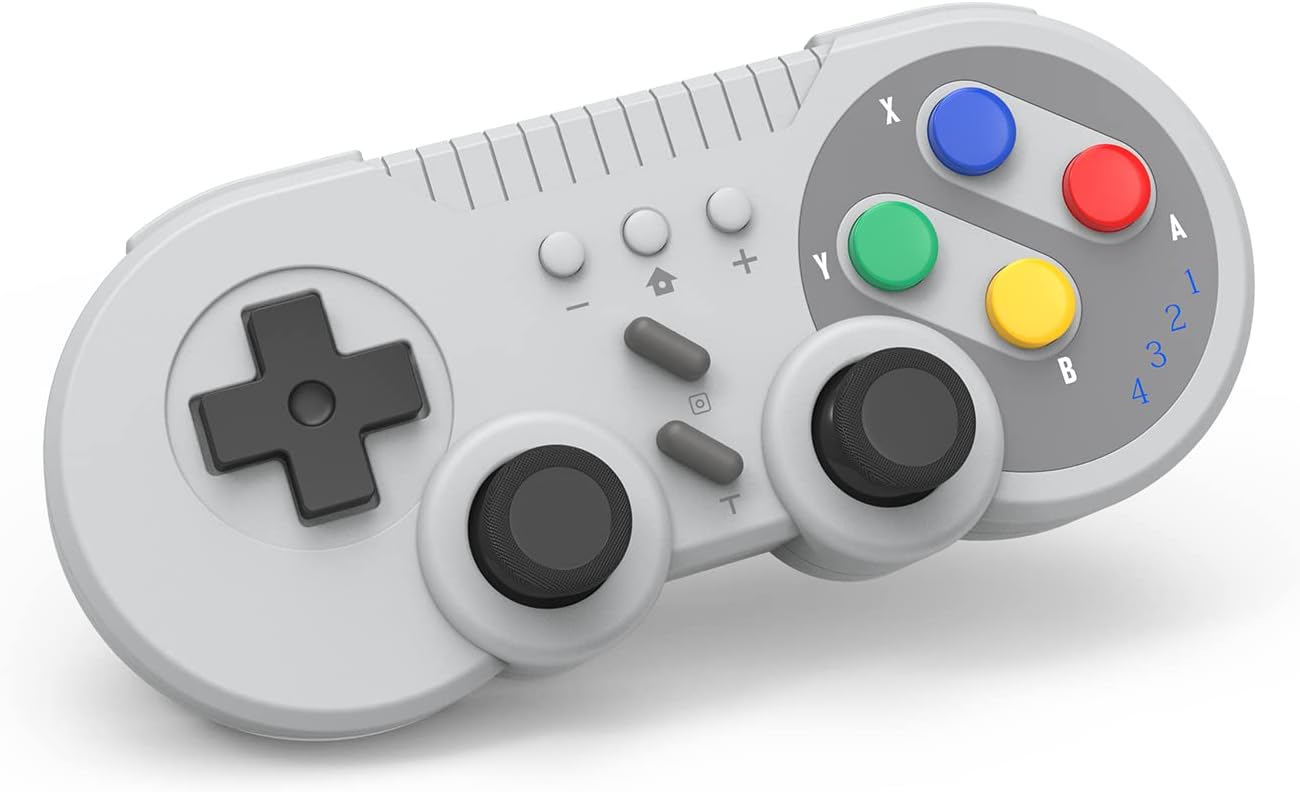
Switch Controller Wireless Gamepad Compatible with NS/Switch OLED/Windows PC – Classic SNES Style Controller with Motion Control/Vibration/Turbo/Wakeup – Gray
$29.88
Related Products





Product description


Wireless Controller for Nintendo Switch
This wireless gamepad compatible with switch console and also supports Windows PC.
Adopt new wireless connection technology, strong anti-interference ability, more stable connection.
Built-in large capacity battery for long time use.
Support wake-up function, built-in gyroscope to provide motion control and built-in dual motor to provide dual vibration function.
You can use the Turbo and screen-capture buttons to implement corresponding functions.

HOW TO CONNECT?
First Connection:
1.Select the [ Controller ] Menu.
2.Select the [ Change Grip/Order ] Menu.
3.Press and Hold the [ HOME ] key 4 seconds on the [ Change Grip/Order ] Page and 4 indicators blinks fast.(Enter the search configuration.)
4.After the connection is successful,the LED lights indicate the corresponding game player.
Connect The Controller To The Console Again:
Switch Console In the Open state, press the [ HOME] button to start the controller, and the gamepad will be automatically connected to the console.
At the same time also supports the [ HOME ] button to wake up the console, wired to connect the computer and other functions, please see the manual operation.

Support Controller Six-axis Sensing Function
The Switch gamepad, which has a gyroscope sensor built in, allows you to provide six-axis induction control in games.
It can directly use the controller to control the steering of the car, the aim of the arrow and other application scenarios. Provide you with more rich game experience.

About Dual Vibration
Dual motors are built in to provide dual vibration function.
1. Press and Hold [ T ] key + [ Up ] key to enhance vibration.
2. Press and Hold [ T ] key + [ Down ] key to reduce vibration.

About Turbo
Provides Turbo Function.
1.Press the [ Turbo ] key to enable the combo function.
2.Press the [ Turbo ] key again to disable the combo function.
Pressing [ Turbo ] allows you to reduce the number of times you have to press a key, improving your game efficiency.

About ScreenShot
Provides ScreenShot Function.
Press the [ Screenshot ] button to capture a moment of the game.


13 reviews for Switch Controller Wireless Gamepad Compatible with NS/Switch OLED/Windows PC – Classic SNES Style Controller with Motion Control/Vibration/Turbo/Wakeup – Gray
Add a review

$29.88
Samuel Espinosa –
Works well If you can figure it out.
Works as intended for what I need it for. Note, for me to use with emulators I had to make sure steam was closed out otherwise it would just turbo random buttons. For Bluetooth pairing holding the home button created a pro controller, holding home + Y made an Xbox controller, and holding home + A (I think, hard to remember) gave me the gamepad controller (which I could use with PC/emulators). Hope this helps those who were having issues with connecting to PC in the reviews since its not stated in the booklet.
WLLIAM U. –
Flash backs
I order this remote control because growing up I used to play Mario kart but on the super Nintendo. So now that I play with my son, even though the Nintendo controllers are a lot more comfortable than this, I just thought it would be very nice to play with my old style controller that I grew up playing with. Connecting the remote control to the system itself was fairly easy. The only thing is I needed to remember to let the lights flash before I went ahead and pressed the start button. The control itself feels a little bigger than what I’m used to but it’s actually nicer because my hands are a lot bigger than they used to be as well. The control reacts as you think you would. The only thing that caught me off a guard a little bit was the extra buttons in the back. The original controllers did not have this, but aside from that it’s almost identical to my original controller. I didn’t play my son for a few matches and seem to get the hang of it pretty quick because I’ve been used to playing with the Nintendo controllers. I wouldn’t recommend this for any new beginners. God controller type play thing that it’s better than the newer controllers. I love the way the controller feels in your hand. The grip is very nice. Doesn’t feel like it’s going to fall off your hands or anything like that. Nice and sturdy. I was playing maybe like for 4 hours and even the joysticks fell really comfortable. I haven’t had to charge my controller as of yet, which is a very nice thing, but comes with a USBC type which would charge it pretty quickly. I’m assuming if it’s anything like the Nintendo controllers. It was very easy to connect to the system. Didn’t take me maybe more than 30 seconds, just make sure you read the instructions. It always helps.
MariahHeath –
Not a remote for Mario party
Nice remote depending on the games you play not the easiest to connect and sucks you can’t use it on Mario party
wendell collins –
Great product
I be slinging but whippins with this bad boy buttons are great wish I could disconnect easier but it connects ok with the wire but once it’s on it on great for the price I got it too feels nostalgic
Erin –
Some stuff to consider
Tldr; cute and fine for casual game play but not responsive or comfortable for anything competitive or long sessions.It arrived fast, connected easily and is super nostalgic. It feels light and sort of cheap, the joysticks feel awful and are quite tall so there’s gonna be no adding thumb grips. The joysticks are tight and lead to finger fatigue after just an hour of open world play. The buttons are also stiff. There’s a pleasant clunk in pressing them but there’s no half press so I wouldn’t use this controller for anything competitive. Im not sure if it can be modified but the screws are standard so if it’s not to complicated internally when I crack it open, I’ll be adding some weight to the inside to try to balance the hard pressing and general hand feel. It’s probably worth that 🤷♀️
Philly Phlip –
All that & a bag of chips.
Works flawlessly with my Switch, wakes up the Switch with a convenient press of a button every time! Wired or wireless.Build quality is good, been using it for a little while now, it’s my main controller. No stick drift or lack of button response after a ton of daily gaming.I tried another retro controller from a different brand for 20 dollars more and it does not even come close to this one.HIGHLY recommend! Excellent price point, good build quality, convenient functionality.
Matthew Trezza –
Great controller!
Love the look of this controller, I spent most of my childhood with my SNES so when I saw this I knew i had to have it. Easy to connect, fits great in my hand, and it’s very light. Great buy for any SNES fans.
John –
Controller has no guide to connect to pc bluetooth
I bought this for my pc, and instantly was let down that i couldnt use it. I went onto amazon to see if anyone was able to get it to work and someone posted instructions to do it! got it to work( on PC!) it works with BLUETOOTH! SADLY i was trying to connect it to another device and now bluetooth will not work, i tried to find the post again that had the correct instructions and the post is gone. no reddit threads. no nothing. the company really needs to include those instructions for bluetooth pc x-input because the manual does not explain how to do so. now my controller is constantly blinking like its trying to connect but nothing shows. it shows on my phone sometimes as either pro controller or xbox wireless controller but wont connect. *note that when bluetooth did connect it recognized it as gamepad*, so now im stuck with no direction of information i need. 🙁 on a side note after literally writing this i tried again, it recognized as a pro controller finally. but yet again another problem. it just wont stop blinking. i tried a button tester and it doesnt register. i think the limbo of connecting has now bricked my controller. ill update with any thing i find
Beto –
Muy bien control para switch y fácil de vincular, se siente algo frágil pero muy bueno.
Yoss –
Funciona bien.
SAUL RGUEZ –
Buen dia.Me llegó, si se agrega al Bluetooth, o eso me marca pero no se conecta. Solo me aparece conectado en la tablet o lap.. pero no el control. Siguen las luces como que buscando.Ayuda.. =/
Ricardo –
Se sincroniza con la pc o el swich
Daniel –
Compre dos y hasta ahora van muy bien, si les a durado la carga y por el precio que los encontré valieron la pena.