

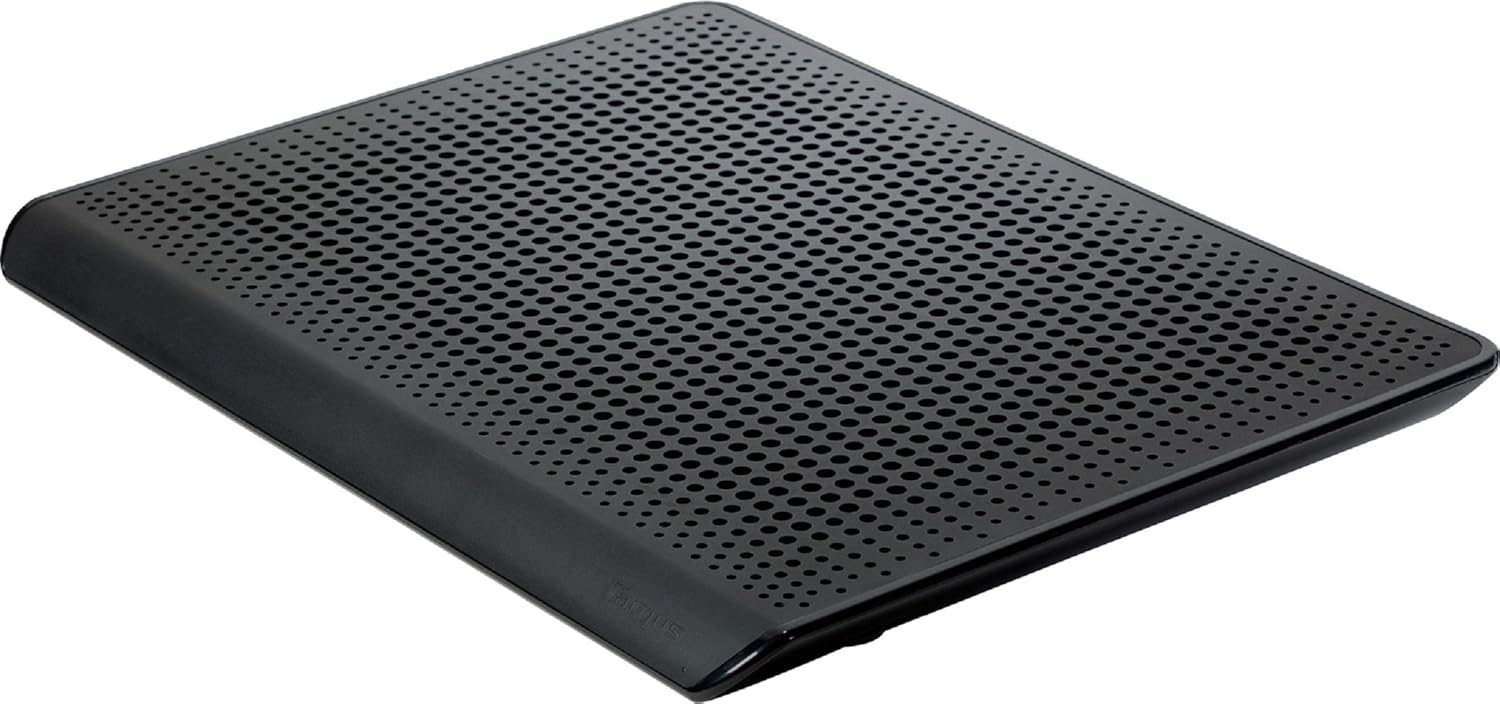
Targus Chill Mat HD3 Gaming for up to 18-Inch Laptop, Black (AWE57US)
Original price was: $45.89.$31.82Current price is: $31.82.
Related Products






The Targus HD3 Gaming Chill Mat is specifically designed to cool high-performance laptops up to 18″. This cooling system features three ultra-quiet, highly efficient fans with bearings that have twice the rated lifespan compared to standard cooling device fans. An adjustable fan speed dial features precise, tactile control so it’s easy to adjust the cooling level without taking your eyes off the laptop screen. Its industrial, perforated design improves heat dissipation while the laptop is in use. Advanced airflow straighteners help focus the air right where you need it most while reducing air turbulence for more targeted and efficient cooling. The non-skid elastomer feet provide a stable grip, so the laptop cooling mat does not slide while the laptop is in use. A convenient LED indicator light is positioned on the front of the device, so you always know when it’s powered. HD3 measures 16.00″ x 12.00″ x 1.00″ (W x H x D). Each HD3 cooling mat comes with a limited 1-year manufacturer warranty.
Gaming on the Go: Get your game on without worrying about your laptop overheating! The Targus HD3 Gaming Chill Mat is specifically designed to cool high-performance laptops up to 18″, compatible with PC, Mac, and netbooks
Stay Cool: HD3’s cooling system features 3 ultra-quiet, highly efficient fans with bearings that have twice the rated lifespan compared to standard cooling device fans. The industrial, perforated design of the mat helps improve heat dissipation as well
Efficient Air Flow: Adjustable fan speed dial features precise, tactile control to make it easy to adjust the cooling level without taking your eyes off the game. Integrated airflow straighteners reduce air turbulence for more efficient cooling
Additional Features: Non-skid elastomer feet provide a stable grip, so the chill mat doesn’t slide while gaming. A convenient LED indicator light is positioned on the front of the chill mat, so you always know when it’s powered
Measurements: 16.00″ x 12.00″ x 1.00″ (W x H x D). Each HD3 cooling mat comes with a limited 1-year manufacturer warranty
8 reviews for Targus Chill Mat HD3 Gaming for up to 18-Inch Laptop, Black (AWE57US)
Add a review

Original price was: $45.89.$31.82Current price is: $31.82.
Call of Kthalia –
Notable improvement!
I have yet to test my actual temps with and without this product but this cooling mat has made a significant difference in the heat I can feel on the surface of my machine after gaming or watching movies. My computer is pretty powerful and so it definitely can crank out the heat. This mat really helps!It is not silent as my machine is, but it’s fairly quiet. For how much difference it makes in the tactile feeling of the temps… I don’t mind the little bit of noise this creates.My only disappointment was that, rather than push air out the sides at all, this really mainly seems to push through pretty traditional fans out the bottom of the unit. This means you won’t see tooooooo much cooling unless you have this on a flat HARD surface, like a desktop so the peg feets hold it up for some clearance, or you raise it up and expose the center bottom area. I only mention this as I use my laptop a lot while laying in bed. The soft surface of the blanket-covered mattress doesn’t really leave much room for the three fans on this thing to push out air. To mitigate this I only sometimes set it on the bed – more frequently I set it on my thighs. And I ordered a little, vented laptop desk thing. I am hoping this combo will be PERFECTION! :-)For reference I have a 2015 17.3″ Alienware R3 and this thing fits like a glove. In fact… I can’t see how an 18″ would fit too well as my machine fits juuuuuuuuuuust over the edges a skosh. It works and does it’s job, fits pretty darned well… but if you have an 18″ machine you may wanna look elsewhere or be prepared for a lot more overhang.
M. Flemming –
Passes Wife Test! (And I love it, too!)
BLUF: Great product for excellent laptop cooling! I ended up buying two of these!The first purchase was for my new Sager NP9377-S superwhamadyne gaming laptop. It’s a 17.3″ beast with lots of power which I set up this past weekend. After several gaming sessions of a few hours with the Chill Mat underneath it the Sager’s high speed fans did not have to kick on! As I said, the Sager is a beast but it sits perfectly on the Chill Mat. No overhang at all. The cooling pad has two USB plugs but I’m finidng it cools the superwhamdyne just fine with only one plugged in and the fan on “3”. I have no reason to adust the setting and since the cooling pad is USB powered is turns on and off with the laptop I pretty much never have to touch the dial.I tested the Chill Mat initially on a four year old 15.6″ Sony VAIO laptop (my previous gaming computer) that did a fair job of getting hot after an hour. Although I had a laptop board to rest the VAIO on I would still put a towel over my leg due to the exhaust. Just testing it on the VAIO convinced me of the cooling properties of the Chill Mat. There was not a bit of hot exhaust being ejected out the left side of the laptop as I’ve experienced in the past. My wife was very impressed with the cooling that I ordered a second Chill Mat that day since she’s keeping my VAIO as her primary computer now. She didn’t want a smaller cooling pad; she wanted this one because it does the job.Pros: Light weight. USB powered; turns on and off with your computer. Provides excellent cooling. Very, very quiet. You could call it “whisper” quiet or “hardly noticeable” quiet, even on the highest setting. Perfect for a 17.3″ heavy duty notebook computer.Cons: The USB cable is a little bit too long for my liking and with the additional USB plug it’s difficult to frap out of the way. Will add some “height” to your set up and could be an ergonomic issue for some people.Overall: I did a lot of shopping around on Amazon comparing specifications, sizes and reveiews. If you have a large notebook computer then this is the cooling pad you’re looking for.
Jeremy K. Jones –
HP Pavilion DV7 running very hot – Chill Mat keeps it cool
I have an old HP Pavilion DV7. It’s a 17″ laptop with an i7 processor that I currently use as a media device for my television. For the past few years, it has been running very hot. I keep a temp gauge widget running all the time so I can keep an eye on it. It has shut down due to thermal reasons several times. I had originally planned to use it with the cover closed, but the heating issues prevented that. I had another laptop mat with two USB powered fans that helped a little bit, but it still had issues with heat.Eventually, I ended up restoring the laptop using the restore partition on the hard drive and then I opened it up, convinced I was going to find a huge wad of dust clogging up the vents. I did not find that, the vents were clear. After the restore the laptop did run a bit cooler but while I was installing the massive amounts of windows updates I watched the temperature gauge hover around 100C and I knew I needed better cooling.After reading through dozens of cooling mats here on Amazon I chose this one because quite a number of people said it put out a good amount of air flow. I was concerned about it being powered by USB, especially two USB for ‘maximum’ air flow. I was concerned that the fans would not receive the maximum power it could by my computers USB ports. I also didn’t want this device to hog two of my ports, so I purchased a powered three port USB hub.The Chill Mat is very light and has three fans that span the width of the mat. They put out far more air than my old mat did. At the highest setting, it is quite breezy.Using this mat, powered by a wall plug powered USB hub, I am now able to use my laptop with the lid closed. I can watch 1080p movies and play games and the laptop remains far cooler than before. During the last batch of updates I ran, the temperatures only got up into the mid 80C range, with the lid closed!So far I am quite pleased.
Amazonian Reviewer –
Well made design lays flat and sleek so the laptop isn’t at an awkward height for desk use. Keeps my Alienware 17 cool and refreshed without any awkward fit. Has three fan speeds which I didn’t even realize until accidentally over-turning it on lol. Aluminum top plate helps to keep the laptop cool and also makes the product feel more sturdy. Overall a great product, and to avoid the dual-usb power issue, use a micro-usb to usb cable that’s plugged into a wall charger, I am using a PS3 Controller Charge chord and an iPhone power brick to power mine and it works like a charm without hindering my laptops resources.
Amazon Customer –
I bought this cooling pad about 3 months ago and it works great. It dropped the temperature of my laptop’s CPU by 25-30°C. Even at full speed, the fans aren’t unpleasantly loud. I actually found that the medium fan speed was quieter than the lowest fan speed (the fans probably become more stable at a certain speed, like a bike). It does take two USB ports if you want to run it at its highest possible speed, but you’ll not notice much of a difference between only using one USB rather than 2, unless you crank it all the way.Mine did break after a month and a half; I accidently turned the fan speed dial past its max point and then the fan got stuck at the lowest speed. The fans would no longer register the turning of the dial with a change in speed. I contacted Targus and got a person right away who was very helpful. They would simply replace my broke one with a brand new one, all I had to due was pay for shipping of my old one to their service center. Shipping was only $12 even though I live in BC and Targus is located in Ontario.I just got my replacement today (no shipping fee) and true to their word, it’s brand new. Overall this cooling pad is great for laptops 14″ and larger; just be careful when adjust the dial to its max as it is delicate.
Rusty –
I thought I was buying the biggest and the best, and it might be. It is pretty powerful and does help keep my MSI Stealth cool. The fans on the higher two settings are fairly loud, but if you expect powerful cooling cans that are also nice and quiet you’re a lunatic. Air displacement = noise. Unfortunately if I put it on the lowest (and otherwise quietest) setting for some consistent light cooling it makes a grinding/grating noise that is definitely not normal operating noise. So that was pretty disappointing, I can only use the higher two settings. It has two USB plugins, which would be hella inconvenient but it doesn’t seem to make any difference in performance with only one plugged in. It’s nice and low profile and non-intrusive and wide for bigger laptops. Overall I would recommend this cooling mat, I just hope you don’t get one that has the same problem mine does.
sweckform2 –
I don’t normally write reviews but I felt absolutely compelled to pen my opinions down to warn any future potential buyers. I purchased this cooler based on all the positive Tech Reviews (Google them) and the fact that Targus is a well established brand name and maker of computer accessories. Having brought into the hype, I pulled the plug and got this and I couldn’t have been more wrong…Let me explain: for starters this unit is made entirely of plastic (although it’s been glossed to give it a metallic-like finish), its absolutely cheaply made and constructed. On top of that it creaks and squeaks more than your grandma will.My setup: I tried this cooler with 2 different laptops – a 17.3″ HP ENVY desktop replacement and a 16″ Dell Inspiron notebook. I didn’t move the cooler, as it sat on a wooden desk in a well-ventilated room with close access to an AC vent and a tower fan for good measure. I don’t play games and simply needed additional cooling for my notebooks in the summer, and this Targus cooler failed to fulfill even that basic requirement.The cooler has a nice slider wheel switch on the front right-side but that doesn’t do much other than cycle through each fan in an ON/OFF state one-at-a-time. Clicking the slider turns the unit ON with 1 fan running. This does squat. You can’t hear it (which is a plus in my book) and it doesn’t move any air either (which literally sucks) – pardon the pun!The 2nd slider setting turns on 2 fans, which can move some air (I’d say enough to blow a sheet of paper) but now there’s a constant rattling sound (like a metal bar clanging when its run along a metal fence). Trust me, this is hugely unpleasant and disconcerting. The final setting, clicks all 3 fans into high-speed and this sounds like a leaf-blower (albeit much worse because the cooler has a wooden desk to bounce the sound off its surface). Cooling is only marginally improved.Now, the worst part is that if you were to plug in the 2nd USB cable end (Yes, this has 2 USB cables which means 2 USB ports are required to get the full fan speeds), the cooler is now practically a lawn-mower – only its not mowing any grass. At this setting, the Targus cooler can capably cool your devices, but at the cost of your hearing. You can’t use this mode without wearing a pair of noise-cancelling headphones.In overall, save yourself the time and headache and skip this cooler entirely. Your wallet and your sanity will thank you!
Abelard –
Works as described. Fans are quite powerful at full speed setting that my laptop was no longer crashing from overheating. Fans can be noticeably a bit loud but easily canceled out with headphones at any volume. Highly recommended for gaming laptops to ensure a longer hardware lifespan.