

TECKNET Laptop Cooling Pad, 12″-15.6″ Laptop Cooler, Gaming Laptop Cooling Stand, 2 Wind Speed Adjustable, 2 USB Powered Laptop Fan Cooling Pad for Laptop Within 16 Inch (Blue)
Original price was: $32.99.$22.99Current price is: $22.99.
Related Products




Product description


TECKNET Ergonomic Laptop Cooler for Lap 
Laptop cooling pad rests on your lap and disperses heat generated by the laptop, using dual fans to provide ventilation which can be obstructed if the laptop is used directly on a pillow or comforter.

It can also be used when sitting cross-legged. The laptop cooler not only disperses the heat, but also provides a flat surface for the computer to sit on.


What type of USB cable can I use with this laptop cooler?
Both A-A and A-C cables are supported for use, but only A-A cable is included.
Can the speed of cooling fans be adjustable?
Yeah, there is a wheel on the right side of the product for adjusting the air speed, which ranges from 1300 to 1800 rpm.
Where can I use this laptop cooler?
Works on any flat surface and also supports use on your lap, effectively insulating you from the heat generated by your computer.
Can I turn the lights off?
No, only just turn the cooling pad off. The lights exist so that you can effectively tell if the radiator is working properly.
Adjustable Wind Speed Fans: TECKNET Laptop Cooling Pad with two 110mm adjustable strong fans and metal mesh; Side switch allows free control of the wind speed from 0 to maximum. The lowest wind speed is enough for your normal use with less noise. The maximum wind effectively prevents heat buildup in intense gaming. It is very suitable for gamers to improve their competitive level.
Ultra Portable Laptop Cooler: Slim, portable, and lightweight, easy to take away; Blue rear LED indicator helps to notice the active status of the pad. The portability of the laptop cooler makes it suitable for use anywhere in your home, on a desk, on your lap, or in bed.
Extra USB Ports: You can choose a USB A or USB C port to power the laptop according to your needs (A-A cable included), another USB port for you to power low-current products such as smart watches, compact fans, and so on. Suitable for students to charge watches and mobile phones while using the laptop cooling pad, or connect a small fan to improve comfort when playing games or studying.
Ergonomic Comfort: A laptop Lap pad with a flat bottom fits nicely on your lap and isolates heat between your computer and lap. Ergonomic design provides a comfortable user experience. You won’t feel tired even if you use it all day long.
Wide Application: Laptop fan cooling pad provides optimal airflow to help keep your device( laptop, notebook, netbook, ultrabook, or Apple Mac BookPro) cool quickly and avoids overheating during a long period of use. It allows you to maintain high efficiency at work or focus on games throughout the day. Compatible with various laptop sizes 12/13/14/15/15.6/16 inches, such as Apple Macbook Pro, Air, HP, Alienware, Dell, Lenovo, ASUS, etc
9 reviews for TECKNET Laptop Cooling Pad, 12″-15.6″ Laptop Cooler, Gaming Laptop Cooling Stand, 2 Wind Speed Adjustable, 2 USB Powered Laptop Fan Cooling Pad for Laptop Within 16 Inch (Blue)
Add a review

Original price was: $32.99.$22.99Current price is: $22.99.
Matthew Greidanus –
Worth the money, good cooler if you actually want to put your laptop on your lap!
First time shopping for a laptop cooler i bought 3 of them, only 1 of them i could actually put on my lap and be comfortable doing it, this is the one that was the best for what i ordered. Note it will also work on a desk and does tilt laptop up a little for ergoDoes it keep it cool? Yes, i have a Samsung PRO which does have vents on the bottom so this really works well, i suppose if your laptop had a side fan it would not work as good, but nothing would unless it was attached to the actual side where your fan is, but it would keep your lap cool to where your laptop would not heat it up and overheat itself without the airflowIs it loud? Not really, i can defiantly hear it but its not that loud since usually the TV is on while i am browsing or have music playing.Does it break? Yes, i will be straight forward mine broke, but i used it from March 2018 to Jan 2021 and it still works, but the bottom had a few cracks on it, mostly from me stepping on it so not really the laptops coolers fault, but on the sides will break if you apply enough pressure. 3 years of good service and fans still quiet i would say very much worth it for the priceComes with a USB to USB cord to plug directly into your laptop, could possibly be used on other electronics that have a USB port nearby
J. H. –
power switch is nice
I purchased this mainly because it has an on/off switch. I have a couple friends that *think* they burned up a USB port in their laptops by powering cooling pads. NOT any particular brand, just that they think the port was never intended to deliver constant power to such a device. I elected to utilize an old wall charger and purchase an long cable to power the pad from a wall outlet. It works great, and I need not worry about my laptop. (This may simply be an unfounded concern on my part but I would rather not take the chance. Note this would be a function of amperage, not voltage since the voltage on a USB port is standard. Milli-amp output may vary.)Something of note, between the time I purchased mine, and I recommended this to a friend, the design has changed. In mine, there are two USB ports and the power switch centered in the back. The one my friend got has one USB and the on/off switch on the right side near the back. Hers is already giving her trouble due to cable strain. (Off the left would have been better for her. In my case, coming off the middle back, I used some tape to create strain relief right away and it has been fine. Both hers and mine are the blue LED version and the pics reflects the new USB/switch location on the side. The red LED version still shows the rear USB/switch location.Fan noise is minimal and for my needs, it does a great job of keeping things cool. I am not a gamer so I cannot speak to heavy gaming use. The LED is not annoying as I thought it might be. You really don’t see it when in use and I find it helpful to know it is on or off. It is stiff enough that I don’t really get flexing, so no worries there. This cooler is serving duty with a small HP Spectre computer with a best of everything build. It used to get to warm for my comfort and this works as I hoped.If you are going to use this with a wall outlet, I might suggest some kind of strain relief for the cable right away. I’m using tape. Otherwise, pulling on the plug will eventually result in a failure as noted with the one my friend has.If TEKNET is reading this, a couple small holes in either end of the back to put a small Ty-Rap through would really be a nice addition. (To address the strain relief I mention.) Also, a power cable protruding off the back seems more practical for sitting on someones lap than a cord protruding off the side IMHO.
Kiteless –
Not entirely quiet as it states, but it works.
Does the job of helping my Gigabyte Aero 14 cool itself a bit. When browsing the web, chatting, watching youtube videos it seems to know between 3 to 9 degrees Celsius (All temps are in Celsius) and while gaming I think I saw around a 3 to 5 degree difference. Not too bad. Under heavy load however, I would say it’s a 2 to 4 degree difference. All in all it does the job. I chose this cooler specifically because of the price, position of the fans and the size as the Aero 14 is… you guessed it, a 14″ laptop.Some good things: The USB cable it comes with seems cheap but good enough. I don’t think it will fall apart for a while under normal use. The rubber feet on the bottom seems sturdy and the top strip of rubber near the front (Narrow part) that gives the laptop feet something to grip. For being so cheap I like that a power switch was included. A lot of the cheapo pads just power on when plugged in. Finally the fan blade design seems efficient, but I’m not an expert at fan blade design. I am a PC air cooling NERD however. I also like the design overall. It also came well packaged.Onto the bad. When I opened it, it smelled like a electronics factory. It was a bit odd. The whole thing does seem very cheaply made but constructed well enough. But the biggest dissapointment was the fans. While they do move an acceptable amount of air, they have a buuuururrrrrrrrrrrr sound to them that is audible. They are louder than the laptop’s built in fans when they are at low. This was a major bummer for me. I really wanted to give it 3.5 stars.Bottom line, I like it overall. I would have gladly paid a little more for some higher quality fans that are truly “quiet”. As I said before. I chose this cooling pad partially on price. But mainly on fan position and size. This was the only one that I found that I thought would do the best job of cooling my laptop and was the right size for it. It will get the job done and while the fans are not exactly quiet in my opinion, they are not an annoying high pitched noise. Just a electric kind of whuuuuuuurrrrrrrrrr. Hard to spell.Hope this review is helpful. Cheers.
David –
Works well for gaming laptops
Works well, my temps are 5-10% lower, which helps my laptop not to throttle and stay at max speed consistently.
Alex –
It works. But there is a quirk: it has both USB and USB-C sockets for power input, but it only works if you either connect it USB to USB or USB-C to USB-C. Strangely, but it doesn’t work if you connect USB socket to USB-C output of the laptop (MacBook Pro), it just doesn’t powers up. Everything else is good, the fan is very quiet, the LED light is not annoying.
Steven A. –
Wir haben uns den Untersteller gekauft weil wir gerne auf der Couch spielen und das sich angenehmer macht. Jedoch muss man aufpassen das der Laptop nicht zu hoch geschnitten ist wir haben einen HP Omen dieser Rutsch fast immer über den “Steg” sodass dieser nicht zu hundert Prozent sichersteht. Aber für den Preis kann man sich nicht beklagen
user-M3ZE3L1 –
جميله جدااا تستاهل تمنها 👌
Sanket Patel –
EDITED — 02-01-2022 — It is still working and I use 8 hrs per day every day. THIS IS SUPER ITEM. SO I EDITED THIS AND GIVING 5 STARS.Yes, Fan On/Off switch is not working. As I had problem as described in my first review below.OLD –I purchased it on 5th Jan 2018. I am regularly 6 hours monday – friday user of this on my regular same table.It worked till now 9th Sep – Approx 8 months. Today it stopped without any damaged from my side.It better to purchase low price same product than this if THIS KIND OF HIGH PRICE products also even not work for 1 year at least.
Gary –
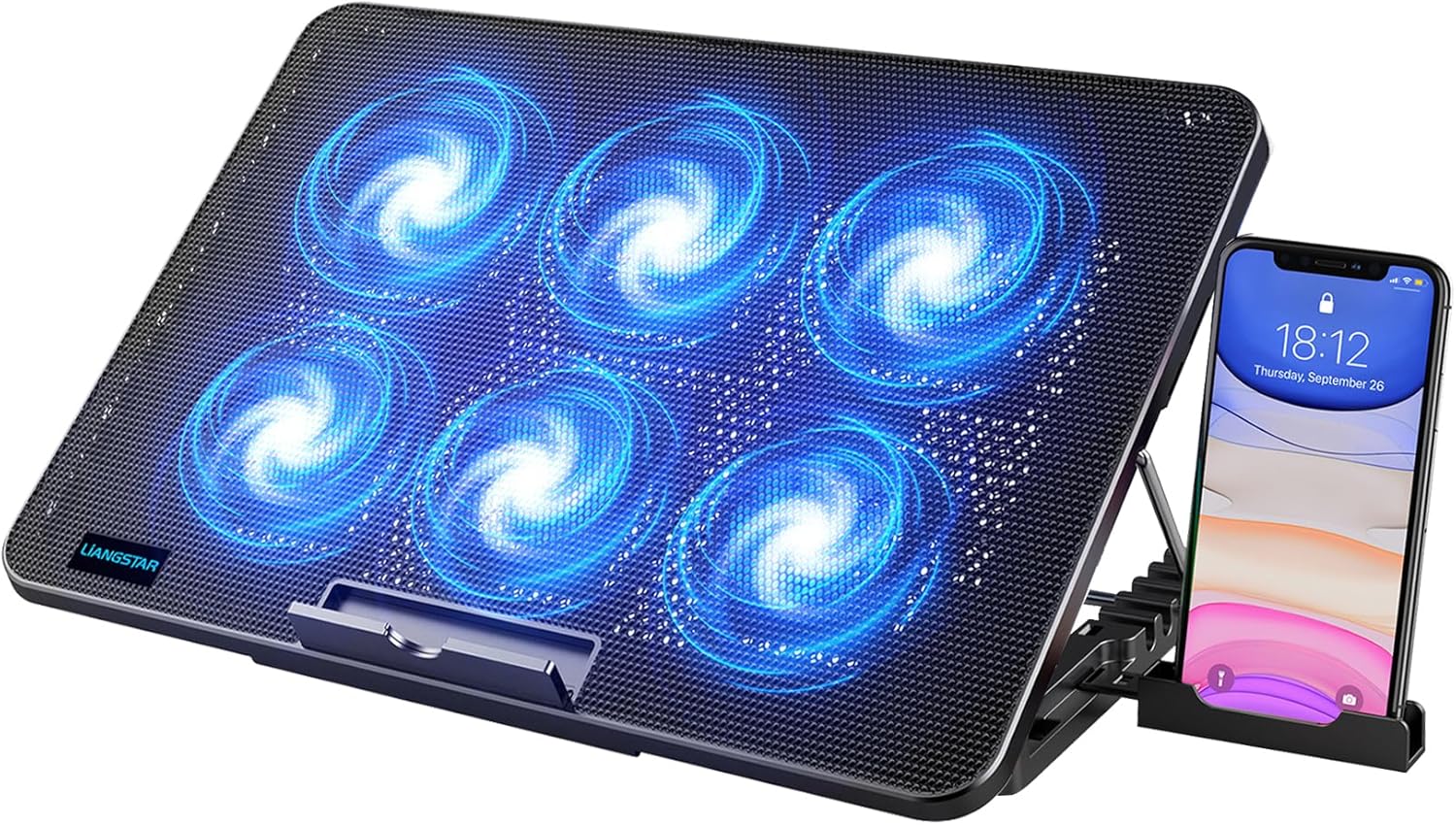
-This was not originally a review sample but Tecknet reached out to me recently and offered to send me a replacement unit to see if that resolved my issue-To start this review of my original review I would like to thank you TeckNet for arranging a replacement unit in response to my original somewhat negative review as they believed I had received a faulty unit and arranged a replacement without issue and it arrived fairly fast.So my issue with the original one I received was when the tray was elevated up and my laptop was resting on it on occasion the legs that held the tray up in the elevated position one of the legs would collapse and fold in so the laptop would go fall down one side causing the laptop to slide off the tray and when you have a £1,500 laptop resting on it that is the last thing you really want to be seeing.Now the new unit that arrived came in the same packaging as the last and is covered in a bubble wrap with a USB power cable which is medium length and is not a bad quality cable. The first thing I wanted to do was to test the legs that elevate the cooler pad before placing my laptop on it for obvious reasons and this time around they actually felt more sturdy than the last one so I placed my laptop on it and sure enough, this one held the laptop up fine with no creaks or slipping.The front flap that holds the laptop in place once the pad is elevated on the original one I received was loose and did not stay up unless the laptop was there to hold it in place and eventually broke off so I tested this out and this one seems much stronger and does not feel like it would fall off I have tested this out and it feels much better than the original so I now have no worries about it damaging me hp omen laptop with scratches should it slip. The rubber feet on the bottom of the pad now also do not slip or move as much as the original one did either which is plus for when I have it on my desk.There are 6 fans included in this and they give out some pretty decent air flow for keeping my hp omen laptop nice and cool during some intense gaming sessions but I also use it as a mini desk for when I am working in bed because it keeps the laptop nice and still for typing. The fans have a nice blue LED colour to them as well which is pretty cool as I can match the RGB keyboard colours and it looks like a cool combo.This also has a second USB connection which can sync to the laptop so I use it to charge my phone or my iPod at the same time. Extra USB ports are always cool to have. I also like the fact the metal mesh layer on top of the fans keeps a fair amount of dust and lint from inside the fans otherwise, my OCD would have me taking these apart every week to clean them.Overall I am happy that tecknet sent me a replacement and I am also glad that all of my original issues have been resolved and I am now happy to recommend this to people like myself who own gaming laptops that need a little extra cooling on those heavy gaming sessions but also for anyone who wants a cooler for there laptop in general. Makes a pretty good desk too for working in bed 😀