
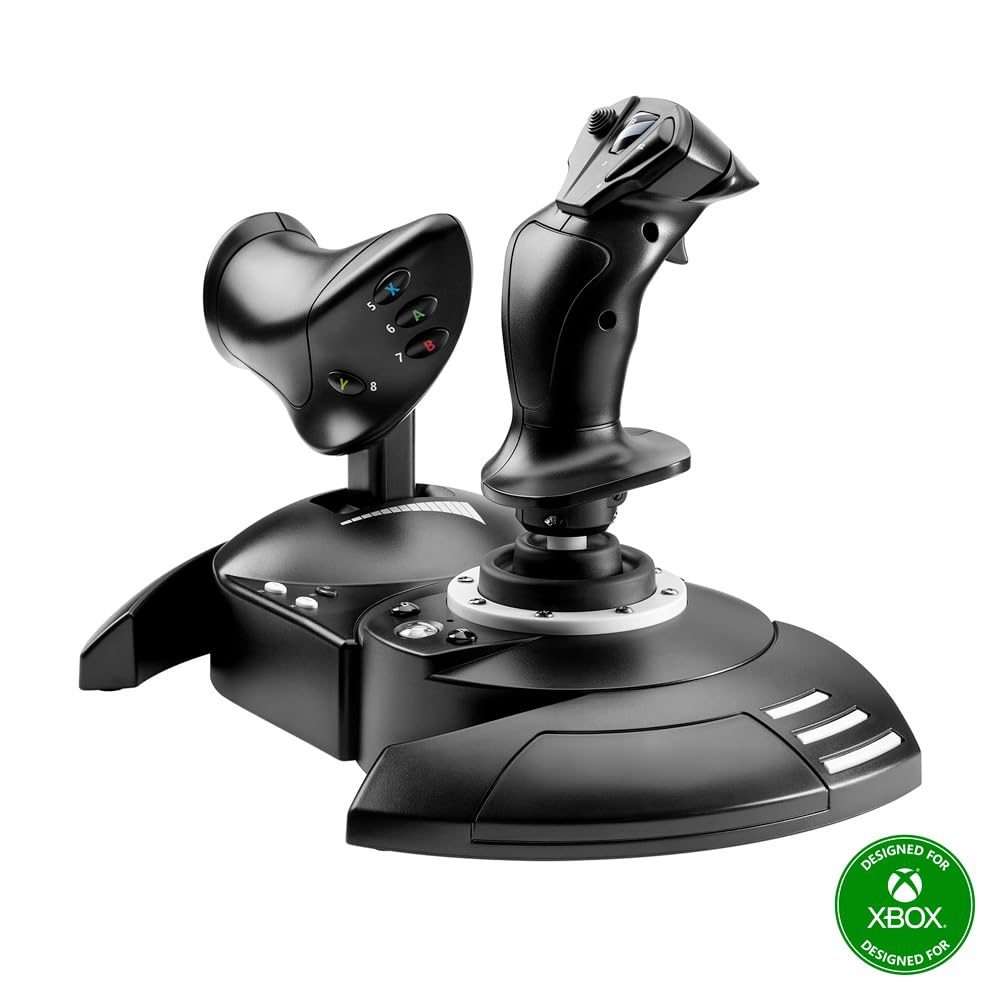
Thrustmaster T-Flight Hotas One (compatible with XBOX and PC)
$99.99
Related Products
![Miracase Compatible with iPhone 15 Case, [Soft Anti-Scratch Microfiber Lining], Liquid Silicone Case Gel Rubber Shockproof Drop Protection Phone Case for iPhone 15 (Black)](https://bestdealsavvy.com/wp-content/uploads/2025/12/61veHQlJP6L._AC_SL1500_.jpg)



T.Flight Hotas One, an officially-licensed joystick for Xbox One and Windows, provides a high level of realism: the stick includes five axes, fourteen action buttons, a rapid-fire trigger and a multidirectional hat switch (navigation/panoramic view), all of which are easily accessible. The throttle – detachable and full-size for easy maneuverability, even in virtual reality – provides super-responsive power. The dual rudder system can be engaged by rotating the handle (with an integrated locking system) or via the progressive tilting lever. The T.Flight Hotas One includes official buttons for the Xbox One console (Guide/View/Menu): access social features, switch between the game and the console, navigate through the console’s menus, etc. My joystick does not function correctly or appears to be improperly calibrated make sure that the selector switch is set to the proper position (Xbox or PC) before connecting the USB cable to the console or PC. Switch off your console or your PC, disconnect your joystick, reconnect your joystick and then relaunch your game. When connecting your joystick: Leave the handle, rudder and throttle centered and do not Move them to avoid any calibration problems.
The first official joystick for Xbox One,Xbox X/S and Windows, with the official buttons for the Xbox One console.
Works on Xbox Series X|S,Xbox One and Windows
Ergonomic design perfectly adapted for all types of flight simulation (space adventure, modern combat, warplanes, civil flight)
Detachable, full-size throttle for easy maneuverability, even in virtual reality
Comprehensive flight gear: 5 axes plus 14 action buttons plus 1 rapid-fire trigger plus 1 multidirectional hat switch (navigation/panoramic view)

Brian Gonzalez –
Great Entry-Level HOTAS – Smooth Controls and Perfect for Flight Sim Beginners
The Thrustmaster T-Flight Hotas One is an awesome starter setup if you’re getting into Microsoft Flight Simulator or any flying games on Xbox or PC. The controls feel solid and responsive, and the throttle + joystick combo gives a much more realistic flight experience compared to a standard controller.Setup was extremely easy — literally plug in and go. The joystick has a nice weight to it, the buttons are well placed, and the adjustable resistance is a nice touch. The throttle moves smoothly and gives you good control during takeoff, cruising, and landing. I also like that you can separate the throttle from the stick if you want more realistic spacing.For the price, the performance is excellent. You’re not getting the super high-end metal feel of a premium HOTAS, but everything works reliably and feels good in the hand. Perfect for new pilots, casual sim players, or anyone who wants a big upgrade from using a controller.If you’re looking for an affordable and dependable HOTAS setup for Xbox or PC, this one is absolutely worth it…..
Alex Proffitt –
Don’t download the drivers I was ready to return it
Works mint, just DO NOT FOLLOW THE PAPER GUIDE SAYING TO UPDATE DRIVERS, fresh out of the box it was perfect (bought used like new version) so I decided to myself”heck why not update them drivers”Worst mistake I made. At first it was fine no issue but mid flight on MSFS 2020 my plane starts sinking, I think it’s me being dumb and not having enough pitch up but I swap views and sure enough my throttle is having a seizure between 0%-25% throttle range. I was like that’s odd, check my game settings and my input for throttle was jumping from 0-25% range, so I decided to unplug and plug it back in, no luck. Google and there’s apparently issues from 3+ years ago of people complaining, I was about to return this thing. I decided to try uninstalling the drivers since I was going to return it anyways, decided to recalibrate it (never gave option to calibrate because I updated drivers so it preconfigured) and magically my throttle works perfectly. Turns out the driver updates break the throttle axis all together and it doesn’t let you calibrate to fix it the only option to get your throttle to function is to calibrate it and not update the drivers. Upon deleting and calibrating it to pc it functions perfectly plus it’s awesome to know I can throw it on my Xbox and enjoy playing too if I decide to!
Joe P –
Nice controllers very happy
So far very happy no issues maybe 4 hours of use
colonfranqui –
Poor Quality Correction
I am updating my previous rating. I discovered that the product was Ok. It has a connector from the cable to the USB port that got loose, and that is why it stopped working. Once I discovered it and corrected the connection, the product began to work again without problems. I want to be fair; thus, it was an operator’s error and not the product. My bad!The product is not made to last. It was used sporadically and worked without problems for about two years. Once it was out of warranty, it stopped working. In my opinion, it should have lasted longer
Brian Ayers –
Gaming changer
Excellent quality for the price. I had wanted to upgrade for a while and finally decided to purchase it. Very easy to install, it’s got a lot of features. It’s made my gaming life a lot funner. Item works just as described!
Carl E Cunningham –
Great buy
great quality and outstanding performance. very easy to setup
Topwatch –
Frustratingly Poor – #1 9days; #2 13 daysl; #3 14 daysl: #4 21 days; #5 Still working 6 weeks, but..
I received this 9 days ago. The first few days it was great, but then… This is an Xbox controller… X-Y-B-A buttons are sorta important. After about 4 days of use, the “Y” button started taking a holiday every few presses. I had to remap every “Y” button combination. That decided me to return the T-Flight to Amazon. I am awaiting the second one before I return this one. Since then, an even more frustrating problem has arisen. The stick has decided to jump to the right on its own, not a slow roll, a bouncing right. Want to go left… nope jumps right then allows left. It bounces around enough to make ANY operation a challenge. I end up fighting the stick making things like landings, combat, cargo scooping, flying straight a real challenge. Apparently, these problems are legend with this controller. Too bad Xbox doesn’t work with a company to produce a quality product, too bad we don’t have other choices in flight sticks for the Xbox one. Hopefully the new one will be different, not holding my breath.I’d say not to buy this, but if you have a Xbox and need a flight stick/throttle setup… you really don’t have a lot of choice. Roll the dice. Thanks MS, thanks Xbox, thanks China.UPDATE#1: Received replacement. Lasted 13 days before it became unusable. Similar failure as the first. Serious RZ axis and X axis problems. I am using #3 right now. So far 1st: 9 days, 2nd: 13 days. 3rd: TBDHow is Thrustmaster making money on this? Bigger question, who are these people who give this trash a “5”? Did they actually use the thing for more than an hour before writing the review?Honestly, playing Elite:Dangerous is much better with this stick (first week anyway), which is the only reason I will return these hoping to get a good one. If you haven’t bought one… All I can say is it will spoil you and it will disappoint you, because it WILL fail. You don’t miss what you never had, so don’t buy until you see a lot of good and real reviews. Thrustmaster should be ashamed of itself. The POTS on this thing are simply trash.UPDATE #2 June 20, 2020:This one failed after 14 days with the same problems as #2. I was very, very gentle with this one. I unplugged it from the xbox after each use. The previous two I updated the firmware, but that does nothing. About 3 days ago the twitch appeared and worsened each use. The drift started several days ago, but it could be managed. The right drift and hysterical twitching makes you fight the stick more than play the game. Amazon didn’t give me the option to replace this one. BUT, I purchased two at the outset, so I have #4 waiting to be used. The new one is the Ace 7 Combat model, which is the replacement for failed #2. I don’t think I will replace this one when it fails. It is a real shame. I really like using the stick and throttle over the standard controller. Apparently the Hori is equally as bad or worse, so there are no alternatives to the Thrustmaster. Will update #4… should hear from me in two weeks… which seems to the lifespan of this stick.Stick #4 lasted for 3 weeks. Same problems as previous 3.Stick #5: Friday was 6 weeks with this stick. It has developed a small left drift but nothing serious. I unplug it from the quick disconnect after each use, probably does nothing but makes me feel better. I don’t use powered usb hubs. Apparently, Thrustmaster doesn’t put protective circuitry in these so using powered hubs could be a problem. I am building a new gaming rig and will use a different stick for that, so I hope this one will last a couple of more months. So, 5 sticks since May. (Just bought a thrustmaster xbox racing wheel for a 9yo, DOA returned that today. TM’s quality control issues apparently aren’t limited to these flight sticks .)
Ella Hawley –
Amazing deal!
Amazing for the price! These are by far cheaper than anything else out there, and it works great! Plugged right in to by Xbox Series S and you can fully customize the buttons in game, which is nice. I use it with MSFS 2024.
tara Mills –
Easy to use, qreat quality and just what he wanted
Robin Panigrahi –
Excellent. Everyone should take it. It makes adventure to play Games .
Fernando R –
Es una buena adición para el simulador, además de que incluye los botones de xbox por si lo juegas en el xbox series. yo lo conecte a la pc y ha funcionado muy bien con MSFS 2020, 2024 y X-Plane 12. tiene varios botones para poder configurar a tu gusto
jan prokopec –
Un joystick davvero eccellente e intelligente … pienamente soddisfa la mia modalità di gestire gli strumenti di vari aerei per volare in MSFS 2020. Grazie
Ten –
Cant find any HOTAS combo for under 100 SGD, i would say this is a good product for anyone trying to get into flight sim as it is very affordable and customisable.