
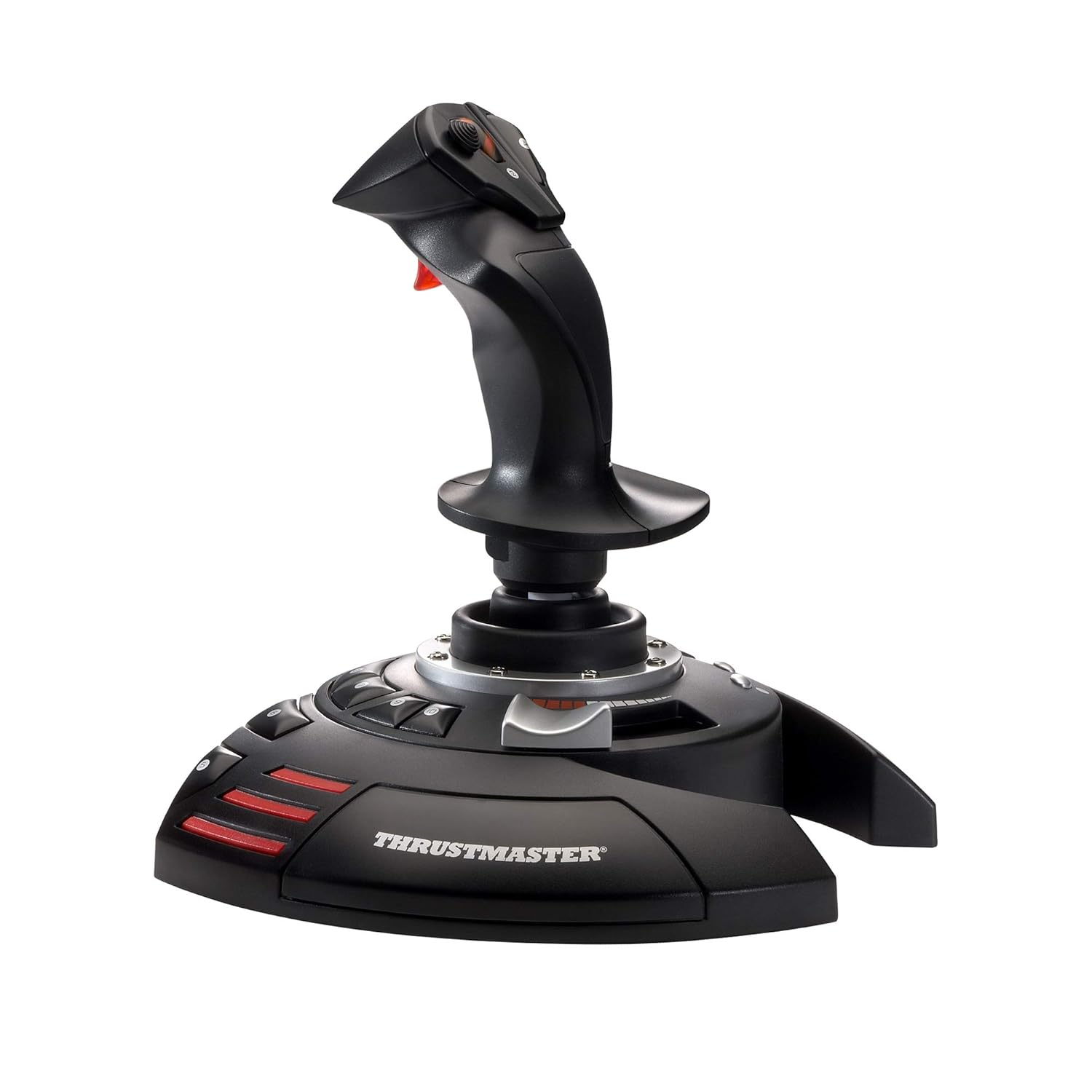
Thrustmaster T-Flight Stick X (Compatible with Windows PC)
$56.05
Related Products



Thrustmaster T.Flight Stick X, Joystick with Rudder Control, Reprogrammable Buttons and Axes, Rotating Handle, Integrated Throttle, Fire Trigger, PC/USB Compatible
Unique Plug & Play device offering extremely simple and fast installation
Extremely precise joystick with adjustable resistance control
Weighted base for enhanced stability
Ergonomic throttle lever
Wide hand rest for perfect comfort.Rotating handle with built-in locking system offering flawless control over plane rudder.Airbrake or Rapid fire trigger with multidirectional hat.Exclusive MAPPING button.Exclusive PRESET button.Internal memory
9 reviews for Thrustmaster T-Flight Stick X (Compatible with Windows PC)
Show all
Most Helpful
Highest Rating
Lowest Rating

dlaville –
Work perfectly
I upgraded my computer to a gaming computer so I could run MSFS 2020. Let me also mention I am running Windows 11. I tried using my older MS Sidewinder Flight Stick with the game but for some reason the aircraft were uncontrollable. I switched to an older Logitech flight stick I also had and even that was unusable. In the course of trying to figure out why the MS flight stick wasn’t working it broke so I was forced to look for a new flight stick. I looked through all the flight sticks on Amazon and for some reason this one I seemed to like the most. I looked at reviews on the web and some people were saying this stick didn’t work with Steam games and others were saying it didn’t work with Windows 11. However all the other reviews were very positive. I figured for $40 it was worth taking a chance, if it didn’t work at least I had a new flight stick I could use with MSFS X.When the stick arrived I plugged it into the USB port and Windows 11 recognized it immediately. I launched MSFS 2020 and went to the control options and the stick was there and the buttons were already pre-programmed. MSFS gives you the option to change the button settings but I left them as they were, it just took me a while to get use to them since it was a change from my Sidewinder stick. The first takeoff I tried was perfect and I flew to another local airport and landed perfectly. The flight stick worked perfectly and flawlessly. There is also a knob on the bottom the stick you can use to adjust the tension to your liking. On my computer this stick is compatible with Windows11 and Steam.The only con I have with this flight stick is the arrangement of the buttons. Some of them like the brake release, landing gear toggle and elevator trim kind of require an awkward reach to get to. While I can reassign them I like keeping them off the stick itself. I hope on the future Thrustmaster considers moving these buttons to a more ergonomic location on the base of the stick.All in all I give this flight stick a 10/10 and is an excellent value for the money.
William Gibbs –
Good stick for the price
Great, mid-priced HOTAS. Responsive…..bought it for DCS and can now land the Flanker without crashing…..
Kristy –
Don’t listen to the bad reviews!!!
Honestly it’s a really REALLY good HOTAS for only $80, no it’s not made to be top notch which is what most of negative reviewers were expecting, however it works great for games like elite dangerous, warthunder, ms flight sim, and Star wars squadrons.If you run into any issues with squeaking just put a couple drops of wd40 or oil on the hinge parts and it will be gone.I seen some people complaining about stick drift and honestly they were most likely yanking the stick around super hard when they first used it, it’s not top notch!!!! It’s not meant to be yanked on super hard.Another one was complaining about the throttle stiffness, honestly it’s not going to super stiff on any HOTAS, I have a warthog HOTAS as well and the throttle isn’t even stiff on that one,none of the throttles are going to be super stiff on any HOTAS so please don’t expect that.All in all this HOTAS is absolutely amazing for the price and will last a very long time as long as you ACTUALLY take care of it properly.
Luna –
Works fine for PS3. For PC too. Just do not calibrate joystick.
Unboxed it yesterday.* For PS3 it works fine with Il-2 Sturmovik, by setting switch to PS3. You need to use the Joystick as controller, and not the PS3 control.* For PC (with switch in PC position) you may need NOT to calibrate.During calibration does not draw a circle in the calibration area, but some sort of weird “8” shaped line. Horrible problem if you dare to calibrate. Cannot use on PC if you calibrate, reset to default. This problem takes down one star.This is how it works. There is a switch for PC and PS3 in front of the joystick.To use for PS3:1.Set switch to PS3 position.2.Connect to PS3 USB port.3.Turn on PS3.4.If another controller is connected you must set it as controller 2 so Joystick is controller 1.5.You may need to change your game options to use Thrustmaster joystick.6.Exit game, reboot PS3.In the PS3 you should navigate menus with hat and the button that is used as X button.Joystick does not have a way to emulate START and SELECT buttons.Not all games are meant to be used with a joystick. For example, Top Gun Hard lock will not work with this joystick. It was made for the standard PS3 controller.You will not succeed trying to use joystick for racing cars either.To use on PC.1.Set switch to PC position.2.Plug joystick to PC.3.Manual has a URL. Download PDF manual and drivers. Install drivers.4.Reboot computer.* PC games that have custom joystick handling, or that are set to use analog USB joysticks may have compatibility problems.* My tests suggest that games that use TrueVision engine will not work. This engine will mess up your joystick input until you reboot. Do not try TrueVision games with this joystick.* It works perfectly with Orbiter Space Flight Simulator that is a realistic freeware space sim. Just select joystick device “T Flight Stick X” and main engine control “Slide 0”.Lack of an intuitive manual and calibration issues.
Carl Knight –
Works well with my Flight Simulator.
Client d’Amazon –
Manette de très bonne qualité, installation et reconnaissance par le PC en 2 secondes.Il y a un mode “présélectionné” pour les boutons pour FSX, volets, train, spoilers, correspondent à des touches trés accessibles.Il y a un autre mode entièrement configurable par le joueur.La résistance du Joystick est réglable ce qui évite que l’avion tourne trop rapidement au sol on peut vraiment doser les rotations, top !Piloter avec une manette ça change la vie sur FSX, on utilise plus du tout le clavier à part pour des commandes plus poussées, passerelles, etc….
Susana –
Según mi marido, que es quien lo usa, un buen producto, aún está probando configuraciones de él ya que son muchas y variadas. Contento con lo estable a la hora del manejo. El precio ha sido decisivo a la hora de comprarlo. Contentos, lo recomendamos.
Amazon カスタマー –
以前から欲しかったのを購入。プレステ5でエースコンバット7 に使用。個人的には操縦感覚が楽しめて満足。
Karl B –
Känns bra i handen, men fartreglaget är i minsta laget. För den som ska spela riktiga flygsimulatorer behövs något en något hetare modell, men för mig var den här perfekt.