
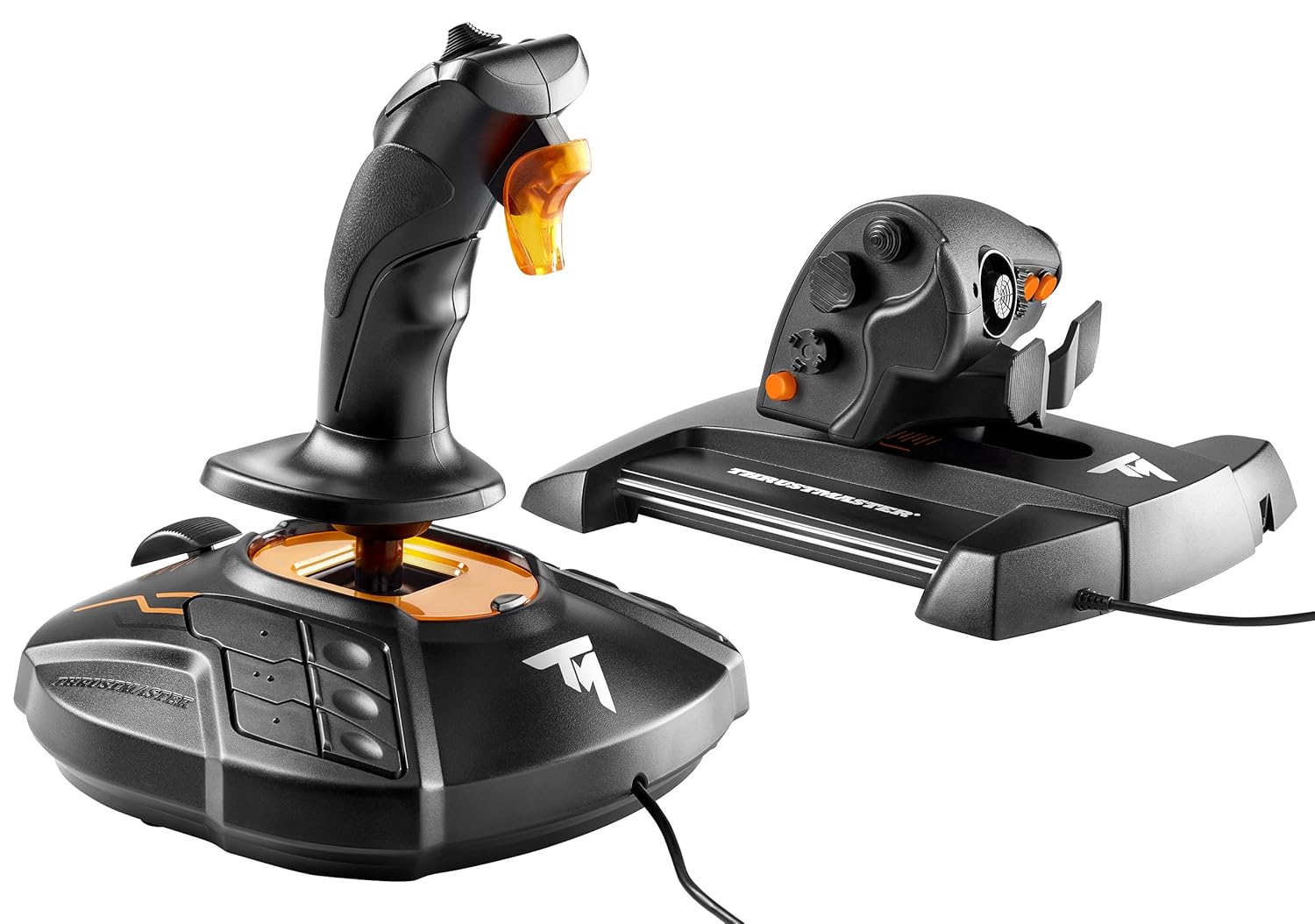
Thrustmaster T16000M FCS HOTAS (Compatible with PC)
$169.99
Related Products
![CANSHN Magnetic for iPhone 16 Case, Upgraded [Full Camera Protection] [Compatible with Magsafe] [Translucent Matte] Shockproof Protective Phone Case for iPhone 16 – Hot Pink](https://bestdealsavvy.com/wp-content/uploads/2025/12/71r56OMFMqL._AC_SL1500_.jpg)
![Miracase Compatible with iPhone 15 Case, [Soft Anti-Scratch Microfiber Lining], Liquid Silicone Case Gel Rubber Shockproof Drop Protection Phone Case for iPhone 15 (Black)](https://bestdealsavvy.com/wp-content/uploads/2025/12/61veHQlJP6L._AC_SL1500_.jpg)


T.16000M fcs (flight control system) flight stick featuring H.e.A.R.T magnetic precision technology + twcs (Thrust master weapon control system) throttle featuring s.M.A.R.T technology.
The T.16000M FCS is compatible with PC via USB in Windows (32-bit and 64-bit).
16 action buttons with braille – style physical button identification
Exclusive Precision: Hall effect accurate Technology 3D (Hall effect) magnetic Sensors located on the stick (US patent: Us08471815)
4 independent axes, including twist rudder (controlled by rotating the stick)
14 action buttons – 8-way POV hat: two 4-Way switches – 3 Buttons – One 2-position slider – 1 push mini-stick – One 8-way point of view hat Switch
9 reviews for Thrustmaster T16000M FCS HOTAS (Compatible with PC)
Show all
Most Helpful
Highest Rating
Lowest Rating

Ryan Park –
The King of Deep Space.
I just wanted to leave a review for this as there currently aren’t very many. This is part review for this stick, and part comparison of it between other sticks. For reference, I’ve extensively used the following sticks: Saitek X52 and X52 pro, Logitech 3D Extreme Pro, old FCS, Warthog, and now this. Also, I play pretty much every type of flight game, including DCS, IL-2 back in the day, SWG back in the day, E:D, and SC.So with that out of the way, this is my favorite stick. It feels weird to say that when I own a warthog, and the build quality and general feel is definitely better on the warthog. The button layout is also much better on the hog. However, once you factor in the price difference and the twist axis, this stick is my daily driver. Another big advantage this stick has over the hog, to me, is the lighter springs. The hog is great for flying an old warplane or something that’s really slow, but not so great when dogfighting in a space sim, or when needing to do really precise movements. I just overall find this stick to be easier to use for space sims in general.The new model doesn’t seem like a massive upgrade from the old one. I’m not sure what’s up with the orange coloring, but I digress. The main difference is that the buttons on the base now have textured markings (which is a life saver in VR or if you just don’t want to be looking down), most of the buttons now are textured and more ergonomical, and it seems that the spring makes a lot less noise and is of slightly higher quality. Although that could just be because it’s new and my old FCS is old. One thing to note, expanding on textured buttons, is that if you are playing in VR, the warthog throttle is actually a pretty terrible experience. The switches are all over the place and you won’t have any way to see them. I hope that all sticks in the future follow the trend of having unique textures on the buttons, so you can feel your way around what you’re doing. Definitely a major plus if you’re playing in VR.If you’re new to Thrustmaster in general, another thing to note is that the T.A.R.G.E.T. scripting software is second to none as far as allowing you to get really in depth with customizing how you want your stick to act, as well as how it’s programmed. It’s not exactly user-friendly, but you can do pretty much anything you want with it.This stick’s biggest weakness is the lack of buttons on the handle. There are plenty on the base, but I really find myself just wanting more on the handle. I picked up two of the cougar MFD’s, and find those easier to use than the buttons on the base. Still, next time around, get some more buttons on this thing’s handle Thrustmaster. I really wish that this stick and the warthog could make a baby. I’d love to have the metal sticks with the great button layouts, while also having the ability to use it ambidextrously, having a twist axis, and having the lightweight handling that this one does. Unfortunately, that’s not really an option. So given that, this stick is my recommendation. The warthog is technically superior, but this stick offers more than enough bang for the buck, and I’m actually probably going to sell my hog soon since it doesn’t have a twist axis. The extra handle buttons on the hog are really nice, but the lack of a twist axis just makes it almost useless in a space sim. And you can make up for a lack of buttons with VoiceAttack.The bottom line is that whether you’re a new pilot or a seasoned veteran, this stick can do it all pretty well. I’ve been flying in PC games since I was a kid, and I’ve used a lot of sticks. This one is my favorite. I think you’d be hard pressed to prove that a warthog is going to give any real-world combat advantage, so the only reason I see to fork over the extra cash is if you really want that metal handle (which does feel nice…).My current setup is using two of these, two MFD’s, and a throttle on my left side. I have rudder pedals, but I have no need for them with this setup. The two sticks provide full 6DOF freedom in space sims, and the throttle still allows me to fly regular planes (or long haul flights in space sims) without awkwardly trying to use two sticks. Then the MFD’s fill the need for a near infinite amount of buttons. You can slap all of that on a board with some velcro, sit in an office chair, and rival the setups of the biggest and baddest simpits out there for less than what you’d pay for just a warthog stick in some places. Just buy two of these and you won’t regret it, seriously.That’s my .02, hopefully it helps someone. Happy flying, o7
DebbieT –
Great sticks for star citizen
what’s not to love about these sticks. They are very sturdy, extremely responsive in game and have 32 buttons that can be mapped out to any key you want. I found them easy to customize in star citizen. They make flying so much more fun and they give you a level of control, you can’t get from a keyboard and mouse. If you are looking for a starter set of sticks that won’t break the bank these are it. I’ve tried a cheaper set and it only lasted a few days. These ones are very sturdy and well built. I expect them to last for a long time.They are setup one for each hand when you get them although it comes with the adapters so you can change them around and have two right or two left handed ones, if you wanted to share with someone instead of using two sticks at once. I will say there is a little bit of a learning curve going from keyboard and mouse to joysticks. That said, it doesn’t take long to get used to them and all the buttons. They are so customizable, you don’t have to use anything else while in flight mode. I don’t recommend for running around on foot but they weren’t meant for that. I do however, recommend them for flying.
T.C. –
*Requires* lubrication from the user due to poor throttle tension design. Otherwise, an excellent HOTAS.
Upgrading from the most basic Thrustmaster HOTAS, this is a very nice setup. Plenty of hat switches and buttons, making Elite: Dangerous very easy to manage. I find that the 6 buttons on the right side of the base of the stick are hard to hit without looking, even though there are tactile bumps on them that are supposed to make this easier. It’s not a great idea to map anything critical like hard points on that side. I’ll be down to 40% hull and trying to stow my weapons and jump out of a system when, Woops! I’m in the map screen instead because I can’t feel the difference between the buttons when moving quickly.I struggled to give this unit 4 stars mainly due to the throttle’s problem with lubrication. Only a couple of days after I began using it, it started to become a bit sticky as it slid on the rails, even after adjusting the tension to make it as loose as possible. This quickly devolved to to point where I couldn’t adjust the throttle without pushing the whole base around as it wasn’t sliding properly. It’s easy to open up and I added a silicone based lubricant that’s safe for plastics. This helped quite a bit, but making fine adjustments was still problematic as it would stutter-slide in an irritating way. I wiped the silicone lubricant, and instead switched to ‘Fluid Film’, which is lanolin based. I’m taking a gamble as to whether or not it will cause problems with the plastic parts, but I think the design of the tensioning system for the throttle is simply no good. It’s essentially a leaf spring that presses down on metal rails inside. The silicone lube didn’t last because it basically rubbed off. The fluid film should last longer, but I’m afraid it will probably need to be reapplied periodically.If this remains a problem, I’ll probably take off a star and spend more money on a better HOTAS, but this is still the sweet spot as far as features/performance for the price.
Gopher and Biscuit –
Hall effect. Great value. Highly recommend.
I read the negative reviews for this, but all joysticks like this have bad reviews. I just got a LogiTech HOTAS and it was a piece of garbage. This is 100 times better. Better materials, better build, better feel. Very smooth and solid. I love it. It doesn’t have a ton of buttons. But what it does have works perfectly.
1980 Something Space Guy –
Using this with Flight Gear and it works well. Lots of buttons to configure as you choose. Good solid feel. If you are starting out with flight simulators and don’t want to spend excessive amounts of money then this is the device for you.
Thiago Silva –
Produto Muito bom, qualidade bem legal e chegou rapidinho, tive um problema nos botões de aceleração (Eixo Z) mas isso não tem nada a ver com a qualidade do produto, e sim um problema aleatório que infelizmente tive o azar de ter. Falei com o vendedor que foi 100% atencioso e resolveu tudo prontamente.No futuro se precisar de outros itens certamente comprarei com ele novamente.
Thiago Tadeu Goulart –
Vi um review antes de comprar e este foi favorável. Não parece haver contras pois ela não se propõe a ter tantos botões e nem é necessário nos meus aviões civis. No quesito de maciez, calibração e precisão é muito satisfatória. Ergonômica. Botões bem dispostos.
Bandu –
I am very happy with the purchase. Only downside that noticed is the ‘stickiness’ in the trust slider, which makes it difficult to do finer adjustments. I mostly fly airliners so it doesn’t matter much.
Raúl N. –
Es claramente lo mejor en calidad-precio. Al principio me pensaba comprar el TCA (que es el mismo que este joystick, pero con la apariencia de Airbus) pero estaba agotadisimo, y al final decidí gastarme un poco más y comprarme este con el HOTAS. Juego al Flight Simulator con este set y es UNA DELICIA. Es de plástico pero no se nota para nada “plasticoso”. Es un plástico de buena calidad.Lo bueno que tiene el joystick es que tiene exactamente el mismo sensor que el Warthog de ThrustMaster de 500€. La sensibilidad es excelente y se siente muy cómoda la mano. Además tiene muchas setas y joysticks que son muy útiles para mover la cámara, etc. Al igual que el HOTAS.Hablando del Hotas, además de ser comodísimo, dispone de una ruede cita de trim (compensador) que es muy muy útil y cómoda de utilizar. Compra totalmente recomendada. Estoy contentísimo.Muy recomendado. Lo estoy disfrutando mucho.