
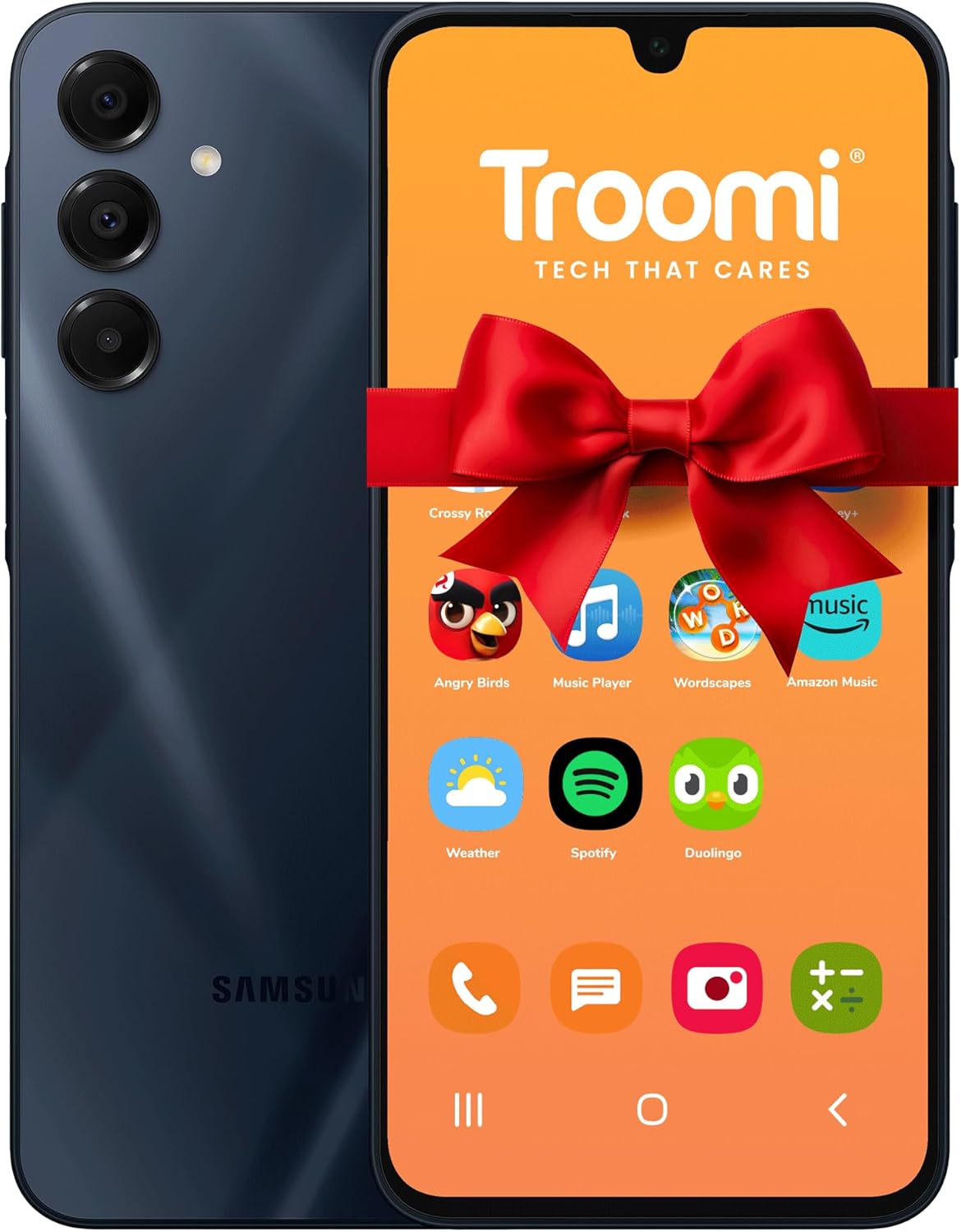
Troomi Phone for Kids and Teens – Galaxy A16 – Parental Controls, GPS Tracking, Text Monitoring & Content Filtering, 10,000+ Apps – Monthly Service and Activation Required
$42.95
Related Products







Product description
The video showcases the product in use.The video guides you through product setup.The video compares multiple products.The video shows the product being unpacked. Troomi Kids Phone Merchant Video


What network does Troomi use? Is coverage reliable?
Our services run on the AT&T network, one of the nation’s top ranked networks for overall network performance, network reliability, network speed, and data performance.
How does the Text Message Monitoring work? Do I have to read everything
Not at all! Our smart monitoring uses AI to analyze texts (incl. images/video) for risks like bullying or concerning content based on filters you set. Get alerts for flagged messages & view insights in the Parent Portal without reading every text.
How do I manage all the settings and rules? Is it complicated?
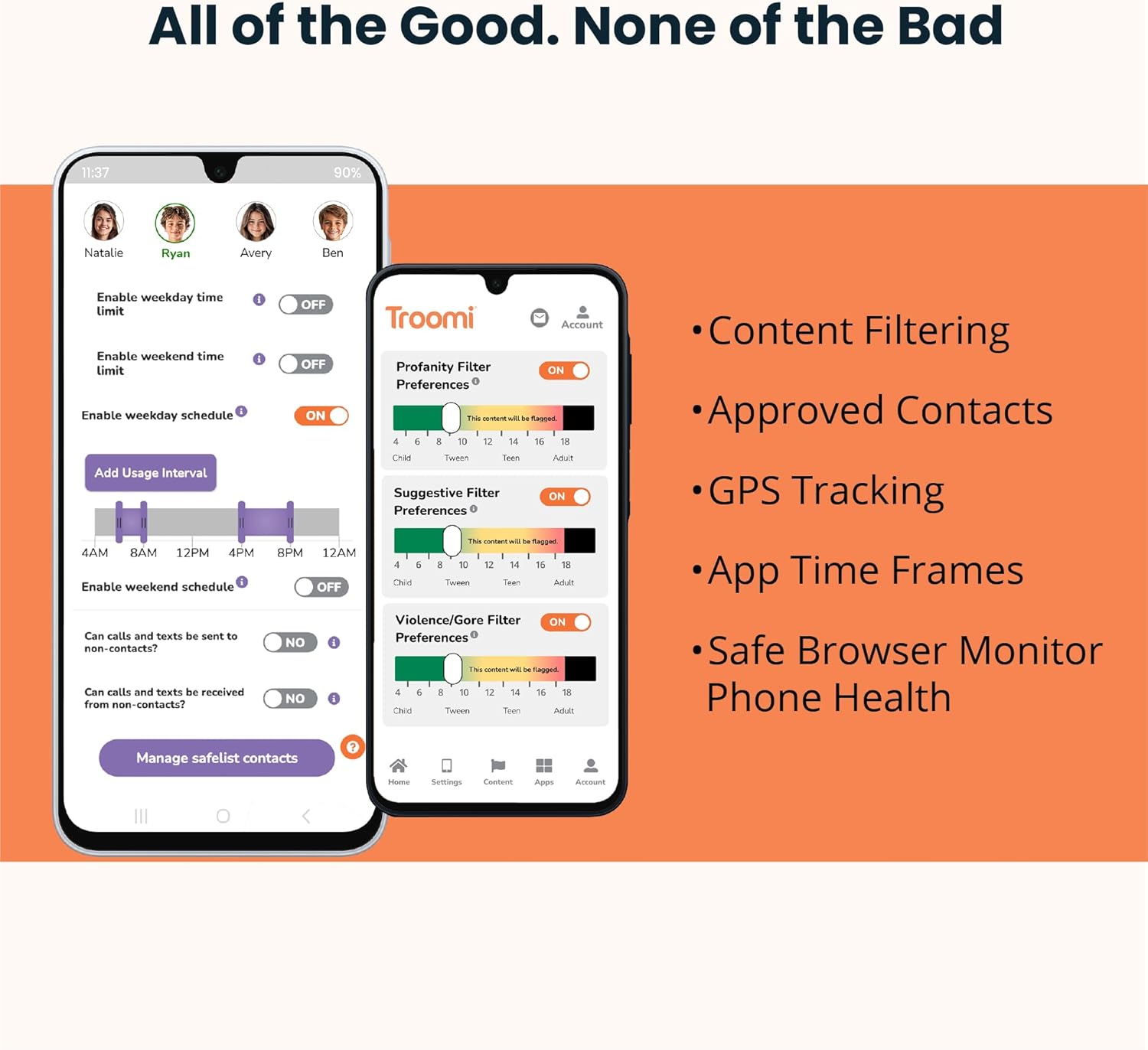
It’s simple! Manage everything remotely using our intuitive Parent Portal – accessible from any web browser on your computer or smartphone. Set time limits, approve contacts/apps, check location & adjust rules easily, anytime, anywhere.
How does Troomi “Grow with my child”?
Troomi adapts! Start with basic call/text & GPS. As your child matures, easily grant more privileges via the Parent Portal – like adding approved apps, enabling more websites, or letting them request new contacts for your approval.
How is Troomi different than just using parental control software on a regular smartphone?
Controls are integrated at the OS level (harder to bypass), there’s no open app store by default, and features like AI text monitoring go deeper. It’s an ecosystem designed for kids’ safety from the start.
SAFE & SECURE SMARTPHONE FOR KIDS: Designed with built-in parental controls so you can manage apps, contacts, screen time, and location, all from the Troomi Parent Portal on your own device. No social media, no open app stores, no stress.
BEST FIRST PHONE FOR KIDS: Give your child a distraction-free phone experience. The Troomi Phone is designed to grow with your child, offering safety today with flexibility for tomorrow.
STAY CONNECTED WITH CALLING & TEXTING: Kids can safely call and text parent-approved contacts. Unknown numbers are automatically blocked. Plus, monitor text activity and get alerts for any concerning content, powered by smart Al filters.
GPS TRACKING & EMERGENCY SOS: Check your child’s real-time location anytime with GPS tracking. The built-in SOS button lets your child instantly alert emergency contacts with their location in case they need help.
SCREEN TIME MANAGEMENT MADE SIMPLE: Set healthy phone habits with custom schedules, daily time limits, and app-specific restrictions-all remotely through the Parent Portal.
KID-SAFE, EDUCATIONAL APPS ONLY: No risky downloads here. Choose from 120+ Troomi-approved apps free from ads, in-app messaging, or user-generated content. Popular apps like Minecraft and Roblox are blocked by default.
FLEXIBLE WEB BROWSING OPTIONS: Start with a kid-safe, whitelist-only browser or allow a more open browser with built-in Troomi filtering as your child grows.
FUN, SAFE AI CHATBOT (OPTIONAL): Meet Troodi-a safe Al chatbot designed just for kids. Encourages curiosity and learning through text, with positive daily messages and safety guardrails built in.
DURABLE, KID-FRIENDLY DESIGN: Built to handle daily use and made with young users in mind, this phone is secure, reliable, and age-appropriate.
4 reviews for Troomi Phone for Kids and Teens – Galaxy A16 – Parental Controls, GPS Tracking, Text Monitoring & Content Filtering, 10,000+ Apps – Monthly Service and Activation Required
Add a review

$42.95
K Webb –
Does exactly what I need. Son is happy!
PhoneIt’s a dense phone. I shouldn’t be surprised, but being the first kid’s phone I’ve ever bought, I guess I half expected it to feel lighter when I took it out of the box. It’s all of the Galaxy/Android look and feel that I’m used to with my own phone. Cameras and selfie cam are all very solid – took a couple funny photos of myself to leave on the phone as a little Easter egg before wrapping it back up and giving it to my son – the photos all looked sharp to me, although admittedly I’m not much of an expert on the matter. Software is slick, responsive, and again, exactly what I’m used to with my own “adult” phone. Basically this looks and feels exactly like an adult phone, except for the parental control software layered on top. Very happy with the quality.Parent Portal/SoftwareI’m only a couple days into it, but so far everything functions as expected. Parent portal is intuitive and easy to use. It was a little work upfront to get everything set up the way I wanted for my son, especially the approved contacts, but I kind of expected that. So far I’m loving the peace of mind though – it’s very easy to check in on my son’s location or get a quick view of how he’s using his phone with the dashboard views they have in the parent portal. He hasn’t had any problems with texts/calls/cell coverage etc. If I’m nitpicking, the design of the parent portal maybe looks a little old school, but it functions well and does all the things I need it too. And it’s easy to find what I need.OverallMy son seems pretty happy with it so far. While I’m sure he’d love complete access to social media and everything else, I’m not quite ready for that yet (nor is he) and he’s excited to finally have a phone to call, text, take photos, play games, etc. His friends all have phones, and he doesn’t feel like the odd kid out anymore, and no one would ever know he has a “kid” phone by looking at it. So win-win. Would buy again when my daughter gets old enough for her first phone.
Aaron –
Parents avoid this. It is not private and not controlled by you.
This phone is flat out dangerous for kids and totally misrepresented. It is not a parental control phone. It is a fully locked enterprise device that Troomi owns, not you. The phone literally tells you that during setup. It forces a work device setup and says the device is not private because Troomi is the administrator. That means Troomi has total control of everything on it. They have system access to the camera, microphone, photos, messages, apps, everything. No parent should ever find out a company has that kind of access to their child’s phone.Nothing removes their control. Factory reset does nothing. OS reset does nothing. Even flashing a fresh stock operating system does not break their ownership. The phone keeps forcing enterprise setup because it is tied to Troomi at a deeper level than a normal user has access to. This is not a parent control situation. This is a company level device lock like a work laptop.To make it worse, the phone cannot even be used unless you pay Troomi immediately. There is no wifi only mode. There is no basic setup. If you do not pay, the phone is useless. The listing does not warn you that the phone is locked behind a subscription paywall or that Troomi becomes the device owner. It is absolutely misleading.Parents should stay far away from this. I have never seen a kids phone sold like an enterprise controlled device before. This is not safe, it is not private, and it should not be marketed to families.
Lydia –
Troomi is a great option for families
Our family has been using Troomi devices for four years now. We’ve had four kids use a phone and one use a Troomi watch.It has been really important to me to1.) Know where my kids are2.) Help them develop self-control and good habits on a safer/monitored device3.) Graduate my kids into more smartphone functionality4.) Delay them using social media5.) Have open conversations about text and call etiquette as they practiceWith troomi, I can see my child’s location anytime. That function cannot be turned off on their phone.We waited until 8th grade to get any phone or a device. “Wait till 8.” When they got a phone, we started by adding only a couple of contacts. As they showed responsibility for charging their phones, checking in, speaking to peers with respect, we added more contacts from the Parent Portal. As my oldest grew, I was able to give him the option to add contacts himself. I appreciated that he wasn’t getting spam texts or calls because only people added as a contact could reach his phone.Troomi phones will never have social media. Even when I let them choose which apps to add, social media will not be an option. No snap chat, facebook, or instagram. I can also choose to whitelist websites that might be useful, but an internet browser is not a standard option.The troomi watch was a great option for my child who only needed to contact dad or me. I could see where he was; he could call; or he could respond to texts with emojis. It wasn’t used as a social tool. It was just right for him.Overall, we are happy with the service Troomi provides. I find their helpdesk knowledgeable and helpful.The Troomi
Hannah –
Does not have internet or work on hot spots
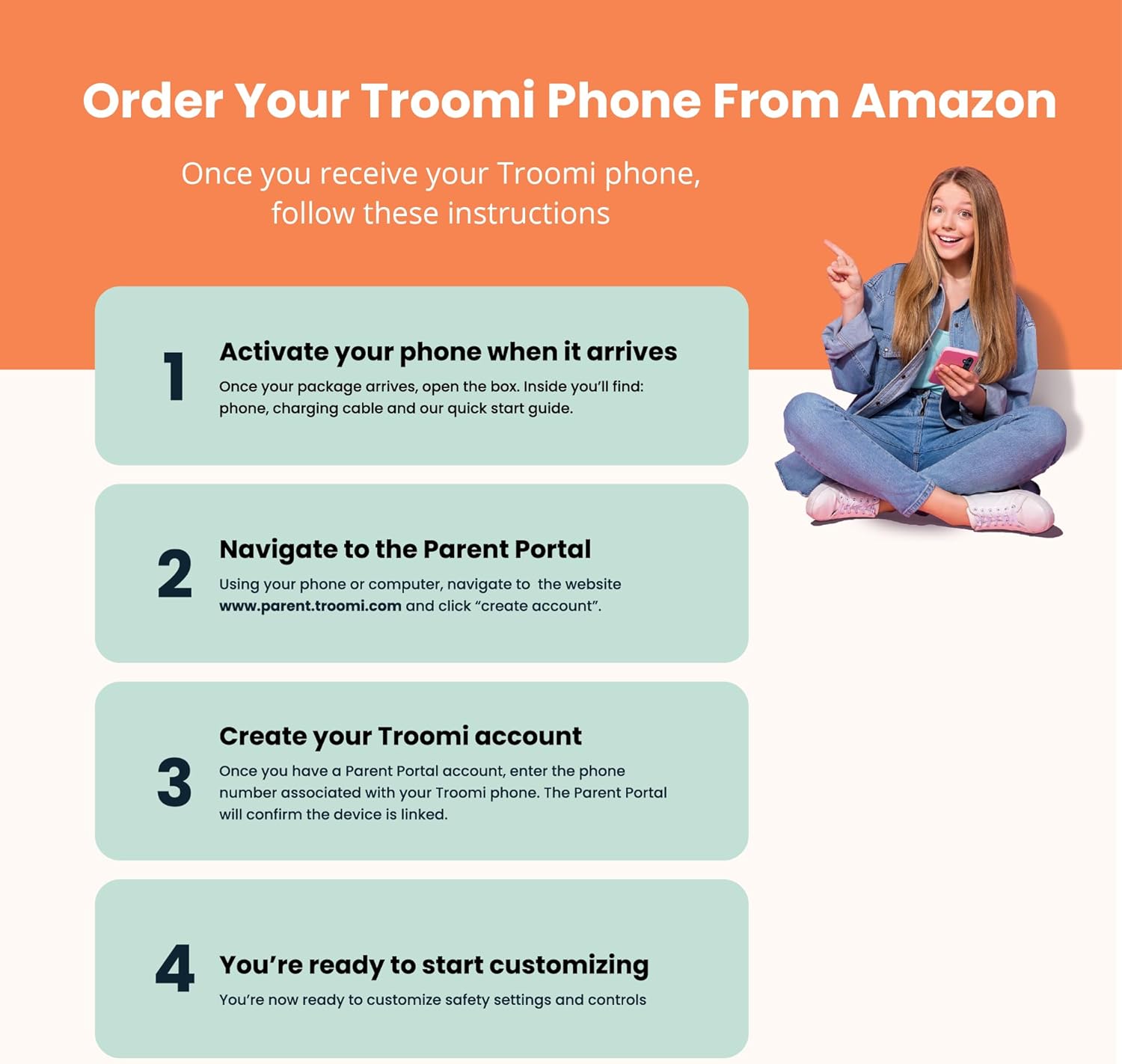
I purchased 3 of these for my kids, I was extremely excited about them. Did not even make it through set up before boxing them back up. Set up did not work on phones, I was referred to set up through parent portal on my personal device, I tried setting up on my phone and personal laptop and could not get through set up page. Upon further review these phones DO NOT have internet nor does it have capability to use through hot spot. You cannot download games and apps. Defeats the purpose of a smart phone. My intentions for these phones were for the kids to use to play games and watch videos mainly in the car. They have no need to talk or text.