

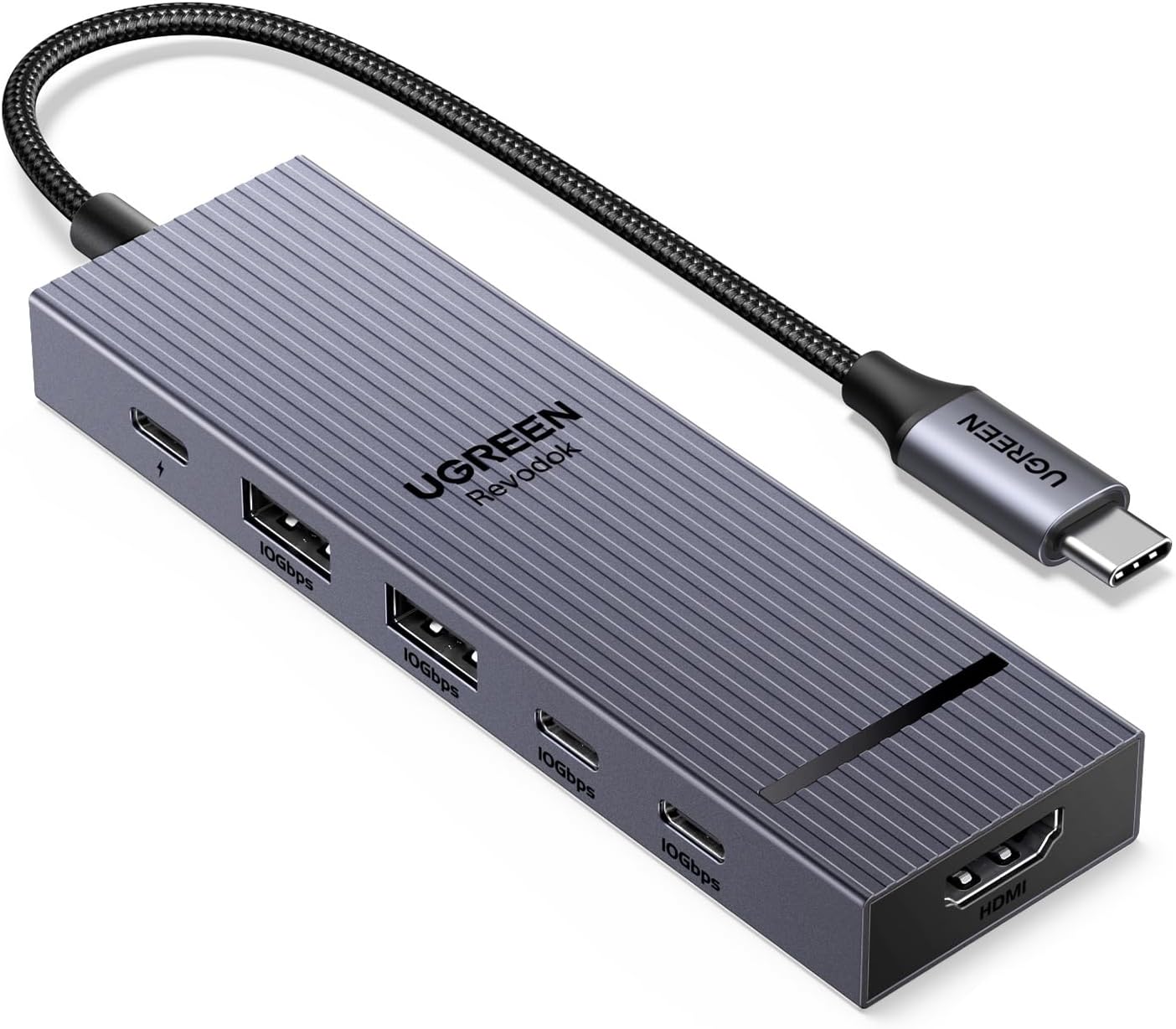
UGREEN Revodok Pro USB-C Hub 6 in 1 10Gbps 4K 60Hz HDMI, 100W Power Delivery for MacBook Pro/Air, iPad Pro, Thinkpad Rog Ally and More.
Original price was: $19.99.$13.98Current price is: $13.98.
Related Products








Product description





UGREEN USB C Hubs
Add to Cart
Add to Cart
Add to Cart
Add to Cart
Add to Cart
Customer Reviews
4.5 out of 5 stars 4,565
4.3 out of 5 stars 267
4.5 out of 5 stars 575
4.4 out of 5 stars 1,042
4.4 out of 5 stars 1,195
4.5 out of 5 stars 1,013
4.6 out of 5 stars 7,672
Price
$13.98$13.98
$18.99$18.99
$27.99$27.99
$19.98$19.98
$22.49$22.49
$59.99$59.99
$16.99$16.99
Max Transfer Speed
10Gbps
10Gbps
10Gbps
10Gbps
10Gbps
10Gbps
5Gbps
USB Data Ports
2*USB A+2*USB C
2*USB A 3.2+USB C 3.2
2*USB A +2*USB C
2*USB A+2*USB C
2*USB A 3.2+USB C 3.2
4*USB A+USB C
2*USB A+USB C
Charging Port
PD 100W
PD 100W
PD 100W
PD 100W
PD 100W
/
PD 100W
Max Display Resolution
4K@60Hz
4K@60Hz
4K@60Hz
4K@60Hz
4K@60Hz
/
4K@30Hz
Display Port(s)
HDMI
DP
HDMI
HDMI
HDMI
/
HDMI
Plug & Play
✔
✔
✔
✔
✔
✔
✔
SD/TF Card Reader
✘
✘
✔
✔
✘
✔
✔
Gigabit Ethernet
×
×
1000Mbps
×
1000Mbps
×
×
FAQ
Q1 How many external monitors can this hub support? A1 It can only support one external monitor. Q2 What happens when there is no HDMI image output after the product is connected? A2 1) Please make sure that the USB-C interface of the laptop supports the video function; 2) confirm whether the length and specifications of the connected cable meet the requirements; 3) Please adjust the resolution setting, the resolution supported by your monitor may be lower than the highest supported resolution; 4) Please select the correct input signal source (some monitors need to manually select the signal source); 5) You can try to restart the laptop, or re-plug the upstream end Q3 Why am I charging my docking station so slowly, it doesn’t reach 100w? A3 a. Please confirm whether the USB-C interface of the laptop supports the charging function. If your computer uses a DC interface, please connect the original adapter. b. When your computer is charging slowly, please use the original adapter of the computer or a charger above 65W.
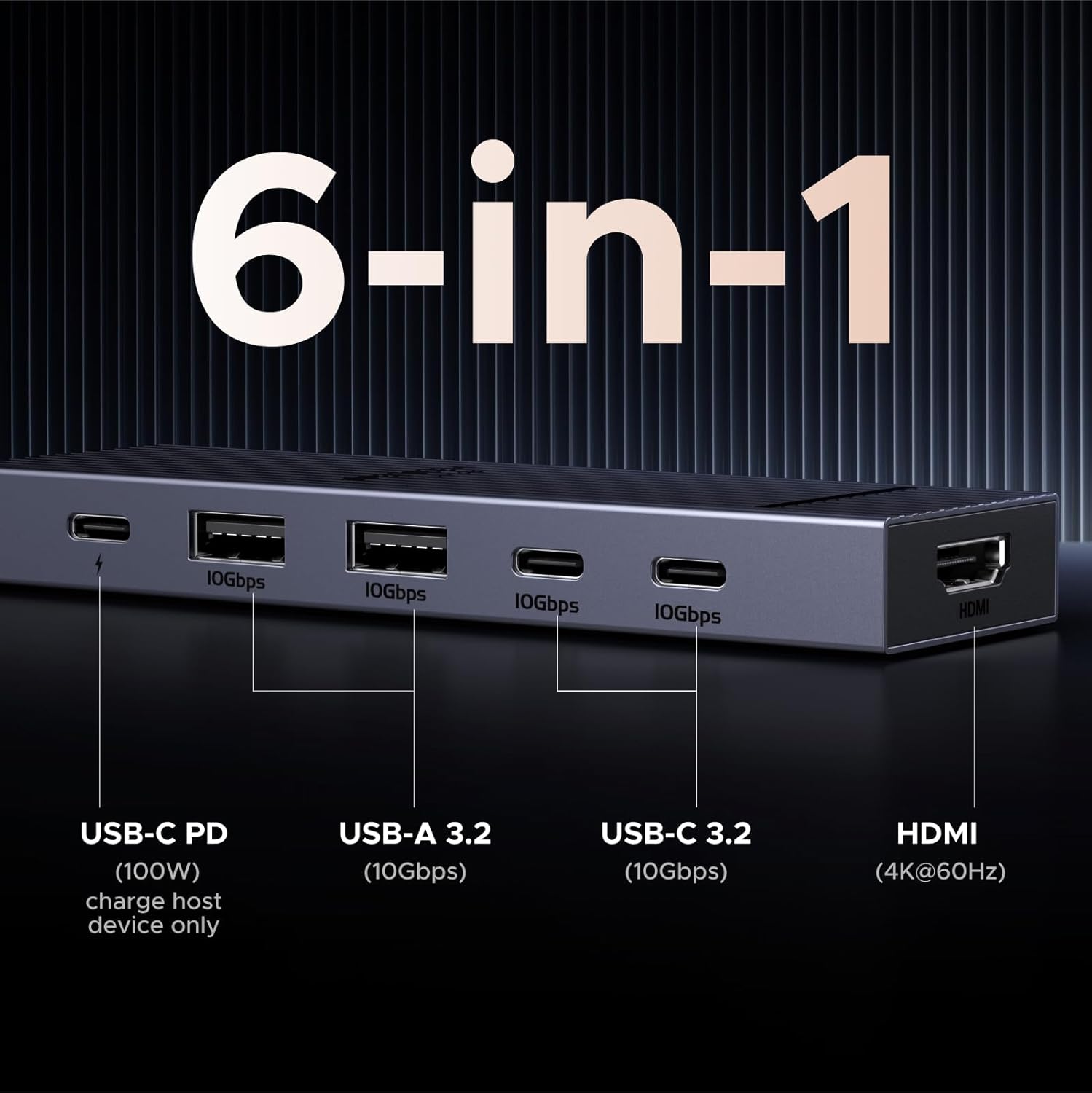
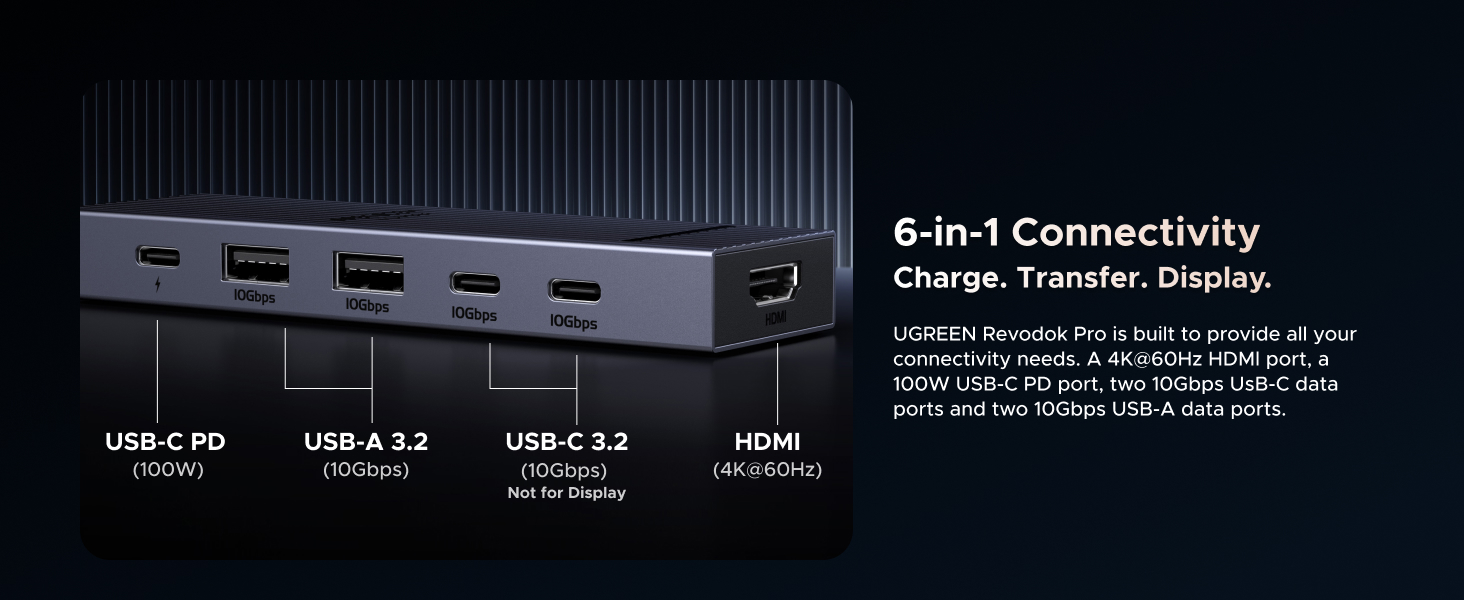
6-in-1 10Gbps USB C Hub: Inspire more potential of your laptop’s USB-C port with two 10 Gbps USB-C 3.2 Gen 2 port, two 10 Gbps USB-A 3.2 Gen 2 ports, 4K 60Hz HDMI and 100W Power Delivery. Ultimate all-in-one dock, works on multiple ports simultaneously
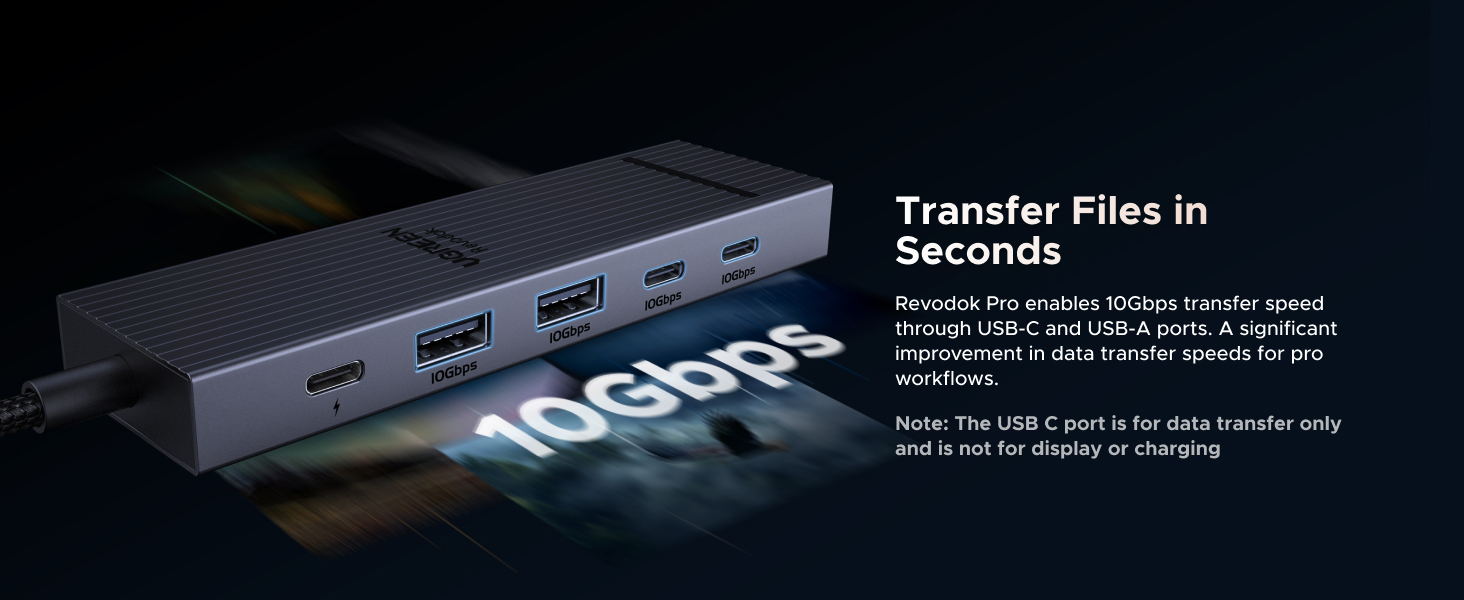
Start the USB 3.2 Era: Transfer files, movies, and photos at speeds up to 10 Gbps via the dual USB-C data port and dual USB-A ports.The C port marked with 10Gbps can only be used for data transmission, and does not support video output or charging.
Brillant 4K 60Hz Display: SUSB C Dock is equipped with a 4K@60Hz HDMI port. Enjoy visually stunning movies, high-definition online meetings, smooth gaming or extend your display for incredibly appealing presentations.
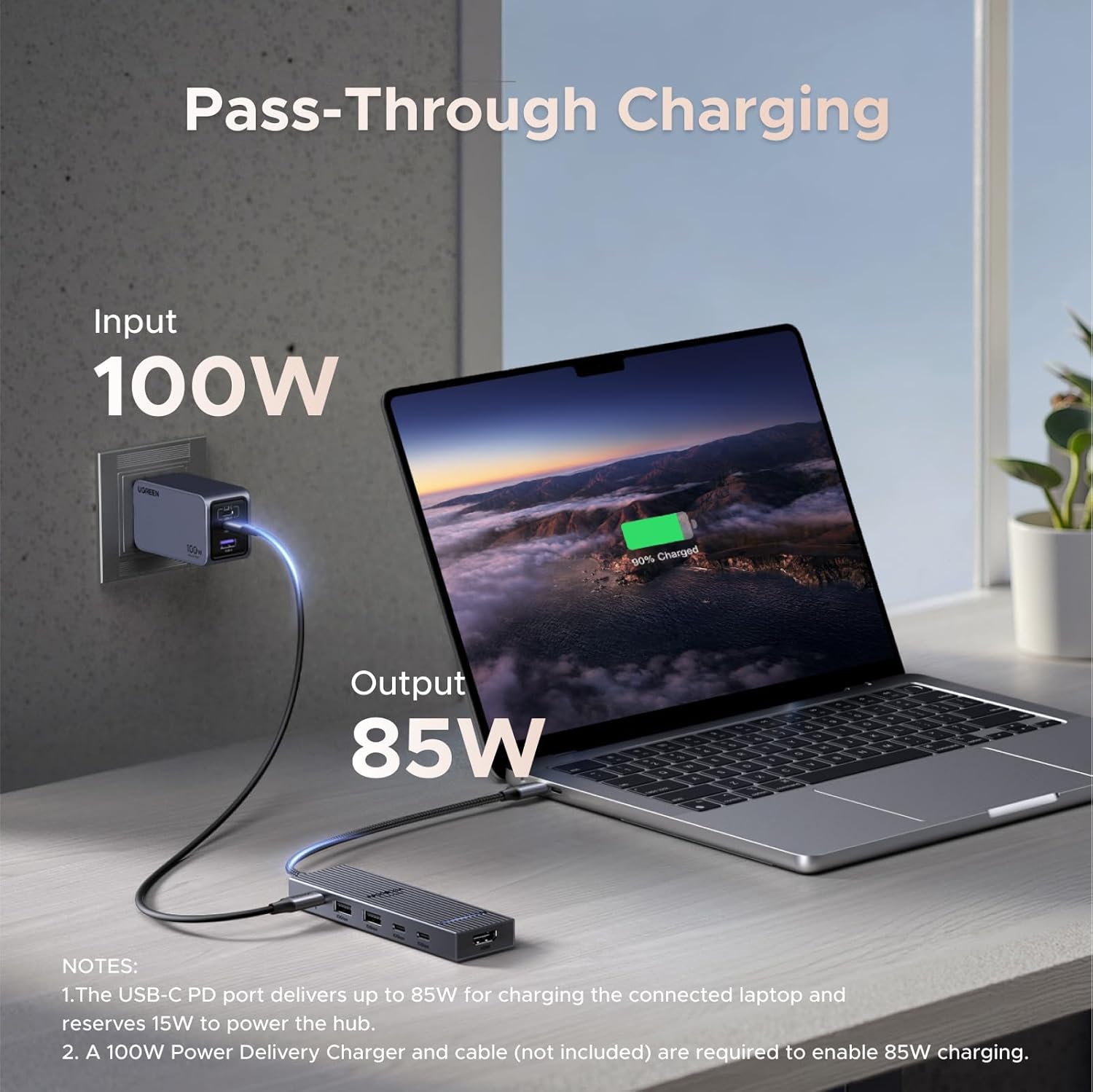
Powerful 100W Power Delivery: Support for max 100W USB C pass-through charging over the Type-C port, to keep your laptop always powered. When demonstrating screencasting or transferring files, please do not plug or unplug the PD charger to avoid loss of images or data.
Widely Compatible & Driver-Free: The USB C dongle is compatible with almost USB-C devices such as MacBook Pro, MacBook Air, MacBook M1, M2,M3, iMac, iPad Pro, iPhone 15, Chromebook, Surface, Steam deck, Rog Ally, etc.
12 reviews for UGREEN Revodok Pro USB-C Hub 6 in 1 10Gbps 4K 60Hz HDMI, 100W Power Delivery for MacBook Pro/Air, iPad Pro, Thinkpad Rog Ally and More.
Add a review

Original price was: $19.99.$13.98Current price is: $13.98.
Allen Bk –
Fast, reliable and inexpensive
I love the value of this adapter. My laptop was in repair so I used this with my Pixel 8 Pro to connect my external monitor and powered hub. You’ll need a 100w (GAN) powered hub. It powers one HDMI monitor at 4k 60hz. I plugged my other USB-3.0 male into it and it ran the Ethernet through it as well as sound and video through the HDMI. Niggles are you need an Ethernet adapter on another hub (some more expensive adapters include it), it only drives on monitor. Also watch out for phone screen burn in so use a black screen program. But for $20 if you just need to power one monitor it’s great.
Mahesh –
Simple and reliable USB-C hub
The UGREEN Revodok Pro is a well-designed, reliable USB-C hub perfect for anyone needing more ports in a stylish, compact package. It combines HDMI, USB-A, and USB-C connections, delivering fast data transfer and sharp 4K visuals when paired with an external monitor. It’s lightweight, feels sturdy, and is easy to throw in your bag for travel. Plug-and-play across a range of devices, it’s a great pick for keeping your workspace tidy and your tech running smoothly.
IAMINFIN8T –
Great Usb hub – worth every cent
I bought this hub sometime ago for my M1 MacBook Air, I still use this laptop to this day even though newer models are available. But this laptop just keeps going and the addition of this usb hub will make me hold onto it even longer. it’s quite compact and the usb c and usb a ports work great. most times I charge my iphone 15 pro from it and it charges relatively fast. The color and design looks great and it’s very easy to use just plug and play. it does get a bit warm but i guess its normal as its plugged in 24 hrs 7 days a week on my laptop. i would definitely recommend this device and have recommended it to many of my friends over the last few months. Quality product, great price and very useful.
Ryan S. –
Still Going Strong After Years — Reliable, Fast, and Worth It
I’ve been using the UGREEN Revodok Pro USB-C Hub (6-in-1, 10Gbps, 4K@60Hz, 100W PD) for over four years, and it’s still going strong. I originally used it for HDMI output, which worked flawlessly, and now I mainly use it as a hub for my MacBook Pro. Just plugged it in and it works.The build quality and performance have held up perfectly — ports are still snug, connections are stable, and the transfer speeds remain fast. It’s compact, reliable, and has become a permanent part of my setup.What I likeExcellent reliability even after years of daily useFast transfer speeds and stable HDMI outputCompact, sturdy design that travels wellWorks perfectly with MacBook ProThe badHonestly, nothing significant — it’s held up impressively wellOverallAfter years of consistent use, this hub continues to perform like new. If you want a dependable, all-in-one USB-C hub for your Mac, this is an easy 5-star pick.Durable, fast, and worth every penny.
Marcus Dean Adams –
Great USB C hub, can also serve as a dock
I bought this to use with a Minisforum mini PC I have to expand one of the rear type C USB 4 ports, not only for more connectivity, but to prevent regular plugging and unplugging from the computer itself.It’s a great little hub with all of the IO I need, including an HDMI port which, honestly, I don’t really need since the PC itself has both an HDMI and a DisplayPort connection. It provides 2 USB type A ports, two 10 Gbps type C ports and a third type C port that is capable of 100 watt power delivery. That combined with the HDMI output means this hub could also feasibly be used as a dock for something like a Steam Deck, ROG Ally, a laptop PC, etc. I tested it with my Steam Deck OLED and it worked just fine and was able to output an HDR signal to my LG television while charging the Deck at full speed since the Deck’s charger puts out way less than 100 watts.It feels reasonably sturdy, has a braided cable and even a faint little LED to let you know when it’s actually plugged in.The cable could have been a little longer, though it’s serviceable since it spends its time just sitting on a desk right beside the PC. When I tested it with my Steam Deck though, to test whether it could serve as a dock for that, it was short enough that the hub couldn’t lay flat on the desk behind the Deck and was sort of suspended in the air by the tension in the cable, which would probably damage it over time, so if you want to use this as a dock for another device I would consider mounting it to the back of the device’s stand or to the wall or something to keep it from just hanging from its own cable. I also think more companies should consider opting for the more open Displayport instead of the more proprietary HDMI. Not having to pay licensing fees to use HDMI could have brought the cost down a little bit.Overall though it’s easy to use, turns my otherwise hard to reach rear facing USB 4 port into something more accessible and can even charge attached devices at up to 100 watts. I’m pretty happy with the purchase and will definitely consider UGreen for my needs in the future.
Stephen D Pearl –
Reliable, cost effective, all the ports most people need. No overheating.
I bought an HP Victus gaming laptop and needed to support multiple HDMI monitors as well as extra USB C ports. the Victus only came with one USB C port and one HDMI port. I bought this dock to get the extra ports I needed. After a few months of use it’s still working well. No complaints. No overheating. Good performance, even with my super-wide Dell 38″ monitor.
Patricia Hidalgo –
✨ Finally, a hub that actually solves the HDMI struggle!
This UGREEN hub solved all my connection problems! I use a MacBook Pro M3, and since the HDMI port is on the right side, I was constantly hitting the cable with my mouse and losing my monitor signal.This hub was the perfect solution! The USB-C ports are on the left side of my MacBook, so now I can connect my monitors without any interference — and still have access to regular USB ports for my gadgets that don’t support USB-C yet.The materials are top-notch: sturdy, elegant, and with that premium feel that matches Apple’s design perfectly. Totally worth it if you want a sleek and practical setup!
Caio D. –
Excelente produto. Boa construção em metal. Bom mix de portas USB-C e USB antigo. Uso no meu iPad para conectar peridéricos e mantê-lo conectado ao carregador tudo ao mesmo tempo.
Jurek –
super sprawa, bez problemu działają 2 monitory HDMI w trybie “rozszerz”, jeden podłączony do laptopa drugi do huba, mysz, klawiatura i zasilanie laptopa też bezproblemowe, za tą cenę rewelacyjny produkt, żadnych lagów czy przycięć, gdyby w tej cenie był jeszcze port lan to byłby mega idealny hub 🙂
Tejeshwar Singh Dugal –
It’s a well built usb hub with a decent amount of ports. The braided cable for the usb c connector is very nice to have and I hope more companies start making this a standard. Specs wise it’s an absolute value for money but since I’ve only been using it for one day, I’ll update this review with time. One thing I will say you should keep in mind especially if you’re using it for MacBook to connect to an external display via the hdmi cable is that the ugreen hub and Mac don’t communicate well when using an external monitor so the colours may look very pinkish out of the box (check pics for reference). To fix this, you’ll need to go to your monitor settings and change the colour space from RGB to YUV or auto. It’ll display colours the way you expected it to. Note that this does not happen when connected to windows so it’s mostly a Mac and hub issue but not a manufacturing defect. It’s just how the hub communicates with the Mac. It’s perfectly fine for majority of the people. Also note that in order to keep your display on and MacBook’s lid closed, select your monitor as an external monitor and connect the charging cable to either your Mac directly or via the usb hub’s power delivery port.Another very good thing I noticed was that it doesn’t get hot at all when connected to an external display, charging cable and mouse and keyboard (both wired in my case). It may not seem as a big deal but in the longer run, it pays for sure.So overall it’s a great hub for the price and I do recommend it so far.
سعود عبد الله –
جهاز يفي بجميع الأشياء والاستخدام وشكراً لكم
Tor –
ワイフと僕で共用の自宅ワーキングスペースで使ってます。ワイフはMacbook Proで僕はレッツのFVですが、充電給電と外部モニター、これ1つで共用できて便利です。Ankerの100Wで給電してます。これに出会うまではそれぞれのACアダプターとHDMI付け替えてーとバタバタしてましたが、USB-C1本でラクチンです。もっと早く買うべきでした(笑)