

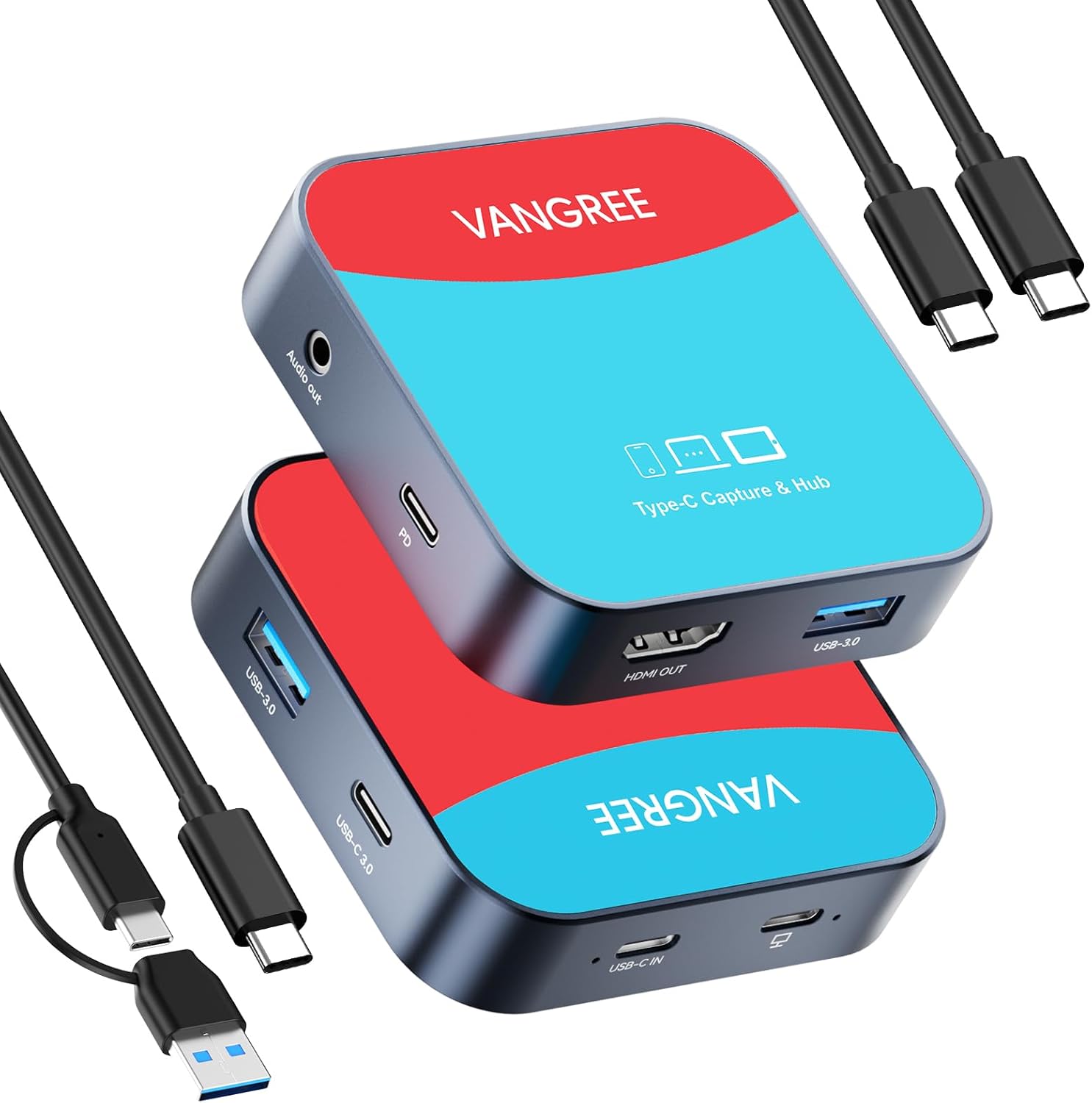
USB-C Video Capture Card & USB Hub, 1080P 60FPS USB C Video Capture USB 3.0 100W PD with Ultra-Low Latency for Streaming, Compatible with iPad, Meta Quest 3, iPhone 15 (Incompatible with Switch 2)
Original price was: $39.99.$31.99Current price is: $31.99.
Related Products

![JISULIFE Handheld Mini Fan, 3 IN 1 USB Rechargeable Portable Fan [12-19 Working Hours] with Power Bank, Flashlight, Pocket Design for Travel/Summer/Concerts/Lash, Gifts for Women (Pink)](https://bestdealsavvy.com/wp-content/uploads/2025/12/51E76z7oaWL._AC_SL1500_.jpg)


Product description
Elevate your Stream Experience with 2-in-1 Video Capture Card & USB-C Hub
Why Choose This 2-in-1 USB-C Capture Card and USB-C Hub? Firstly, Space-Saving Design: Consolidate your devices and reduce clutter with one multifunctional product. Secondly, Enhanced Connectivity: Switch effortlessly between a video capture card and a USB-C Hub to suit your needs. Thirdly, Top-Notch Performance: Enjoy the best of both worlds with high-quality video capture and versatile connectivity options.
Video Capture Card Mode:
1. USB-C Capture Card: Ideal for USB-C interface devices such as Nintendo Switch, Steam Deck, iPhone 15, iPad Pro, Samsung Galaxy S24 Ultra, S23 Ultra, Meta Quest 2/ 3 Pro, and MacBooks.
2. High-Quality Performance: The game capture card supports up or down-conversion of the video up to 1080p@60Hz without CPU interaction, and optional audio capture.
3. Ultra Low Latency Screen Sharing: The capture card has an MS2131 intelligent chip with a transmission rate of up to USB 3.0 5Gbps, low latency, and no delay.
4. YUY2 4:4:4 1080P With 60FPS:YUY2 uses YUV color space, which separates brightness (luma) and color information (chroma). YUY2 is an uncompressed format, which means it does not suffer from any loss of quality due to compression artifacts.
USB-C Hub Mode:
1. 100W Power Delivery: Support 100W PD charging up to 100W. Fast and efficient charging for your devices.
2. 5Gbps Data Transfer: The portable USB-C Hub expands your laptop/PC ability with 2*USB-A 3.0 ports, and 1*USB-C 3.0 port, bringing all your work and daily life needs into one slim hub.
3. 3.5mm Audio Output: This product supports 3.5mm audio signal transmission for seamless audio integration. It’s helpful for transferring audio from devices like microphones, headphones, line-level sources, or musical instruments without additional converters or interfaces.

Note: 1. In Capture Card mode, the C to C/A cable only works when plugged into the “Capture” port. 2. In Capture Card mode,2*USB-A 3.0 & USB-C 3.0 Ports do not Work. 3.When using the Nintendo Switch, connect the “PD” interface first, then the “USB-C IN”interface, and finally the “capture” interface.

Note: 1. In USB C Hub mode, the C to C cable can only works when plugged into the “USB-C IN” port. 2. In USB C Hub mode, the “Capture” port does not work. 3. Please connect the 100W power supply to ensure proper functionality.


1 USB-C Video Capture 2 PD 100W Charging 3 YUY2 Video Format 4 3.5mm Audio Output


1 For Mobile Gaming
2 For Steam Deck
3 For Nintendo Switch
4 Turn Into Portable Screen


1 Capture Card Wiring Guide
2 USB C Hub Wiring Guide
3 Universal Compatibility
4 What You Get
Why are some interfaces on the product not usable?
This product is a 2-in-1 combination of a Capture Card and a USB-C Hub. When used as a Video Capture Card, the 2 USB-A 3.0 and 1 USB-C 3.0 ports will not work. When used as a USB-C Hub, the Capture port will not work.
Does this product need to be connected to a PD power supply when used in connection with the Nintendo Switch?
An external power supply above 15V is required when connecting the Nintendo Switch. When using the Nintendo Switch, connectthe “PD” interface first, then the “USB-C IN”interface, and finally the “capture” interface.
How should Android system mobile phones /iPad Pro tablets use this product for video recording?
“USB Camera” software such as “CamX/MoniCon” is required for Android phone/iPad Pro tablet to capture. The mobile phones /iPad Pro tablet cannot download the OBS software for use together. iPadOs need to be updated to 17/18 or higher to use it.
Why can’t I use the product after connecting the wire to it?
Please refer to the wiring guide provided on the product details page. In capture card mode, the C to C/A cable only works when plugged into the “Capture” port. In USB C Hub mode, the C to C cable can only works when plugged into the “USB-C IN” port.
Is this product compatible with Nintendo Switch 2?
No, this product is not compatible with Nintendo Switch 2.
【Important Note】This product is not compatible with Nintendo Switch 2.
【2-in-1 VIDEO CAPTURE CARD & USB-C HUB】The innovative 2-in-1 USB-C video capture card is specially designed to capture USB-C devices like Nintendo Switch, Steam Deck, and iPhone 15. It also features 1* 100W PD port, 1*HDMI port, 2*USB-A 3.0 ports, 1*USB-C 3.0 port, and 1* 3.5mm audio port, providing an easy and quick transfer or backup to your data. ⚠️⚠️⚠️Note: When used as a video capture card, the “USB-A 3.0” and “USB-C 3.0” interfaces do not work. When used as a USB-C Hub, the “Capture” interface does not work.
【1080P 60FPS USB-C VIDEO CAPTURE CARD】Supports up to 1080p@60Hz USB-C input & HDMI output, the device works instantly with stream media like OBS. Whether you’re watching high-definition movies, editing videos, or live-streaming games, this capture card can provide an outstanding visual experience. Plug and play, no driver is required.
【PD 100W FAST CHARGING】Support a PD 3.0 fast charging up to 100W. You can stream the game and charge the Nintendo Switch or Steam deck simultaneously. Say goodbye to battery anxiety! ⚠️⚠️⚠️As a capture card, you need to connect the power supply when using Nintendo Switch. As a USB C hub, you can safely charge your laptop while connecting multiple peripherals for data transfer and hassle-free power storage.
【MULTIPORT USB-C HUB】The portable USB-C Hub expands your laptop/PC ability with 2*USB-A 3.0 ports, 1*USB-C 3.0 ports, 1080p@60Hz HDMI port, and 100W power delivery port. Bring all your work and daily life needs into one slim hub. ⚠️⚠️⚠️Note: Not all laptop’s USB-C ports support video output. Only a USB-C port with DP protocol can support screen casting.
【UNIVERSAL COMPATIBILITY】The USB-C video capture card is compatible with Nintendo Switch (⚠️⚠️⚠️Incompatible with Switch 2)/ Steam Deck/ iPhone 15/ iPad Pro/ Samsung Galaxy S24 Ultra/ S23 Ultra/ Meta Quest 2/ 3/ Pro and other USB-C laptops, tablets, and phones. It is suitable for real-time streaming, recording, editing, and transferring high-resolution video on OBS, XSplit, Potplayer, QuickTime Player, and more. Compatible with Windows 11/10/8.1, MacOS, iPadOS 17, and Android.
3 reviews for USB-C Video Capture Card & USB Hub, 1080P 60FPS USB C Video Capture USB 3.0 100W PD with Ultra-Low Latency for Streaming, Compatible with iPad, Meta Quest 3, iPhone 15 (Incompatible with Switch 2)
Add a review

Original price was: $39.99.$31.99Current price is: $31.99.
Doug M. –
Excellent for Connecting Video Production Peripherals to a Mobile Phone.
It would appear that Vangree had gamers in mind when they developed their USB-C Video Capture card; but that’s not me. I’ve been looking for ways to live stream video wirelessly from my iPhone 15 Pro Max, and the Vangree USB-C Capture Card caught my eye as a likely candidate. Does it work for that purpose? It does.I haven’t figure everything out yet, for example, will it pass through sound captured from a wireless mic. And if so, how’s it connected? There is a pin connected audio output port, but that’s audio from the iPhone’s microphones, and meant for monitoring sound live. I am able to connect an external SSD to the USB-C 3.0 port that is recognized by the phone. Also, the USB-C PD port allows me to supply external power from a power bank to the iPhone while it’s recording; that’s handy.I’ve been pleased with the Capture Cards performance in so far as my needs are concerned. There doesn’t seem to be any noticeable latency. The electronics are housed in an aluminum case with a rubberized bottom. There are LEDs associated with the USB-C in port and the capture port. It is light weight and portable, great for a video rig built around a mobile phone. One thing I will mention here is Vangree’s customer support; they are responsive, informed and helpful. I also have one of the there USB-C hubs, and in both cases, this capture card and the hub, quality is evident.For those interested in the setup I used, I connected the phone to the USB-C in port of the capture card using the provided USB-C to USB-C cable. I used an HDMI cable to connect the card, from its HDMI out port, to the wireless transmitters HDMI in port. The wireless receiver was connected to a laptop with an HDMI capture card; HDMI in, USB-C out to the computer. Video was streamed to OBS software.To produce and feed the video out of the iPhone, I used the Blackmagic Camera app. Once in the app, go to settings, the path is as follows: “Settings” -> “Monitor” –> “HDMI Out” -> select “Video Feed.” Once Video feed is selected, toggle “Clean Feed” to the on position. The app settings would be the same if, for example, rather than a wireless transmitter, a field monitor was connected to the phone using the capture card; it’s a handy device for the videographer.The card is supplied with two quality cables, a USB-C to USB-C and an adaptable cable from USB-A to USB-C or, with the adapter attached, USB-C to USB-C. The cables are heavier than usual and all of the USB-C connectors are solid all the way around; they don’t have the seams found on cheaper cables. Also included are user manuals with physical connection diagrams and OBS settings.All good; no complaints.All good; no complaints. It’s a cool little device.
Anonymous Customer –
Functions well, but can be a bit finicky with getting to stream successfully
I was quite excited to get this video capture device since I wanted to stream my Switch to my PC. Initially, despite a few hours of troubleshooting and even testing out different port configurations, it never actually successfully streamed. Strangely, the Switch did act as if it was docked (it only showed the power icon for a few seconds once it was plugged in and then the screen went black) and also successfully charged, but regardless of whether I selected the VC-003 Pro as a stream source in VLC or set up OBS per the included instructions for a Windows PC, I didn’t get anything more than the 8 colored bars pattern.I attempted to use different USB-C cables (whether the included ones or several different ones of my own), tried switching between my desktop and laptop as a capture device, and even tried connecting my Steam Deck to test using it as a capture source – unfortunately, nothing worked. I also did verify multiple times that I was using the correct ports, both according to the manual and the images here on the page. Only when all the cables were properly connected (the PD port to the AC, both using a random 45W adapter and a Steam Deck 45W adapter; the PC or laptop connected to the capture port; and the Switch/Deck connected to the USB-C In port) did the Switch’s screen go off and act as if it was connected to the dock or external display.I contacted Vangree’s customer support, and initially it seemed as though the suggestions they had were all things I had already tried, and I tested streaming my phone and tablet (the prior didn’t work, though the latter did). I eventually tried disconnecting all cables and reconnecting them in a particular order (PD first, then Capture device, then Switch), which once again caused the Switch’s screen to turn off. I then disconnected the Joy-Cons, turned them on by pressing a button on each one, and after they connected and a few seconds had passed, the stream started to work on OBS! Latency was fortunately insignificant, and the video and audio were smooth – no added lag seemed to be present that may have been caused by the streaming. I also tried switching control over to the Pro Controller, which also worked fine.I did further testing with other cables, and while doing so I also noticed that the connecting order of inserting cables seems to be very important with the on-device processing chip, since from my testing, if you did not insert the Capture device cable first, it would not change to Capture mode after the fact, leading to the need to disconnect all cables (including the PD cable) before reconnecting them. Furthermore, if for whatever reason you disconnect any of the cables while streaming and reconnect them, you may have success with getting audio streaming working again after a few seconds, but to get the video working again, you’ll probably have to go to the video streaming properties and switch the source to something else and then back to the VC-003 Pro device to get it functioning again in OBS. As far as other cables go, I did experience some extreme latency/lag when using cables other than the supplied ones, and Vangree support did advise that the included cables were specialized for video transmission functionality. Just be sure that you are using the USB-C to USB-A/C cable to connect to your computer, and the USB-C to USB-C cable is connected to the Switch or other source device.Overall, after I’ve been getting accustomed to the quirks and particular operation of this capture card, I have been enjoying it, and it’s been nice to have the ability to stream using OBS. Although I’ve also had luck with getting it to stream in VLC, playback has been quite subpar in there (with substantially lower resolution and extreme latency). However, OBS has been more than enough for me after setting up the scene and source properties. Therefore, I can recommend this video capture device if you plan to stream your gaming, but just keep in mind that it has its quirks; once it gets going, however, it performs quite well! I hope that Vangree can continue to improve the device and maybe even consider adding a way to force a mode (or maybe ensure that it auto-switches to Capture mode if a device is plugged into the Capture port).
Whistler –
Capture card doesnt relay a charge without disconnecting the source from the receiver.
These capture cards seem to have difficulty passing on a charge. When Usb in is transmitting from my iphone 15 and the capture card is transmitting to my occulus there seems to be no issues; but whenever a charger is plugged into the PD it intermittently disconnects the signal and I have to disconnect it for that to stop. Its very irritating to have to deal with things running out of a charge every hour and a half, especially since the Meta Quest 3’s battery is so cheap. Being able to keep them plugged into a charger at least takes care of that. I feel sorry for the people who want to play moving games on their occulus. They sucked them into using a device made with half of its technology from cheap parts. Is those the problem im having with this capture card as well? Not cool being that it was made to do these things. I wonder if there are any capture cards that do function as theyre supposed to. It’s not like im using usb 2.0 wiring according to this products specs.Hey BTW; are they ever going ro make these reviews capable of a response from other viewers or do we always have to find a forum?