

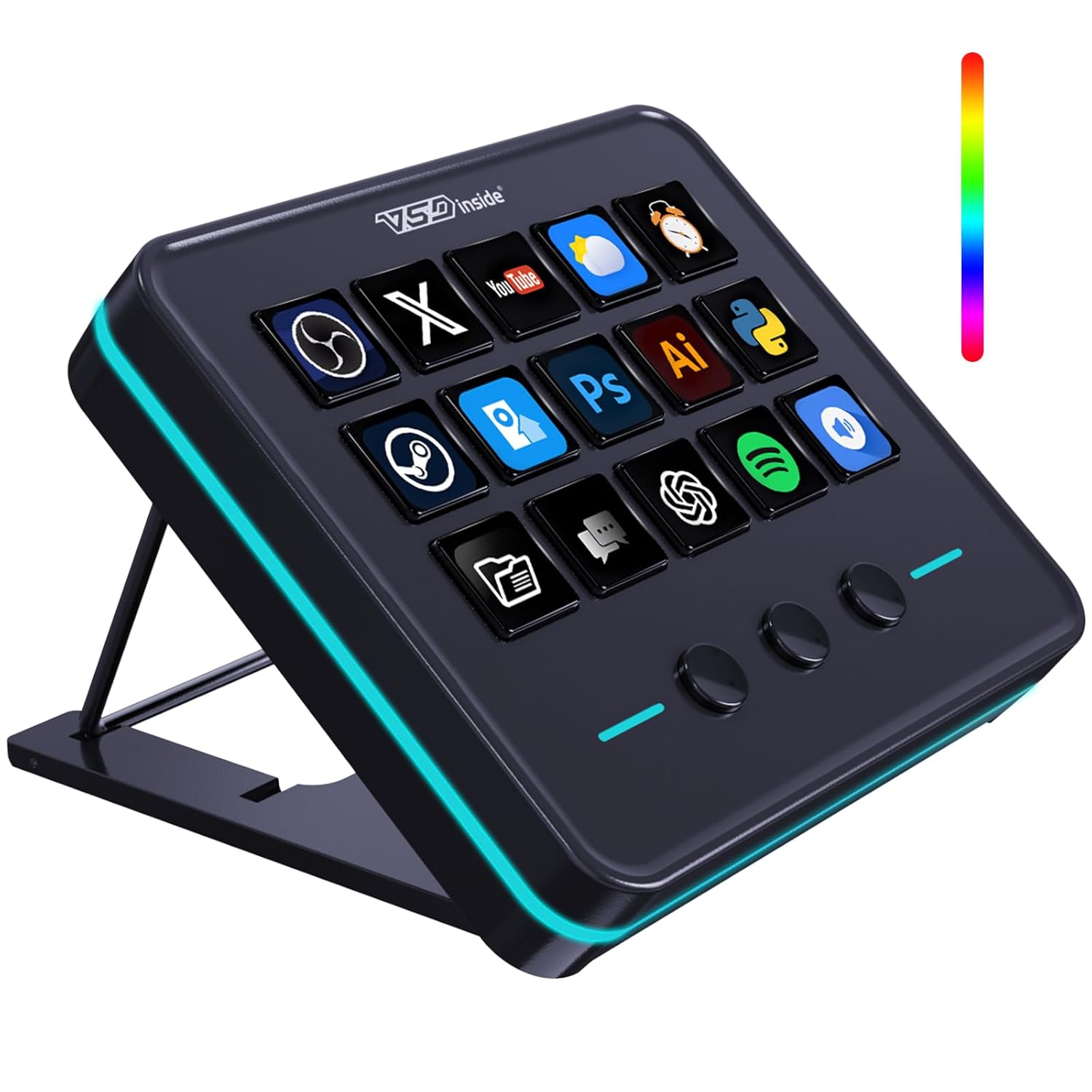
VSDINSIDE Macro Keypad, Stream Controller Deck Gaming Streaming Shortcut Keyboard, 18 Programmable Keys Customizable Visual AI Pad USB Soundboard for OBS, YouTube, Desk Office Setup, Laptop, PC, Mac
Original price was: $499.99.$54.99Current price is: $54.99.
Related Products




Product description

VSDinside Streaming Deck Controller, an unbeatable-value smart macro keypad, is perfectly suited for gamers, streamers, and professional content creators.
With this live-streaming device, enjoy:
10x faster streaming setup!
Director-free streaming management!
One-click sound effect control!
Instant background music switching!
Seamless live screen transitions!
Single-hand camera control!
Lightning-fast message replies!
Once you experience the VSDinside STREAMING DECK smart console, you’ll find live streaming is no longer possible without it. Every button can be customized, transforming this device into your personalized personal assistant and elevating the experience of controlling APPs, external devices, and MIDI devices to a new level. It’s not just for live streaming, when retouching in Lightroom or editing videos in Final Cut, you can design a unique control interface for it. It can become any form you envision.
One Interface, Limitless Possibilities
The VSDinside macro keypad empowers you to take charge of your workflow with a single, intuitive interface. Say goodbye to complex setups and hello to a streamlined experience that saves you time and effort. With its 18 fully customizable macro keys (15 LCD keys and 3 button keys), you can create shortcuts, macros, and commands tailored to your specific needs, whether you’re live-streaming on Twitch, Youtube, editing videos, or managing intricate tasks.
VSDinside Streaming Deck – Your Ultimate Workflow Companion
Elevate your content creation, gaming, and productivity to new heights with the VSDinside Stream Controller Deck. Designed with precision and innovation, this multifunctional visual AI keypad is a game-changer for gamers, streamers, and professionals seeking seamless control and efficiency.

Key Features:
18 Programmable Keys Macro Keyboard
The heart of the Stream Dock Deck lies in its 18 customized shortcut keys (15 visual LCD + 3 buttons). These keys offer unparalleled flexibility, allowing you to assign individual or a series of actions to streamline your workflow. Whether it’s executing game combos, launching apps, or controlling media, the possibilities are endless. You can even personalize each LCD key with different images and animations (JPG, PNG, GIF) for enhanced recognition and memorization.
Surrounding RGB Light Ring
Immerse yourself in a captivating desktop experience with the VSD Stream Controller Deck’s surrounding RGB light ring. This feature supports automatic color cycling, adding a touch of style and ambiance to your setup. Whether you’re gaming in the dark or working late into the night, the RGB light ring creates a visually stunning atmosphere that enhances your overall experience.
One-Touch Operation
Efficiency is at your fingertips with the Streaming Deck’s one-touch operation. Instantly launch macros, input text, open files and websites, control media, or switch scenes in OBS with a single click. This intuitive design makes it perfect for gamers, streamers, and professionals who need to execute tasks quickly and accurately.
One-Click Multi-Hotkey Macro Pad
The Streaming Deck’s one-click multi-hotkey macro keypad is a game-changer for gamers and content creators. Use hotkeys (shortcut keys) to streamline your game combos, video editing, music production, photography workflows, and more. The “Operation Follow” feature allows you to execute multiple macro operations simultaneously or in a specific sequence, giving you complete control over your tasks.
Versatile Compatibility
The VSDinside PC control board’s AI shortcut keyboard is compatible with both Windows 11 and above, as well as macOS 14.0 and above, making it a versatile choice for users across different platforms. Simply connect it via a USB-C cable and start using it in seconds. It seamlessly integrates with popular software such as OBS, Streamlabs, YouTube, Twitter, Discord, Excel, Word, and Photoshop, ensuring that you can use it with your favorite tools and applications.
Premium Quality at an Unbeatable Value
Despite its advanced features and capabilities, the VSDinside keyboard macro pad offers premium quality at an unbeatable value. It is built with high-grade materials and undergoes rigorous quality control to ensure long-lasting performance. Additionally, it comes with a variety of versatile plugins, including schedule reminders, clock, stopwatch, weather, calendar, and more, making it not just a high-tech productivity tool but also the perfect desktop companion for your computer setup.

Why Choose VSDinside?
Affordable Excellence
The VSDinside media controller deck offers premium features at half the price of leading brands, making it an excellent choice for budget-conscious users who don’t want to compromise on quality.
Factory Direct Quality
As a factory direct product, the streamer setup visual deck is built with high-grade materials and undergoes rigorous quality control to ensure long-lasting performance. You can trust that your investment will last for years to come.
Professional Engineering Team
We value our customers’ needs and user experience. Whether you encounter product, software, or plugin issues, or have needs for feature improvements, VSDinside’s team of professional engineers stands ready to assist and resolve any challenges you may face.
24/7 Mail and Discord Support
At VSDinside, we are committed to providing our customers with the best possible experience. That’s why we offer 24/7 Mail and Discord Community to ensure that your Streaming Deck always performs at its best.
Promptly Upgrade Products to Meet Customer Needs
– The official website regularly updates software versions to fix issues and enhance user experience.
– We also provides upgrade tools and instruction manuals to help users upgrade and optimize your device, including adding RGB customization, improving compatibility between the device and computers, and enhancing USB port stability, among other features.
Package Contents:
Streaming Deck x1
USB-A to USB-C Cable x1
User Manual x1
UPGRADE YOUR WORKFLOW today with the VSDinside streamdock and experience the difference for yourself!

18 Programmable Keys Macro Keypad – The heart of the Streaming Deck lies in its 18 customized macro keys (15 visual LCD & 3 button). These keys offer unparalleled flexibility, allowing you to assign individual or a series of actions to streamline your workflow. Whether it’s executing game combos, launching apps, or controlling media, the possibilities are endless. You can even personalize each LCD key with different images and animations (JPG, PNG, GIF) for enhanced recognition and memorization
One-Touch Operation – Efficiency is at your fingertips with the customizable usb macro keypad’s one-touch operation. Instantly launch macros, input text, open files and websites, control media, or switch scenes in OBS with a single click. This intuitive design makes it perfect for gamers, streamers, and professionals who need to execute tasks quickly and accurately
One-Click Multi-Hotkey Macro Pad – The Stream Controller Deck’s one-click multi-hotkey macro keyboard is a game-changer for gamers and content creators. Use hotkeys (shortcut keys) to streamline your game combos, video editing, music production, photography workflows, and more. The “Operation Follow” feature allows you to execute multiple macro operations simultaneously or in a specific sequence, giving you complete control over your tasks
Surrounding RGB Light Ring – Immerse yourself in a captivating desktop experience with the VSD Streaming Deck’s surrounding RGB light ring. This feature supports automatic color cycling (custom RGB colors can be achieved by upgrading the device through seller support), adding a touch of style and ambiance to your setup. Whether you’re gaming streaming in the dark or working late into the night, the RGB light ring creates a visually stunning atmosphere that enhances your overall experience
Versatile Compatibility – The VSDinside PC control board’s AI shortcut keyboard is compatible with both Windows 11 and above, as well as macOS 14.0 and above, making it a versatile choice for users across different platforms. Simply connect it via a USB-C cable and start using it in seconds. It seamlessly integrates with popular software such as OBS, Streamlabs, YouTube, Twitter, Discord, Excel, Word, and Photoshop, ensuring that you can use it with your favorite tools and applications
Premium Quality at an Unbeatable Value – The VSDinside PC media controller board macro pad is built with high-grade materials and undergoes rigorous quality control to ensure long-lasting performance. Additionally, it comes with a variety of versatile plugins, including schedule reminders, clock, stopwatch, weather, calendar, and more, making it not just a high-tech productivity tool but also the perfect desktop companion for your computer setup. With 24/7 customer service support and free software updates, we are here to help you succeed
6 reviews for VSDINSIDE Macro Keypad, Stream Controller Deck Gaming Streaming Shortcut Keyboard, 18 Programmable Keys Customizable Visual AI Pad USB Soundboard for OBS, YouTube, Desk Office Setup, Laptop, PC, Mac
Add a review

Original price was: $499.99.$54.99Current price is: $54.99.
“Affordable CarPlay Upgrade with Great Features” –
Great Stream Deck for the Price!
I got this stream deck today and started using it right away, and I’m really impressed with how simple the setup was and how smoothly it works. The screen is bright, the icons look clear, and the buttons feel responsive. I was able to customize all my shortcuts quickly, and everything synced perfectly with my computer. For the price, this is a great device that makes my workflow faster and easier—I really like it so far and definitely recommend it.
BP232 –
Very useful tool I did not know I needed in my life to make things easier and more efficient!
Let me start by saying that this is my first stream deck, and I can honestly say I don’t know how I lived without one for so long. As a gamer, software developer, and content creator, I’ve known about stream decks for some time, but as I’m sure so many people do, simply relate them to streamers. In reality, these are capable of so much more than just streaming, but more on that later.First impressions as I removed this from the box is it feels like a solid high-quality unit. Setting it up was a breeze too. I have both a MacBook and a Windows Laptop, and set it up on both.Once the software is installed, just open it up and you’re ready to start customizing the stream deck. It honestly took me all of 3-5 minutes to figure out how to go about setting everything up. It’s laid out in a fairly intuitive way that just makes sense. Best part is, once you have some different actions created, it’s basically just drag and drop.One of my favorite things about this stream deck though is how you can set up different profiles, but best of all, how it will automatically switch between them anytime you enter a window or program set for that profile.For example, I set this stream deck up on my MacBook because that’s what I use for all of my content creation, specifically for Final Cut Pro. As I’m navigating around my MacBook, the main profile is up, which I have general things setup for like taking screenshots or starting a screen recording. Then as soon as I open up Final Cut Pro, whether from the task bar or hitting the stream deck button I have on the main profile, it instantly switches to the Final Cut Pro profile, which I’ve customized to have buttons for those tasks I use the most. As soon as I click on anything outside of Final Cut Pro, this stream deck again immediately switches back to the main profile.The stream deck may just have 15 buttons, but between all the profiles you can set up and them having multiple ‘pages’ you can rotate through, there’s more customization options than I can even think to need at this point. So if I have one tip for setting it up, I would say don’t worry about getting every single button on every single profile assigned. It’s ok to leave some blank buttons and then as you’re doing various tasks, assign them as needed. Otherwise it can be overwhelming and you might just end up wasting time setting up buttons you never use just for the sake of setting them up.Now let’s switch to my Windows laptop, this is where I do more of my gaming. I have a usb hub switch that this stream deck, along with my mouse and keyboard, are hooked up to so that I can easily swap between machines. As soon as I hit the switch, the stream deck changes to all my windows settings since it’s now talking to the software installed on there. I’ve just started live streaming in addition to my usual static content I create, and again this stream deck becomes invaluable. From playing pre-set sounds to specialized graphics, this can do it all.That’s what I love so much about this stream deck, it’s almost a necessity for anyone looking to get into streaming, but it’s also for so much more than that. It could almost be considered a ‘productivity’ deck. In fact, you don’t even need to be a streamer to make use of this. While I am using this for streaming, so far the majority of my use of it has been in editing videos.The last thing I want to mention is the physical stand. You can use this with or without it. Without the stand, the deck has rubber feet that do a great job to keep it in place. On the stand though, the bottom is so sticky this thing will definitely not move a single hair as you’re using it, which makes it even easier to use when you don’t have to worry about it sliding around everywhere, not to mention it’s at a perfect angle.
Chezbe 2.0 –
Game-Changer for Streamers
I’m blown away by the VSDINSIDE macro keypad! As a streamer, I’m always looking for ways to enhance my setup and improve my content. This customizable keypad has been a total game-changer.The 18 programmable keys allow me to streamline my workflow and access frequently used functions with ease. The visual AI pad is incredibly intuitive, and I’ve been able to customize it to fit my specific needs.The integration with OBS and YouTube is seamless, and I’ve noticed a significant improvement in my stream quality and production value. The keypad is also super easy to set up and use, even for a tech novice like me!The build quality is solid, and the design is sleek and compact. I’ve been using it for weeks now, and it’s become an essential part of my streaming setup.Highly recommend for streamers, and content creators!
Mason –
Great value and nice productivity enhancer
I’ve been trying out this stream deck and it’s made a noticeable difference in my workflow. The 18 programmable keys (especially the 15 LCD ones) are super customizable—I’ve set them up with icons and GIFs to make switching tasks faster and more intuitive. The RGB light ring adds a nice touch to my desk setup, especially during late-night sessions.One-touch macros work flawlessly for launching apps and even controlling media. The multi-hotkey feature is a lifesaver for video editing and gaming. Setup was easy with USB-C, and it works well on both my Windows and macOS computers.Only challenge was the software could be a bit more intuitive for first-time users. But once you get the hang of it, it’s a powerful tool at a great price.
Amazon Customer –
Best product, best software, button are little hard to press
It’s a very good product, very easy to use and lots of customization available, very straight forward software. Over all it’s the best for the money.Having said that I find the button are little hard to press, it’s not like red key keyboard.For data entry work in my use case it’s not suitable. Otherwise nice designMaybe we have use this product for the intended purpose. stream.
chaz.photo –
Game-changer for workflow and shortcuts
Just started using the VSDINSIDE Macro Keypad and I’m honestly impressed. Build quality feels solid, buttons have a nice tactile click, and setup was way easier than I expected. I’ve got mine mapped for trading macros, ComfyUI flows, and even some studio shortcuts — it handles all of it flawlessly. It’s one of those tools you don’t realize you needed until you start using it. Price-wise it’s actually pretty cheap compared to the Stream Deck, but it still feels just as capable. Total time-saver and a great addition for anyone who loves efficiency or wants their setup to look dialed-in and pro.